New Beginner-Friendly Course Simplifies .NET Application Modernisation

Microsoft has unveiled a new beginner-focused training course that teaches developers how to modernise legacy .NET applications using practical, real-world scenarios. The free course walks learners through the modernisation journey step by step while introducing AI-powered tools that streamline the process.
Here's what you need to know:

  • Why this course matters

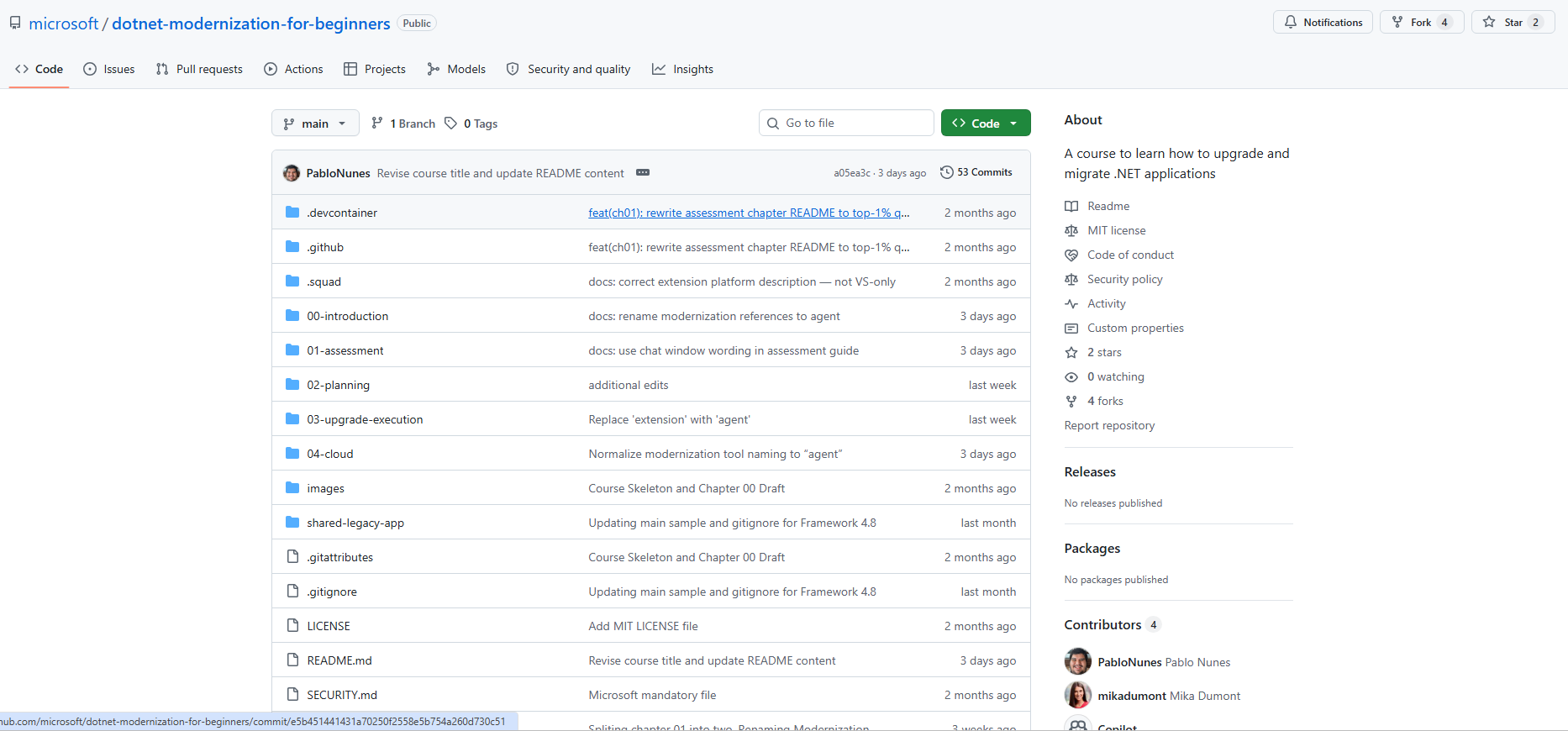
    Modernising legacy .NET applications can feel overwhelming, especially if you're just getting started. This free, open-source course walks you through upgrading a real ASP.NET application to .NET 10 using the GitHub Copilot Modernisation Agent, helping you understand every stage before any code is changed.

  • Learn by doing

    Instead of simply explaining the concepts, the course gives you practical exercises to complete yourself. You'll learn how the modernization agent creates transparent, editable artifacts—including assessment.md, plan.md, and tasks.md—so you can review, customise, and stay in control throughout the entire upgrade process. (A GitHub Copilot subscription is required.)

  • What you'll learn

    The course follows the same journey as a real-world .NET modernisation project, taking you from assessment to deployment. You'll learn how to analyse legacy applications, create and customise upgrade plans, modernise code with GitHub Copilot, and deploy your application to Azure.

  • Getting started

    To begin, you'll need Visual Studio 2022 (17.10+) or Visual Studio 2026, a GitHub Copilot subscription, and the free .NET Modernisation for Beginners GitHub repository. The repository includes step-by-step documentation, videos, and hands-on exercises to help you learn at your own pace.

Need an application that helps your team work efficiently from anywhere? Discover our custom business applications and contact us today.
Visual Studio Makes AI Model Selection Simpler for Developers

Microsoft has introduced new AI model management capabilities in Visual Studio, making it easier for developers to choose, compare, and organise the models they use every day. The update also provides greater visibility into model capabilities and usage, helping developers make more informed decisions without interrupting their workflow.

Here's what you need to know:

  • A model picker that matches your workflow

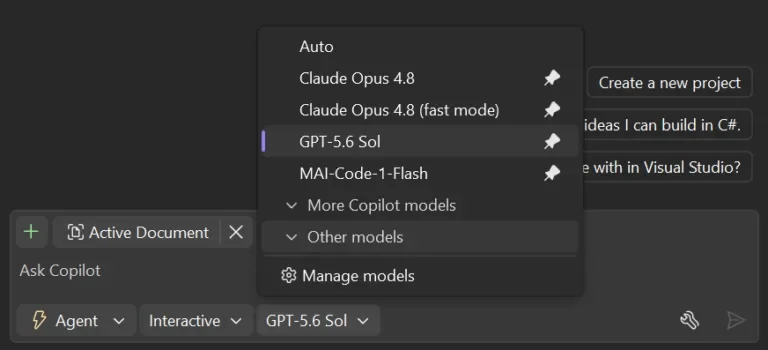
    Stop scrolling through a long list of AI models every time you start coding. Pin your favourite models to the top, collapse the ones you rarely use, and keep your most-used options within easy reach.

  • Compare models before you choose

    Need more details before selecting a model? The new Manage Models view lets you compare capabilities, context window sizes, and cost levels side by side, while also managing your own custom models in one place.

  • Track your AI context usage

    Know exactly how much of your model's context window you've used during a conversation. Visual Studio also provides quick access to Copilot usage, helping you avoid limits and decide when it's time to start a new chat or switch models.

  • Build with greater confidence

    Choosing the right model shouldn't interrupt your development flow. These improvements give you clearer insights and better control, so you can focus on writing code instead of managing AI.

Transform the way your team works with AI in Dynamics 365 and Power Apps. Discover Infinity AI Agents and contact us today.

Visual Studio Dev/Test Benefit Makes Azure Development More Affordable

Microsoft is highlighting the Visual Studio Dev/Test Benefit, which gives eligible Visual Studio subscribers access to discounted Azure pricing for non-production workloads. The benefit enables developers to build, test, and experiment in production-like Azure environments while helping organisations manage cloud costs more effectively.

Here's what you need to know:

  • Why it matters

    Developers need the freedom to experiment without worrying about unnecessary cloud costs. Azure Dev/Test pricing lets you quickly provision, test, and remove environments, helping your team innovate faster while keeping development expenses under control.

  • Build and test in production-like environments

    Azure Dev/Test gives you access to the same Azure services used in production, allowing you to validate applications in realistic environments. Create temporary environments, support CI/CD workflows, test new Azure capabilities, and safely experiment before deploying to production—all at a lower cost.

  • Choose the right Dev/Test option

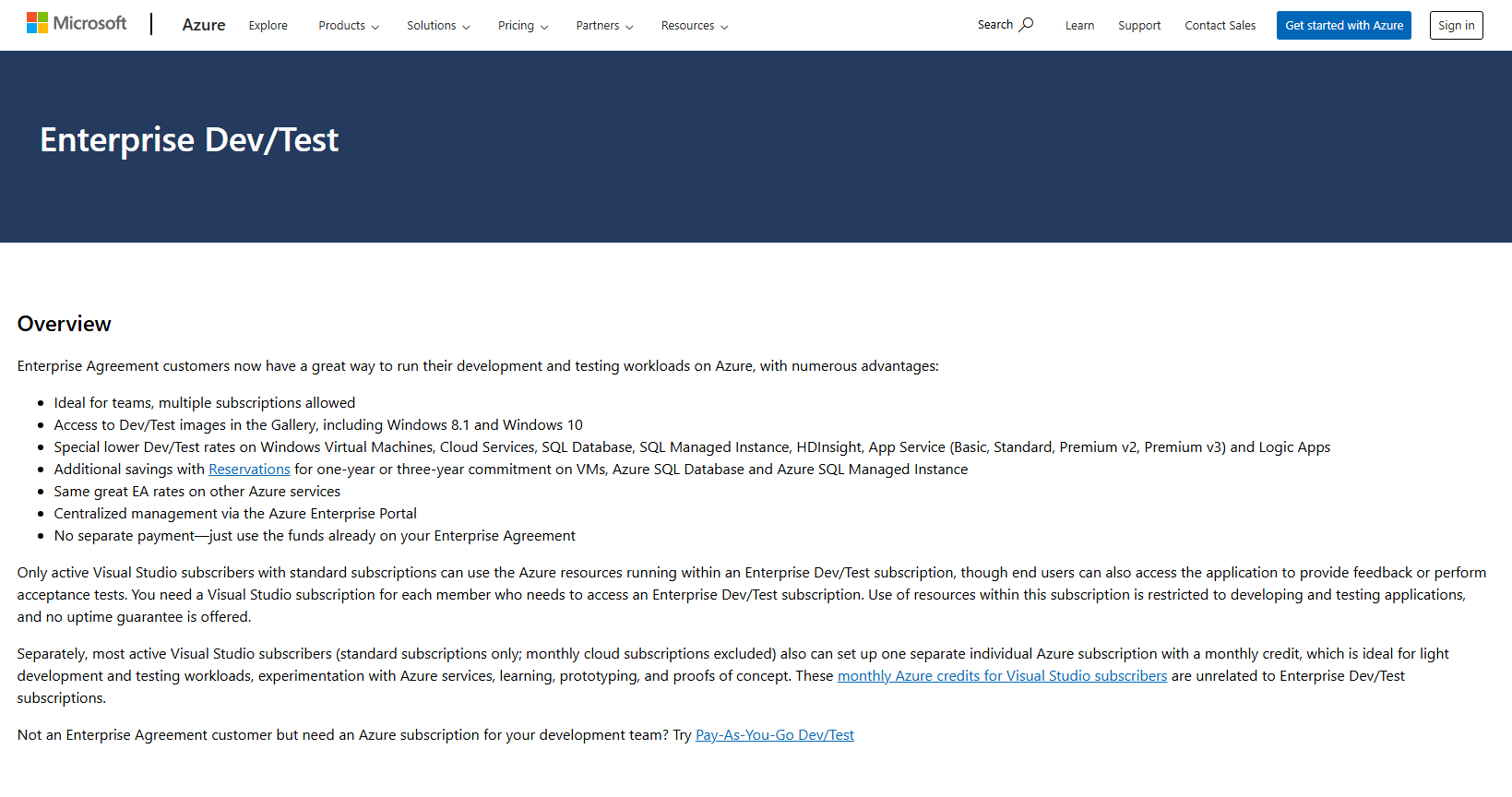
    Microsoft offers three Azure Dev/Test purchasing options to suit different organisations. Whether you use an Enterprise Agreement, Microsoft Customer Agreement, or Pay-As-You-Go subscription, there's a flexible option that lets eligible Visual Studio subscribers take advantage of discounted Azure pricing.

  • Get started today

    If you have a Visual Studio Professional or Enterprise subscription, you can activate Azure Dev/Test pricing through your Visual Studio benefits. It's a simple way to reduce development costs, speed up testing cycles, and maximise the value of your Visual Studio Subscription.

Keep your development secrets secure with a secret management solution that runs within your own Azure environment. Discover Secret Vault and contact us today to see it in action!

Dynamics 365 Customer Service Introduces Shadow Mode for Safer AI Testing

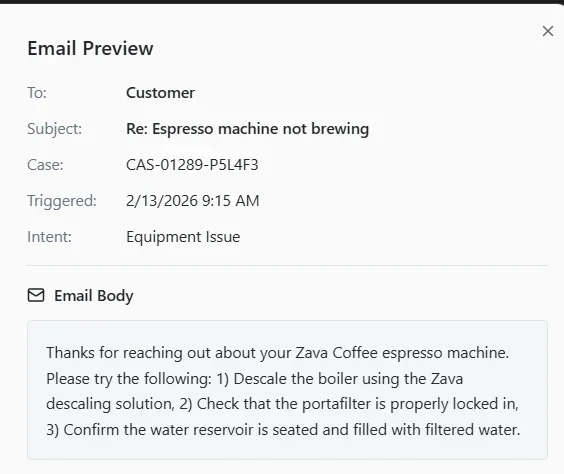
Microsoft has introduced Shadow Mode for the Case Management Agent in Dynamics 365 Customer Service, giving organisations a safer way to evaluate AI before enabling automation. The new capability allows AI to observe and simulate decisions on live production cases without making any changes, helping teams measure accuracy and build confidence before deployment.

Here's what you need to know:

  • The Challenge

    AI can make incorrect recommendations, route cases to the wrong team, or close issues too early if it isn't properly validated. These mistakes can reduce customer satisfaction and damage trust in your service operations.

  • What is Shadow Mode?

    Shadow Mode runs alongside your support team, analysing live cases and showing exactly how the AI would respond. Every recommendation includes the reasoning behind it, while no actions are taken in your production environment.

  • Full Visibility Without the Risk

    You can monitor AI recommendations, predicted actions, and decision logic in real time before enabling autonomous execution. Because nothing is updated or sent to customers, your team stays in complete control throughout the evaluation.

  • Validate Every Stage of Case Management

    Test AI performance across case enrichment, resolution, follow-up, and closure using real customer cases. Compare AI recommendations with actual outcomes to identify improvements before moving into production.

  • Build Confidence Before Deployment

    Shadow Mode validates AI against real-world customer interactions instead of relying solely on historical data. This gives your team measurable insights, explainable decisions, and greater confidence before enabling automation.

  • Get Started

    Enable Shadow Mode from the Copilot Service admin center under Case Settings > Case Management Agent. Start validating AI safely and confidently before putting it in control of your customer service.

Extend the power of your CRM with Infinity AI Agents for Dynamics 365 and Power Apps. Contact us today to start automating your business workflows.

GitHub Copilot App Simplifies .NET Application Modernisation

Microsoft has introduced GitHub Copilot app modernisation for .NET, bringing AI-assisted application upgrades into the developer workflow. The new experience helps teams assess existing applications, generate modernisation plans, and automate key upgrade tasks to simplify the journey to modern .NET.

Here's what you need to know:

  • Assess Before You Upgrade

    Modernising a .NET application involves evaluating dependencies, identifying compatibility issues, and planning the right sequence of work. Every discovery influences the next step, making upgrades more complex than simply changing framework versions.

  • Simplify Modernisation with AI

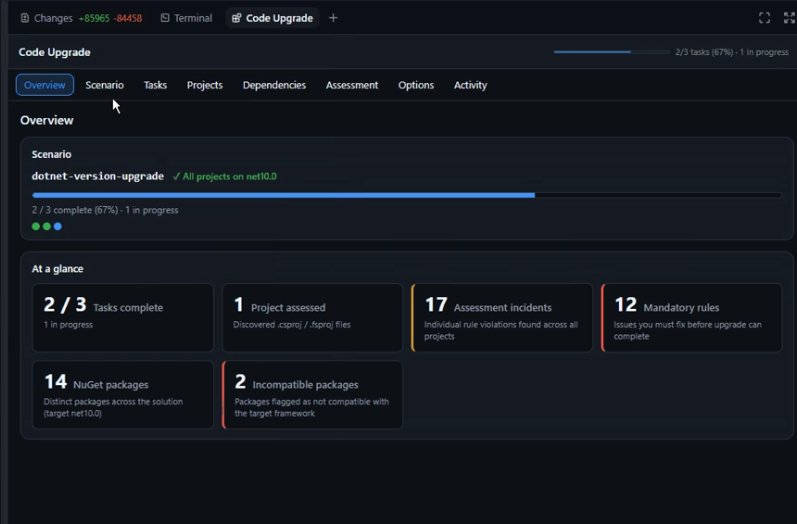
    The GitHub Copilot app introduces an interactive Upgrade Dashboard that keeps your entire modernisation workflow in one place. Instead of switching between chats, documentation, and code changes, you can monitor every stage from assessment to execution in a single view.

  • From Assessment to Execution

    The upgrade agent analyses your application, identifies what needs to change, and generates a structured implementation plan with actionable tasks. It also tracks code changes, build status, execution progress, and final results throughout the upgrade process.

  • Work Across Your Preferred Tools

    The GitHub Copilot Upgrade Agent isn't limited to the GitHub Copilot app. You can use the same upgrade workflow in Visual Studio, Visual Studio Code, and GitHub Copilot CLI, allowing you to modernise applications using the developer tools you already rely on.

  • Get Started in Minutes

    Install the Upgrade Agent plugin from the GitHub Copilot marketplace, open your repository, and start a new agent session. Then launch the Upgrade Dashboard to assess your application, review the upgrade plan, and track your modernisation from start to finish.

Looking to build custom business applications that help your team work smarter wherever they are? Contact us today to discuss how we can bring your ideas to life.

Automating VSIX Builds: Microsoft Highlights GitHub Actions Approach

Microsoft has shared a practical approach for automating Visual Studio extension builds with GitHub Actions. The guidance shows how extension developers can create a repeatable workflow for building, versioning, and publishing VSIX packages. It also highlights reusable actions that can simplify CI/CD setup and reduce manual maintenance across extension repositories.

Here’s what you need to know:

  • Streamline Your Workflow

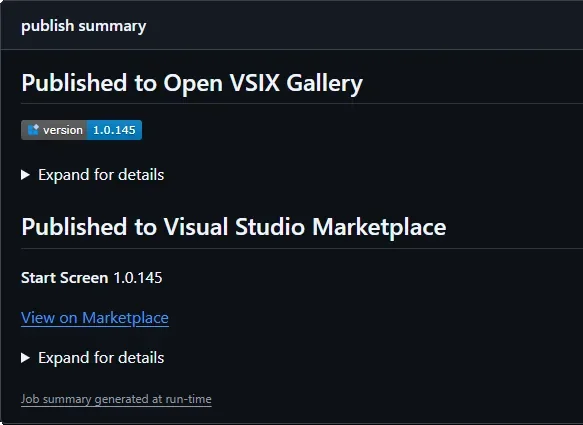
    Break your pipeline into reusable GitHub Actions so you don't have to duplicate logic across repositories. Use dedicated actions for version stamping, publishing CI builds to a VSIX Gallery, and releasing to the Visual Studio Marketplace.

  • Automate Version Management

    Keep your VSIX version in sync without manual edits. The vsix-version-stamp action updates version numbers during the build, while the VSIX Synchronizer extension can expose that version directly in your code from a single source of truth.

  • Publish to the Visual Studio Marketplace

    Releasing your extension is simple with the publish-marketplace action. All you need is your VS_MARKETPLACE_TOKEN, and the VSIX package takes care of the rest.

  • Share CI Builds with a VSIX Gallery

    Use publish-vsixgallery to quickly distribute preview builds for testing and validation before an official release. It supports both public and self-hosted VSIX Galleries, giving you flexibility without changing your workflow.

  • Build the Pipeline That Fits You

    Choose only the actions you need. Whether it's a minimal Marketplace release, a CI-focused testing pipeline, or a complete automated workflow, each action works independently and integrates seamlessly.

  • Choose the Right Publishing Target

    Use a VSIX Gallery for preview builds, internal testing, and rapid feedback. Publish stable, production-ready releases to the Visual Studio Marketplace so users always get the latest official version.

Take your CRM further with custom business applications built around your business. Learn how we can help your team work smarter—contact us today.

Microsoft Expands Power BI with Fabric Apps for Smarter Data Experiences

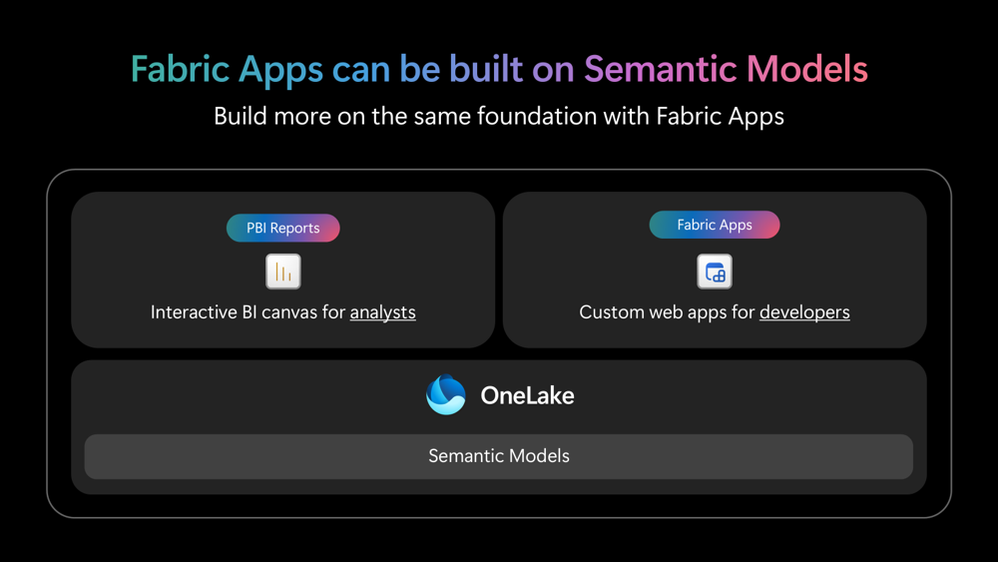
Microsoft is expanding how organisations can use their trusted semantic model data by bringing together the strengths of Power BI reports and Fabric Apps. The update gives analysts and developers more ways to create everything from governed business intelligence reports to custom application experiences—all while building on the same secure data foundation.

Here's what you need to know:

  • Build on a trusted semantic foundation

    Power BI Semantic Models bring together data from hundreds of sources while keeping your business logic, calculations, and metrics consistent. This trusted foundation makes it easier to build scalable, reliable reporting solutions for every team.

  • Create reports with greater ease

    Power BI's reporting experience lets you focus on building compelling visualisations while Power BI handles the underlying query complexity. Easily share reports across Microsoft 365, the web, or your own applications with confidence.

  • Accelerate report development with AI

    The new Power BI Desktop bridge enables secure AI-assisted edits directly within Power BI Desktop, making report and model authoring faster than ever. Combined with MCP and agentic experiences, you can co-create reports using natural language prompts.

  • Build AI-powered apps with Rayfin

    Rayfin introduces a new AI-first way to create managed web applications on top of your Power BI semantic models in minutes. Extend your data beyond dashboards while maintaining the same governance, security, and business logic across Fabric.

  • Customise your analytics your way

    From drag-and-drop report design to AI-generated interfaces powered by CSS and TypeScript, Power BI gives you greater flexibility than ever before. Reuse the same semantic models with Direct Lake or imported data to deliver consistent insights across every experience.

Learn how Power BI empowered the Independent Police Conduct Authority to process thousands of claims overnight. Read the case study and contact us with your inquiries.

Power BI Introduces More Flexible Tooltip Options for Better Data Context

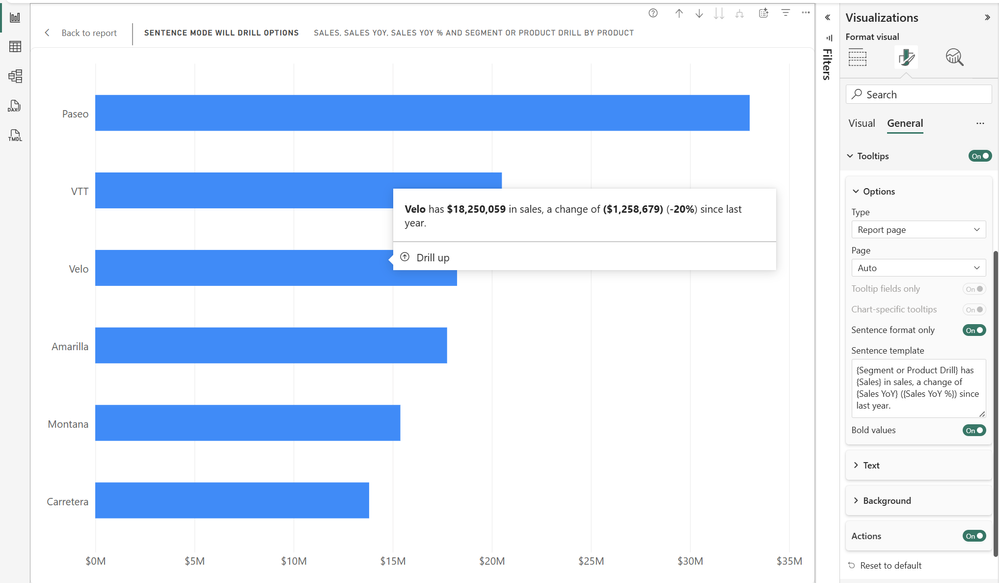
Power BI users can now provide richer context directly within their reports with the general availability of enhanced tooltip options for visuals. The latest update introduces more flexible ways to customise tooltips, making it easier to explain data and surface relevant information without building complex report pages or additional DAX measures.

Here's what you need to know:

  • Smarter Default Tooltips

    Default tooltips automatically display the fields used in your visual, any additional tooltip fields, and supported drill actions. You can also customise the text, background, actions, and styling to match your report theme.

  • Show Only What Matters

    Use Tooltip fields only to display only the information you've intentionally added to the Tooltip field well. This keeps hover details clean, focused, and relevant for your users.

  • Turn Data into Meaningful Insights

    Sentence format lets you transform raw numbers into easy-to-read insights using dynamic field references like {Sales}. You can even display only the sentence for a cleaner, more conversational tooltip.

  • Dynamic Tooltips with Field Parameters

    Tooltips automatically adapt when users switch between field parameters. Display both the selected field name and its corresponding value to keep insights accurate and contextual.

  • Tooltips That Follow Drill Hierarchies

    Create tooltip sentences that update correctly as users drill through different hierarchy levels. This ensures the explanation always matches the data currently being viewed.

See the full list of Power BI tooltips.

Unlock deeper insights from your data with Power BI. Learn more about our Business Intelligence solutions and contact us today.

Power BI Visual Calculations Are Now Generally Available

Microsoft has announced the general availability of Visual Calculations in Power BI, allowing users to write DAX calculations directly within individual visuals. The feature simplifies report creation by keeping calculations close to where they're used, making it easier to build and customise visual insights.

Here's what you need to know:

  • Why should you use it?

    Visual calculations let you create calculations that only apply to a specific visual, keeping your data model clean and easier to manage. This means you can build insights faster without creating additional report or model measures.

  • How it works

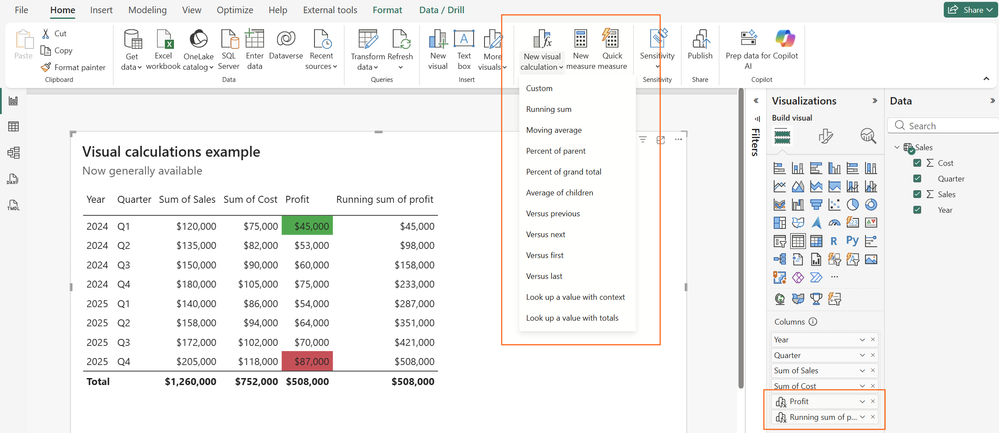
    Create a visual calculation by selecting a visual and choosing New visual calculation from the ribbon, where you can write DAX and instantly preview the results. You can use familiar DAX functions, visual-specific functions like RUNNINGSUM and MOVINGAVERAGE, or built-in templates to speed up development.

  • Custom totals for tables and matrices

    You can now customise how totals are calculated in tables and matrices by choosing options like Average, Count, Max, or even no total at all. This gives you greater control over how summary values are presented without writing additional DAX.

  • Example use cases

    Visual calculations make it easy to create running totals, profit calculations, and conditional formatting directly within a chart or table. They're ideal for quick analysis without changing your underlying semantic model.

  • Where can you use it?

    Visual calculations are available in both Power BI Desktop and the Power BI Service. They also work with embedded analytics, ensuring your calculations remain consistent wherever your reports are used.

Discover how the Independent Police Conduct Authority transformed complex data into clear, actionable insights with Power BI. Read the case study and contact us to see how we can help your organisation do the same.

Visual Studio June Update Brings Greater Transparency to AI Development

Microsoft has released the June update for Visual Studio, introducing new features that give developers greater visibility into AI usage and more confidence in the tools they use every day. The update focuses on improving transparency, strengthening security, and streamlining AI-assisted development workflows without disrupting existing coding experiences.

Here's what you need to know:

  • Stay on top of your Copilot usage

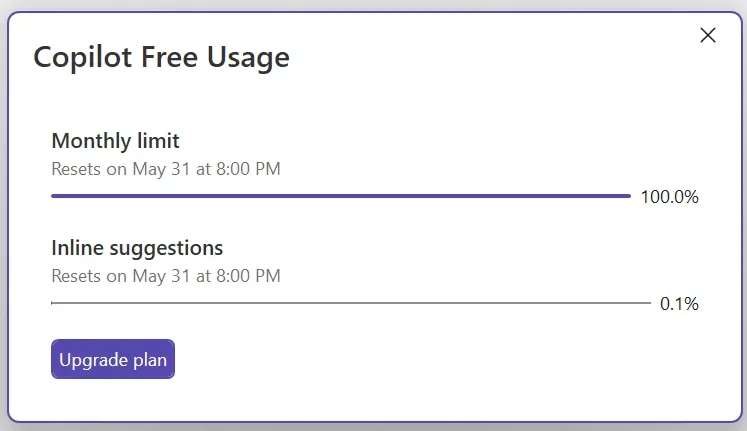
    GitHub Copilot usage is now tracked based on token consumption, giving you real-time visibility into your usage and billing status. You'll also receive customisable alerts before you reach your quota, helping you stay ahead of your limits.

  • Verify MCP servers before they run

    Visual Studio now validates MCP server configurations and fingerprints before they're launched, helping you detect unexpected changes. If differences are found, you'll be prompted to review and approve them before the server runs.

  • Modernise your C++ projects with AI

    The GitHub Copilot modernisation agent for C++ is now generally available, making it easier to upgrade projects to the latest MSVC Build Tools. Run upgrades automatically or review every step through Guided mode before changes are applied.

  • Get smarter edit suggestions across your file

    Long-distance Next Edit Suggestions can now recommend changes anywhere in your active file—not just near your cursor. This helps you keep related code synchronised with less manual searching and editing.

  • Bring your code to life with color emojis

    Visual Studio now displays emojis in full color across the editor, Markdown previews, Copilot Chat, build output, and Solution Explorer. Visual indicators like ✅ and ❌ are now easier to recognize at a glance.

Empower your team with custom business applications that boost productivity and simplify everyday workflows. Contact us today and let's build a solution tailored to your business.