
Microsoft has introduced new AI model management capabilities in Visual Studio, making it easier for developers to choose, compare, and organise the models they use every day. The update also provides greater visibility into model capabilities and usage, helping developers make more informed decisions without interrupting their workflow.
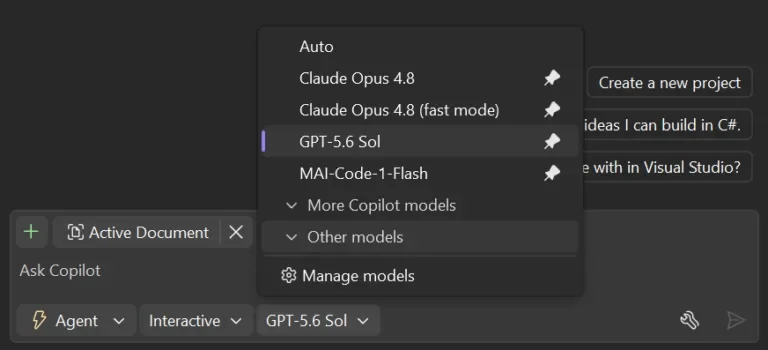
Here's what you need to know:
A model picker that matches your workflow
Stop scrolling through a long list of AI models every time you start coding. Pin your favourite models to the top, collapse the ones you rarely use, and keep your most-used options within easy reach.
Compare models before you choose
Need more details before selecting a model? The new Manage Models view lets you compare capabilities, context window sizes, and cost levels side by side, while also managing your own custom models in one place.
Track your AI context usage
Know exactly how much of your model's context window you've used during a conversation. Visual Studio also provides quick access to Copilot usage, helping you avoid limits and decide when it's time to start a new chat or switch models.
Build with greater confidence
Choosing the right model shouldn't interrupt your development flow. These improvements give you clearer insights and better control, so you can focus on writing code instead of managing AI.
Transform the way your team works with AI in Dynamics 365 and Power Apps. Discover Infinity AI Agents and contact us today.