
Microsoft has introduced GitHub Copilot app modernisation for .NET, bringing AI-assisted application upgrades into the developer workflow. The new experience helps teams assess existing applications, generate modernisation plans, and automate key upgrade tasks to simplify the journey to modern .NET.
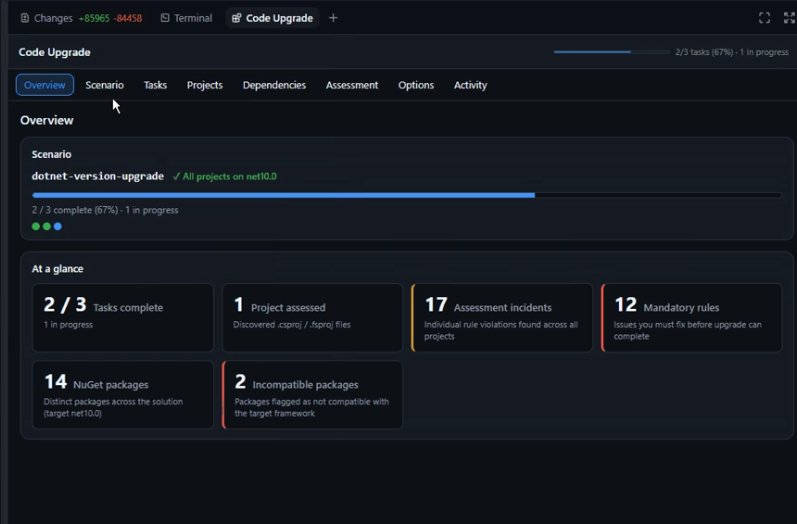
Here's what you need to know:
Assess Before You Upgrade
Modernising a .NET application involves evaluating dependencies, identifying compatibility issues, and planning the right sequence of work. Every discovery influences the next step, making upgrades more complex than simply changing framework versions.
Simplify Modernisation with AI
The GitHub Copilot app introduces an interactive Upgrade Dashboard that keeps your entire modernisation workflow in one place. Instead of switching between chats, documentation, and code changes, you can monitor every stage from assessment to execution in a single view.
From Assessment to Execution
The upgrade agent analyses your application, identifies what needs to change, and generates a structured implementation plan with actionable tasks. It also tracks code changes, build status, execution progress, and final results throughout the upgrade process.
Work Across Your Preferred Tools
The GitHub Copilot Upgrade Agent isn't limited to the GitHub Copilot app. You can use the same upgrade workflow in Visual Studio, Visual Studio Code, and GitHub Copilot CLI, allowing you to modernise applications using the developer tools you already rely on.
Get Started in Minutes
Install the Upgrade Agent plugin from the GitHub Copilot marketplace, open your repository, and start a new agent session. Then launch the Upgrade Dashboard to assess your application, review the upgrade plan, and track your modernisation from start to finish.
Looking to build custom business applications that help your team work smarter wherever they are? Contact us today to discuss how we can bring your ideas to life.