Manage Power BI Semantic Model Settings Directly From Your Workspace

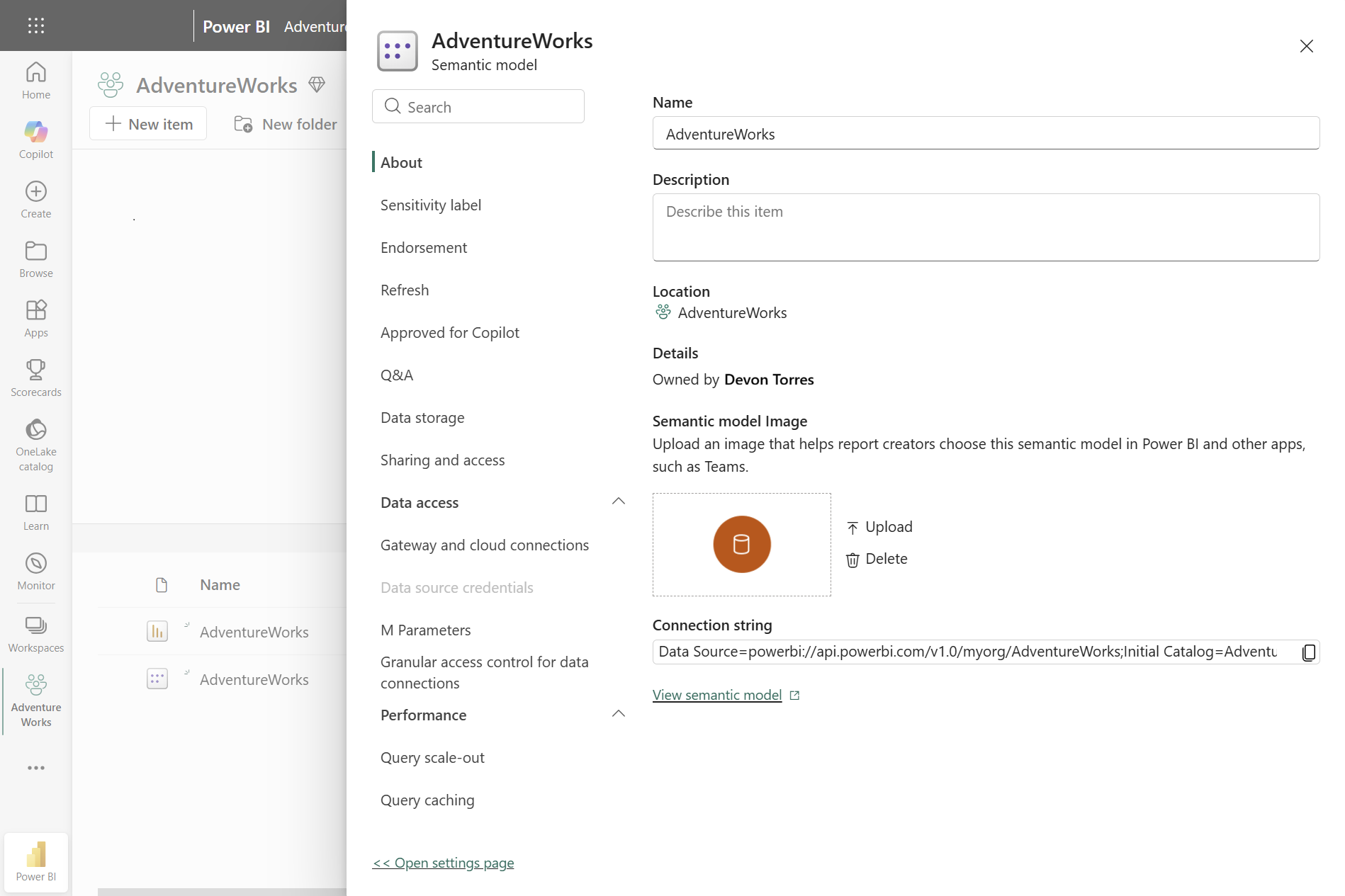
Power BI is introducing a new default settings pane in preview to make managing semantic model settings more convenient. The pane opens alongside your workspace, allowing you to review and configure settings without navigating away from the page.
Here’s what you need to know:

  • The Problem: Settings Take You Away From Your Work

    Switching between your workspace and a separate settings page can interrupt your workflow, especially when working with semantic models that have multiple configuration options. Finding a specific setting can also mean navigating through several sections manually.

  • The Solution: Manage Settings In Context

    The new settings pane opens alongside your workspace, allowing you to review and update semantic model settings without leaving the page. You can access the same settings available on the full settings page while keeping your workspace visible.

  • Find Settings Faster

    When you know what you need, searching through multiple sections can be time-consuming. The search box lets you quickly find settings such as View refresh history, while expandable sections group related options together.

  • Keep Related Settings Organised

    With settings grouped into sections and tabs, it’s easier to manage areas such as refresh, data access, performance, and OneDrive and SharePoint. This can be particularly useful when working with semantic models that have several connection, refresh, or performance settings.

  • Prefer the Full-Page Experience?

    If the pane doesn’t fit your workflow, you can still select Open settings page at the bottom to access the classic full-page experience. Microsoft plans to retire the classic settings page over time, so the switchback option supports users during the transition.

  • Get Started

    Open the settings for one of your semantic models in Power BI and explore the new grouped sections and search experience. You can also learn more about semantic model permissions and managing semantic model settings, or share feedback through Fabric Community Ideas.

Want to see how Sport Wellington uses Power BI to make participant tracking easier and more efficient? Read our case study to learn more, and contact us for your enquiries.
Microsoft Simplifies SSL/TLS Management for Power Pages Custom Domains

Microsoft has announced that Microsoft-managed SSL/TLS certificates are now available for custom domains in Power Pages. The new option allows Microsoft to handle certificate provisioning, configuration, and renewal, reducing the need for organisations to manage certificates manually.

Here’s what you need to know:

  • A Simpler Way to Manage Certificates

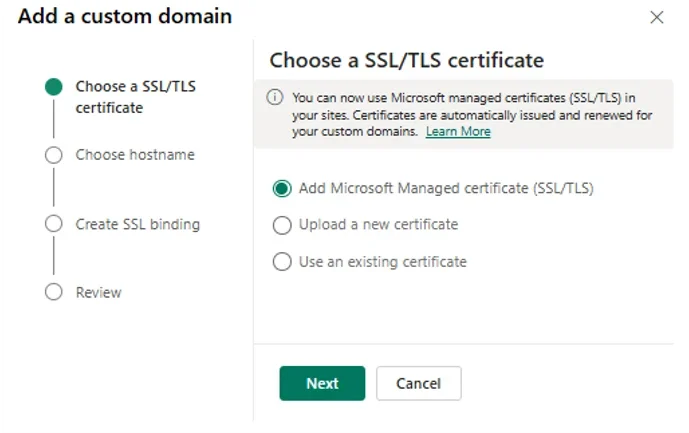
    Microsoft-managed certificates are now available in the Choose an SSL/TLS certificate step of the Connect Custom Domain wizard. Power Pages provisions the certificate for the host name you enter and automatically handles configuration and renewal.

  • Less Certificate Admin, Fewer Things to Track

    With Microsoft-managed certificates, you no longer need to purchase a certificate, export it as a password-protected PFX file, and upload it to Power Pages. Automatic renewal also helps reduce the risk of certificate expiry and browser warnings on customer-facing sites.

  • How to Get Started – Step 1

    In the Power Platform admin centre, go to Manage > Power Pages, select your site, choose Manage, and then select Connect Custom Domain in the Site Details section. From there, you can begin configuring your custom domain and choose how you want to manage its SSL/TLS certificate.

  • How to Get Started – Step 2

    Select Add Microsoft Managed certificate and choose Next, then enter and validate your host name. Review the configuration and finish the setup, which can take a few minutes to complete.

  • Ready to Migrate an Existing Domain?

    To switch an existing custom domain to a Microsoft-managed certificate, remove the current SSL binding and certificate first. Then reconnect the domain and select Add Microsoft Managed certificate to complete the migration.

Wondering how Power Pages helped Human Resources New Zealand enhance its membership management? Read our case study to see how it works and contact us to learn how we can help your organisation.

Improve Test Coverage With Visual Studio and GitHub Copilot

Microsoft has shared how developers can improve test coverage by combining Visual Studio’s code coverage analysis with the Test Agent in GitHub Copilot. The approach helps identify gaps in an application’s tests and generate targeted tests, from individual classes to the entire solution.

Here’s how:

  • Start With a Baseline

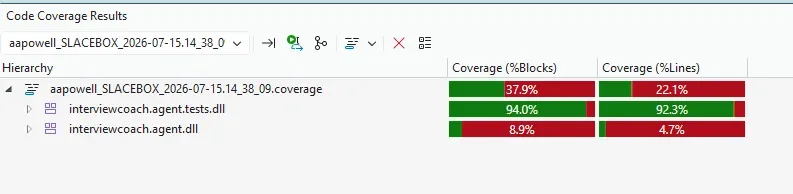
    Before adding new tests, run Analyze Code Coverage for All Tests from the Command Palette by pressing CTRL + SHIFT + P or Tests menu to understand where your coverage currently stands. This gives you a clear starting point and helps you focus your testing efforts where they’re needed most.

  • Find the Gaps

    The coverage results highlight which projects and areas of your codebase have limited or no test coverage. In the example, the analysis revealed significant gaps in the InterviewCoach.Agent project and a project with no tests at all.

  • Let Copilot Help Write the Tests

    GitHub Copilot’s Test Agent can analyse a class and its surrounding solution to determine an appropriate testing approach. It can create a test project, add the necessary references, and generate test cases based on the code it needs to cover.

  • Go Beyond a Single Class

    Once the initial tests are in place, the Test Agent can analyse the entire solution using the #solution context and generate tests for repositories, DbContext, extension methods, and other code paths. It can also identify areas that don’t need testing, helping you use Visual Studio’s coverage analysis and Copilot to address testing gaps more systematically.

  • Test With Purpose

    Code coverage gives developers visibility into where testing effort can have the most value instead of simply chasing a higher percentage. Pairing that insight with the Test Agent can help teams build targeted tests for individual classes or analyse coverage across an entire solution.

Your CRM may be at the heart of your business, but your teams may need more to stay productive wherever they work. Extend your CRM with custom business applications designed around your processes, giving your people the tools they need to get work done anytime, anywhere. Contact us to explore what’s possible.

Microsoft Shares How Azure AI Is Scaling Expertise Across Marketing

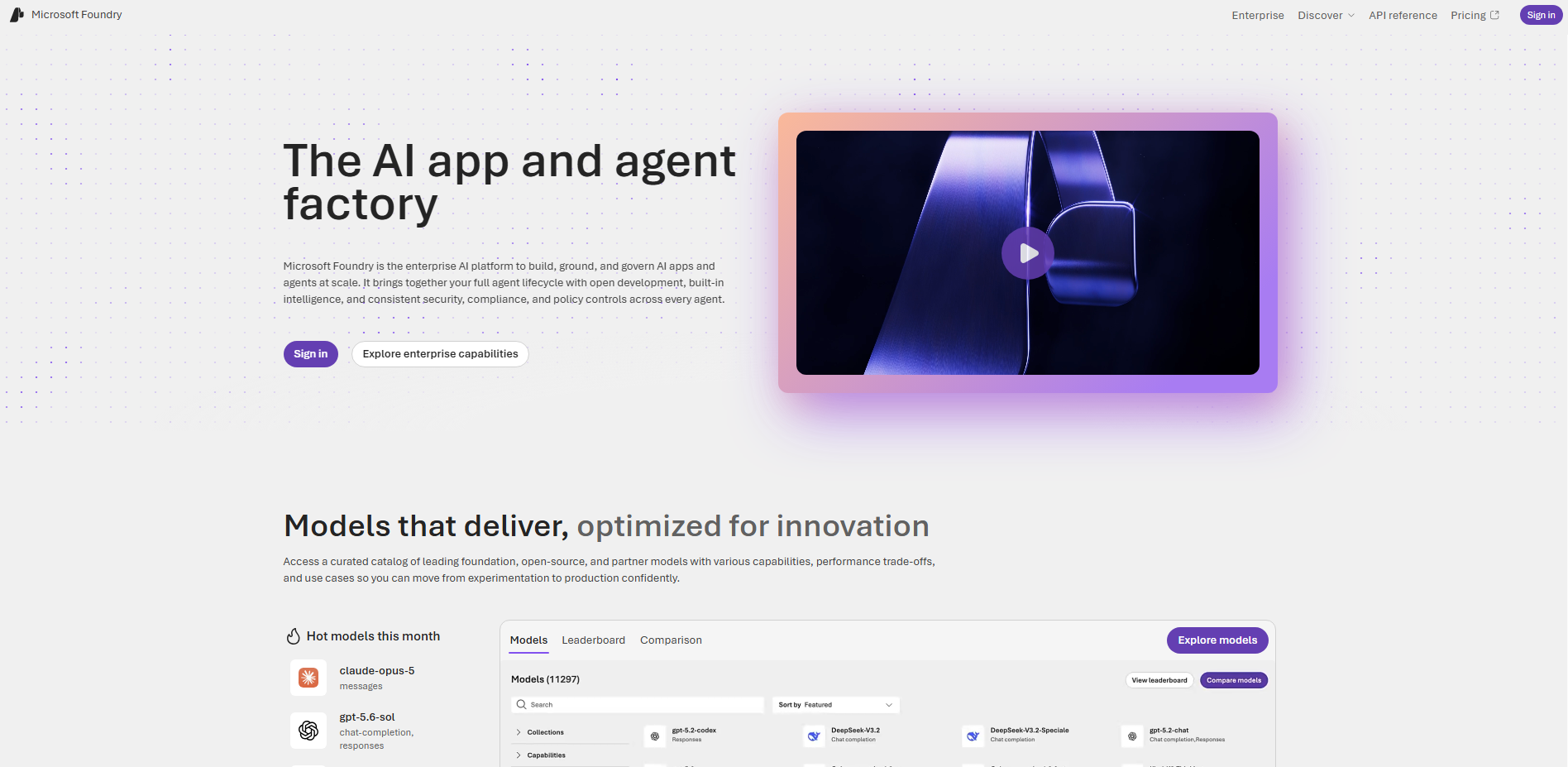
Microsoft is showing how its marketing team is using AI to scale expertise, improve workflows, and keep pace with a rapidly growing volume of work. Using Microsoft Azure Foundry and AI agents, the team is turning expert knowledge and business context into repeatable processes that help people work more efficiently while keeping human judgement at the centre.

Here’s how:

  • AI Knows More When It Knows Your Business

    AI is only as good as the data and business context it can access, from documents and workflows to business systems, communications, and institutional knowledge. Microsoft IQ and Microsoft Foundry help connect this context to AI, allowing agents to work from the same knowledge teams rely on every day.

  • What If Expertise Could Be Built Into Every Review?

    Microsoft turned an expert-defined content review rubric into a repeatable AI workflow using Microsoft Foundry, helping identify gaps and opportunities before content reaches a human reviewer. The approach saves an estimated 2,000 hours annually, while allowing experts to focus on judgment, coaching, and experience rather than repetitive reviews.

  • Would Your Customers Say the Same Thing?

    The AI Messaging Assistant (AMA) helps teams evaluate messaging and positioning from different audience perspectives before it goes to market. Built with Microsoft Foundry, it combines customer insights, product knowledge, messaging guidance, and business context to help teams assess whether messaging is clear, relevant, and actionable.

  • What Happens When Everyone Has the Same Context?

    As launch activity increases and priorities shift quickly, Microsoft uses agents built on Microsoft Foundry to connect planning backlogs, documentation, meeting signals, and operational systems. This gives teams a shared view of important developments and changes, so they can spend less time gathering information and more time deciding what to do next.

  • The Goal Isn’t to Replace Expertise — It’s to Scale It

    Across these examples, the goal isn’t automation for its own sake but making expertise available wherever it can create value. People provide the judgment and strategy, while AI helps scale that expertise across teams and throughout the organisation.

Want AI to streamline your marketing efforts across Dynamics 365 and Power Apps? Explore Infinity AI Agents and see how AI can help your team work smarter. Contact us today to get started!

Microsoft Brings Natural Language App Building to Copilot Cowork and Copilot Studio

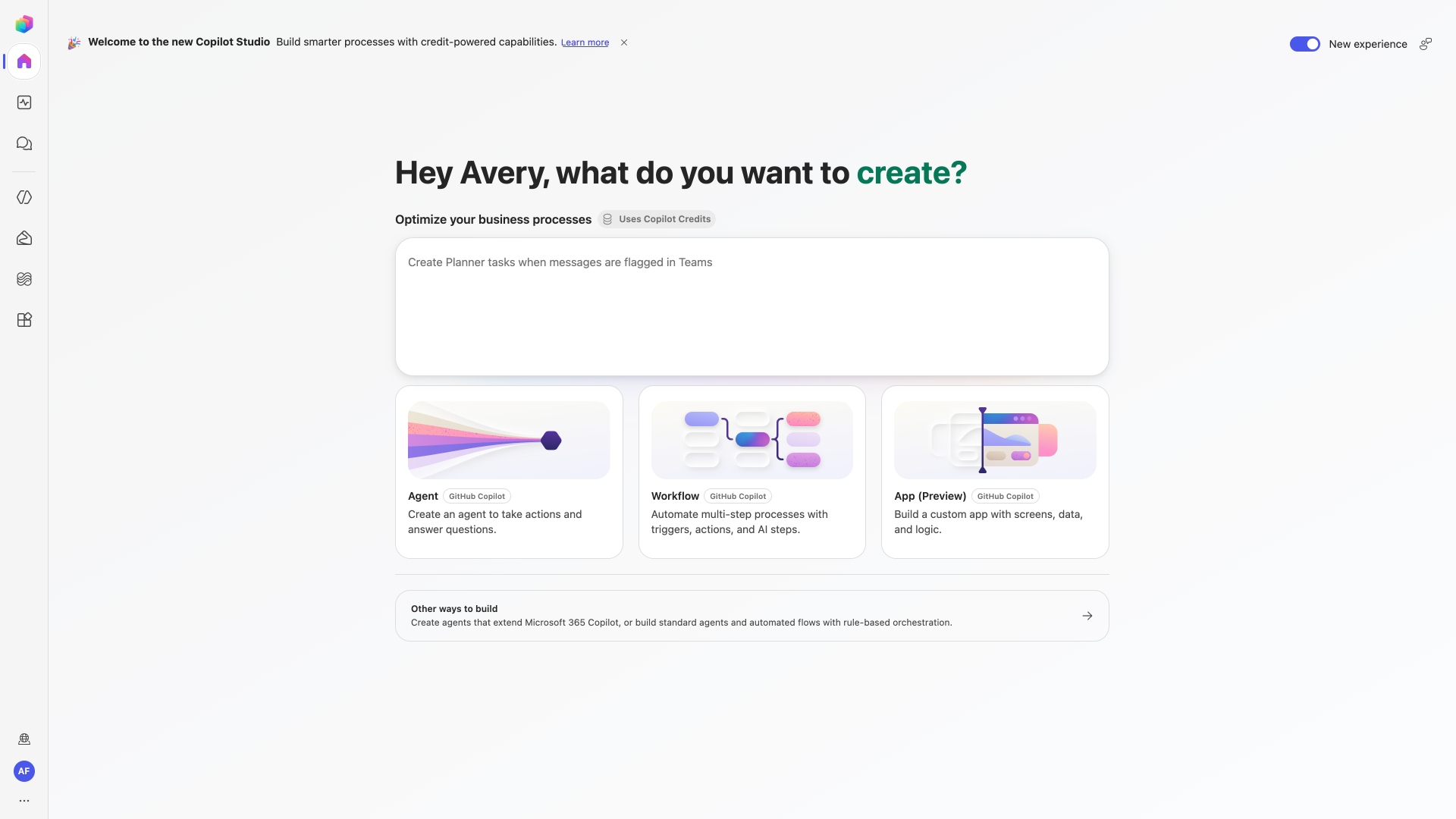
Microsoft is expanding app development in Copilot Cowork and Copilot Studio, allowing users to build full-stack business applications through natural language. The new capabilities bring app building closer to everyday conversations while connecting applications to enterprise data and business systems.

This update gives organisations another way to turn ideas into connected business applications, with app building now becoming a more integrated part of the Copilot experience.

Here’s what you need to know:

  • Build Apps Through Conversation

    In Copilot Studio, choose App (Preview) from the home screen, or invoke the /app skill in Copilot Cowork to get started. You can iterate through conversation, preview the app, and even review the underlying code, giving both everyday users and experienced developers the flexibility they need.

  • Connect Apps To Business Data

    Apps built with Copilot Cowork and Copilot Studio can use connectors to work with business data and organisational context through Work IQ. This means apps can do more than surface information—they can help users take action and write results back to the systems where work happens.

  • Build With Enterprise Governance In Mind

    Apps are full-stack solutions built using open standards, with support for Git-backed source control, deployment stages, and version isolation. Microsoft Entra identity, organisational data policies, connector controls, and centralised visibility through the Microsoft 365 admin centre help IT teams maintain oversight throughout the app lifecycle.

  • Start Building With Copilot Studio

    App building is available today through the Frontier programme using the /app skill in Copilot Cowork, while native app building in Copilot Studio is rolling out in public preview. Once available in your environment, you’ll be able to describe an app in natural language, publish it, and make it discoverable through managed enterprise applications.

Want AI that works the way your business needs it to? Explore Infinity AI Agents for Dynamics 365 and Power Apps, and see how custom AI agents can support the way your teams work. Contact us today to get started!

Power BI Q&A Retirement Extended to February 2027

Microsoft has provided an updated timeline for the retirement of Power BI Q&A, extending the retirement date to February 2027. The extension gives organisations more time to assess their existing Q&A dependencies and prepare for newer, Copilot-powered alternatives.

Here’s what you need to know:

  • Understanding the Q&A Retirement

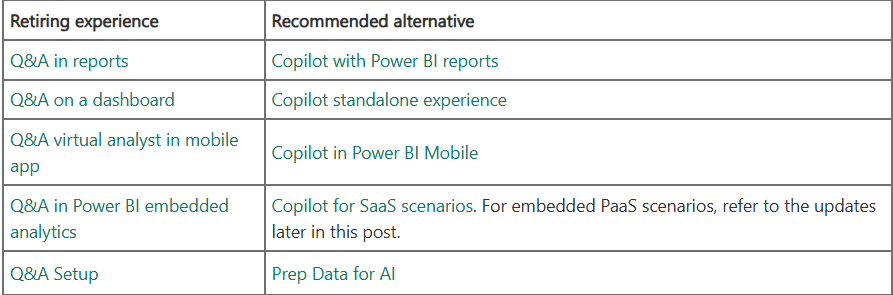
    The retirement covers both the end-user Q&A experiences and the associated Q&A configuration tools in Power BI. Microsoft recommends Copilot-powered experiences as the alternative where available and appropriate.

  • What to Expect in February 2027

    Starting in February 2027, Q&A will no longer work in Power BI, and the Q&A visual will be removed. Existing reports containing Q&A visuals will display an error where the visual previously appeared.

  • Expanding Access to Copilot

    Copilot is now available across Fabric capacities starting at F2, giving organisations with smaller capacities more options for evaluating Copilot. Fabric Copilot Capacity (FCC) can also now be created on F2 and higher capacities, providing an optional way to centralise Copilot usage for assigned users, including Pro and PPU workspaces.

  • Planning for Embedded Q&A

    There are currently no plans for a direct Copilot replacement for embedded Q&A PaaS scenarios. Organisations using embedded Q&A should begin evaluating alternatives, including supported SaaS experiences, Narrative visuals, smart narrative summaries, and Fabric IQ MCP Server.

  • Copilot and Sovereign Cloud Considerations

    Copilot does not yet support sovereign cloud environments due to GPU availability. Organisations relying on Q&A in these environments should review their dependencies and discuss migration options with their Microsoft account representative or support team.

  • Preparing for the Transition

    Start by identifying your existing Q&A dependencies across reports, dashboards, mobile experiences, embedded solutions, and Q&A configuration artefacts. Then evaluate migration paths, confirm Copilot availability and requirements, test alternative experiences, and communicate planned changes well before February 2027.

Discover how Power BI can help your organisation turn data into clearer insights and better decisions. Explore our Business Intelligence solutions and contact us today to get started!

Power Pages: Enhanced Data Model Migration Utility Is Now Generally Available

Microsoft has announced the general availability of the Standard Data Model (SDM) to Enhanced Data Model (EDM) migration utility in Power Platform CLI. The update also adds support for four key Dynamics 365 portal templates, making it easier for organisations to move existing Power Pages sites to the Enhanced Data Model.

Here’s what you need to know:

  • A Simpler Path to Enhanced Data Model

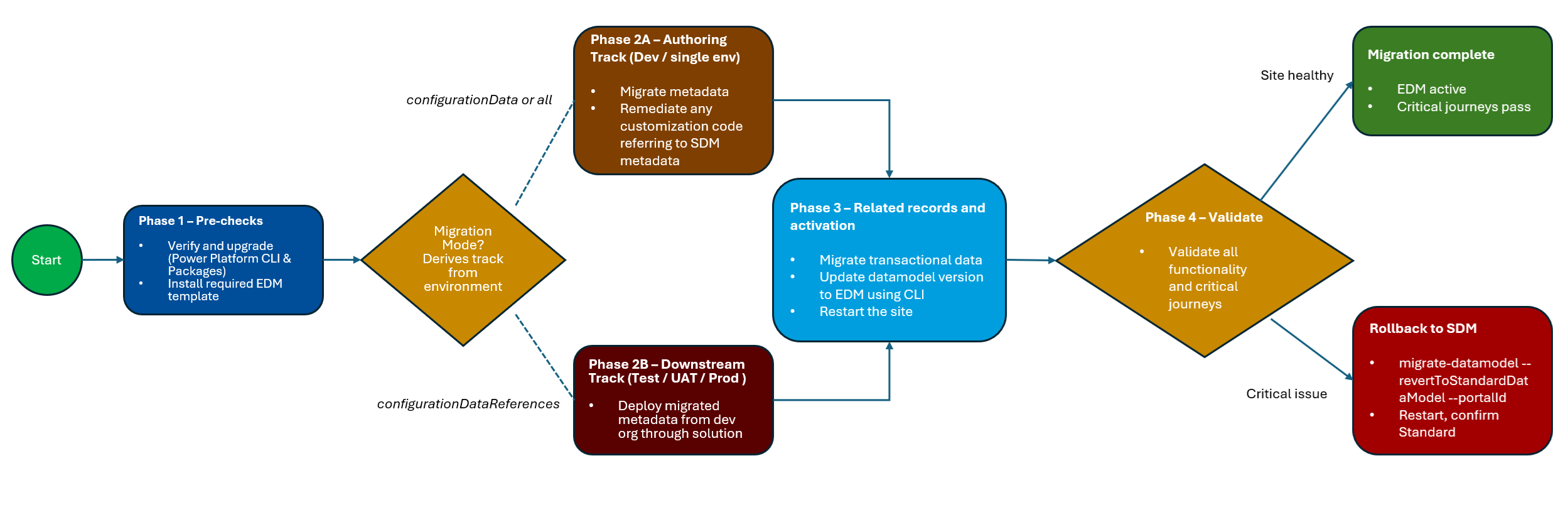
    The migration utility is now generally available and can move supported site configurations and related records from SDM to EDM before switching the site to the new data model. It also provides an enhanced customisation report, migration status checks, and rollback capabilities to help you manage the process.

  • Four Dynamics 365 Portal Templates Are Supported

    The migration utility now supports four key Dynamics 365 portal templates, making it possible to migrate these sites from SDM to EDM. Supported templates include Customer Self-Service Portal, Employee Self-Service Portal, Community Portal, and Partner Portal.

  • What EDM Brings to Your Sites

    EDM provides more modern application lifecycle management by making site configuration solution-aware and allowing sites to move alongside their apps, flows, and tables through Dataverse solutions. EDM sites also provision faster, receive platform updates automatically, and provide access to new Power Pages features built on the Enhanced Data Model.

  • Getting Ready for the Migration

    To begin, make sure you have Power Platform CLI 2.11.2 or later, the required Dataverse and Power Pages Core packages, and a supported site template with its corresponding EDM template installed. You’ll also need the appropriate administrator permissions and should follow Microsoft Learn’s step-by-step guidance to generate the customisation report, run the migration, verify its status, and switch your site to EDM.

Discover how Power Pages can support real-world business needs by reading our Human Resources New Zealand case study. Contact us to learn more.

Copilot Studio Expands Agent Capabilities with GitHub Copilot Harness

Microsoft has announced a new wave of updates for Copilot Studio, introducing the generally available GitHub Copilot harness alongside new capabilities designed to help agents handle more complex, reasoning-heavy work. The updates also bring reusable agent skills, richer organisational context, memory, connected agents, workflows, and additional tools to help organisations build more capable and scalable AI agents. These updates mark a broader shift in Copilot Studio from building individual agents toward creating more intelligent, extensible agent solutions that can reason, collaborate, access context, and take action across complex business processes.

Here’s what you need to know:

  • What is GitHub Copilot harness?

    The GitHub Copilot harness provides a foundation for building reasoning-heavy agents and workflows that can dynamically determine how to approach a goal. It orchestrates models, context, tools, MCP servers, connected agents, skills, and other capabilities so agents can adapt their execution instead of relying solely on predefined paths.

  • Enhance Your Agents with Skills, Tools & Connected Agents

    Skills provide modular, reusable capabilities, while connected agents can delegate work to specialised agents for more complex scenarios. Workflows and MCP servers can also give agents access to deterministic automation and external services, helping teams build solutions that are more reusable, extensible, and scalable.

  • Provide Richer Context with Knowledge, Memory & Files

    Copilot Studio now offers more ways for agents to understand the organisation, the task, and the individual user through capabilities such as Work IQ, Foundry IQ, memory, and file handling. These capabilities can help agents work with organisational information, remember relevant context, analyse substantial documents, and complete more complex tasks with less repeated input from users.

  • Explore the Agents' Governance Capabilities

    New governance capabilities give administrators greater control through agent-level identity, MCP server certification, and environment-level telemetry. Together, these features provide clearer identity, trusted connections, and deeper operational visibility as organisations scale their use of agents.

  • Reach Customers Across Voice & Digital Channels

  • Real-time agents are expanding beyond voice with support for digital messaging channels, allowing organisations to create more consistent customer experiences across interactions. New voice capabilities, including GPT-5 Chat in preview and Application Insights monitoring, also provide more flexibility for custom voice experiences and performance management.

  • Build Better Agents with More Tools

    Copilot Studio continues to expand its model and harness options, including the general availability of Claude Sonnet 5 and GPT-5.5 Chat as primary models. These choices give makers more flexibility to select the right combination of reasoning capabilities and predictable execution for each agent scenario.

  • What's Next?

    These updates represent more than a collection of new features—they provide building blocks for agents that can reason, act, collaborate, use context, and work across complex business processes. The bigger question is no longer just “What can an agent do?” It’s becoming “What work is your organisation ready to give it?”

Bring the power of AI into your Dynamics 365 and Power Apps workflows. Explore Infinity AI Agents and contact us to discover what’s possible for your organisation.

Microsoft Benchmarks Power BI Architecture Choices for Azure Databricks

Microsoft has published a new performance benchmark exploring how different Power BI architecture and storage-mode choices perform when reporting on data stored in Azure Databricks.

The analysis compares multiple approaches to serving the same Delta tables, giving Power BI developers and data teams a clearer view of the performance trade-offs involved. In this article, we take a closer look at what was tested and what the results could mean for your reporting architecture.

  • What’s Being Compared?

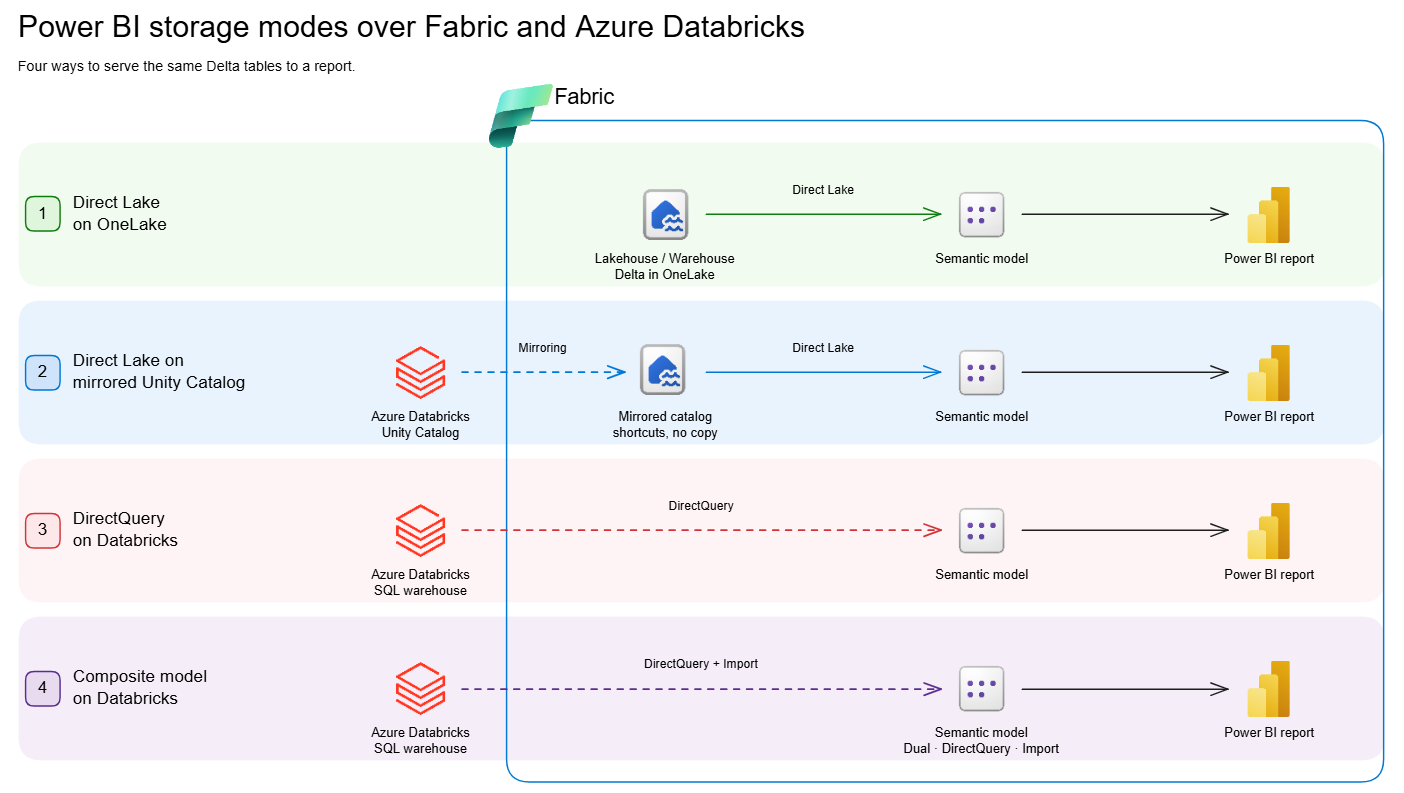
    Microsoft’s latest white paper compares four different approaches for serving the same Delta tables to Power BI reports when Azure Databricks is the data source. It looks at Direct Lake on OneLake, Direct Lake on mirrored Unity Catalog tables, DirectQuery on a Databricks SQL warehouse, and Composite Models with import-mode aggregations.

  • What Do the Results Show?

    There’s no universal winner, but clear performance patterns emerge across the different scenarios. Direct Lake on OneLake performed well across the broadest range of situations, particularly for smaller and mid-sized volumes and frequently accessed Power BI reports.

  • The Fastest Pattern at Scale

    When working with billions of rows, Composite Models with aggregations delivered the fastest and most consistent results in the benchmark. Queries resolved by the aggregation tables stayed below 100ms, although queries that fall through to the underlying DirectQuery source can lose that advantage.

  • What Should You Take Away?

    Performance varies depending on data volume, cache state, filtering scenarios and query type, so the headline results don't tell the whole story. The white paper provides the detailed benchmark results and testing methodology to help you assess which approach makes sense for your environment.

  • One Important Consideration

    The comparison reflects a point-in-time benchmark from June/July 2026, and both Power BI and Azure Databricks continue to evolve. Use the findings as a guide, then validate the results against your own data, workloads and user behaviour.

Read the full white paper to explore the benchmark results, test setup and performance breakdowns in detail.

Discover how Business Intelligence can turn your data into better insights and smarter decisions. Contact us today to explore what’s possible for your organisation.

Power BI Refreshes Sample Reports with Modern Visual Defaults

Microsoft has refreshed its Power BI sample reports with modern visual defaults, bringing a cleaner and more consistent look to the examples users rely on for inspiration. The updated 2026 sample reports showcase the latest reporting experience while giving users a practical way to explore the changes in Power BI.

Here’s what you need to know:

  • Experience Stronger Semantic Models

    What happens behind the visuals matters just as much as what you see on the report page. The refreshed samples demonstrate clearer naming, descriptions, measures, formatting, relationships, and reusable modelling patterns.

  • A More Modern Report Experience

    The refreshed reports bring together a cleaner, more consistent design with updated visuals and improved navigation. They also introduce features such as larger canvases, mobile layouts, report page tooltips, the new card visual, date pickers, and button slicers.

  • Refreshed Sample #1: Revenue Opportunities

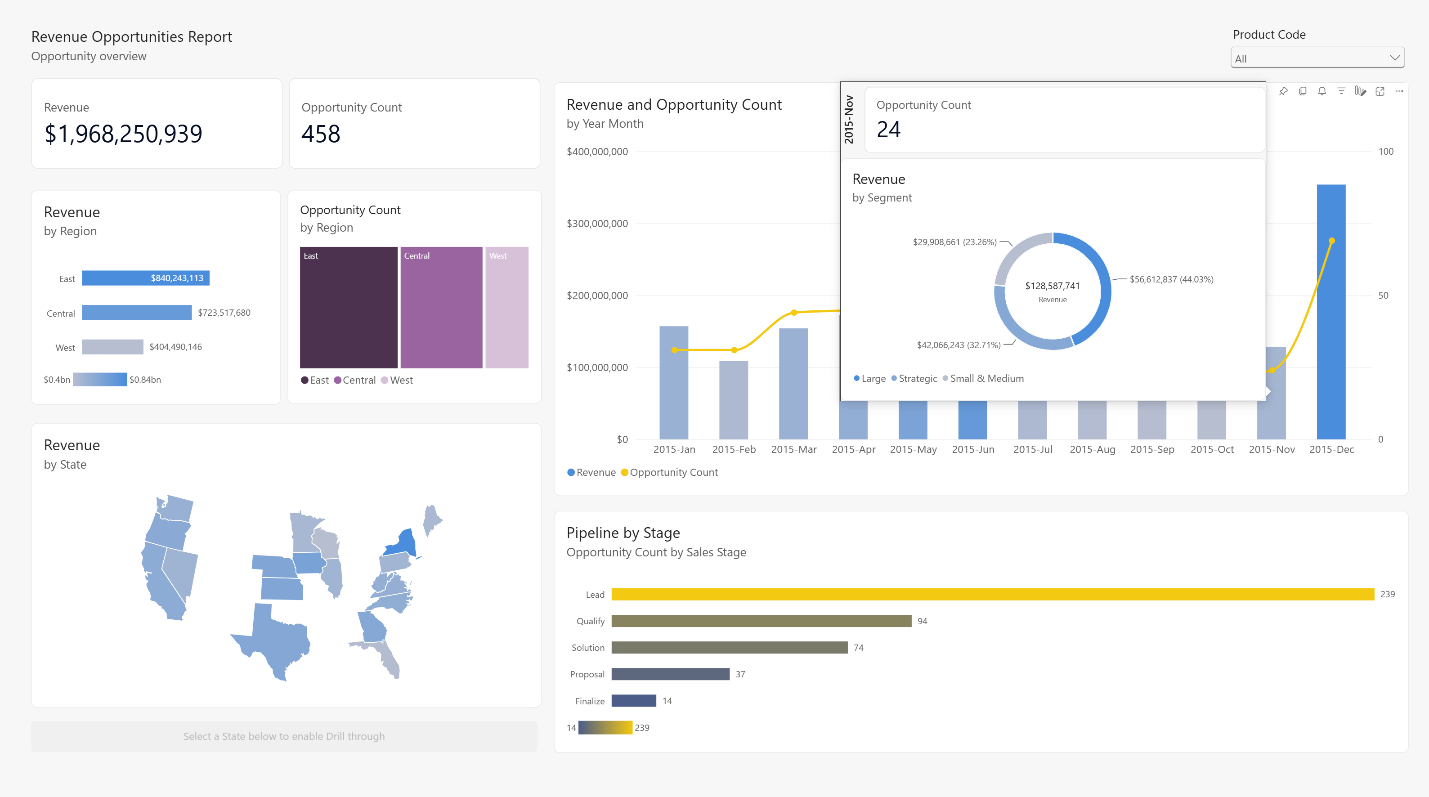
    Explore a revenue-pipeline report that combines a Shape Map, report page tooltip, and combo chart. Hover over data points to uncover additional context without leaving the page.

  • Refreshed Sample #2: Regional Sales

    This sales report now takes advantage of the larger canvas, new card visual, page navigation, Shape Map, and improved table and matrix layouts for a more structured analysis experience.

  • Accelerate Your Own Refresh with AI

    You can apply similar ideas to your own reports with Skills for Fabric and Copilot for Power BI. Use AI to explore your data, shape report content, and identify opportunities to modernise your reports—then bring in your own business context and design judgment.

  • Ready to Try the Refreshed Samples

    Explore the updated reports, review their semantic models and mobile layouts, and discover design patterns you can adapt to your organisation.

Curious about what Power BI can do for your organisation? Explore our Independent Police Conduct Authority case study and get in touch with us to learn more.