
Microsoft has announced that Microsoft-managed SSL/TLS certificates are now available for custom domains in Power Pages. The new option allows Microsoft to handle certificate provisioning, configuration, and renewal, reducing the need for organisations to manage certificates manually.
Here’s what you need to know:
A Simpler Way to Manage Certificates
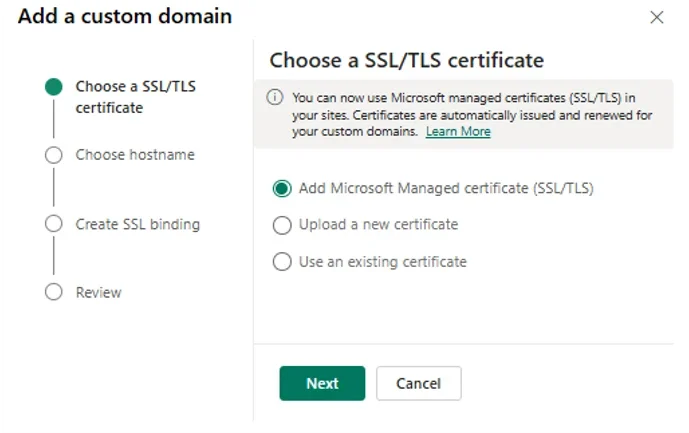
Microsoft-managed certificates are now available in the Choose an SSL/TLS certificate step of the Connect Custom Domain wizard. Power Pages provisions the certificate for the host name you enter and automatically handles configuration and renewal.
Less Certificate Admin, Fewer Things to Track
With Microsoft-managed certificates, you no longer need to purchase a certificate, export it as a password-protected PFX file, and upload it to Power Pages. Automatic renewal also helps reduce the risk of certificate expiry and browser warnings on customer-facing sites.
How to Get Started – Step 1
In the Power Platform admin centre, go to Manage > Power Pages, select your site, choose Manage, and then select Connect Custom Domain in the Site Details section. From there, you can begin configuring your custom domain and choose how you want to manage its SSL/TLS certificate.
How to Get Started – Step 2
Select Add Microsoft Managed certificate and choose Next, then enter and validate your host name. Review the configuration and finish the setup, which can take a few minutes to complete.
Ready to Migrate an Existing Domain?
To switch an existing custom domain to a Microsoft-managed certificate, remove the current SSL binding and certificate first. Then reconnect the domain and select Add Microsoft Managed certificate to complete the migration.
Wondering how Power Pages helped Human Resources New Zealand enhance its membership management? Read our case study to see how it works and contact us to learn how we can help your organisation.