
Microsoft has shared how developers can improve test coverage by combining Visual Studio’s code coverage analysis with the Test Agent in GitHub Copilot. The approach helps identify gaps in an application’s tests and generate targeted tests, from individual classes to the entire solution.
Here’s how:
Start With a Baseline
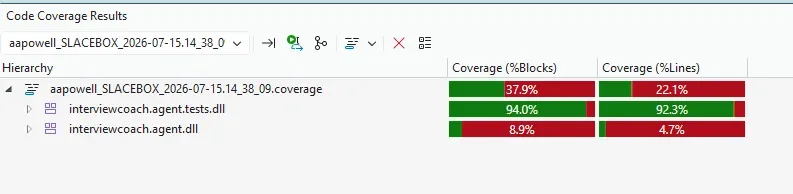
Before adding new tests, run Analyze Code Coverage for All Tests from the Command Palette by pressing CTRL + SHIFT + P or Tests menu to understand where your coverage currently stands. This gives you a clear starting point and helps you focus your testing efforts where they’re needed most.
Find the Gaps
The coverage results highlight which projects and areas of your codebase have limited or no test coverage. In the example, the analysis revealed significant gaps in the InterviewCoach.Agent project and a project with no tests at all.
Let Copilot Help Write the Tests
GitHub Copilot’s Test Agent can analyse a class and its surrounding solution to determine an appropriate testing approach. It can create a test project, add the necessary references, and generate test cases based on the code it needs to cover.
Go Beyond a Single Class
Once the initial tests are in place, the Test Agent can analyse the entire solution using the #solution context and generate tests for repositories, DbContext, extension methods, and other code paths. It can also identify areas that don’t need testing, helping you use Visual Studio’s coverage analysis and Copilot to address testing gaps more systematically.
Test With Purpose
Code coverage gives developers visibility into where testing effort can have the most value instead of simply chasing a higher percentage. Pairing that insight with the Test Agent can help teams build targeted tests for individual classes or analyse coverage across an entire solution.
Your CRM may be at the heart of your business, but your teams may need more to stay productive wherever they work. Extend your CRM with custom business applications designed around your processes, giving your people the tools they need to get work done anytime, anywhere. Contact us to explore what’s possible.