Microsoft Introduces Contact Center Intelligence to Transform Customer Experiences

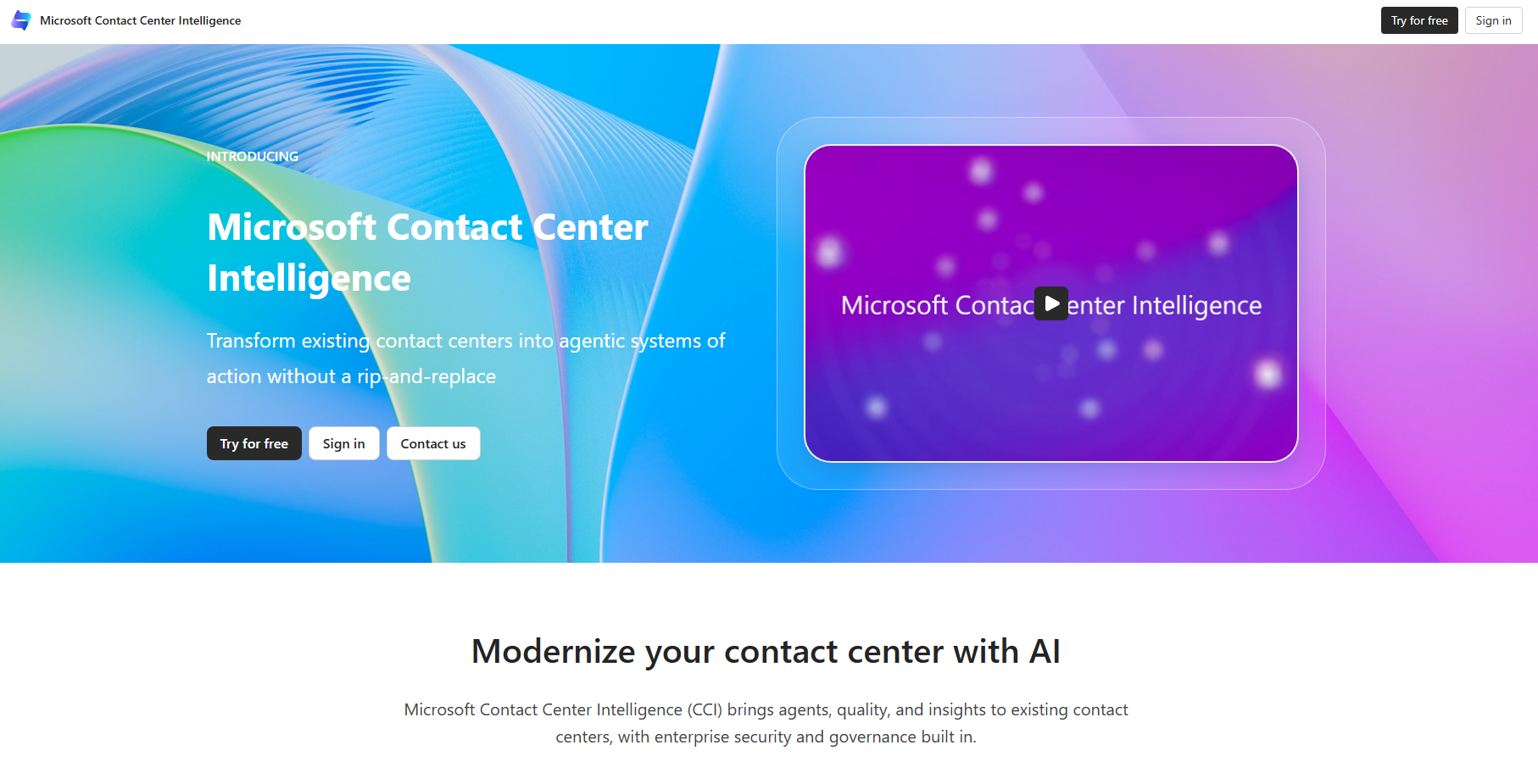
Microsoft has introduced Microsoft Contact Center Intelligence (CCI), a new AI-powered solution designed to improve customer experiences and contact centre performance. Now in public preview, it brings intelligent agents, quality assurance, and analytics to existing contact centre platforms, helping organisations modernise customer service without requiring a complete system replacement.
Here's what you need to know

  • What Is Microsoft CCI?

    Powered by Microsoft IQ, CCI combines CRM data, contact centre insights, and organisational intelligence to help AI agents resolve customer needs with relevant context, enterprise security, and governance.

  • Three Agents, Three Business Outcomes

    Microsoft CCI features three specialised agents designed to improve customer service, quality assurance, and contact centre operations. From resolving enquiries to evaluating interactions and optimising workflows, each agent supports better business outcomes.

  • Key Features of Microsoft CCI

    Microsoft CCI combines AI-powered self-service, quality analytics, flexible integrations, voice biometric authentication, and centralised agent governance. With access to Microsoft IQ and more than 1,700 connectors, organisations can deliver more personalised, consistent, and efficient customer experiences

  • Your Existing Contact Centre Modernised

    Build, test, and deploy AI agents grounded in your business data without a major migration. Combine structured and generative conversations, with handoffs to human representatives when needed.

  • Improve Quality and Compliance

    Evaluate historical self-service conversations against built-in and custom metrics, with real-time evaluation coming soon. Measure up to 100% of conversations for greater visibility into service quality.

  • Build Trust into Every Interaction

    Voice biometric authentication can reduce separate verification steps and support smoother customer experiences, including when calls are handed over to human representatives.

  • How Can You Get Started?

    Microsoft CCI is available in global public preview, except in Austria, with usage-based pricing through Copilot Credits. Connect your existing contact centre through the Microsoft CCI portal and configure an agent for a high-volume customer enquiry.

Ready to make Dynamics 365 work smarter for your organisation? Discover Infinity AI Agents and create AI-powered experiences tailored to your business needs and workflows. Contact us today to get started!
Discover More Benefits Included in Your Visual Studio Subscription

Microsoft is encouraging Visual Studio subscribers to explore the benefits already included in their subscriptions and share what they want to learn next. In its latest blog post, Microsoft highlights opportunities to build with Azure credits, access technical learning resources, and use developer tools while inviting feedback to help shape future Visual Studio Blog content.

Here's what you need to know:

  • Experiment with Azure Without the Extra Cost

    Curious about a new Azure service but hesitant to request additional budget? Eligible Visual Studio subscribers receive monthly Azure credits to explore eligible services, test architectures, and build proof of concepts.

  • Build Your Skills with Included Learning Resources

    Preparing for an Azure certification or looking to expand your technical knowledge doesn't have to mean purchasing another course. Eligible Visual Studio Subscriptions include access to learning providers such as Cloud Academy and Pluralsight, which offer courses and hands-on training to help you prepare for certifications like Microsoft Certified: Azure Administrator Associate (AZ-104).

  • Speed Up Development with Ready-Made UI Components

    Building dashboards and business applications often requires interactive charts, sortable data grids, and other interface elements that take time to develop. Eligible Visual Studio subscribers can access Syncfusion developer tools with prebuilt UI components, helping them spend less time building common features from scratch.

  • Discover More Benefits in Your Subscription

    Your Visual Studio Subscription may include useful tools and resources beyond the benefits you already use. Visit the Visual Studio Subscriptions portal to explore available offers and find new ways to learn, experiment, and develop applications more efficiently.

Keep your organisation’s secrets secure with a secret management solution hosted within your Azure environment. Explore Secret Vault and contact us today to learn how it can help strengthen your organisation’s security and compliance.

Visual Studio 2026 Makes Comparing Code with Earlier Commits Easier

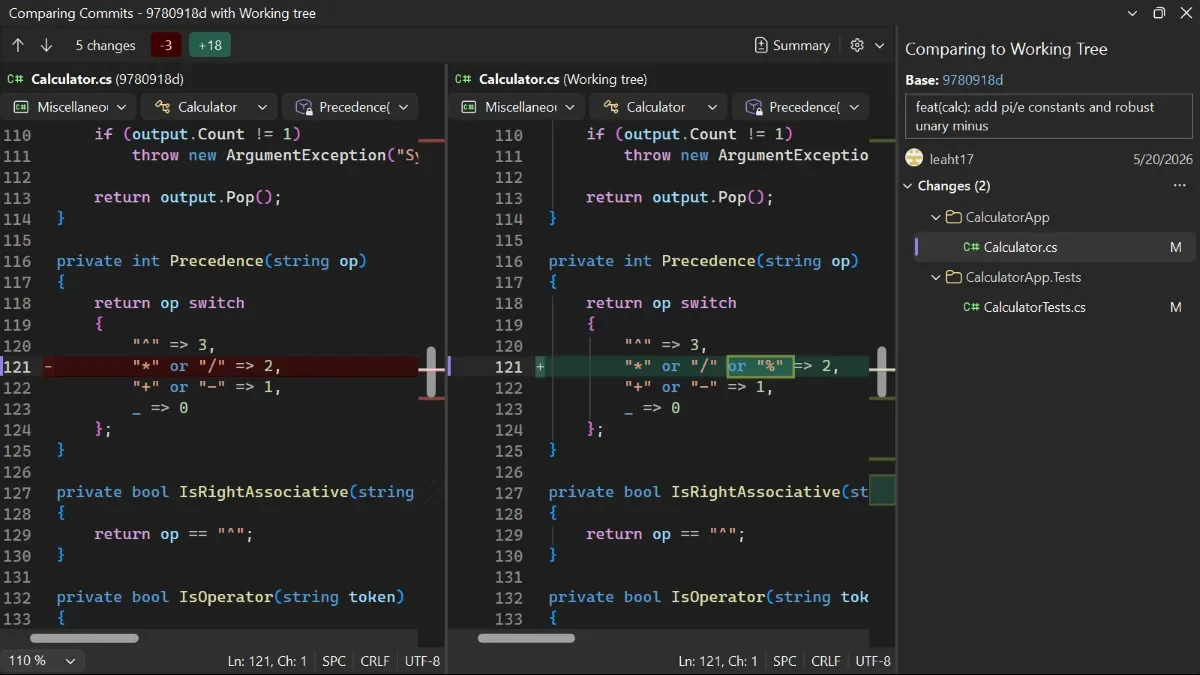
Microsoft has introduced a new way to review code changes in Visual Studio 2026 version 18.11, making it easier for developers to compare their current work with an earlier commit. The new Compare with Working Tree option helps developers review historical changes without checking out an older commit or leaving their current workflow.

Here's how it works:

  • Step 1: Find the Commit

    Open the commit history or branch list and locate the commit you want to inspect.

  • Step 2: Compare with Your Working Tree

    Right-click the commit you want to review and choose Compare with Working Tree to see how it differs from your current code.

  • Step 3: Review the Differences

    Select any file in the comparison view to examine its changes. Visual Studio uses the selected commit as the baseline and displays all files that differ from your working tree, including changes made outside that commit.

  • Take Note:

    Want to explore more ways to trace code changes? Check out Browse your repository history in Visual Studio to investigate when an issue was introduced or check out an earlier commit to run older code.

Want to improve process compliance, reduce manual data entry, and automate information management? Discover how custom business applications can streamline your workflows and help your organisation work smarter. Contact us today to get started!

Visual Studio 2026 Introduces New Keyboard Shortcuts for Tab Navigation

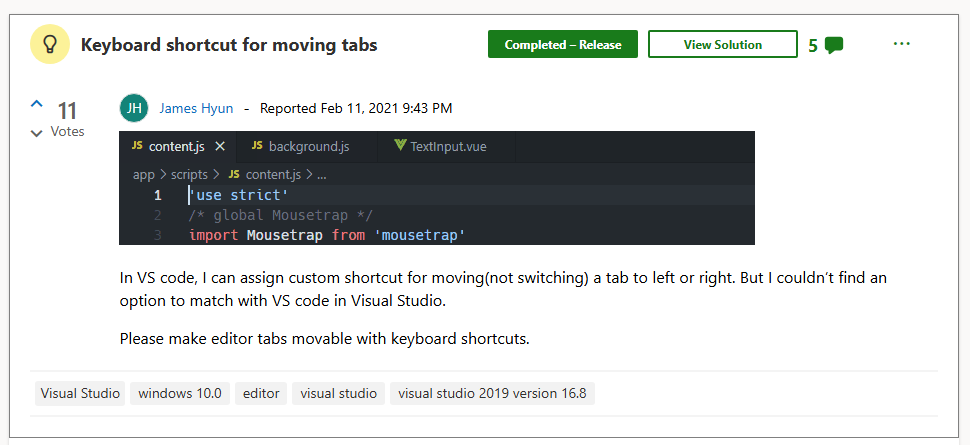
Visual Studio is making it easier for developers to navigate their workspace and return to important files without interrupting their workflow. With keyboard shortcuts for managing and revisiting tabs, developers can spend less time navigating between documents and more time focusing on their code.

Here's what you need to know:

  • Move Tabs Without Reaching for Your Mouse

    Keep related files together and arrange your workspace with simple keyboard shortcuts. Use Ctrl + Shift + PgUp to move the active tab left or Ctrl + Shift + PgDn to move it right.

  • Jump Directly to the Document You Need

    Skip cycling through multiple open files and return to a document by its visible position. Use Ctrl + NumPad1 through Ctrl + NumPad9 to activate the corresponding document tab in the active document group.

  • Make Better Use of Tool Window Space

    Visual Studio 2026 allows tool window tabs to size themselves according to their labels instead of matching the longest one. You can also customise minimum and maximum tab widths independently for tool windows and document tabs in Tools > Options > All Settings > Environment > Tabs > Tool Window Tabs.

  • Customise Your Keyboard Shortcuts

    Prefer different key bindings? Find Window.MoveTabLeft and Window.MoveTabRight under Tools > Options > Environment > Keyboard to assign shortcuts that suit your workflow.

  • Spend Less Time Navigating, More Time Developing

    Small workflow improvements can make a difference when you're working across multiple files and tools. Explore the latest Visual Studio updates to find more ways to streamline your development process.

Streamline business processes, minimise manual data entry, and automate information management with custom business applications tailored to your organisation’s needs. Contact us today to get started!
Make Business Processes More Proactive with Microsoft Copilot Studio

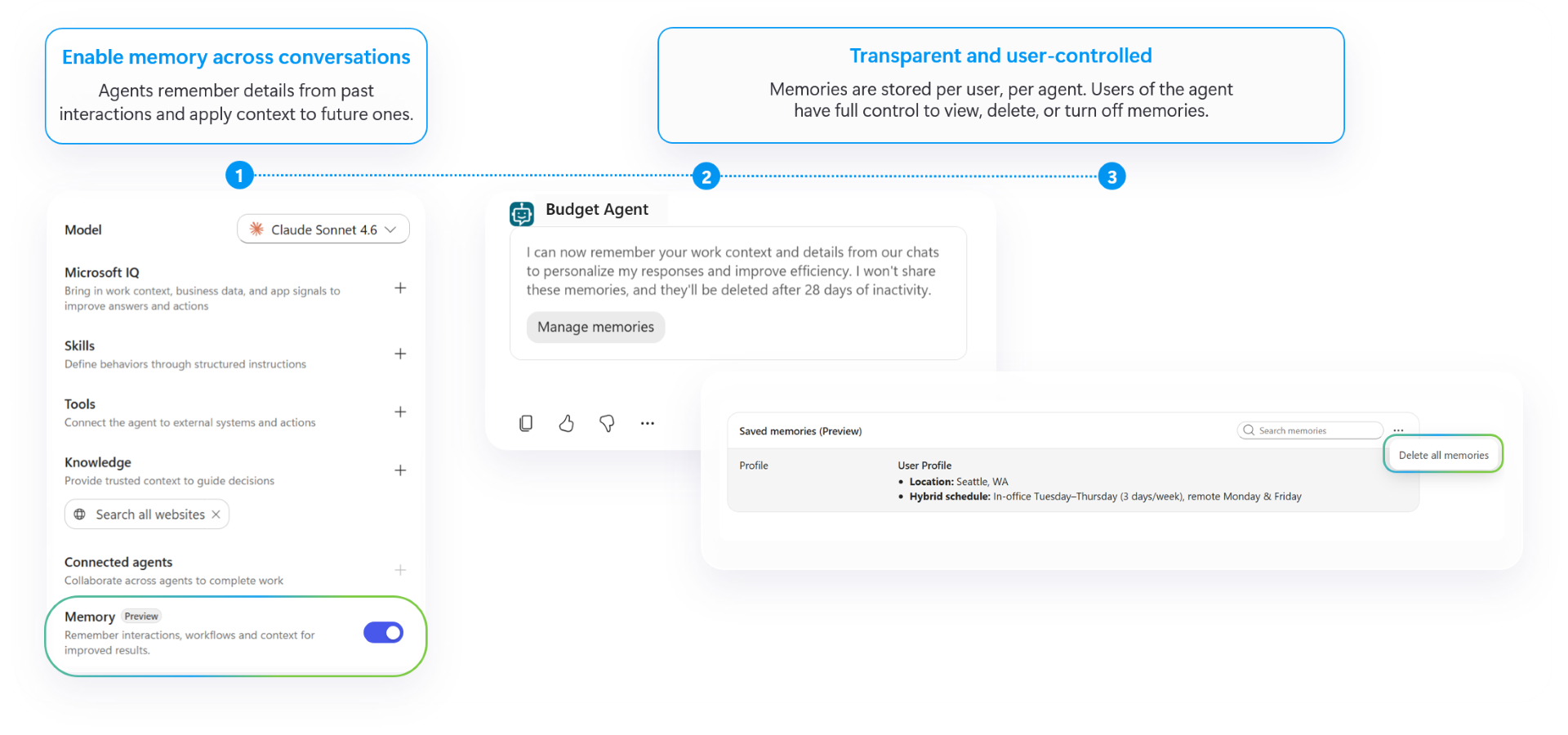
Microsoft is introducing new capabilities in Copilot Studio to help organisations delegate shared business processes to AI agents that can work proactively and retain context over time. With agent accounts, business process memory, and automated triggers, businesses can build digital teammates that support collaboration and help streamline recurring tasks across their organisation.

Here's what you need to know:

  • Connect AI Agents with People, Systems, and Workflows

    Agent accounts allow AI agents to work across Microsoft 365 using their own approved credentials and permissions. They can participate in conversations in Teams and Outlook, contribute to Word, Excel, and PowerPoint, and take on delegated tasks while maintaining clear accountability and oversight.

  • Retain Context and Improve Over Time

    Business process memory helps agents carry forward relevant preferences and process knowledge into future tasks, reducing the need for people to repeat instructions. Upcoming agent refinement capabilities are also designed to help makers identify improvements, turn recurring tasks into workflows, and improve agent quality and cost efficiency.

  • Handle Complex, Long-Running Tasks

    Triggers in the GitHub Copilot harness allow agents to start working when an external signal occurs or a scheduled interval is reached, without requiring a new prompt each time. Combined with planned browser-enabled cloud computer capabilities, these features open up new possibilities for automating complex, ongoing business processes.

  • Start with a Shared Business Process

    The GitHub Copilot harness in Copilot Studio provides a foundation for building agents that can reason, execute tasks iteratively, and use skills across an organisation. For example, a company uses an executive business-case review agent to work across Outlook, Teams, and Word, apply company policies and precedents, and prepare decision-ready briefs for executive review.

Let AI agents simplify everyday tasks in Power Apps and Dynamics 365 with solutions tailored to your organisation’s needs. Explore Infinity AI Agents and contact us today to discuss how they can support your business.

What’s New in Power BI? October 2026 Feature Summary

Microsoft has released its October 2026 Power BI feature summary, introducing new capabilities across Copilot and AI, reporting, and semantic models. The latest updates aim to simplify report creation, improve data visualisation, and enhance capacity management for more efficient analytics.

Here’s What You Need to Know:

  • Copilot and AI: Simplify Report Creation with Custom Visuals

    The Power BI Report Authoring skill now supports custom visuals, allowing you to create and customise reports using natural-language prompts. Connect visuals to report data, apply formatting, and validate visualisations with less manual configuration.

  • Reporting: Make Filtering Easier with the New Dropdown Slicer

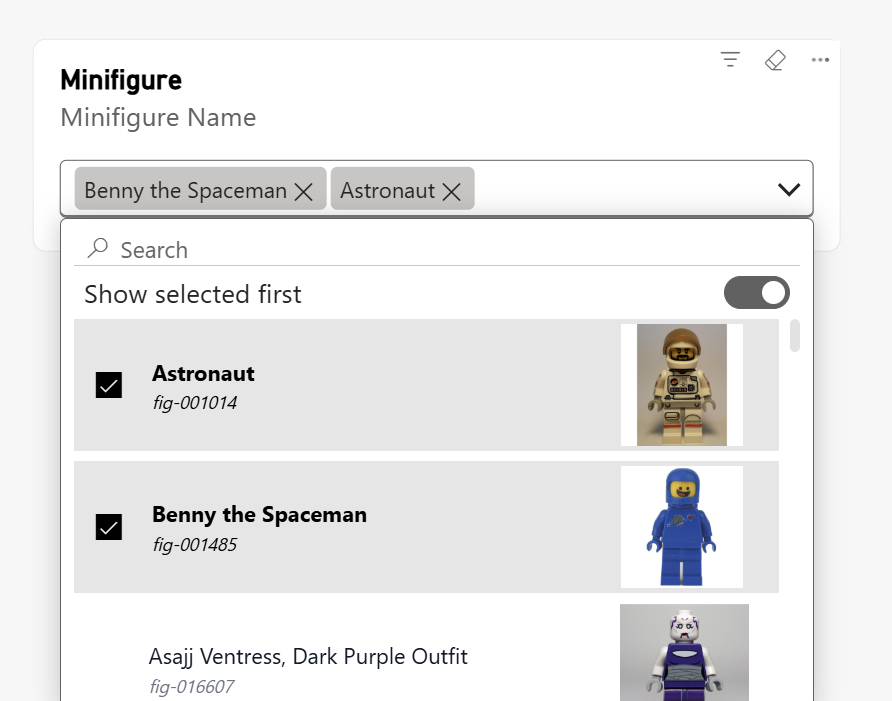
    The new list slicer dropdown makes long filter lists easier to navigate, with selected values displayed at the top for quick access. Customisable formatting, removable selection pills, and clearer filter indicators help you manage filters and improve the report experience.

  • Semantic Models: Strengthen Capacity Management with Smarter Surge Protection

    Power BI semantic models now report capacity unit (CU) usage continuously during long-running background operations, helping surge protection respond more accurately to actual consumption. This improvement enables earlier capacity interventions, increasing proactive rejections while reducing late-stage Fabric throttling rejections without requiring configuration changes.

See the full list of Power BI’s October 2026 update.

Discover how Business Intelligence can help your organisation make informed decisions and gain valuable insights from your data. Contact us today, and let’s get started!

Visual Studio 2026 Introduces Stop-on-Failure Builds

Microsoft has introduced a new feature in Visual Studio 2026 version 18.11 that helps developers save time when a project fails to compile. The opt-in setting allows solution builds to stop after the first project failure, reducing unnecessary waiting and helping developers focus on fixing errors sooner.

Here's what you need to know:

  • Stop the Build at the First Error

    Enable Stop solution build after first failure under Tools > Options > Projects and Solutions > Build and Run to stop the solution build when a project fails. Visual Studio stops starting queued projects and safely stops projects already building, while still reporting the build as failed.

  • Spend Less Time Waiting

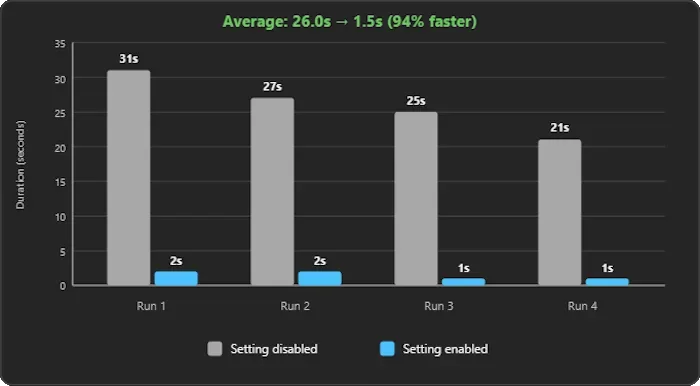
    In four test builds, the average time spent waiting after a failure dropped from 26 seconds to just 1.5 seconds with the setting enabled. That's approximately a 94% reduction in post-failure waiting time, although your results may vary depending on your solution's size, dependencies, and parallel build activity.

  • Choose the Build Behaviour That Works for You

    This setting stops the entire solution build, not just projects that depend on the failed project, so you won't collect results from every remaining project. If you prefer to review those results before troubleshooting, leave the option disabled to preserve the existing build behaviour.

Enhance your organisation’s systems with custom business applications that help your team work seamlessly anytime, anywhere. Contact us today to get started!
Power Pages Simplifies Multilingual Website Development with AI

Microsoft has introduced localization support for the Power Pages plugin for GitHub Copilot CLI and Claude Code, making it easier for developers to create multilingual websites. The new /add-localization skill supports more than 43 languages, including right-to-left languages such as Arabic and Hebrew.

Here's what you need to know:

  • Simplify Multilingual Website Development

    Localising a website traditionally involves choosing an internationalisation library, extracting text, building language selectors, and manually testing right-to-left layouts. With the new /add-localization skill, you can specify your preferred languages, review the proposed changes, and let the AI agent handle the implementation.

  • What's New?

    The update introduces multilingual support for React, Vue, and Angular sites, with options for AI-generated or blank translation files. It also adds right-to-left layout support and integrates localisation into the /create-site workflow.

  • How Does It Work?

    The skill detects your framework and presents a browser-based plan for your approval before making changes. It then installs the required package, generates translation files, adds a language selector, tests each language in a real browser, and prepares your site for deployment.

  • What Should You Know?

    The /add-localization skill localises your website's user interface but does not translate Dataverse records, change environment languages, or localise Power Pages system messages. Support for Astro sites is not yet available.

  • Get Started

    Install or update the Power Pages plugin to access the latest localisation features and Power Platform CLI updates. Then run /add-localization in an existing Power Pages SPA project, or use /create-site and opt in when prompted to add more languages.

Discover how Power Pages helped Human Resources New Zealand (HRNZ) enhance its membership management. Read the case study to learn more, and contact us today to discuss how we can support your organisation’s needs.

Power Pages Introduces SPA Templates for Faster Website Creation

Microsoft is making it easier to build websites with Power Pages through support for ready-made single-page application (SPA) templates. This update gives developers a faster starting point for creating websites, reducing the need to build every page and component from scratch.

Here's what you need to know:

  • Discover What’s New in Power Pages

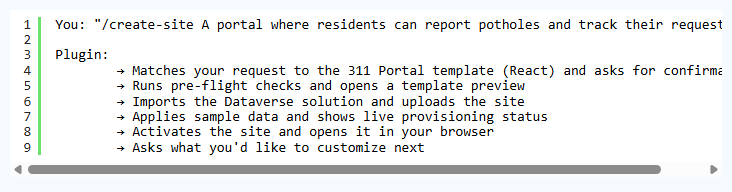
    The Power Pages plugin for GitHub Copilot CLI and Claude Code now supports ready-made SPA templates that match your project requirements. With /create-site, you can preview a recommended template, provision your site with Dataverse solutions and sample data, and customise it to your needs.

  • Build Faster With Ready-Made Templates

    Templates help reduce development time and AI credit costs compared with building a complete site from scratch. They also provide WCAG 2.2 compliance, responsive layouts, recommended Power Pages development patterns, and code that is free of known vulnerabilities at release.

  • Choose a Template for Your Business Needs

    Choose from two React-based templates: the 311 Citizen Services Portal for managing citizen requests and city services, or the Supplier Invoice Portal for supplier onboarding, purchase orders, and invoice tracking. Each template includes site code, a Dataverse solution, and sample data to provide an end-to-end starting point, with more templates coming soon.

  • From Site Idea to Live Website

    Describe the site you want, preview the recommended template, and confirm your choice before provisioning begins. The plugin then imports the Dataverse solution, uploads the site, applies sample data, activates the site, and opens it in your browser so you can start customising.

  • Start Building Your Power Pages Site

  • Install or update the Power Pages plugin and Power Platform CLI using the installer script to get the latest tools and updates. Then, run /create-site, describe your requirements, and follow the guided process to build your site from a template.

See how Power Pages helped Human Resources New Zealand enhance its membership management. Read the case study to learn more, and contact us today to discuss how we can support your organisation.

Microsoft Expands SQL Server Deployment Options With Azure Local

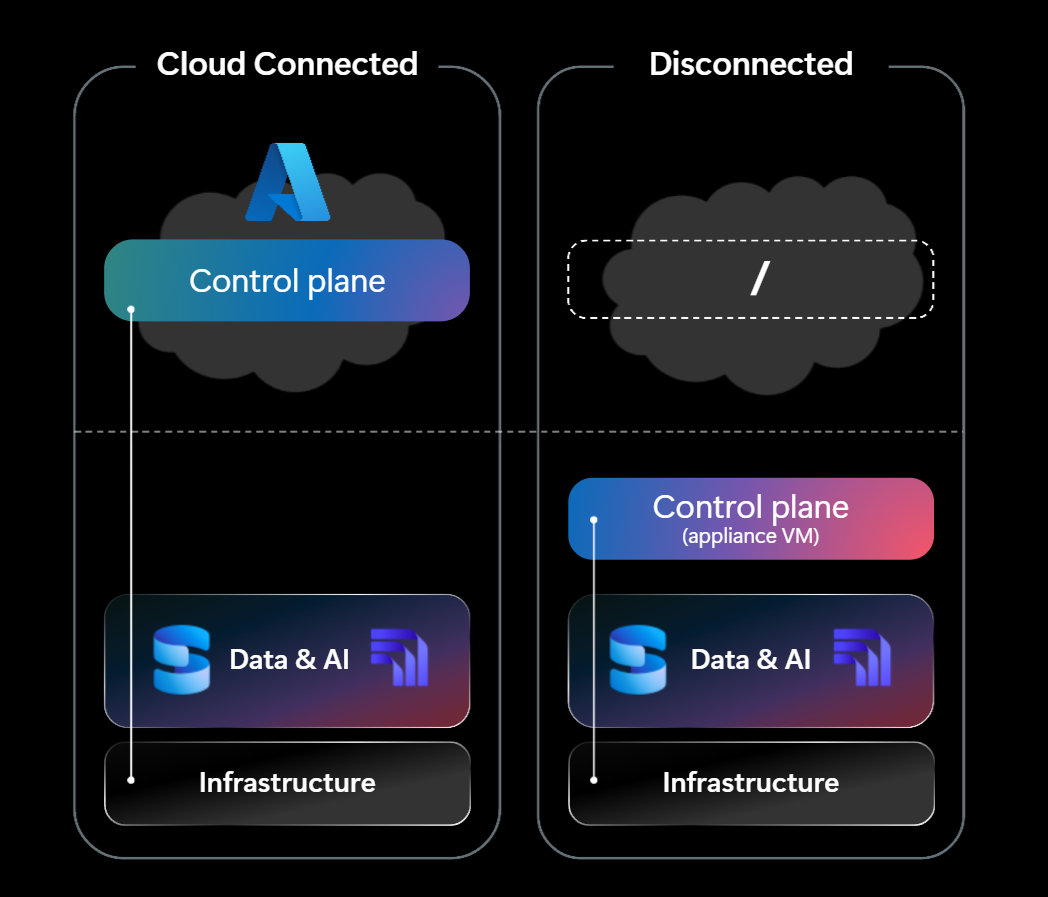
Microsoft has announced the general availability of SQL Server on Azure Local, giving organisations more flexibility to modernise their database infrastructure while maintaining control over data location and connectivity. The release supports both connected and disconnected environments, helping businesses run critical workloads locally while meeting operational, regulatory, and data sovereignty requirements. It also opens new possibilities for running AI closer to enterprise data.

Here's what you need to know:

  • Keep SQL Server Workloads Where Your Data Belongs

    Organisations can run SQL Server on Azure Local infrastructure in their own datacentres and edge locations, maintaining greater control over data placement and connectivity. With options for connected environments and Azure Local Disconnected Operations (ALDO), businesses can choose a deployment model that meets their operational, security, and connectivity requirements.

  • Enable AI-Powered Innovation at the Edge

    With Foundry Local, organisations can run AI models on Azure Local infrastructure alongside SQL Server, bringing AI inference closer to their data. This helps businesses explore AI-powered applications while keeping sensitive data processing within their environment, particularly in regulated, sovereign, and edge scenarios.

  • Maximise the Value of Your SQL Server Licences

    Modernising your infrastructure doesn't mean starting from scratch. Eligible existing SQL Server licences can help organisations build on their current investments, with licensing options depending on the deployment model and applicable terms. Connected deployments can also use pay-as-you-go licensing through Azure Arc, while fully disconnected deployments can use eligible existing licences through Azure Hybrid Benefit.

  • Support Sovereign, Regulated, and Edge Environments

    Not every workload belongs in the public cloud. SQL Server on Azure Local gives organisations more flexibility to modernise across datacentres, edge locations, and environments with strict sovereignty or connectivity requirements. By combining Azure-consistent infrastructure with local data processing capabilities, businesses can support mission-critical workloads while maintaining control over their infrastructure and operations.

  • Want to Learn More?

    Explore Microsoft's SQL Server on Azure Local announcement and deployment guidance to learn how your organisation can modernise its data infrastructure while meeting its operational requirements. Learn more at Microsoft Learn.

Keep your organisation’s sensitive information secure with a secret management solution hosted within your Azure environment. Explore Secret Vault and contact us today to learn how it can strengthen your security.