
Microsoft has introduced a new way to review code changes in Visual Studio 2026 version 18.11, making it easier for developers to compare their current work with an earlier commit. The new Compare with Working Tree option helps developers review historical changes without checking out an older commit or leaving their current workflow.
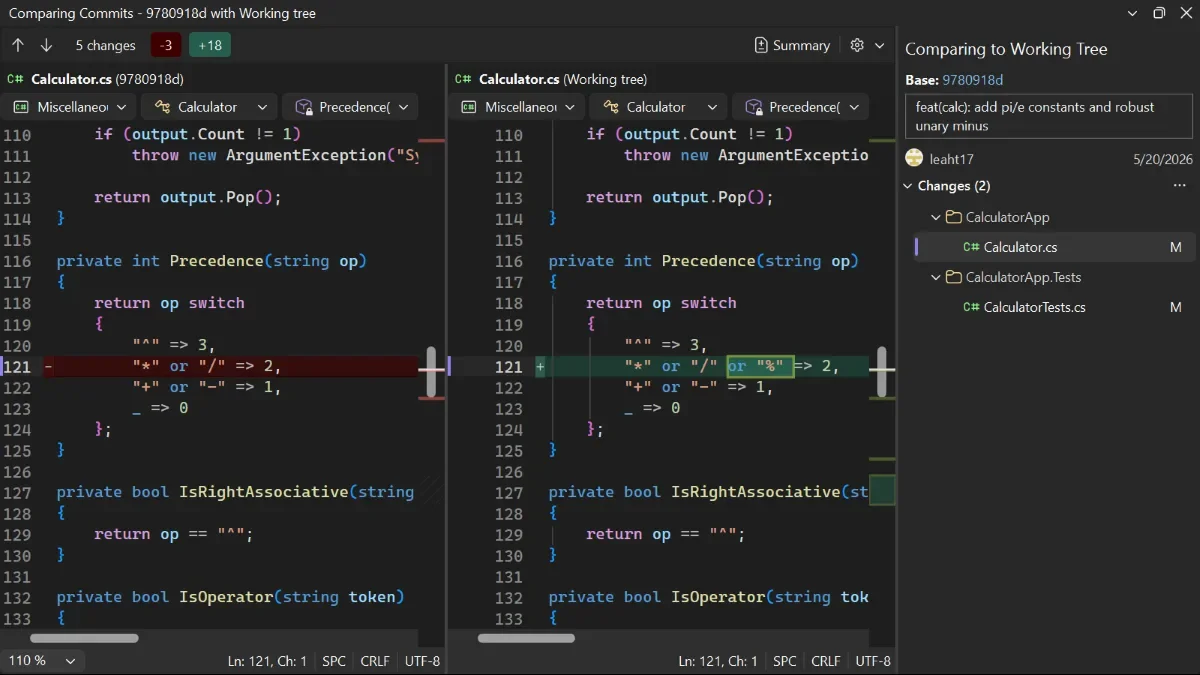
Here's how it works:
Step 1: Find the Commit
Open the commit history or branch list and locate the commit you want to inspect.
Step 2: Compare with Your Working Tree
Right-click the commit you want to review and choose Compare with Working Tree to see how it differs from your current code.
Step 3: Review the Differences
Select any file in the comparison view to examine its changes. Visual Studio uses the selected commit as the baseline and displays all files that differ from your working tree, including changes made outside that commit.
Take Note:
Want to explore more ways to trace code changes? Check out Browse your repository history in Visual Studio to investigate when an issue was introduced or check out an earlier commit to run older code.
Want to improve process compliance, reduce manual data entry, and automate information management? Discover how custom business applications can streamline your workflows and help your organisation work smarter. Contact us today to get started!