
Microsoft has introduced a new feature in Visual Studio 2026 version 18.11 that helps developers save time when a project fails to compile. The opt-in setting allows solution builds to stop after the first project failure, reducing unnecessary waiting and helping developers focus on fixing errors sooner.
Here's what you need to know:
Stop the Build at the First Error
Enable Stop solution build after first failure under Tools > Options > Projects and Solutions > Build and Run to stop the solution build when a project fails. Visual Studio stops starting queued projects and safely stops projects already building, while still reporting the build as failed.
Spend Less Time Waiting
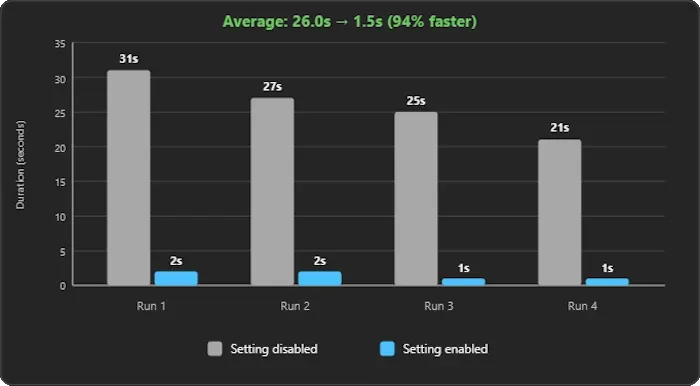
In four test builds, the average time spent waiting after a failure dropped from 26 seconds to just 1.5 seconds with the setting enabled. That's approximately a 94% reduction in post-failure waiting time, although your results may vary depending on your solution's size, dependencies, and parallel build activity.
Choose the Build Behaviour That Works for You
This setting stops the entire solution build, not just projects that depend on the failed project, so you won't collect results from every remaining project. If you prefer to review those results before troubleshooting, leave the option disabled to preserve the existing build behaviour.
Enhance your organisation’s systems with custom business applications that help your team work seamlessly anytime, anywhere. Contact us today to get started!