Cloud Academy Brings Hands-On Azure Learning to Visual Studio Subscribers

Visual Studio subscribers now have another way to strengthen their Azure skills through the Cloud Academy learning benefit. The offering provides hands-on learning designed to help developers build practical Azure knowledge, prepare for certifications, and keep up with evolving cloud technologies.
Here's what you need to know:

  • Learn Azure by Doing

    Cloud Academy goes beyond traditional courses with hands-on Azure labs and real-world environments. You can practice your skills while building knowledge you can apply to everyday cloud projects.

  • Choose Learning That Fits Your Goals

    Whether you're new to Azure, expanding your cloud expertise, or preparing for advanced projects, Cloud Academy offers flexible learning paths for different experience levels. You’ll also get interactive assessments, sandbox environments, and AI-powered guidance to support your learning.

  • Prepare for Azure Certifications

    Cloud Academy combines guided lessons, hands-on labs, and assessments to help you prepare for Microsoft Azure certifications. Learning resources include AI-900: Microsoft Azure AI Fundamentals, AZ-104: Microsoft Azure Administrator, AZ-400: Designing and Implementing Microsoft DevOps Solutions, and AZ-305: Designing Microsoft Azure Infrastructure Solutions.

  • Build Practical Cloud Skills

    Explore real-world scenarios including container deployment, Azure Functions, workflow automation, Azure Container Registry, storage cost optimisation, Microsoft Entra ID security, Azure AI, prompt engineering, and more. This hands-on approach helps turn learning into skills you can use on real projects.

  • Keep Your Azure Skills Current

    As Azure continues to evolve, Cloud Academy helps you keep learning without stepping away from your day-to-day responsibilities. Whether you're exploring Azure AI, developing cloud-native applications, strengthening DevOps skills, or preparing for certification, you can continue building your expertise at your own pace.

  • Activate Your Visual Studio Benefit

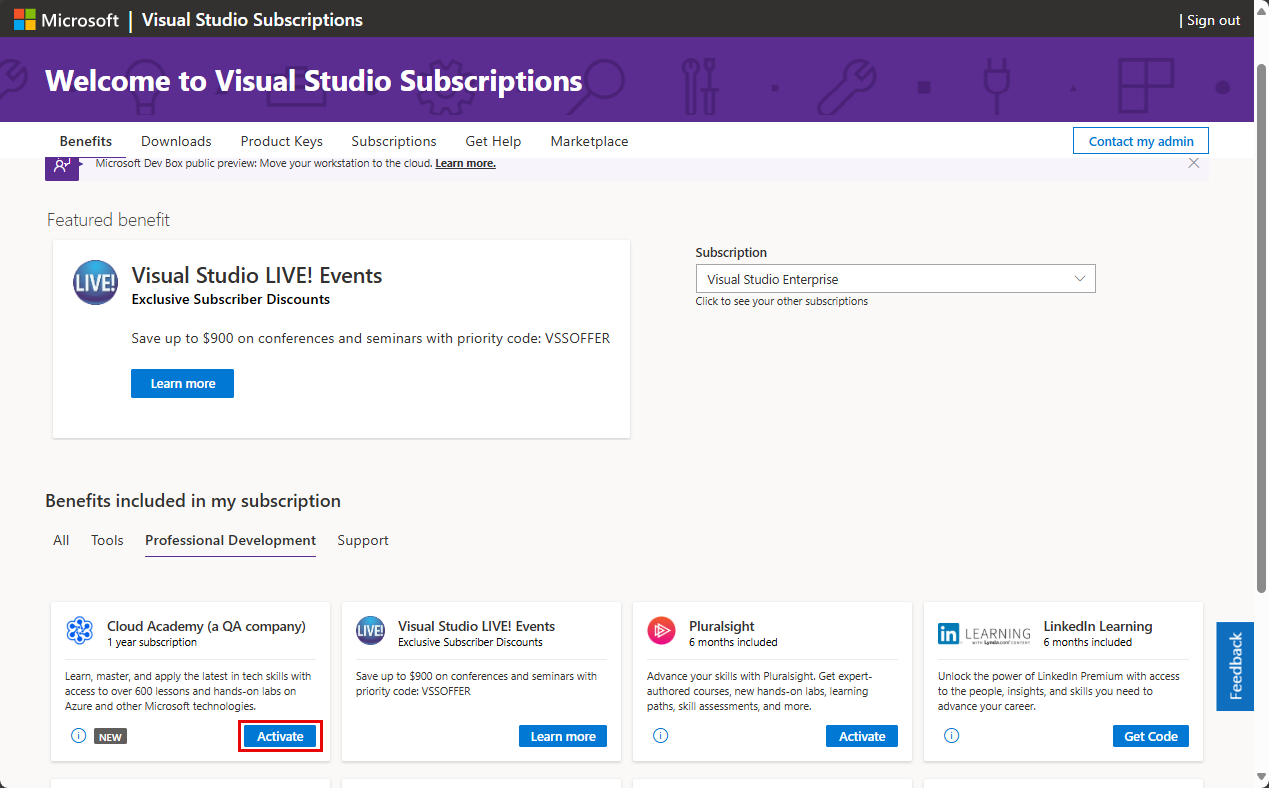
    If you're an eligible Visual Studio subscriber, your subscription includes access to valuable learning benefits through Cloud Academy. Visit the Visual Studio Subscriptions portal to access your benefits and activate Cloud Academy today.

Want to protect your organisation’s sensitive data with a secure password management solution built within your Azure environment? Explore Secret Vault and contact us today to get started!

Microsoft Introduces AI Routing and Failover for .NET

Microsoft has introduced new experimental routing and failover capabilities in Microsoft.Extensions.AI, giving .NET developers more flexibility when working with AI models and providers. The new primitives are designed to help applications manage key challenges such as cost, uptime, and latency by routing requests between AI services and providing failover options when issues occur.

Here’s what you need to know:

  • Route AI Requests Where They Make the Most Sense

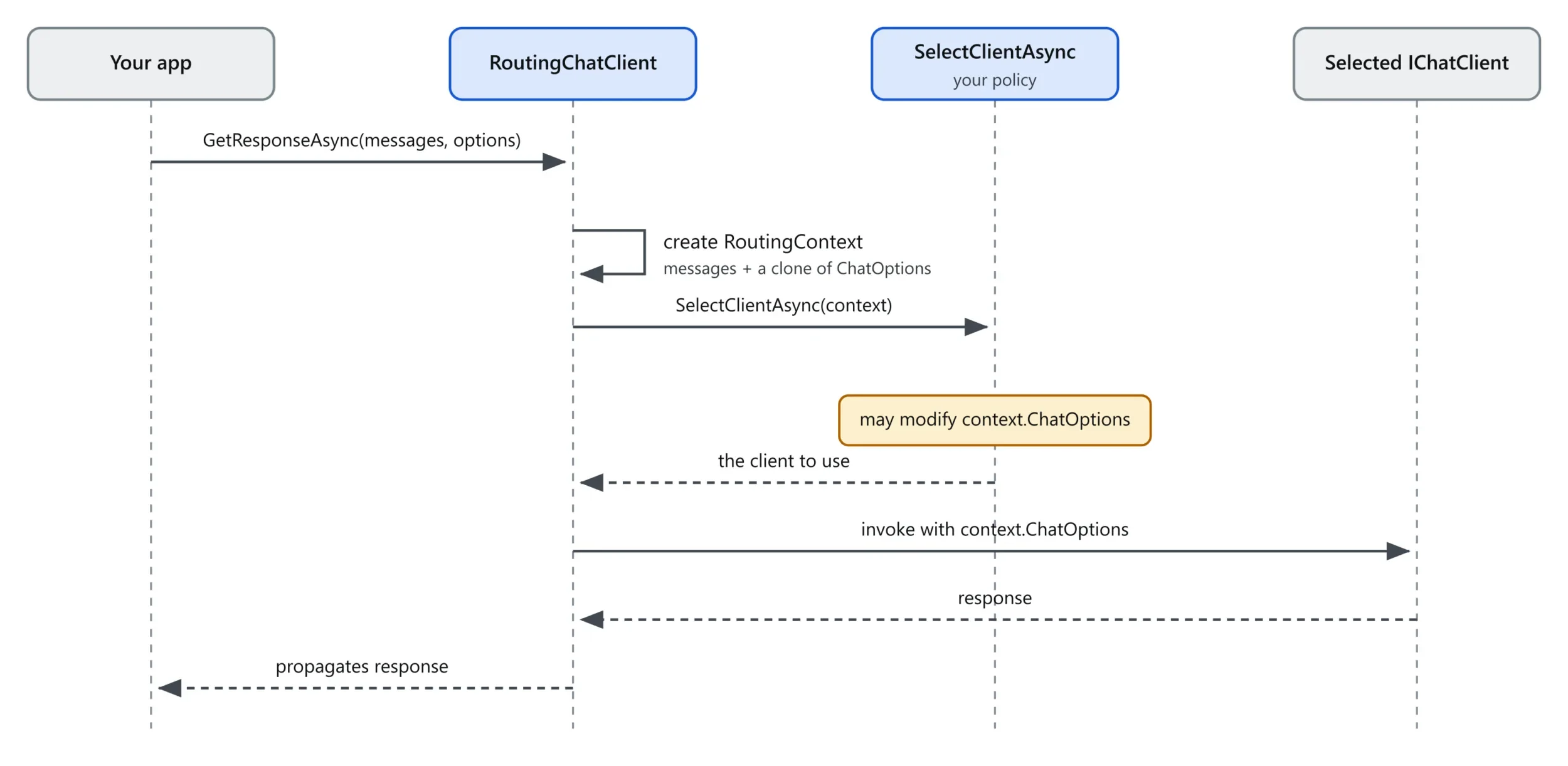
    RoutingChatClient lets your application choose an AI client for each request based on your own rules. For example, you could send simple requests to a lower-cost model while directing more complex tasks to a more capable one.

  • Route Based on What the User Is Asking

    SemanticRoutingChatClient takes routing a step further by looking at the meaning of a message, rather than relying only on predefined rules. It compares the request with example messages and sends it to the client with the strongest semantic match.

  • Keep AI Applications Running with Failover

    FailoverChatClient can retry a request with another AI client when the selected provider fails before any response is sent to the user. This can help applications remain available when a model or provider experiences an issue.

  • Use a Simple Backup Order

    OrderedFailoverChatClient provides a ready-to-use approach for failover by trying AI clients in a defined order. If the primary client fails, the request moves to the next available option.

  • Build Smarter Routing Strategies

    These capabilities can also support cost-aware, latency-aware, health-aware, capability-aware, and region-based routing. Developers can use performance data such as response time and time to first update to make better routing decisions over time.

  • Get Started

    The new routing and failover types are available in Microsoft.Extensions.AI version 10.9.0, although they are currently marked experimental. Developers can add the package with dotnet add package Microsoft.Extensions.AI.

Ready to take productivity to the next level? Explore Infinity AI Agents for Dynamics 365 and Power Apps, and contact us today!

Microsoft Announces PPCC 2026: A Bigger Power Platform Community Experience

The Power Platform Community Conference (PPCC) is returning for its fifth annual event, bringing solution makers from around the world together from October 27–29, 2026, in Las Vegas. This year’s conference will focus on the latest developments across Microsoft Power Platform, AI, agents, apps, automation, and data, while creating opportunities for attendees to learn directly from Microsoft experts and the community.

Here’s what you need to know:

  • Discover What’s Next for Power Platform

    PPCC 2026 will feature 200+ sessions, dozens of hands-on workshops, three days of keynotes, onsite AI and agent certification opportunities, and a global community focused on what’s next with AI. Dive into Copilot, Copilot Studio, Power Apps, Power Automate, Power BI, Power Pages, and Dataverse while learning how agents, apps, workflows, automation, and trusted data can come together as complete business solutions.

  • Hear from the Experts Shaping the Platform

    The conference opens with Charles Lamanna, Executive Vice President at Microsoft, sharing a forward-looking perspective on Copilot, agents, and the future of the platform. You’ll also hear from Microsoft product leaders such as Ryan Cunningham, Corporate Vice President of Copilot Studio & Power Platform, alongside engineers, product managers, enterprise practitioners, MVPs, and community experts.

  • Take AI from Ideas to Real-World Solutions

    Explore how solution development is evolving through sessions covering Copilot-first app design, multi-agent systems, AI evaluation and governance, intelligent automation, enterprise architecture, and adoption. PPCC will show how organisations can move beyond isolated AI experiments and build secure, scalable solutions that connect people, processes, applications, automation, and trusted data.

  • Build Skills Through Hands-On Learning

    Full-day workshops on October 25, October 26, and October 30 give attendees the opportunity to go deeper through guided, practical learning. You can add one, two, or three workshops to your conference pass and take advantage of onsite AI and agent certification opportunities designed to help you build practical skills and advance your career.

  • Connect, Collaborate, and Grow with the Community

    PPCC is more than a conference—it’s a place to meet people tackling similar challenges, learn from experienced practitioners, and discover ideas you can bring back to your organisation. Connect with experts in the Expo Hall, explore what makers are building in the Makers Market, meet community leaders in the Community Lounge, and continue conversations through meetups, networking activities, and the Night Market.

  • Experience the Conference Beyond the Sessions

    On Wednesday, October 28, 2026, attendees can turn up the energy at an exclusive celebration featuring a live performance by Pitbull. Don’t just watch the next era of AI-powered solution building take shape—come to PPCC and help shape it.

  • Mark Your Calendar for PPCC 2026

    The conference will be held on October 27-29, 2026 at the MGM Grand in Las Vegas.

Discover how we used Microsoft Power Platform to help the New Zealand Police Association (NZPA) deliver more services to its members. Read the case study and get in touch with our team to explore what’s possible for your organisation.

Build More Powerful Power Pages Experiences with Liquid Server Logic

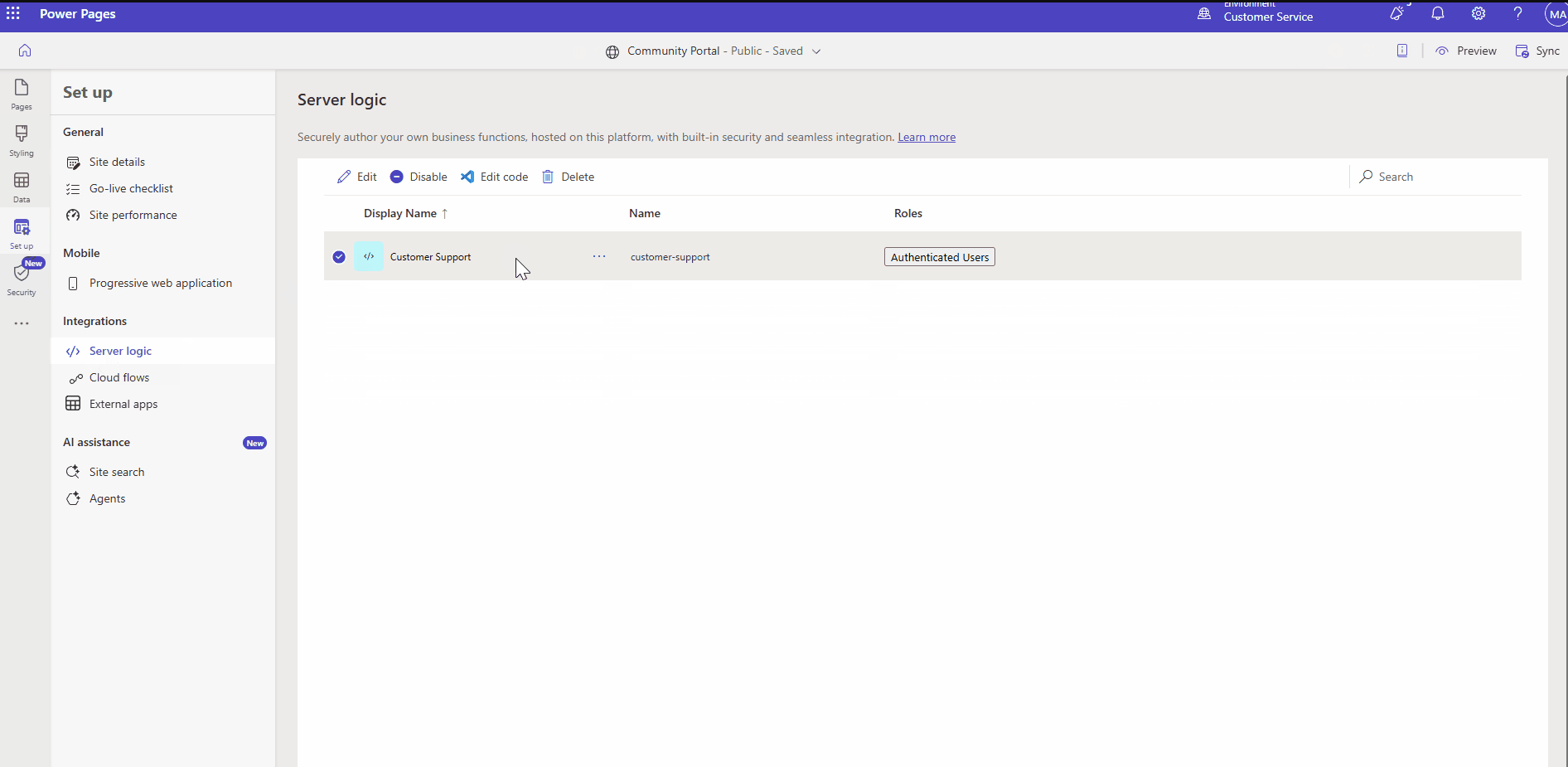
Microsoft is expanding the capabilities of Liquid in Power Pages with the introduction of server logic, giving developers more flexibility when building custom web experiences. The new capability allows developers to extend Liquid beyond the predefined platform-provided objects and bring additional server-side functionality into their Power Pages solutions.

Here's what you need to know:

  • Your Struggle

    Liquid provides powerful capabilities in Power Pages, but developers have often needed to adapt their requirements to available objects or move custom logic to other layers.

  • Bring Your Logic to Liquid

    With Server Logic, you can invoke your own server-backed capabilities directly from Liquid templates, extending what you can accomplish beyond built-in Liquid objects. Your logic runs securely on the server and can work with request and website context alongside Power Pages security capabilities.

  • Build More Dynamic Experiences

    Combine custom server logic with contextual information and Power Pages security to create more dynamic experiences while maintaining consistent access control. This gives developers greater flexibility without compromising how business logic is securely handled.

  • Get Started

    Ready to extend what you can do with Liquid in Power Pages? Explore the Server Logic overview, learn how to call Server Logic from Liquid templates, and discover how server objects and context work together to start building.

See how we used Power Pages to enhance Human Resources New Zealand’s membership management system. Read the case study to discover the solution, and contact us to explore how we can help with your organisation’s digital needs.

Visual Studio 2026 Makes Git Submodules a First-Class IDE Feature

Starting with Visual Studio 18.9, Git submodules are becoming a first-class part of the IDE, allowing developers to manage them without leaving Visual Studio. The update addresses a long-requested developer need by bringing submodule management directly into the Git experience, making it easier to work with shared libraries, SDKs, and other dependencies.

Here’s what you need to know:

  • Your Struggle, Solved

    Git submodules are incredibly useful for bringing shared libraries, SDKs, and build scripts into your projects. But managing them has often meant leaving your IDE and remembering the right Git commands just to get things working.

  • A First-Class Git Experience

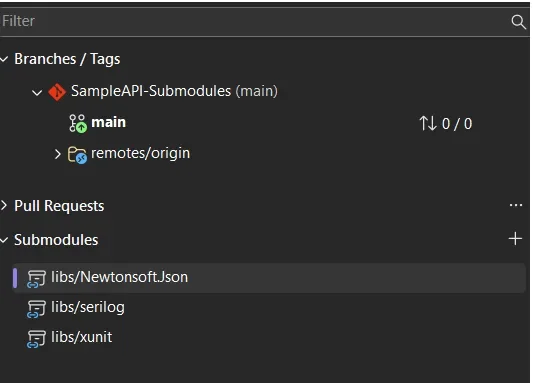
    Git submodules now have a dedicated Submodules section in the Git Repository window, making them much easier to discover and manage. They also appear properly in Git Changes, while branch and repository pickers understand the relationship between your parent repository and its submodules.

  • Manage Submodules Without the Terminal

    You can now add, update, and remove submodules directly from Visual Studio, without memorising Git commands or jumping between tools. Visual Studio can also automatically discover and activate submodules when you open a solution or folder, while keeping them out of the main local repositories list to reduce clutter.

  • Read-Only by Default

    Since submodules are often dependencies rather than code you actively modify, Visual Studio treats them as read-only by default to help prevent accidental changes. When you do need to work inside a submodule, simply enable Tools > Options > Source Control > Git > Automatically activate multiple repositories > Yes, include submodules.

Go beyond CRM with custom business applications designed to complement your existing system, streamline processes, and drive productivity. Contact us today to get started.

TMDL View on the Web: A New Way to Manage Power BI Semantic Models

Microsoft has introduced TMDL View on the Web, bringing a code-first approach to editing Power BI semantic models directly in the browser. The new capability allows developers to view and modify semantic model definitions using Tabular Model Definition Language (TMDL), without needing to switch to Power BI Desktop or download model files.

Here’s what you need to know:

  • Explore Your Semantic Model Metadata

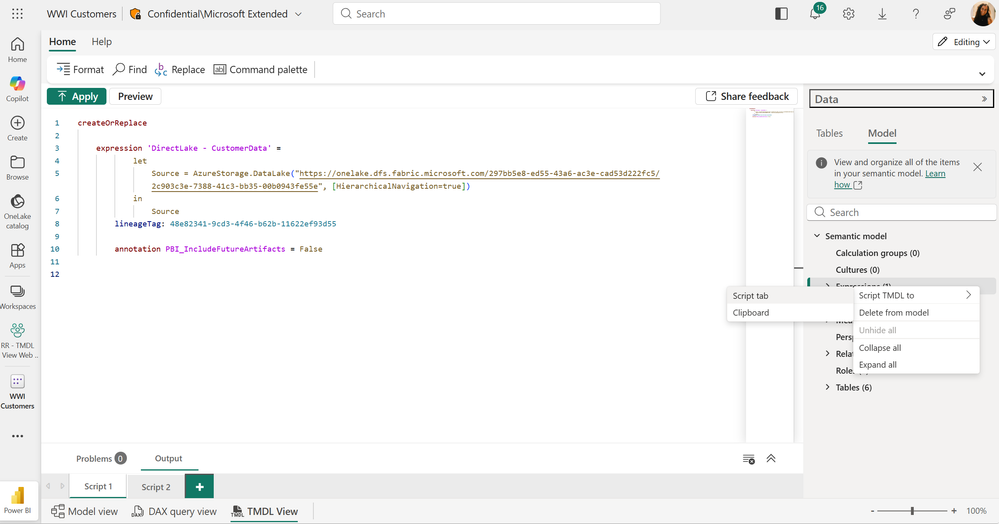
    Get greater visibility into the objects and properties within your published semantic models, including advanced settings that aren’t available in the standard modelling interface. Script individual objects directly in the browser to understand your model structure faster and work with greater transparency.

  • Accelerate Development with a Modern Code Editor

    Use built-in IntelliSense, multiline editing, search and replace, and other features to make bulk changes more efficiently. You can even use AI tools such as GitHub Copilot to help generate or modify TMDL scripts before previewing and applying them in Power BI.

  • Modify Semantic Model Properties Directly

    Edit objects and properties directly in your browser, including advanced configurations such as partition definitions and isAvailableInMdx. This gives developers greater control over semantic models without needing to download files or switch between tools.

  • Reuse and Share Model Components

    Share TMDL scripts to make semantic model objects easier to reuse across projects. For example, you can copy a Calendar table’s TMDL script from another model or a TMDL gallery, paste it into your target model, preview the changes, and apply them.

  • Recover Changes with Version History

    Make changes with greater confidence knowing that web-edited semantic models support version history. Save versions directly from TMDL View on the Web, review previous versions, and restore an earlier version when needed.

  • Get Started with TMDL View on the Web

    TMDL View on the Web brings a flexible, code-first approach to semantic modelling directly into the Power BI Service. Whether you’re making targeted metadata updates, reusing model components, or managing larger modelling changes, you can now work directly from your browser.

New to Power BI? Discover how Business Intelligence can transform your data into actionable insights and help you make smarter, data-driven decisions. Contact us today to get started!
New Power BI Date Picker Makes Dynamic Date Filtering Easier

Microsoft has introduced a new Date Picker slicer option in Power BI, currently available in preview, designed to make date filtering more flexible and reduce the need for ongoing report maintenance. The new experience allows report authors to set dynamic date ranges that automatically move forward as data refreshes, while giving report viewers the flexibility to explore their own date ranges.

Here’s what you need to know:

  • See Exactly What You’re Filtering

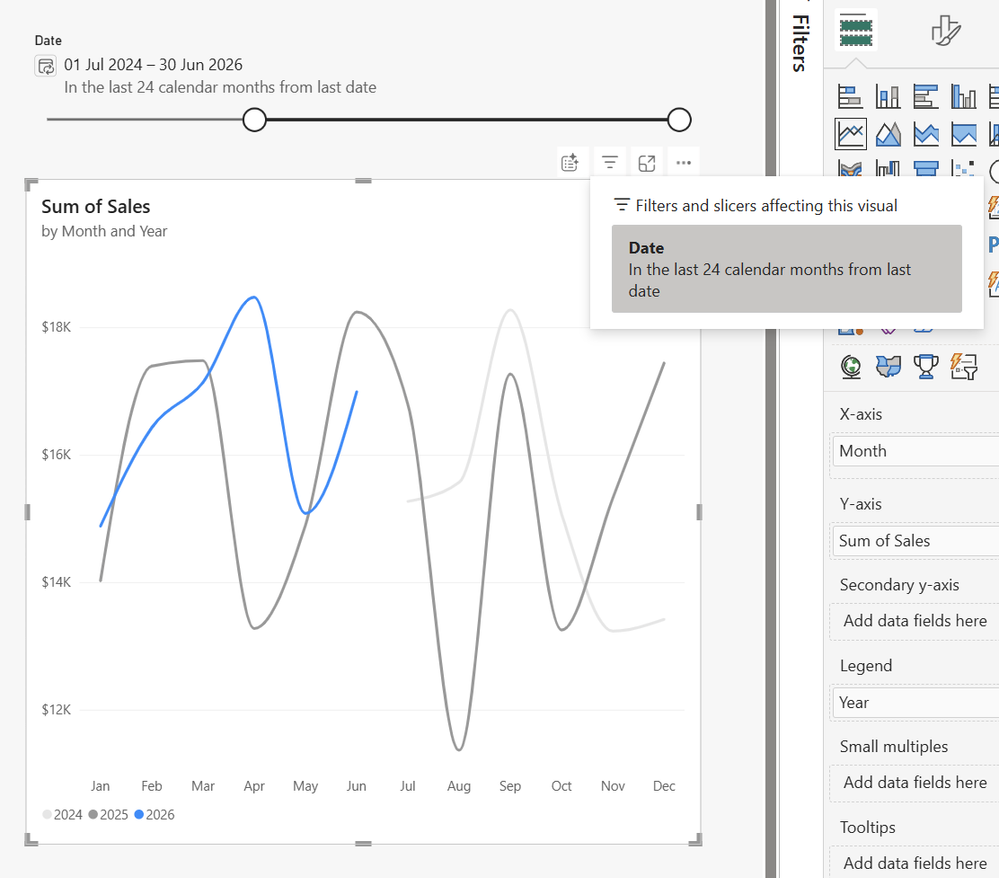
    The Date Picker gives you two summaries so you can quickly understand both the dates being displayed and the range you selected. You can also customise the slider, calendar button, summaries, and date formatting to match your report design.

  • Enable the Date Picker

    You can enable the Date Picker through Visual > Slicer settings > Options in the Format pane when a date column is added to the slicer. During preview, Date Picker slicers can be created in Power BI Desktop, while published reports can be viewed and edited in the Power BI service.

  • Use Case #1: Show the Last Full Month

    Avoid misleading dips caused by displaying a partially completed month by using a relative date range that automatically moves forward as new data arrives. For example, you can configure the slicer to show the last 24 complete calendar months for more meaningful year-over-year comparisons.

  • Use Case #2: Handle Dates Beyond Your Data

    What happens when your date table extends into the future but your actual data doesn't? By applying a filter to your measure or column so that blank values are excluded, the Date Picker can dynamically align the range with the latest date where actual data exists.

  • Use Case #3: Create a More Compact Slicer

    You can customise the Date Picker to take up just a single line, giving your report more room for the visuals that matter. Turn off the slicer header and slider, adjust the summary and date range formatting, and use a calendar button for a clean, compact experience.

Make smarter decisions with data you can trust. Discover the power of Business Intelligence for your organisation and contact us today to get started.

Strengthen Customer Communications with Governance in Dynamics 365 Customer Service

Microsoft has announced the general availability of Governance in Dynamics 365 Customer Service, introducing new capabilities to help organisations enforce business policies on outbound customer communications. The update enables businesses to strengthen compliance and reduce risk while maintaining consistent customer interactions.

Here's what you need to know:

  • Why use Governance Skill?

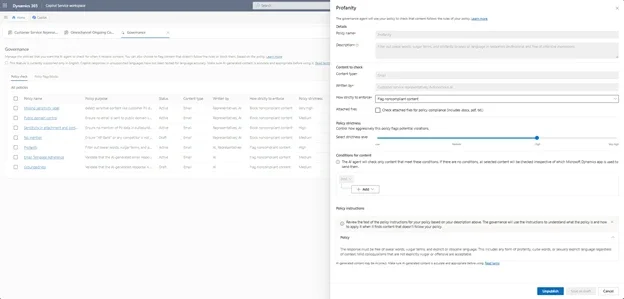
    Governance reviews outbound emails against your organisation's policies before they're sent to customers. It helps reduce compliance risks while maintaining consistent communication across both human and AI-generated responses.

  • What's New in General Availability?

    Governance now checks text-based attachments such as PDFs, Word documents, and text files for policy compliance before they leave your organisation. You can also configure policy strictness levels—from Low to Very High—to balance business risk, accuracy, and enforcement.

  • Why Your Organisation Should Care

    Catch compliance issues before emails are delivered and strengthen trust in every customer interaction. With proactive governance controls, organisations can confidently scale AI while maintaining quality and regulatory standards.

  • Configure Governance Your Way

    Administrators can quickly configure governance policies, choose whether to flag or block violations, and enable attachment scanning. Built-in simulation and reporting tools make it easy to test and refine policies before rolling them out across the business.

  • Built into Dynamics 365 Customer Service

    Governance works alongside the Quality Evaluation Skill within the Quality Management Agent to deliver a complete quality and compliance framework. Together, they help organisations improve policy adherence, communication quality, and customer confidence at scale.

Strengthen customer relationships with a powerful Customer Relationship Management (CRM) system. Contact us today to discover how Dynamics 365 can help your business.

Create Smarter Geographic Reports with Power BI Shape Map

Power BI's Shape Map visual is now generally available, giving users a supported way to visualise data across custom geographic boundaries. The update introduces more flexibility for mapping regions, territories, and other location-based data while making geographic reporting easier to customise.

Here's what you need to know:

  • What is Shape Map?

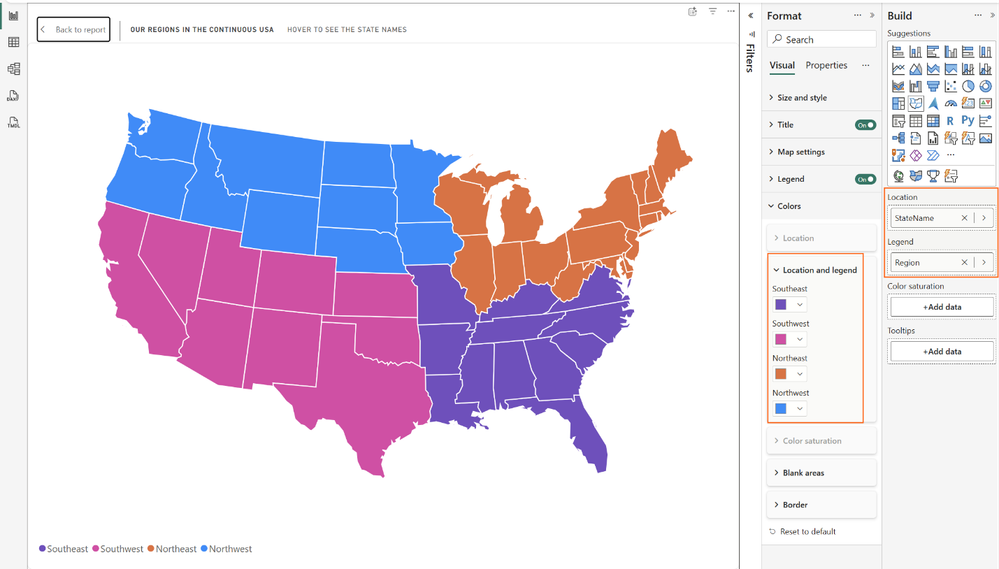
    Shape Map lets you display data using custom boundaries such as sales territories, franchise regions, or service areas instead of relying on standard maps. It helps you compare performance in the way your business is organised.

  • How do you add maps?

    Choose from built-in maps, upload your own TopoJSON or GeoJSON files, or reference map files hosted online. This gives you the flexibility to use standard regions or create maps tailored to your organisation.

  • How do you format map colours?

    Apply gradients, rules, field values, or category colours depending on how your Shape Map is configured. Power BI automatically shows only the formatting options relevant to your visual, making customisation much easier.

  • Use Case #1: Regional Performance

    Group locations into business regions and assign consistent colours to each territory. This makes it easy to compare performance across sales, service, or operational regions at a glance.

  • Use Case #2: Store Coverage

    Use colour saturation to highlight where your stores are located and how densely they are distributed. Darker regions can represent higher store counts, helping identify both strong coverage and expansion opportunities.

Take your reporting further with Power BI and our Business Intelligence expertise. Contact us today to learn how we can help your organisation get more from its data.

Power BI Tips: Enhance Line Charts with Conditional Formatting

Microsoft has released a new deep dive into Power BI's conditional formatting for lines and legends, helping report authors create more dynamic and visually meaningful charts. The guide explores practical techniques for using gradients, rules, and field-driven colours to make reports easier to interpret and maintain.

Here's what you need to know:

  • What is Conditional Formatting?

    Conditional formatting lets you dynamically control colours and other visual properties using rules, gradients, or field values. It also supports visual calculations, making it easier to create flexible, data-driven reports without constant manual updates.

  • Where Can You Use It?

    Conditional formatting now supports lines, legends, markers, and line segments across more chart types, including line, area, bar, column, combo, pie, donut, and funnel charts. This gives you greater control over how important insights are highlighted while keeping report designs consistent.

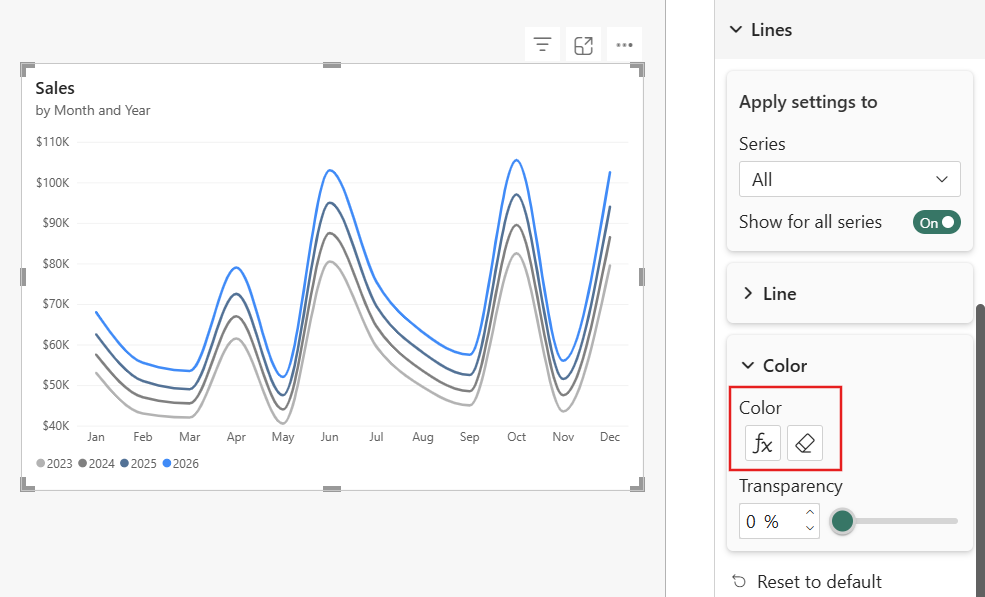
  • Use Case #1: Highlight the Latest Year

    Use gradient colours to automatically emphasise the most recent year's performance while fading historical data into the background. The formatting updates automatically as new data is added, so your reports always highlight the latest results.

  • Use Case #2: Keep Legend Colours Consistent

    Apply colours from a model field so every visual uses the same category colours throughout the report. This improves readability, reduces maintenance, and ensures new categories automatically inherit the correct colours.

  • Use Case #3: Pair Colours with Field Parameters

    Assign colours to field parameters so each selected measure keeps its own visual identity across every report. As users switch metrics, the colours update automatically, making comparisons easier to follow.

Discover how Sport Wellington gained valuable insights into participant performance with intuitive Power BI visualisations. Read the case study and contact us to discuss your business intelligence needs.