
Starting with Visual Studio 18.9, Git submodules are becoming a first-class part of the IDE, allowing developers to manage them without leaving Visual Studio. The update addresses a long-requested developer need by bringing submodule management directly into the Git experience, making it easier to work with shared libraries, SDKs, and other dependencies.
Here’s what you need to know:
Your Struggle, Solved
Git submodules are incredibly useful for bringing shared libraries, SDKs, and build scripts into your projects. But managing them has often meant leaving your IDE and remembering the right Git commands just to get things working.
A First-Class Git Experience
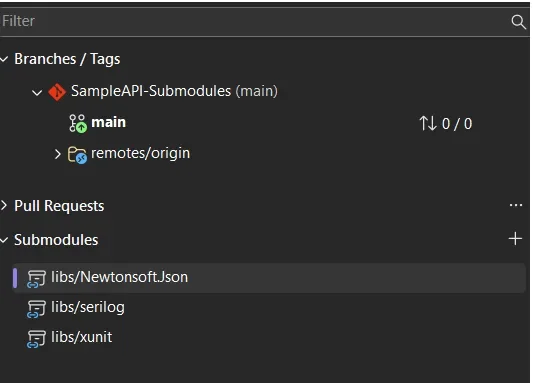
Git submodules now have a dedicated Submodules section in the Git Repository window, making them much easier to discover and manage. They also appear properly in Git Changes, while branch and repository pickers understand the relationship between your parent repository and its submodules.
Manage Submodules Without the Terminal
You can now add, update, and remove submodules directly from Visual Studio, without memorising Git commands or jumping between tools. Visual Studio can also automatically discover and activate submodules when you open a solution or folder, while keeping them out of the main local repositories list to reduce clutter.
Read-Only by Default
Since submodules are often dependencies rather than code you actively modify, Visual Studio treats them as read-only by default to help prevent accidental changes. When you do need to work inside a submodule, simply enable Tools > Options > Source Control > Git > Automatically activate multiple repositories > Yes, include submodules.
Go beyond CRM with custom business applications designed to complement your existing system, streamline processes, and drive productivity. Contact us today to get started.