
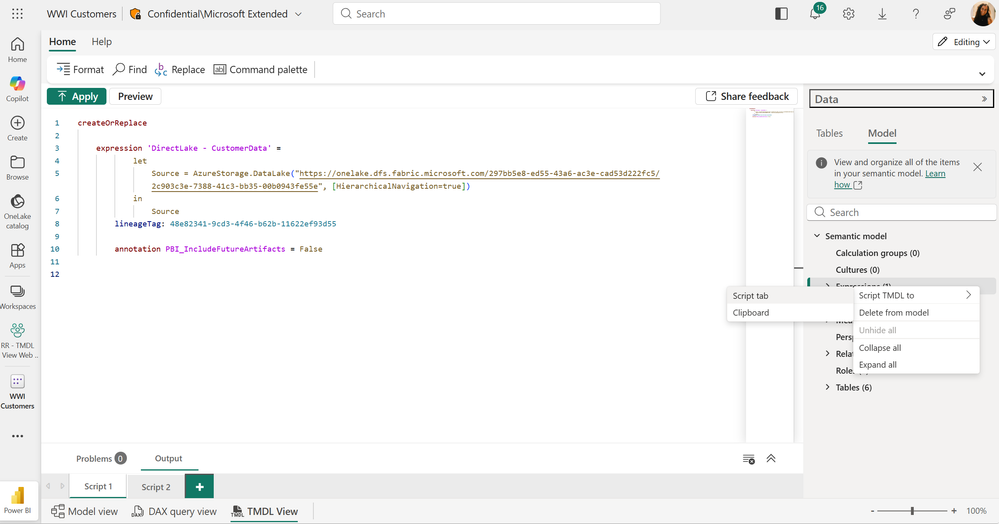
Microsoft has introduced TMDL View on the Web, bringing a code-first approach to editing Power BI semantic models directly in the browser. The new capability allows developers to view and modify semantic model definitions using Tabular Model Definition Language (TMDL), without needing to switch to Power BI Desktop or download model files.
Here’s what you need to know:
Explore Your Semantic Model Metadata
Get greater visibility into the objects and properties within your published semantic models, including advanced settings that aren’t available in the standard modelling interface. Script individual objects directly in the browser to understand your model structure faster and work with greater transparency.
Accelerate Development with a Modern Code Editor
Use built-in IntelliSense, multiline editing, search and replace, and other features to make bulk changes more efficiently. You can even use AI tools such as GitHub Copilot to help generate or modify TMDL scripts before previewing and applying them in Power BI.
Modify Semantic Model Properties Directly
Edit objects and properties directly in your browser, including advanced configurations such as partition definitions and isAvailableInMdx. This gives developers greater control over semantic models without needing to download files or switch between tools.
Reuse and Share Model Components
Share TMDL scripts to make semantic model objects easier to reuse across projects. For example, you can copy a Calendar table’s TMDL script from another model or a TMDL gallery, paste it into your target model, preview the changes, and apply them.
Recover Changes with Version History
Make changes with greater confidence knowing that web-edited semantic models support version history. Save versions directly from TMDL View on the Web, review previous versions, and restore an earlier version when needed.
Get Started with TMDL View on the Web
TMDL View on the Web brings a flexible, code-first approach to semantic modelling directly into the Power BI Service. Whether you’re making targeted metadata updates, reusing model components, or managing larger modelling changes, you can now work directly from your browser.
New to Power BI? Discover how Business Intelligence can transform your data into actionable insights and help you make smarter, data-driven decisions. Contact us today to get started!