Microsoft is making it easier for organizations to connect Power BI to Oracle data sources with new preview capabilities designed to simplify setup and administration. The update introduces a bundled Oracle Managed ODP.NET provider in Power BI Desktop and enables direct cloud connections from the Power BI service to supported Oracle databases, reducing reliance on traditional configuration steps. Together, these enhancements aim to streamline Oracle connectivity and accelerate access to business data.
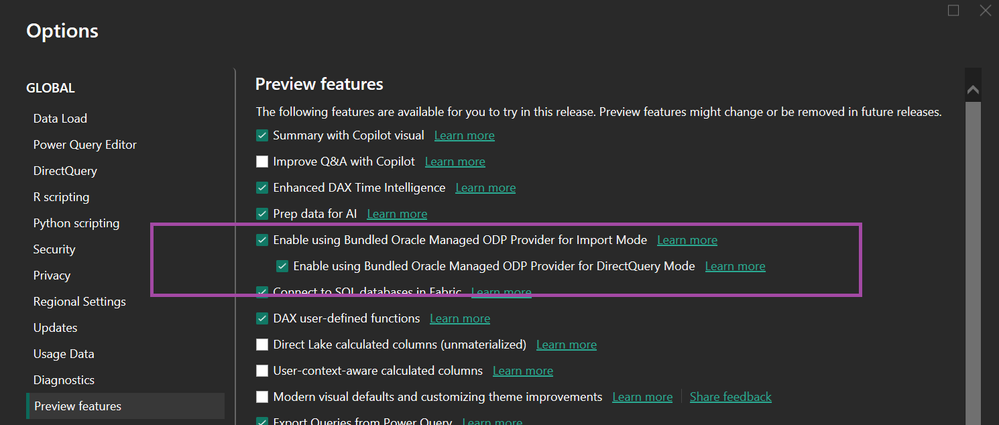
Here's what you need to know:
Simplified Oracle connections in Power BI Desktop
Enable the new Oracle preview features under File > Options and settings > Options > Preview features, restart Power BI Desktop, and connect using the existing Oracle database connector.
Direct cloud connectivity in Power BI Service
You can now connect to Oracle cloud databases directly from the Power BI service by creating a cloud connection in Manage connections and gateways, eliminating the need for a data gateway in supported scenarios.
Changes for personal gateways
The updated Oracle connector no longer supports personal gateways. Organisations using Oracle data sources should plan a transition to an enterprise on-premises data gateway or VNET gateway to maintain support and future compatibility.
Gateway configuration updates
Administrators can enable the bundled Oracle Managed ODP.NET provider on enterprise gateways through a simple configuration change, helping standardise Oracle connectivity across environments.
Single Sign-On support
Microsoft Entra ID Single Sign-On is available for supported Oracle databases when using an enterprise gateway, making authentication more secure and seamless for users.
Ready to make smarter, data-driven decisions? Discover our Business Intelligence solutions and contact us today to see what's possible with Power BI.