
Microsoft has announced Email Classification for Dynamics 365 Customer Service, a new capability designed to automatically categorise incoming emails and improve case quality from the moment customer requests enter the system. By reducing the need for manual triage, the feature helps service representatives focus more on resolving issues and less on administrative tasks. The update aims to streamline case management workflows while improving consistency and accuracy across customer service operations.
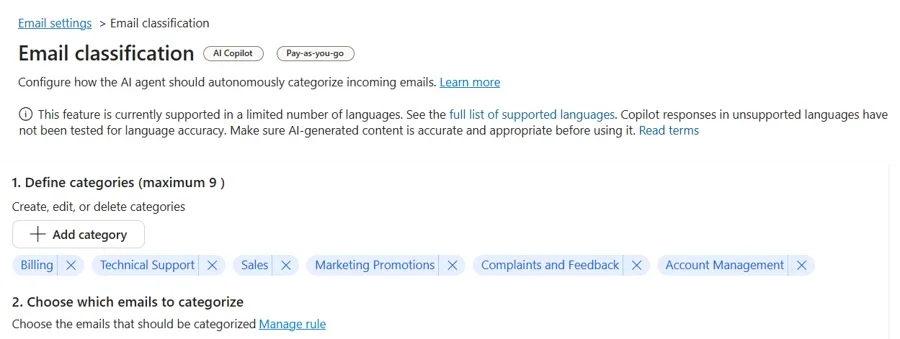
Here's what you need to know:
How it works
Email Classification automatically categorises incoming emails based on rules and categories you define, such as Billing, Technical Support, or Marketing. You can control which categories create cases, helping reduce unnecessary records and avoid unwanted SLA commitments.
How to enhance it
Email Classification becomes even more powerful when combined with Automatic Record Creation (ARC) rules. Use email categories as conditions to ensure cases are created only for emails that require action, while everything else is filtered before reaching your queues.
How to set it up
Configure Email Classification in the Customer Service admin center by defining categories, setting scope conditions, and enabling the feature. Before going live, use Simulation Mode to test classification accuracy against historical emails and fine-tune your setup for better results.
Need a smarter way to manage customer interactions? Discover how a Customer Relationship Management (CRM) system can help streamline engagement, improve service, and strengthen customer relationships. Contact us today to get started.