
Microsoft has introduced a new pull request review experience in Visual Studio, allowing developers to review, comment on, approve, and merge pull requests without leaving the IDE. The update supports both GitHub and Azure DevOps repositories, helping teams streamline code reviews and reduce context switching. Available in Visual Studio 18.7, the feature marks a significant step forward in Microsoft's ongoing efforts to improve developer productivity and collaboration.
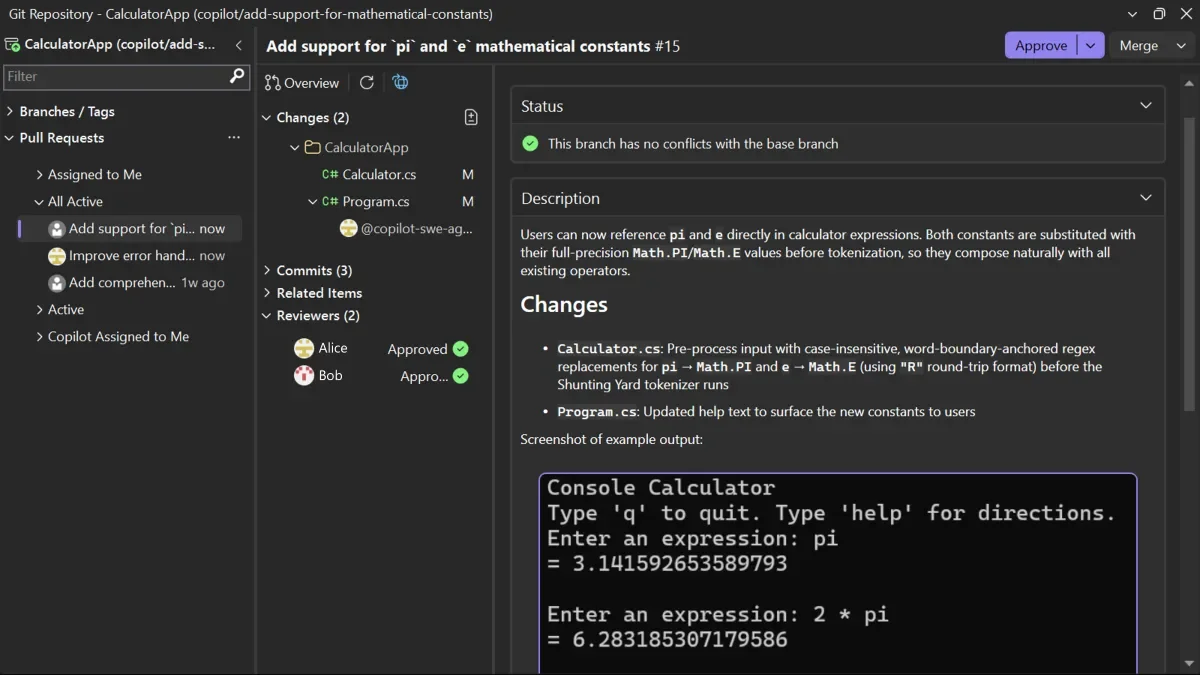
Here's what you need to know:
Find and open pull requests faster
Access pull requests from the Git Repository window, Git Changes window, or Git menu. If your current branch already has an active PR, you can open it directly and view the overview, changes, commits, and reviewers all in one place.
Review code your way
Inspect pull requests without checking out the branch to preserve your current work, or check out the branch for a deeper review using Visual Studio’s navigation, build, and debugging tools. You can also switch between active pull requests with ease.
Browse changes efficiently
View code differences inline or side-by-side, use the multi-file summary view for a high-level overview, and review changes commit by commit to better understand how the code evolved.
Collaborate without context switching
Leave comments, reply to discussions, and resolve conversations directly within Visual Studio. Everything stays synced with GitHub and Azure DevOps. Plus, Copilot can help generate fixes based on review comments, helping you move from feedback to implementation faster.
Approve and merge in one place
Review status checks, approvals, and merge conflicts, then approve, complete, merge, convert to draft, or close pull requests—all from within the IDE.
Available now in Visual Studio 18.7
This release marks a significant step forward in streamlining code reviews and reducing context switching for developers. Microsoft is also working on additional enhancements, including comment filtering, PR activity timelines, and an improved checkout experience.
Give your team the flexibility to work smarter, wherever they are. Explore custom business applications and see how we can help transform your operations.