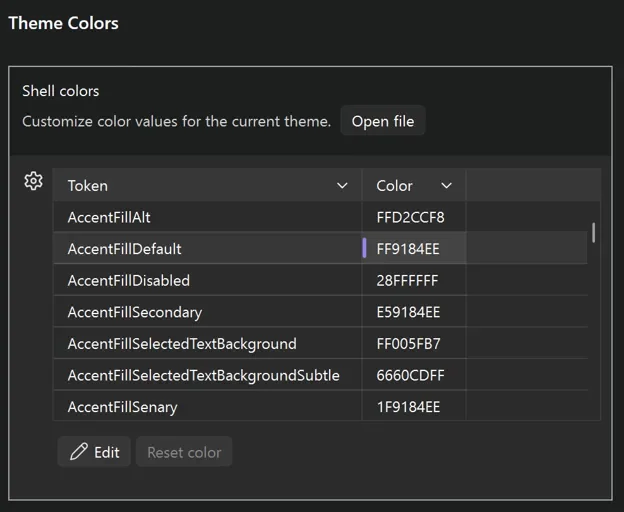
Microsoft is expanding Visual Studio's customisation capabilities with a new Theme Colors options page that enables live editing of Fluent color tokens. The feature gives developers a more flexible way to tailor the IDE's appearance, helping create a workspace that better matches individual preferences and workflows.
Here's what you need to know:
Where to find it
Navigate to Tools > Options > Environment > Visual Experience > Theme Colors. You'll see all Fluent color tokens for your active theme in a searchable grid. Simply select a token, choose a new colour, and see the change applied instantly.
Customisations stay with each theme
Your changes are saved per theme rather than globally. Create a unique version of Dark Mode, customise Light Mode differently, or experiment with tinted themes. Switching themes automatically brings your customisations with it. Made a change you don't like? Individual color tokens can be reset without affecting the rest of your setup.
More granular control with new tokens
Microsoft has also added new color tokens that provide greater control over Visual Studio's appearance. One standout improvement is the ability to customise tab and window headers independently from the rest of the interface, opening the door to more personalised and even retro-inspired designs.
Share your custom themes
Customisations are stored as JSON files, making them easy to share with teammates or the wider community. Simply place the file in the appropriate Visual Studio ColorThemes folder, restart Visual Studio, and your customisations will be applied.
Why this matters
Until now, changing a Visual Studio theme often meant installing an extension or replacing an entire theme just to tweak a few colours. With the new Theme Colors page, developers can make quick, targeted adjustments in seconds, creating a workspace that's more comfortable and productive without the extra overhead.
Take your Dynamics 365 document generation to the next level with customisable PDF exports. Learn more about Infinity Buttons: Record to PDF and contact us today.