Dynamics 365 Contact Center Introduces Real-Time Post-Call Automation with Caller Hang-Up Events

Dynamics 365 Contact Center is introducing a new capability that triggers post-call actions instantly when a caller disconnects, enabling more reliable and automated workflows. The feature leverages caller hang-up events within Copilot Studio to ensure critical tasks like data updates and follow-ups happen in real time. This update aims to eliminate delays and inconsistencies in post-call processes while improving operational efficiency and data accuracy.
Here’s what you need to know:

  • Why it matters

    Manual post-call tasks often lead to missed actions, outdated data, and gaps in reporting. Automating what happens after the call ensures nothing slips through the cracks.

  • What’s new

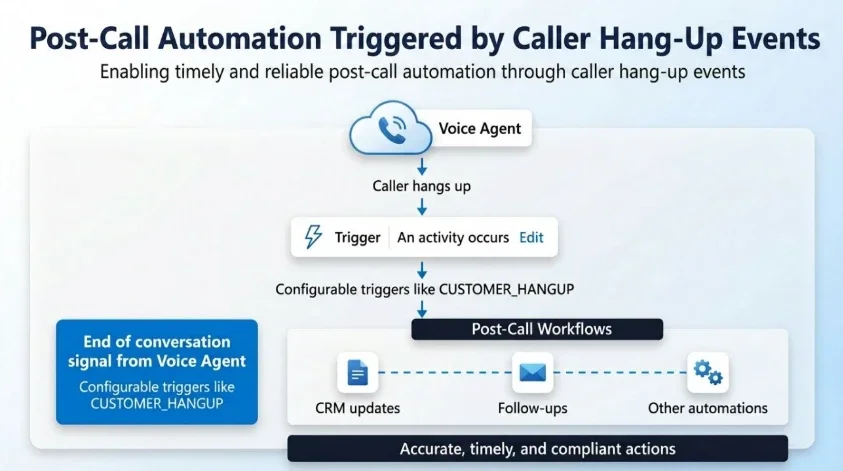
    Voice agents can now detect end-of-conversation events and instantly trigger actions based on how a call ends—directly within Copilot Studio flows. This is powered by activity-based triggers, giving makers full control over post-call automation.

  • How it works

    At the end of each call, the system generates a structured event (including activity type and context). Makers can define triggers based on these events—such as call outcome or reason—and automatically execute the appropriate workflows. The result? A reliable, event-driven approach to post-call automation.

  • Key benefits

    Trigger post-call workflows instantly upon hang-up, improving data accuracy while enabling stronger governance, compliance, and actionable insights.

  • Real-world scenarios

    Automate record updates and follow-ups, detect and recover from drop-offs, and gain deeper operational insights to optimise customer interactions.

Build stronger customer relationships with a reliable system that captures every interaction. Discover Customer Relationship Management solutions—contact us today!
Visual Studio Introduces AI-Powered Debugger Agent to Eliminate Guesswork

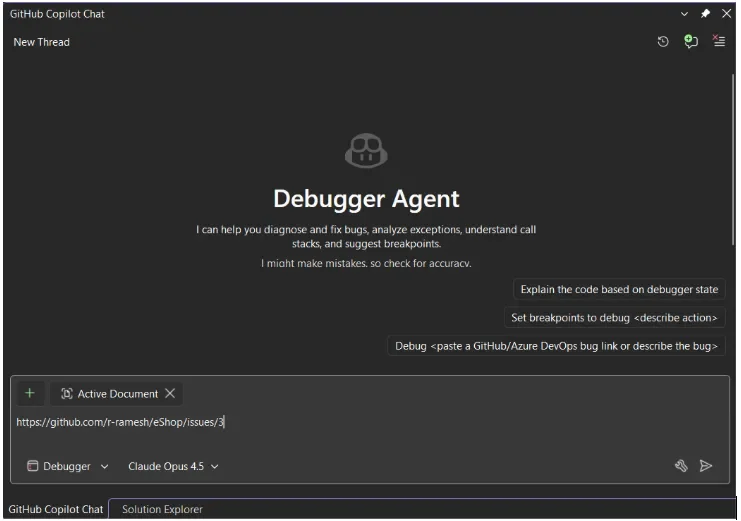
Microsoft has announced a new Debugger Agent workflow in Visual Studio, designed to streamline how developers identify and fix bugs. The upgrade transforms traditional debugging into a guided, interactive process that works directly with live runtime data to reduce uncertainty and speed up issue resolution. By acting as an intelligent partner rather than a passive tool, the Debugger Agent aims to eliminate the trial-and-error approach developers often face.

Here’s how it changes the game:

  • No more guesswork — just guided debugging
    Point the Agent to your issue (via a repo link or a simple prompt like “the app crashes when saving a file”), and it begins analyzing your application in context.

  • Phase 1: Hypothesis & Preparation
    The Agent evaluates the issue, proposes a likely root cause, and sets intelligent breakpoints—preparing your app for investigation before you even hit run.

  • Phase 2: Active Reproduction
    As you reproduce the bug, the Agent stays with you—observing runtime behavior and tracking what’s happening behind the scenes in real time.

  • Phase 3: Real-time Validation
    When breakpoints are triggered, it inspects variables and call stacks to validate its hypothesis or rule out possibilities—helping you converge on the real issue faster.

  • Phase 4: The Fix
    Once the root cause is identified, the Agent suggests a solution—and with your approval, can apply the fix and validate it immediately.

Boost productivity across Dynamics 365 and Power Apps with AI that works the way you do. Discover Infinity AI Agents and get in touch today.

From Experimentation to Impact: The New Rules of AI Scale

Many organizations are eager to scale AI, but success depends on more than just advanced models—it requires the right balance between ambition and control. Microsoft highlights that AI initiatives often stall not due to technology limitations, but because of missing constraints, unclear goals, and lack of thoughtful design from the start. Leading organizations are now shifting toward human-led AI, strong governance, and built-in transparency to ensure AI can scale responsibly while delivering real business value.

Here’s how to scale AI successfully:

  • Keep humans at the center

    AI should support—not replace—human decision-making. Keep people in the loop with audit trails, activity logs, and transparent agent behavior to build trust and continuously improve outcomes.

  • Structure your AI landscape

    Not all AI agents are the same. Distinguish between personal productivity, team-level, and enterprise-wide agents—each requires different levels of governance, oversight, and control.

  • Make governance work for you

    High-performing organisations don’t slow down innovation—they structure it. Clear, governed pathways allow teams to experiment and deploy AI safely, keeping data protected and policies enforced.

  • Act with urgency, scale with purpose

    The question is no longer why AI matters—but how fast you can implement it responsibly. Success comes down to execution: choosing the right use cases, embedding governance early, and scaling with confidence while keeping humans firmly in control.

Want AI you can confidently govern and scale across Dynamics 365 and Power Apps? Discover Infinity AI Agents and get in touch today.

New AI Agent Brings Customer Service Capabilities Into Microsoft 365 Copilot

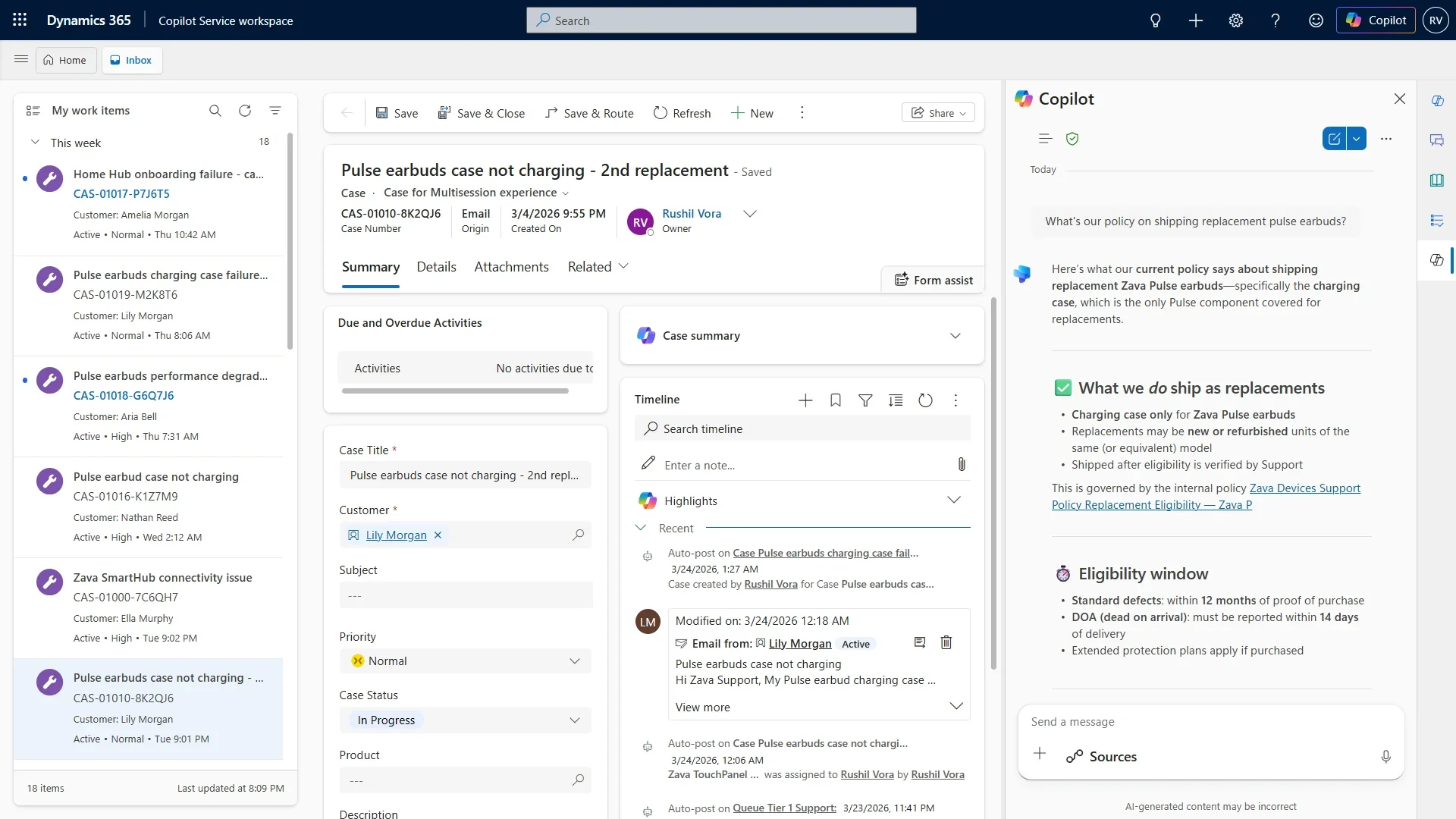
Microsoft has introduced a new Service Agent within Microsoft 365 Copilot, designed to bring customer service capabilities directly into the Copilot experience. The announcement highlights a broader shift toward role-based AI agents that can reason, retrieve data, and assist with complex workflows inside everyday tools. This move reflects Microsoft’s continued push toward agent-driven productivity, where AI evolves from simple assistance to more autonomous, task-oriented support.

Here’s what you need to know:

  • What is Service Agent?

    Service Agent brings together the familiarity of Copilot, the depth of Dynamics 365 Customer Service data, and AI-powered agents that can reason, retrieve, and take action. Service professionals can manage cases, access knowledge, and trigger workflows using natural language—without leaving Copilot.

  • Why this matters for IT and service leaders

    No more switching between tools. Teams get a unified Copilot experience across apps, faster resolution with richer context, and the ability to take action—not just get answers.

  • What can Service Agent do (Public Preview)?

    In its initial release, Service Agent helps teams understand and summarize cases, prioritize workloads, retrieve knowledge, and take action by updating data or triggering workflows. It also enables seamless cross-app continuity with shared context and memory.

Unlock the full potential of AI agents tailored to your business needs in Dynamics 365 and Power Apps. Discover Infinity AI Agents and get in touch with us today to start building smarter, more efficient workflows.

Monitor Alerts Now Live: A New Standard for Power Platform Monitoring

Microsoft has announced the general availability of Power Platform Monitor Alerts, bringing proactive monitoring capabilities for apps, flows, and agents. The feature enables administrators to detect performance and availability issues early through threshold-based notifications, reducing reliance on user-reported problems. With added improvements like predefined alerts and an alerts-centric dashboard, the update aims to strengthen reliability and simplify monitoring across environments.

Here’s what you need to know:

  • What Are Monitor Alerts?

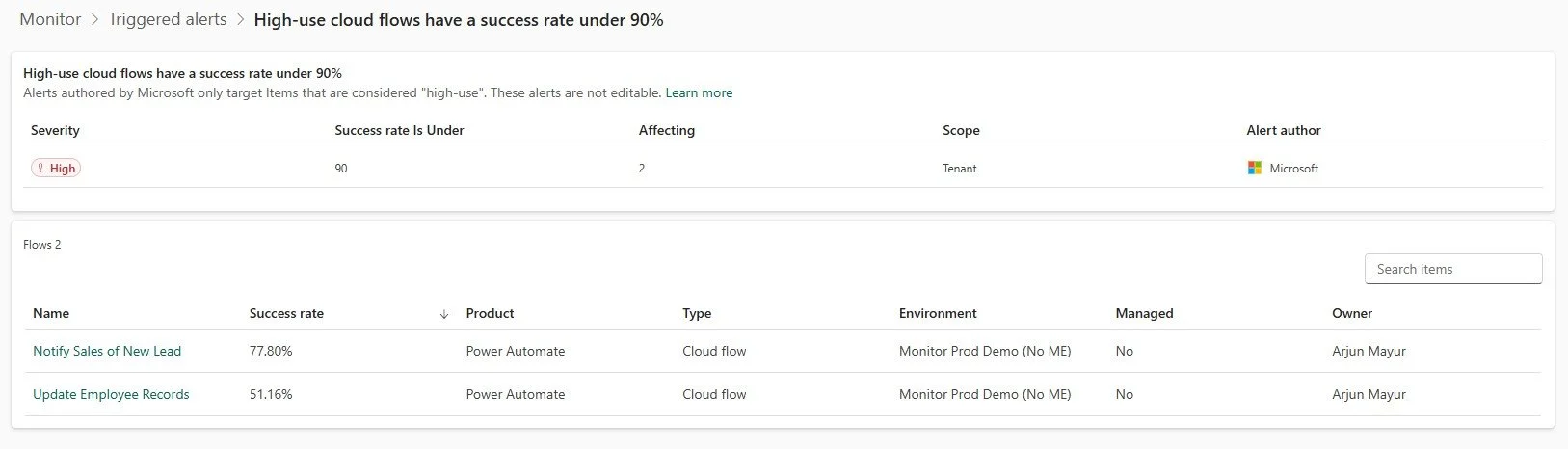
    Monitor Alerts let admins track the health of Power Platform resources and get notified when metrics fall below defined thresholds. Instead of reacting to user complaints, you can resolve issues early—reducing downtime and improving reliability.

  • Default Configuration

    Microsoft now provides built-in alerts enabled by default for every tenant. These automatically flag high-use apps, flows, and agents when their health drops—no setup required.

  • Redesigned Monitor Overview Page

    The new alerts-centric experience gives you an instant view of active issues and resource health across environments, so you can quickly spot and act on what matters most.

  • Code App Alerts

    You can now create custom alerts for code apps—not just canvas and model-driven apps. This means deeper visibility and faster response to performance issues.

  • Work Queue Alerts (Public Preview)

    Monitor now supports alerts for Power Automate work queues, helping you proactively manage queue health alongside apps, flows, and agents.

Looking to build a smarter case management system for your organisation? Discover how Power Platform made it possible in our Independent Police Association case study—then get in touch to see how we can do the same for you.

Microsoft Introduces a Practical Framework for Governing AI at Scale

Microsoft has unveiled a new framework for building trustworthy AI, focusing on adaptive governance that keeps pace with rapidly evolving AI agents. The approach shifts away from rigid, one-size-fits-all controls toward risk-based oversight embedded directly within platforms. It highlights how organizations can enable faster innovation while maintaining security, visibility, and control over AI systems.

Here’s what you need to know:

  • Rethinking Governance for AI-Driven Work

    Most challenges today aren’t about unsafe AI—but outdated governance models. Organizations need frameworks that reflect how AI agents actually operate across systems and workflows.

  • Adopt a Risk-Based Approach

    Not all AI use cases carry the same level of risk. Classifying scenarios into low, medium, and high risk enables faster innovation while protecting critical business processes.

  • Enable Speed Without Sacrificing Control

    Low-risk scenarios should empower teams to build freely, while higher-risk use cases require structured oversight. This balance prevents both over-restriction and under-protection.

  • Make Governance a Built-In Platform Capability

    Governance shouldn’t rely on manual processes or policies alone. Embedding controls directly into the platform ensures consistent enforcement at scale.

  • Shift from Static Policies to Adaptive Governance

    AI evolves quickly—and governance must too. Adaptive models allow organizations to continuously align controls with changing risks, use cases, and business needs.

Experience the power of AI when you use it for your work in Dynamics 365 and Power Apps. Explore Infinity AI Agents and contact us today!

Customize Your Workspace with New Floating Window Settings in Visual Studio

Visual Studio is introducing new controls that give developers greater flexibility over how floating windows behave within the IDE. The update enables better integration with tools like PowerToys FancyZones, improving window snapping and layout management. With a simple setting change, users can reduce friction and create a more customizable, multi-window workflow.

Here’s how to take full advantage of it:

  • Set it up in seconds

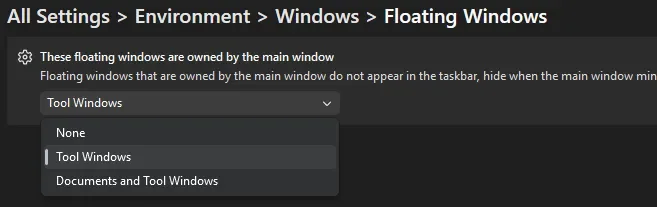
    Go to Tools > Options > Environment > Windows > Floating windows and choose how floating windows behave. This lets you quickly tailor window control to your workflow.

  • What each option actually does

    Each option controls how independent your floating windows are. None gives full independence with separate taskbar entries, Tool Windows keeps tool panels attached while documents float freely, and Documents and Tool Windows keeps everything tied to the main IDE. Choosing the right setup depends on how much flexibility you want across your workspace.

  • Take it even further

    Combine this with Microsoft PowerToys and its FancyZones feature. It lets you create custom layouts so your windows snap exactly where you need them.

Boost productivity by combining your Dynamics 365 CRM with tailored business applications built for your workflows. Get in touch today to see what’s possible.

Power Apps Now Lives Inside Microsoft 365 Copilot Conversations

Microsoft has introduced a new public preview that brings Power Apps directly into Microsoft 365 Copilot, making business applications part of everyday conversations. Users can now interact with app data, view records, and take actions without leaving their workflow across tools like Word, Excel, and PowerPoint. This update marks a shift toward more conversational, AI-driven experiences, enabling organizations to surface and act on business data seamlessly within the flow of work.

Here are its capabilities:

  • Explore data with grids—without leaving the conversation

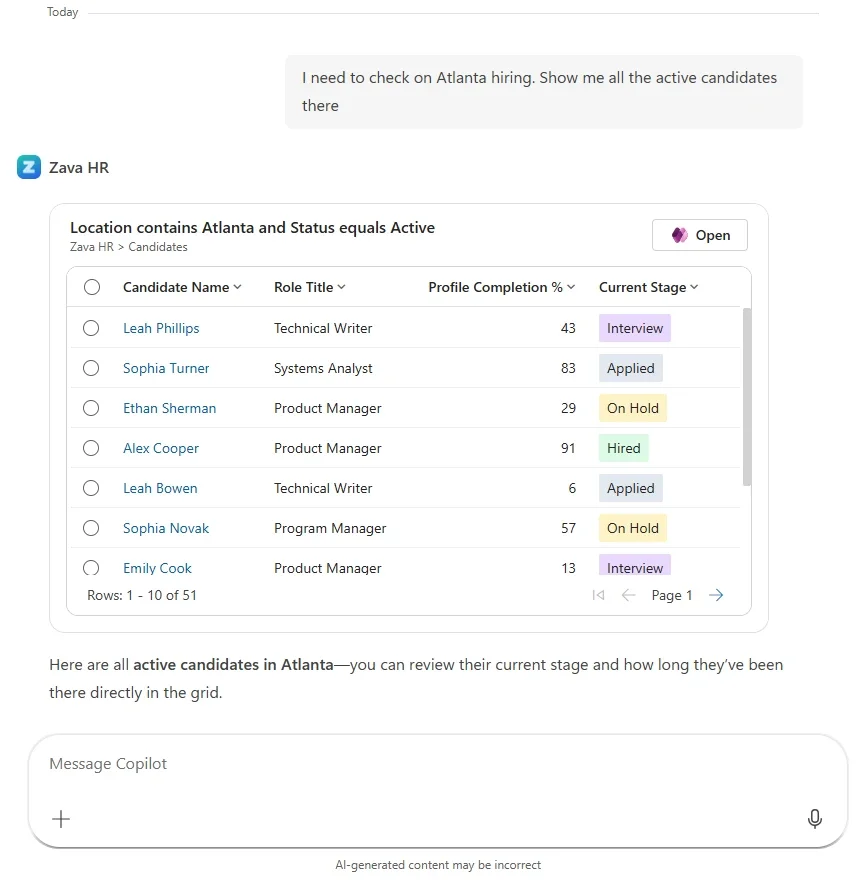
    Ask Copilot questions like “Show me open accounts in the West region” or “Which cases were escalated this week?” and get interactive, filterable results instantly. Drill into records, make edits, and continue the conversation—all in one place.

  • Create and update records with forms

    No more jumping between apps. Create, view, and update records directly in Copilot, with intelligent field suggestions that reduce manual input and speed up data entry.

  • Work across Microsoft 365 apps

    Whether you're in Word, Excel, or PowerPoint, you can access and act on your business data alongside your work. No copy-pasting. No lost context—just seamless productivity.

  • Custom tools (coming soon)

    Extend beyond grids and forms by building tailored tools that fit your unique business scenarios—bringing even more power into Copilot.

  • Get started today

    Enable your app’s MCP server in Power Apps, deploy to Microsoft 365 or Teams, and start interacting with your business data through Copilot—instantly.

Unlock the full potential of your Dynamics 365 and Power Apps data with AI. Discover Infinity AI Agents and get in touch today!

Visual Studio Experiments with Next-Gen Bookmarking Experience

Visual Studio is introducing Bookmark Studio, a new experimental extension designed to modernize how developers navigate and manage bookmarks in their code. The update builds on the existing bookmarking system with enhanced organization and faster navigation features, reflecting ongoing feedback from the developer community. Bookmark Studio aims to streamline workflows and make moving through complex codebases more intuitive.

Here’s what you need to know:

  • Jump to what matters—instantly

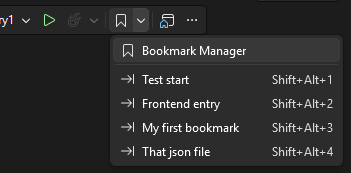
    One of the core additions in Bookmark Studio is slot-based navigation. Assign bookmarks to slots 1–9 and jump directly using simple shortcuts like Alt + Shift + 1–9. It makes navigation feel more deliberate—and much faster when switching between key areas of your code.

  • All your bookmarks, one clear view

    Bookmark Studio introduces a dedicated Bookmark Manager window, giving you a centralized view of all your bookmarks. Easily browse, search, filter (by name, file, location, color, or slot), and jump between them with a double-click or keyboard navigation.

  • Organize your way (or not at all)

    Add labels, colors, and folders to your bookmarks—or keep things simple. Whether you're debugging, refactoring, or exploring unfamiliar code, this added context helps you stay organized without forcing a new workflow.

  • Turn bookmarks into team knowledge

    Bookmarks aren’t just personal anymore. Export them as plain text, Markdown, or CSV to include in pull requests, share investigation paths, or reuse across repositories. It’s a lightweight way to communicate context and decisions with your team.

  • Built to keep up with your code

    As your code evolves, Bookmark Studio tracks changes and keeps bookmarks anchored to the right lines—making them far more reliable during active development.

Level up your organisation’s growth by pairing your CRM with custom business applications. Contact us today!

Visual Studio March 2026 Update Brings Custom Copilot Agents to the Forefront

Visual Studio’s March 2026 update introduces a major shift toward customizable AI-driven development with the ability to build your own Copilot agents. Developers can now create specialized agents tailored to their workflows, integrating internal tools, knowledge sources, and automation capabilities directly into the IDE. The release also brings enhancements in diagnostics, performance profiling, and security, further embedding AI into everyday development tasks.

Here’s what you need to know:

  • Build your own custom agents

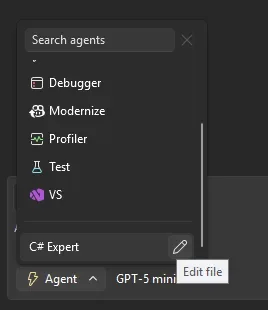
    Create specialised GitHub Copilot agents using .agent.md files in your repo. These agents come with full workspace awareness, code understanding tools, model flexibility, and MCP connections to external knowledge sources.

  • Use agent skills

    Skills are automatically discovered from locations like .github/skills/ or ~/.copilot/skills/. Each skill lives in its own directory with a SKILL.md file—and when activated, it’s visible in chat so you know exactly what’s being applied.

  • Smarter refactoring with find_symbol

    The new find_symbol tool lets agents locate references across your codebase and access metadata like types, declarations, and scope—making refactoring far more accurate and context-aware.

  • Enterprise MCP governance

    Admins can now enforce allowlists for MCP servers via GitHub, ensuring only approved external connections are used within the organisation.

  • Profile tests with Copilot

  • Run performance profiling directly from Test Explorer. Copilot analyses CPU usage and instrumentation data to deliver actionable insights—instantly.

  • Perf tips powered by live profiling

    Optimise code while debugging. Visual Studio now surfaces execution time inline, and with a click, Copilot can suggest improvements on the spot.

  • Fix vulnerabilities faster

    When a vulnerability is detected, Copilot can recommend and apply dependency updates directly from Solution Explorer—helping you stay secure without slowing down.

  • HTML rich copy/cut

    Copy or cut code with formatting intact. Syntax highlighting now carries over seamlessly into HTML-based apps.

Unlock the power of AI to transform how you work in Dynamics 365 and Power Apps. Discover Infinity AI Agents—built to streamline tasks, boost productivity, and elevate your workflows. Get in touch with us today to see it in action.