
Visual Studio’s March 2026 update introduces a major shift toward customizable AI-driven development with the ability to build your own Copilot agents. Developers can now create specialized agents tailored to their workflows, integrating internal tools, knowledge sources, and automation capabilities directly into the IDE. The release also brings enhancements in diagnostics, performance profiling, and security, further embedding AI into everyday development tasks.
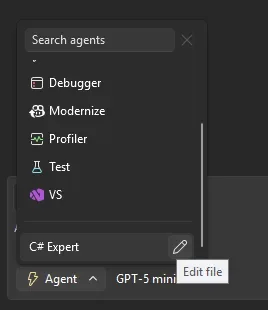
Here’s what you need to know:
Build your own custom agents
Create specialised GitHub Copilot agents using .agent.md files in your repo. These agents come with full workspace awareness, code understanding tools, model flexibility, and MCP connections to external knowledge sources.
Use agent skills
Skills are automatically discovered from locations like .github/skills/ or ~/.copilot/skills/. Each skill lives in its own directory with a SKILL.md file—and when activated, it’s visible in chat so you know exactly what’s being applied.
Smarter refactoring with find_symbol
The new find_symbol tool lets agents locate references across your codebase and access metadata like types, declarations, and scope—making refactoring far more accurate and context-aware.
Enterprise MCP governance
Admins can now enforce allowlists for MCP servers via GitHub, ensuring only approved external connections are used within the organisation.
Profile tests with Copilot
Run performance profiling directly from Test Explorer. Copilot analyses CPU usage and instrumentation data to deliver actionable insights—instantly.
Perf tips powered by live profiling
Optimise code while debugging. Visual Studio now surfaces execution time inline, and with a click, Copilot can suggest improvements on the spot.
Fix vulnerabilities faster
When a vulnerability is detected, Copilot can recommend and apply dependency updates directly from Solution Explorer—helping you stay secure without slowing down.
HTML rich copy/cut
Copy or cut code with formatting intact. Syntax highlighting now carries over seamlessly into HTML-based apps.
Unlock the power of AI to transform how you work in Dynamics 365 and Power Apps. Discover Infinity AI Agents—built to streamline tasks, boost productivity, and elevate your workflows. Get in touch with us today to see it in action.