
Visual Studio is introducing Bookmark Studio, a new experimental extension designed to modernize how developers navigate and manage bookmarks in their code. The update builds on the existing bookmarking system with enhanced organization and faster navigation features, reflecting ongoing feedback from the developer community. Bookmark Studio aims to streamline workflows and make moving through complex codebases more intuitive.
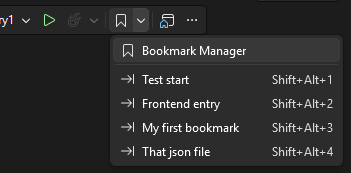
Here’s what you need to know:
Jump to what matters—instantly
One of the core additions in Bookmark Studio is slot-based navigation. Assign bookmarks to slots 1–9 and jump directly using simple shortcuts like Alt + Shift + 1–9. It makes navigation feel more deliberate—and much faster when switching between key areas of your code.
All your bookmarks, one clear view
Bookmark Studio introduces a dedicated Bookmark Manager window, giving you a centralized view of all your bookmarks. Easily browse, search, filter (by name, file, location, color, or slot), and jump between them with a double-click or keyboard navigation.
Organize your way (or not at all)
Add labels, colors, and folders to your bookmarks—or keep things simple. Whether you're debugging, refactoring, or exploring unfamiliar code, this added context helps you stay organized without forcing a new workflow.
Turn bookmarks into team knowledge
Bookmarks aren’t just personal anymore. Export them as plain text, Markdown, or CSV to include in pull requests, share investigation paths, or reuse across repositories. It’s a lightweight way to communicate context and decisions with your team.
Built to keep up with your code
As your code evolves, Bookmark Studio tracks changes and keeps bookmarks anchored to the right lines—making them far more reliable during active development.
Level up your organisation’s growth by pairing your CRM with custom business applications. Contact us today!