Power Apps Puts Existing Solutions at the Centre of AI Transformation

Microsoft is highlighting how organisations can begin their AI transformation by building on the applications, data, automations, and processes they already rely on. With Power Apps, Power Platform, and Copilot Studio, teams can bring AI into existing solutions while creating new ways to solve business challenges and improve how work gets done.
Here's what you need to know:

  • Build Business Solutions Faster with AI

    Power Apps hybrid authoring lets users collaborate with AI agents and choose the development approach that best suits their skills. This helps teams accelerate solution development while maintaining IT governance and control.

  • Integrate AI into Everyday Workflows

    Microsoft Copilot enables users to interact with business data, uncover insights, and take action directly within their applications. By integrating AI into existing workflows, organisations can improve productivity and simplify processes.

  • Discover What's Next for Power Platform at PPCC 2026

    Discover how AI, intelligent apps, agents, and automation are shaping the future of business at PPCC 2026. Check the latest innovations in Power Platform and Microsoft Copilot Studio on October 27 - 29, 2026, in Las Vegas.

Let AI handle routine tasks and streamline your workflows in Dynamics 365 and Power Apps. Explore Infinity AI Agents and contact us today to get started!
What's Next for Power BI? Exploring the Future of Business Intelligence

Microsoft is outlining the next chapter of Power BI as it evolves beyond traditional business intelligence into a more connected, AI-powered platform. The latest announcements introduce new capabilities in AI-assisted app development, semantic modelling, and Microsoft 365 Copilot integration, bringing data insights closer to business workflows.

Here's what you need to know:

  • AI-Powered App Development in Power BI

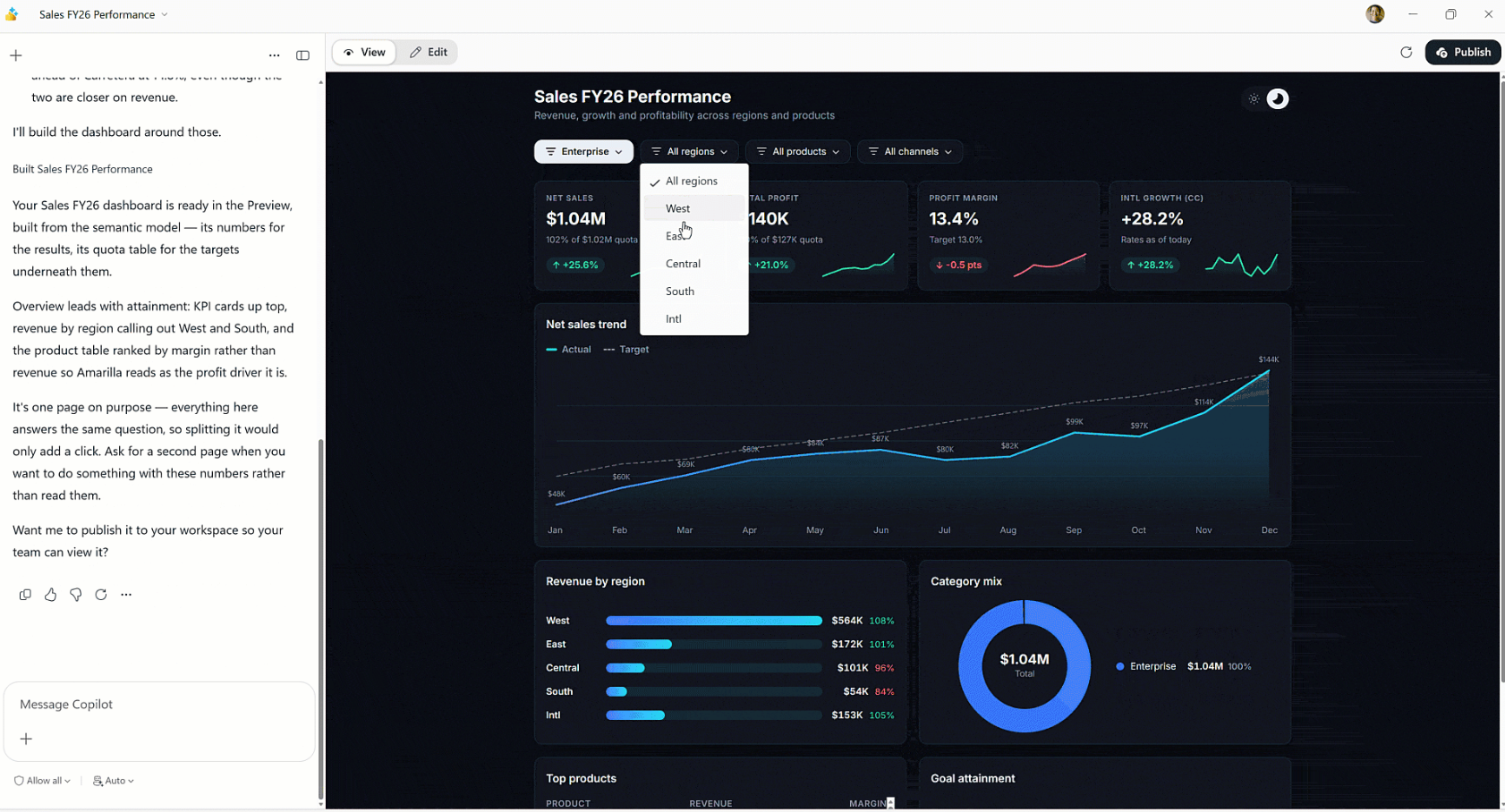
    Power BI is introducing a new app-building experience that lets users create data applications using natural language. Built on trusted semantic models, these apps support data writeback and operational workflows to help turn insights into action.

  • Building a More Connected Semantic Layer

    Power BI is expanding its semantic layer to provide trusted business context for AI agents, applications, and Copilot. New semantic views and industry collaboration aim to make business metrics more reusable and interoperable across platforms.

  • Bringing Power BI Insights to Microsoft 365 Copilot

    Microsoft 365 Copilot Chat and Copilot Cowork can now use governed Power BI reports and semantic models to answer business questions. These capabilities are also expanding to Copilot in Power BI and external MCP clients, bringing conversational analytics to more users.

  • Shaping the Future of Business Intelligence

    Power BI continues to evolve through feedback and ideas from its global community of creators, analysts, and developers. Microsoft is encouraging users to contribute to its roadmap and connect at upcoming events, including FabCon and Microsoft Ignite.

Discover how Power BI helped the Independent Police Conduct Authority streamline investigations and case management. Read the case study and contact us to learn more.

Explore the Latest Updates in Power BI's September 2026 Release

Microsoft has released its Power BI September 2026 Feature Summary, introducing new updates across Copilot and AI, reporting, data modelling, data connectivity, and more. The latest enhancements aim to improve how users create reports, analyse data, and work with AI-powered experiences in Power BI.

Here’s what you need to know:

  • Copilot and AI: Power BI Agentic Experiences (Generally Available)

    AI agents can help BI developers build and refine semantic models and reports, accelerating development workflows. With access to business context, development tools, and team-specific practices, agents can generate, edit, and validate solutions for developers to review.

  • Reporting: New Report Ribbon on the Web (Preview)

    Power BI introduces a new web-based Report ribbon that brings the browser experience closer to Power BI Desktop. With organised tabs, a new Design ribbon, and features such as Format Painter, users can discover tools and complete more report-authoring tasks directly in the browser.

  • Modelling: Create and Edit DirectQuery Semantic Models in the Power BI Service

    Users can now create and edit DirectQuery semantic models directly in the Power BI service without downloading Power BI Desktop. This enables browser-based modelling across different operating systems, real-time collaboration, and faster updates without the usual download-and-republish process.

  • Data Connectivity: Microsoft Outlook Mail Connector (Preview)

    The new Microsoft Outlook Mail connector for Power BI Desktop lets users access mailbox data, including folders, messages, and attachments, through their organisational accounts. Built on Microsoft Graph API, it introduces a modern alternative to the Exchange Online connector, with additional connectivity options planned for the future.

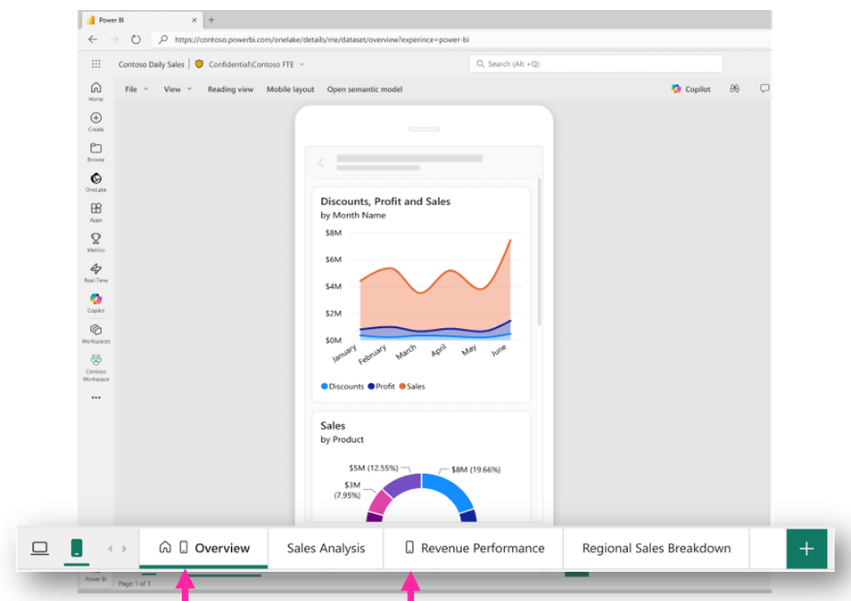
  • Mobile: Mobile Page Indicator (Generally Available)

    Power BI now makes it easier to identify which report pages have mobile layouts through a dedicated icon on their page tabs. This gives report creators a clearer view of mobile-ready content and helps them identify pages that still need mobile optimisation.

See the full list of Power BI’s September 2026 update.

Want to explore what Power BI can do for your business? Discover our Business Intelligence solutions and contact us today to learn more!

Visual Studio September Update Brings More AI Flexibility and Smarter Debugging

Microsoft has released its September 2026 Visual Studio update, introducing new AI-powered capabilities and debugging enhancements to help developers streamline their workflows. The update focuses on giving developers more flexibility in choosing AI models while improving code security, pull request reviews, and debugging experiences.

Here's what you need to know:

  • Bring Your Own AI Model

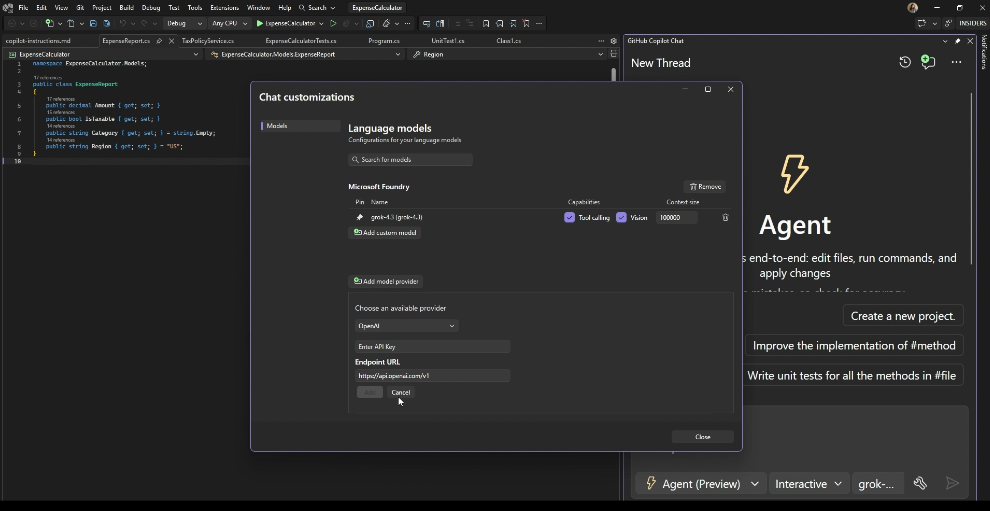
    Visual Studio's updated Bring Your Own Model (BYOM) lets developers connect to their preferred AI providers, including Microsoft Foundry, OpenAI, Anthropic, and Ollama. With support for the new Agent (Preview), developers can tailor AI-assisted workflows to their needs.

  • Fix NuGet Vulnerabilities with GitHub Copilot

    Developers can now use GitHub Copilot to address vulnerable NuGet packages directly from the Visual Studio Error List. This makes it easier to identify security issues, review suggested fixes, and apply changes.

  • Explore Pull Requests with the Git Agent

    The Git agent helps developers explore pull requests by summarising relevant discussions, comments, and file changes. With navigable links and follow-up questions, developers can investigate changes directly within Visual Studio.

  • Simplify Debugging with Branch Highlighting

    Visual Studio now highlights the expressions that determine the outcome of C# if statements using && or ||. This helps developers understand conditional logic more easily while debugging.

  • Debug Podman Containers

    Visual Studio now supports attaching to Podman containers alongside Docker. Developers can discover and debug .NET and C++ containers directly from the IDE.

Choose how AI works for your business with Dynamics 365 and Power Apps. Explore Infinity AI Agents and contact us to learn more.

Visual Studio Live! Explores the Future of Developer Learning

As AI continues to change how developers write code, troubleshoot issues, and learn new technologies, the way they build their skills is evolving too. In a recent Visual Studio blog, Microsoft highlights the importance of hands-on learning, knowledge sharing, and connecting with fellow developers through events like Visual Studio Live! (VSLive!).

Here's what you need to know:

  • Gain Insights From Industry Experts

    VSLive! focuses on practical developer education, helping developers, software architects, and engineers keep up with the evolving Microsoft development landscape. With more than three decades of experience, the event brings together industry experts who share not only how technologies work but also the lessons, decisions, and real-world experiences behind them.

  • Turn New Knowledge Into Practical Skills

    Go beyond theory by exploring technologies, working through challenges, and gaining practical insights you can apply to your projects. Learning alongside experts and fellow developers also gives you the opportunity to ask questions, explore different approaches, and build confidence in your skills.

  • Learn Through Collaboration and Connection

    Some of the most valuable learning experiences happen outside the conference room. Whether you're asking a speaker a follow-up question, exchanging ideas over lunch, or discussing how another team solved a similar challenge, VSLive! creates opportunities to build meaningful professional connections and learn from different perspectives.

  • Stay Ahead of Emerging Development Trends

    Stepping away from your everyday workload gives you time to explore emerging technologies and think about your next steps as a developer. From AI-powered development and .NET to Azure, GitHub Copilot, and modern application architecture, VSLive! helps you discover new ideas and approaches to bring back to your team.

  • Take Advantage of Your Subscriber Benefits

    If you have a Visual Studio Subscription, you may be eligible for exclusive pricing and significant discounts on VSLive! events. Check your benefits at my.visualstudio.com and take advantage of subscriber discounts.

  • Take Your Learning to VSLive! Orlando

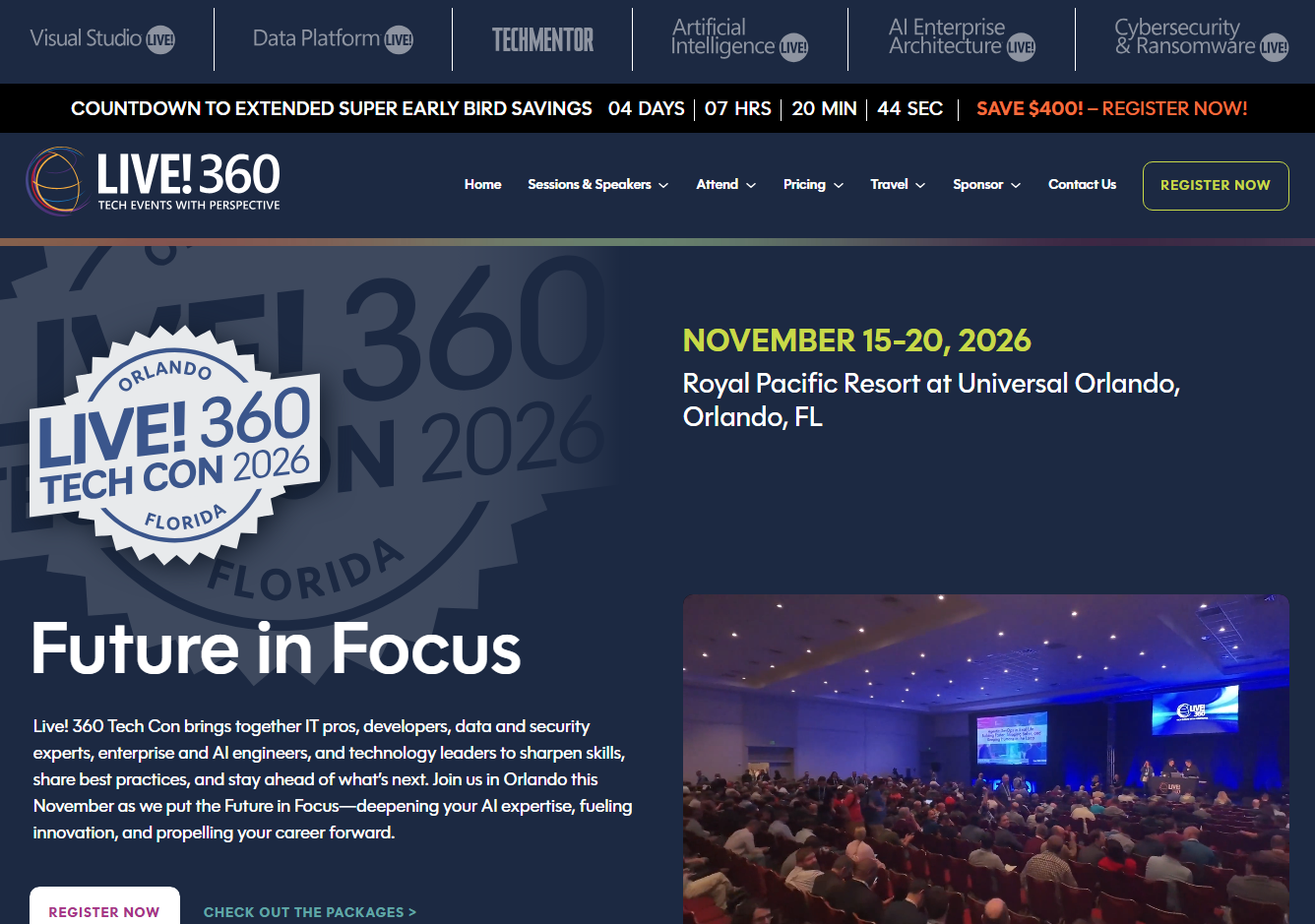
    VSLive! Orlando is part of Live! 360 Tech Con, taking place at Universal Orlando from November 15–20, 2026. Explore a range of topics, including modern software engineering, cutting-edge AI, the core of .NET, full-stack web development, database development, developing new experiences, and human factors in engineering.

Want to see how custom business applications can help your organisation work smarter and achieve more? Contact us to learn how we can build a solution tailored to your business needs.

Power Pages Adds Self-Service Ownership Transfer for Easier Site Governance

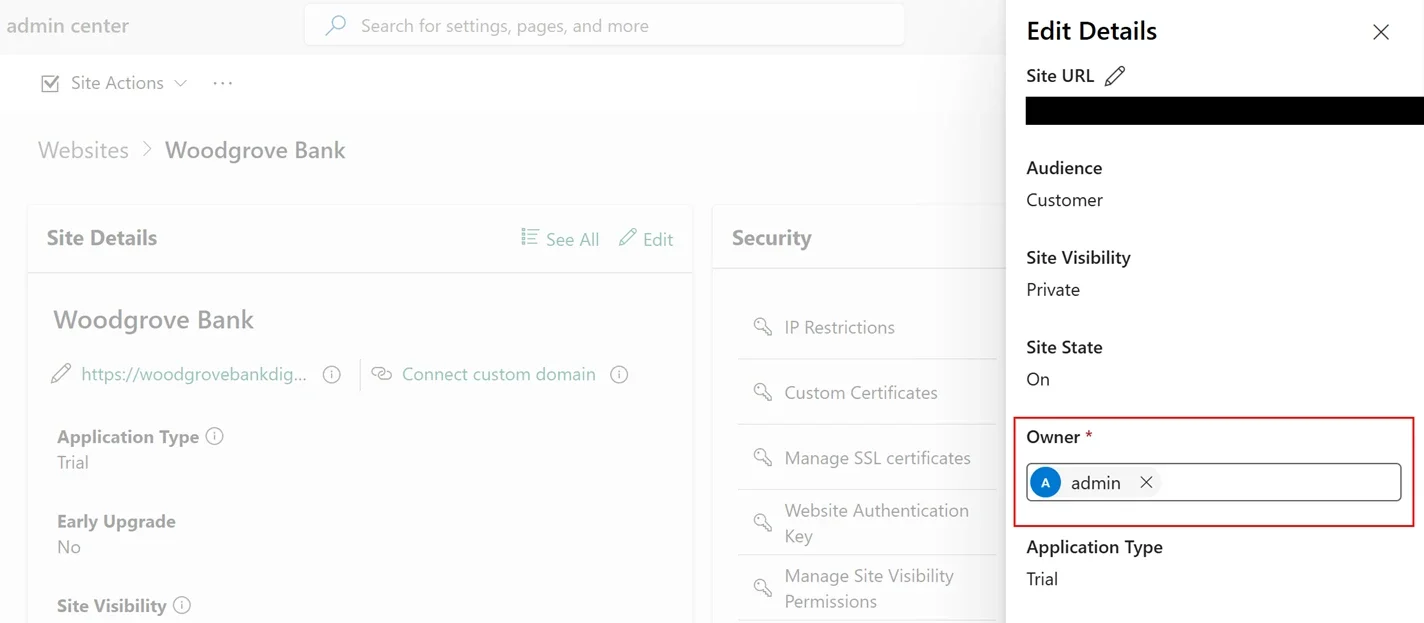
Microsoft has introduced self-service site ownership transfer in Power Pages, making it easier for organisations to keep site ownership aligned as teams, roles, and responsibilities change. The new capability helps simplify ownership handovers while supporting ongoing site governance and accountability.

Here's what you need to know

  • Keeping Ownership Aligned With Your Organisation

    Ownership changes are a natural part of an organisation’s lifecycle, whether an employee changes roles, a project moves from implementation to operations, or another team takes over an existing site. Self-service ownership transfer makes it easier to keep Power Pages sites assigned to the people responsible for managing them.

  • Maintaining Visibility Across Ownership Changes

    Ownership transfers record key details, including the previous owner, new owner, person who initiated the transfer, and when the change occurred. Email notifications also keep relevant stakeholders informed, helping organisations maintain visibility and accountability.

  • Making Ongoing Site Management Easier

    Power Pages sites can become long-term business assets that need to adapt as teams and responsibilities evolve. Self-service ownership transfer helps reduce administrative overhead while keeping ownership records current and sites manageable.

See how Power Pages helps Human Resources New Zealand enhance their membership management. Read our case study to learn more, and contact us for more details.

Microsoft Brings Modern List to General Availability in Power Pages

Microsoft has announced the general availability of Modern List in Power Pages, bringing a refreshed way to present Dataverse data with a more modern and customisable experience. The update also introduces greater flexibility for developers through custom JavaScript support via the Power Pages Client API.

  • What’s New with Modern List?

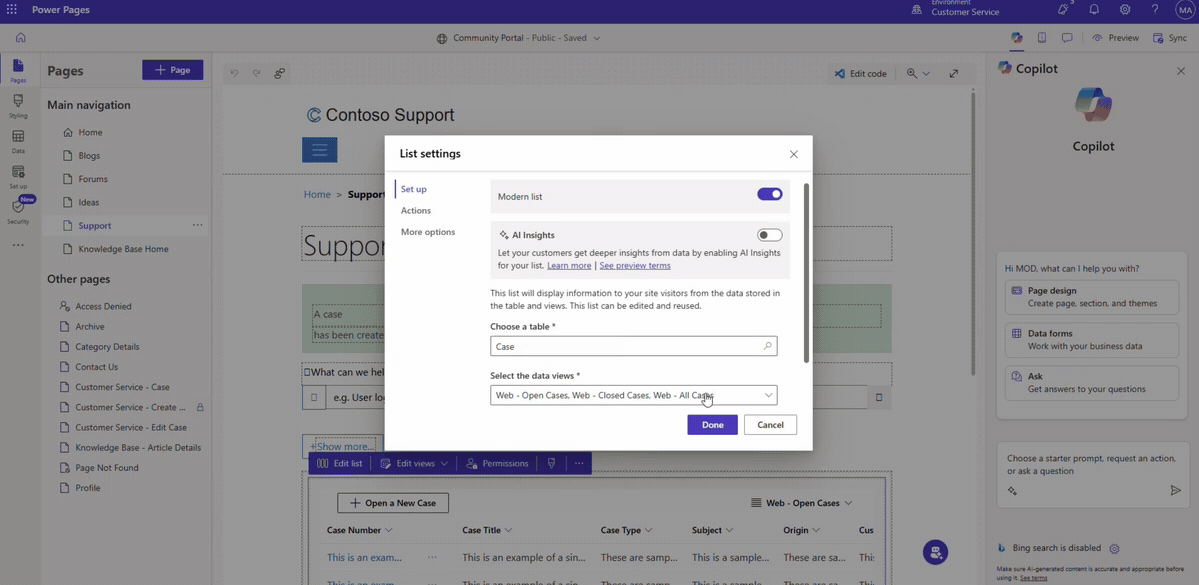
    Modern List provides a refreshed way to showcase Dataverse data with a range of built-in capabilities. Makers can take advantage of infinite scrolling, inline filtering, shimmer loading, low-code customisation, and custom JavaScript support.

  • A More Flexible Default Experience

    With general availability, Modern List is now the default list experience for newly created Power Pages sites. Existing classic lists remain unchanged, giving organisations the flexibility to transition at their own pace.

  • Extend Lists with Custom JavaScript

    When built-in configuration isn't enough, developers can use the Power Pages Client API to add more advanced behaviours without replacing the Modern List with a separate data grid. This makes it possible to customise how data is displayed while retaining existing Dataverse views, actions, filtering, and security configurations.

  • What Can the Client API Do?

    Developers can use the Client API to access and customise Modern List data, respond to user interactions, and style rows, columns, headers, and tooltips. For example, customer service portals can highlight high-priority requests or apply status-based styling while keeping existing list configurations intact.

Want to see what Power Pages can do for membership management? Explore how Human Resources New Zealand uses Power Pages to deliver a more streamlined member experience, and contact us to learn more.

Microsoft Updates NuGet Signing Certificate for .NET Developers

Microsoft is updating the author-signing certificate used for its NuGet packages, with the new certificate becoming the default from 23 September 2026. Developers and organisations that validate Microsoft-signed packages through NuGet client policies or dotnet nuget verify may need to update their certificate settings to avoid potential disruptions.

  • What You Need to Know

    Microsoft uses an X.509 certificate to author-sign its NuGet packages. While existing packages will keep their current signatures, the existing certificate will no longer be used to sign new packages after the transition.

  • Who Will Be Impacted?

    The update may affect customers who use a NuGet client policy to maintain an allow list of trusted signers that includes Microsoft. Check your nuget.config files to see whether a client policy is configured, and remember that these files can exist across multiple locations and scopes. It will also affect customers who use dotnet nuget verify to confirm that signed packages are author-signed by Microsoft.

  • What If Neither Applies to You?

    If you don't use a NuGet client policy or dotnet nuget verify, you should not be affected by the certificate update. Microsoft NuGet packages signed with the new certificate should install the same way as packages signed with previous certificates.

  • If You Use a NuGet Client Policy

    Add the new Microsoft certificate to your trusted signers as soon as possible, while keeping the older Microsoft certificates in your policy. Without the new certificate, packages signed with it may fail to install and return an NU3034 error. You can use the dotnet nuget trust command, available in the .NET 6 SDK and later, to update the applicable nuget.config file. You can also use --configfile <Path> to update a specific configuration file or manually add the new certificate to the existing Microsoft entry.

  • If You Use Package Verification

    If you use dotnet nuget verify to confirm that packages are author-signed by Microsoft, add the new certificate fingerprint while keeping the existing fingerprints. Each --certificate-fingerprint option adds an accepted SHA-256 signer certificate fingerprint. Keeping all four values allows you to verify both newly signed packages and existing packages signed with older Microsoft certificates.

Build custom business applications that give your team the flexibility to work efficiently anytime, anywhere. Contact us to get started.

SharePoint Makes AI Page Authoring More Intuitive

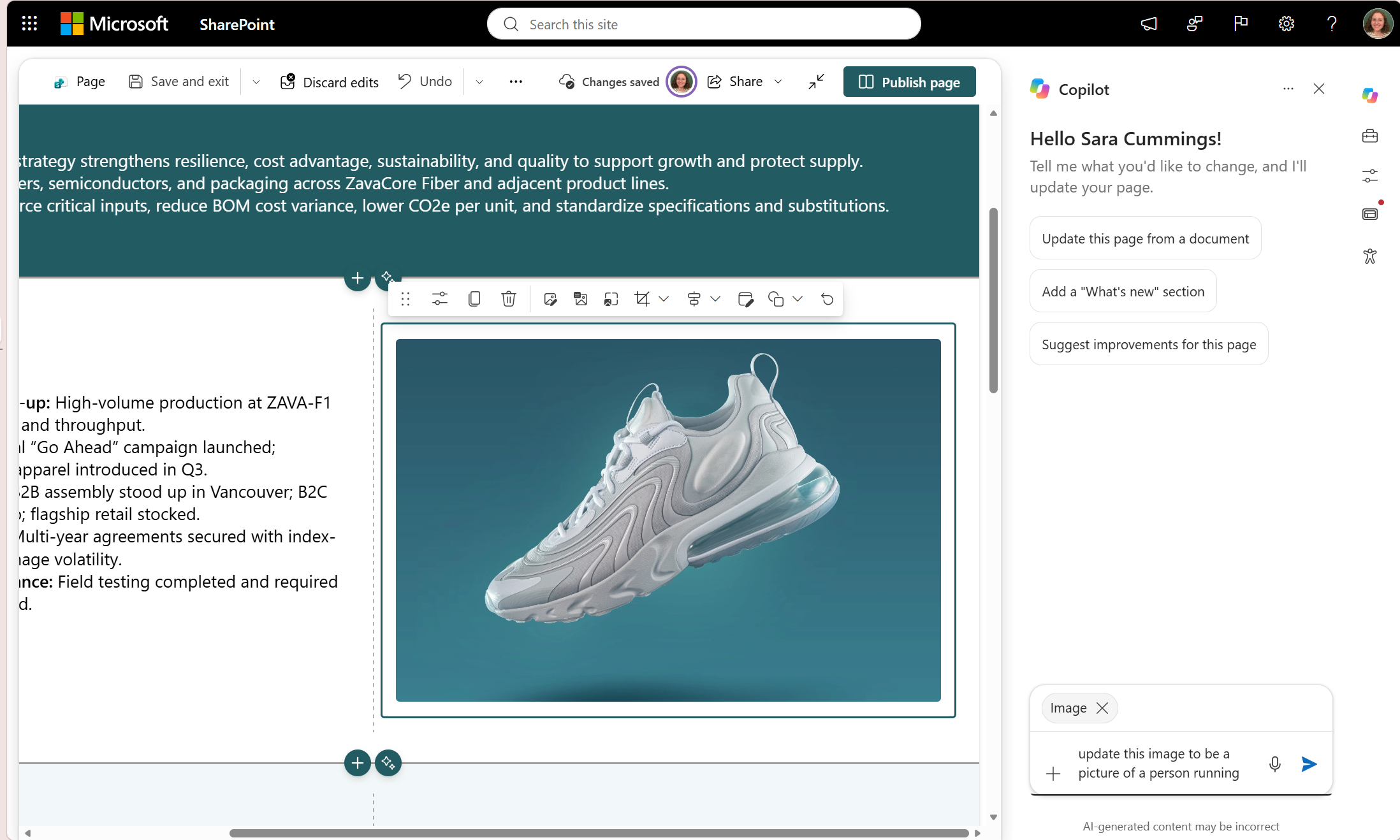
SharePoint is making AI-assisted page authoring more intuitive with an updated on-canvas experience. Microsoft’s latest update lets authors select a section or web part, describe the changes they want in natural language, and review the results directly on the page.

Here’s What You Need to Know:

  • Select What You Want to Change

    Instead of describing where content sits on the page, simply select the web part or section you want to edit. Copilot automatically uses your selection as context, making it easier to give focused instructions.

  • Make Focused or Broader Updates

    Ask Copilot to move an image, update content, or change a section’s column layout. You can also request broader updates, such as changing repeated product or brand names across supported page content.

  • Review Changes Before Publishing

    Updated areas are visually indicated on the canvas, making it easier to see what Copilot has changed. You can review the full page, verify links and facts, check accessibility, and preview everything before publishing.

  • Describe the Outcome, Not the Steps

    You don't need to learn specific commands or syntax. Simply describe what you want, such as “move this to the middle column” or “make this a two-column section”, and Copilot uses your selected page context to understand the request.

  • Refine Pages More Naturally

  • Suggested prompts can help you get started, while follow-up suggestions make it easier to continue refining your page. This can be useful for everything from quick content adjustments to larger page-wide updates.

  • Built for New and Experienced Authors

    For new authors, Copilot can reduce the need to know every SharePoint web part or configuration option. For experienced authors, it can help speed up repetitive edits while keeping the author in control of the final review and publishing decision.

  • Rolling Out Gradually

    The experience is rolling out gradually across Microsoft 365, so availability may vary by tenant and release ring. Organisations need Copilot in SharePoint enabled, and authors need permission to edit pages.

Want to keep your SharePoint documents easily accessible from Dynamics 365? Explore the Infinity Buttons: SharePoint Add-on and make document access more seamless across your business applications. Contact us to learn more.

Bring Power Automate Workflows into Power Pages Server Logic

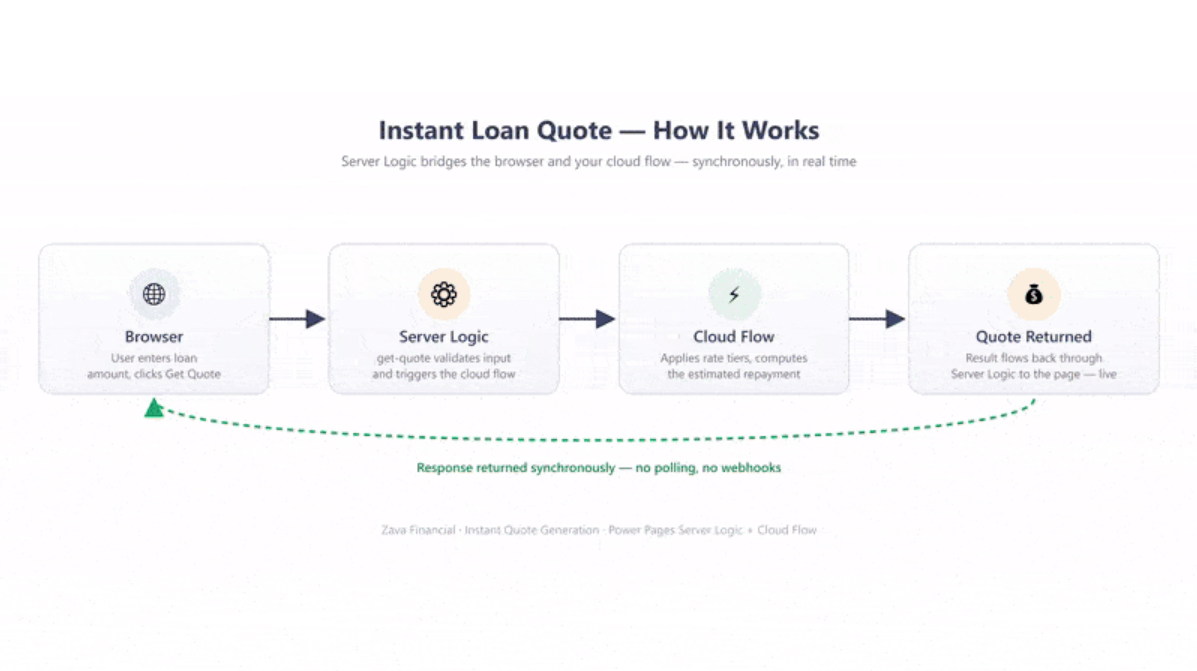
Microsoft has introduced support for invoking Power Automate cloud flows directly from Server Logic in Power Pages. The update extends Power Pages’ server-side capabilities, allowing website business logic to connect with existing automation, integrations, and workflows across the Power Platform.

Here's what you need to know:

  • Connect Business Logic with Automation

    Business applications rarely operate in isolation, and website interactions often trigger processes that extend beyond the site. By invoking Power Automate cloud flows from Server Logic, you can connect Power Pages business logic with existing automated workflows while reducing duplication.

  • Connect Server Logic to the Power Platform Ecosystem

    Power Automate provides access to more than 1,400 connectors across Microsoft services, third-party applications, and custom systems. Cloud flow invocation allows Server Logic to tap into this ecosystem, helping you reuse existing workflows, integrations, connectivity patterns, and governance practices.

  • Learn More and Share Your Feedback

    Ready to bring Power Automate capabilities into your Power Pages server-side logic? Check out the Power Pages documentation to learn how to configure and use cloud flows with Server Logic, and share your feedback to help shape the feature.

See how Power Automate helped the New Zealand Qualifications Authority reduce manual work and streamline its processes. Read our case study to learn more, and contact us to discuss how we can help your organisation.