Power BI Visual Calculations Are Now Generally Available

Microsoft has announced the general availability of Visual Calculations in Power BI, allowing users to write DAX calculations directly within individual visuals. The feature simplifies report creation by keeping calculations close to where they're used, making it easier to build and customise visual insights.
Here's what you need to know:

  • Why should you use it?

    Visual calculations let you create calculations that only apply to a specific visual, keeping your data model clean and easier to manage. This means you can build insights faster without creating additional report or model measures.

  • How it works

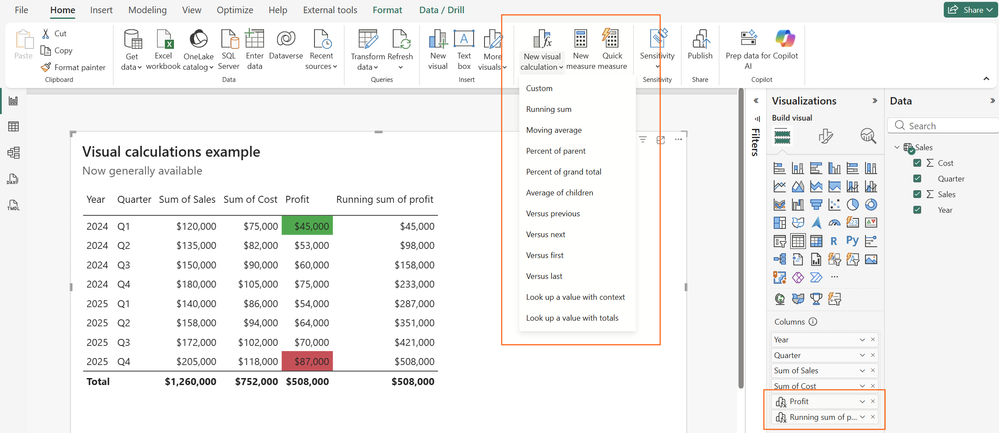
    Create a visual calculation by selecting a visual and choosing New visual calculation from the ribbon, where you can write DAX and instantly preview the results. You can use familiar DAX functions, visual-specific functions like RUNNINGSUM and MOVINGAVERAGE, or built-in templates to speed up development.

  • Custom totals for tables and matrices

    You can now customise how totals are calculated in tables and matrices by choosing options like Average, Count, Max, or even no total at all. This gives you greater control over how summary values are presented without writing additional DAX.

  • Example use cases

    Visual calculations make it easy to create running totals, profit calculations, and conditional formatting directly within a chart or table. They're ideal for quick analysis without changing your underlying semantic model.

  • Where can you use it?

    Visual calculations are available in both Power BI Desktop and the Power BI Service. They also work with embedded analytics, ensuring your calculations remain consistent wherever your reports are used.

Discover how the Independent Police Conduct Authority transformed complex data into clear, actionable insights with Power BI. Read the case study and contact us to see how we can help your organisation do the same.
Visual Studio June Update Brings Greater Transparency to AI Development

Microsoft has released the June update for Visual Studio, introducing new features that give developers greater visibility into AI usage and more confidence in the tools they use every day. The update focuses on improving transparency, strengthening security, and streamlining AI-assisted development workflows without disrupting existing coding experiences.

Here's what you need to know:

  • Stay on top of your Copilot usage

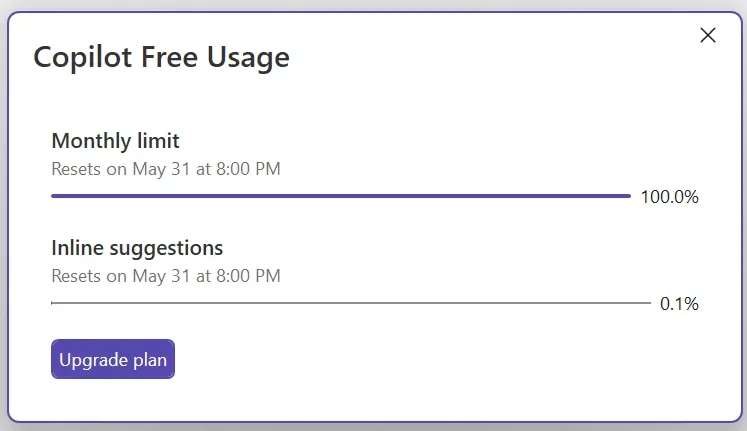
    GitHub Copilot usage is now tracked based on token consumption, giving you real-time visibility into your usage and billing status. You'll also receive customisable alerts before you reach your quota, helping you stay ahead of your limits.

  • Verify MCP servers before they run

    Visual Studio now validates MCP server configurations and fingerprints before they're launched, helping you detect unexpected changes. If differences are found, you'll be prompted to review and approve them before the server runs.

  • Modernise your C++ projects with AI

    The GitHub Copilot modernisation agent for C++ is now generally available, making it easier to upgrade projects to the latest MSVC Build Tools. Run upgrades automatically or review every step through Guided mode before changes are applied.

  • Get smarter edit suggestions across your file

    Long-distance Next Edit Suggestions can now recommend changes anywhere in your active file—not just near your cursor. This helps you keep related code synchronised with less manual searching and editing.

  • Bring your code to life with color emojis

    Visual Studio now displays emojis in full color across the editor, Markdown previews, Copilot Chat, build output, and Solution Explorer. Visual indicators like ✅ and ❌ are now easier to recognize at a glance.

Empower your team with custom business applications that boost productivity and simplify everyday workflows. Contact us today and let's build a solution tailored to your business.

Service Agent Is Now Generally Available in Microsoft 365 Copilot

Microsoft has announced the general availability of Service Agent in Microsoft 365 Copilot, bringing its AI-powered customer service capabilities to production environments. Following its public preview earlier this year, the release introduces a more mature experience for service teams looking to streamline case management and customer interactions.

Here's what you need to know:

  • General Availability

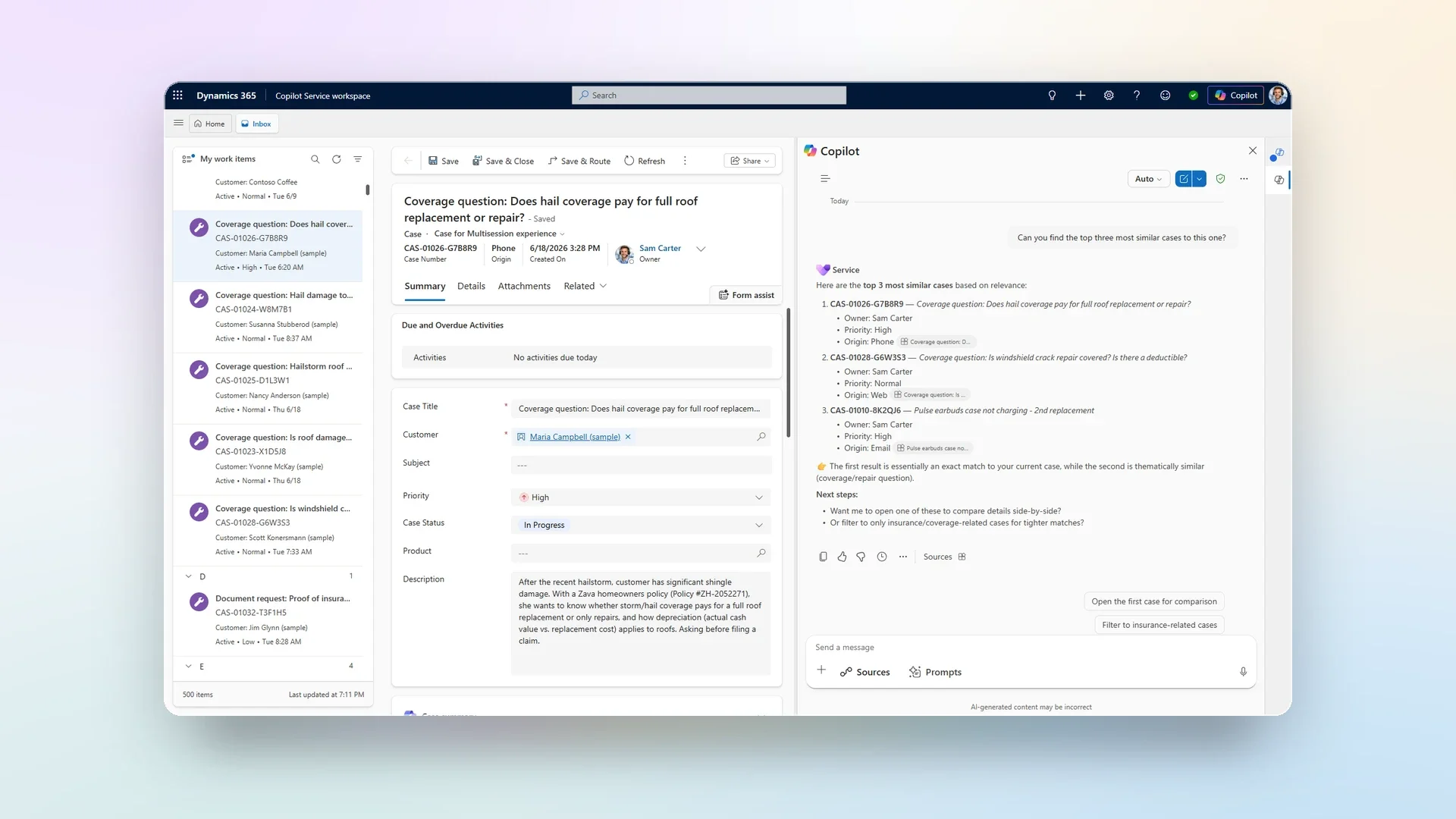
    Service Agent is now generally available, evolving from an AI assistant that summarises information into one that can take action across the customer service workflow. It introduces 70+ MCP tools and new product enhancements that help agents resolve cases faster, with greater accuracy and less manual effort.

  • New capabilities available

    Service Agent helps agents quickly understand customer context, discover trusted knowledge, update cases, create activities, and generate files—all from within Microsoft 365 Copilot. Interactive in-chat experiences, image understanding, dashboards, and extensibility through MCP tools make service workflows more efficient than ever.

  • Why should your service teams use it

    By bringing together data from Dynamics 365, Microsoft Graph, Dataverse, and SharePoint, Service Agent gives teams the context they need without switching between applications. The result is faster case resolution, improved productivity, more consistent customer service, and quicker onboarding for new agents.

  • Getting started

    Organisations with Dynamics 365 Customer Service and Microsoft 365 Copilot licenses can start using Service Agent today across Dynamics 365, Microsoft Teams, and Outlook. Administrators can easily deploy and govern the experience while enabling AI-powered customer service at their own pace.

Take your Dynamics 365 and Power Apps experience to the next level with AI. Explore Infinity AI Agents and contact us today.

Power BI Desktop Bridge Preview Brings External App Integration to Power BI Desktop

Power BI Desktop is becoming more extensible with the launch of Power BI Desktop Bridge (Preview). The new feature enables external tools and AI-powered agents to connect to Power BI Desktop, opening the door to more automated and interactive report development experiences.

Here's what you need to know:

  • Capabilities

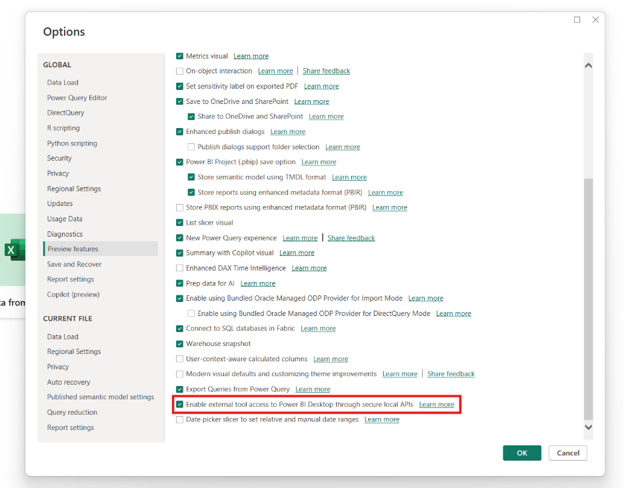
    Power BI Desktop Bridge lets external tools check your Desktop's capabilities, identify which report is currently open, detect unsaved changes, capture PNG screenshots of reports, and reload report files from disk—all through secure local APIs.

  • Why it matters

    AI agents can already generate code and automate repetitive tasks. With Desktop Bridge, they can also interact with your live Power BI environment, helping accelerate report creation, testing, and refinement—reducing work that often takes hours to just minutes.

  • Getting started

    Desktop Bridge is enabled by default. If you've turned it off, go to File > Options and settings > Options > Preview features, then enable External tool access to Power BI Desktop through secured local APIs.

Ready to create smarter, more impactful reports? Discover our Business Intelligence solutions powered by Power BI and contact us today!

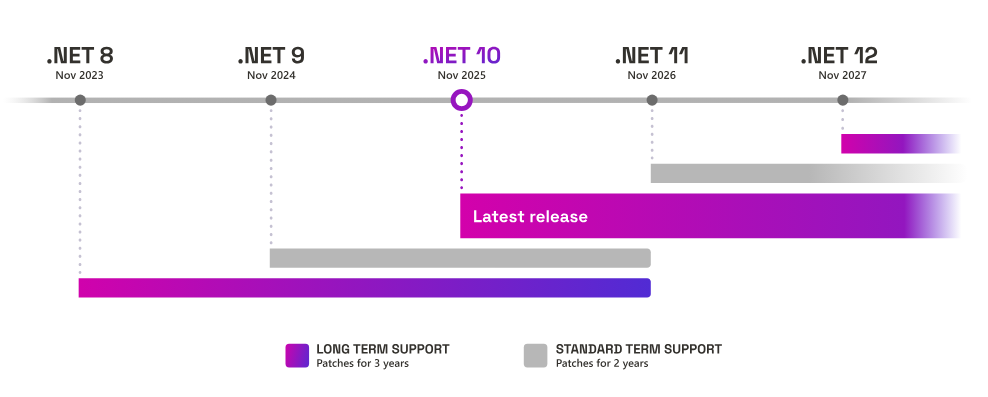
Microsoft Announces End of Support for .NET 8 and .NET 9 in November 10, 2026

Microsoft has announced that support for both .NET 8 and .NET 9 will officially end on November 10, 2026. Developers and organisations using these versions should begin planning their upgrade strategy to continue receiving security updates and technical support.

Here's what you need to know:

  • Support Policy

    .NET 8's Long-Term Support (LTS) lifecycle and .NET 9's Standard Term Support (STS) lifecycle will both conclude on November 10, 2026. As this date falls on a Patch Tuesday, each version may receive one final update if a critical issue is identified.

  • What to Expect

    Your .NET 8 and .NET 9 applications will continue to run after support ends, but they will no longer receive security updates or technical support. Remaining on an unsupported version increases your exposure to security risks and compliance concerns.

  • Visual Studio Compatibility

    A future servicing update for Visual Studio 2022 will mark .NET 8 and .NET 9 components as out of support. To remain supported, you'll need to retarget your projects to .NET 10 or a later version.

  • Upgrading to .NET 10

    Migrating to .NET 10 starts by updating your project's TargetFramework to net10.0. You'll also need to update your development tools and hosting environments to ensure full compatibility.

  • If You're Using a .NET 8 or .NET 9 Application

    If you rely on a third-party application built on .NET 8 or .NET 9, contact your software vendor to confirm that a .NET 10-compatible version is available. Planning ahead can help you avoid security and support issues when these versions reach end of support.

Need help modernising your .NET applications or planning your migration to .NET 10? Contact Magnetism Solutions to ensure your applications stay secure, supported, and ready for the future.

Resolve Customer Emails Faster with Autonomous Email Resolution in Dynamics 365

Microsoft has introduced Autonomous Email Resolution in Dynamics 365, a new generative AI capability designed to resolve customer emails from start to finish with minimal human intervention. The feature marks another step in Microsoft's vision for agentic customer service, helping organizations automate repetitive email requests while allowing service representatives to focus on more complex customer issues.

Here's what you need to know:

  • What Is Autonomous Email Resolution?

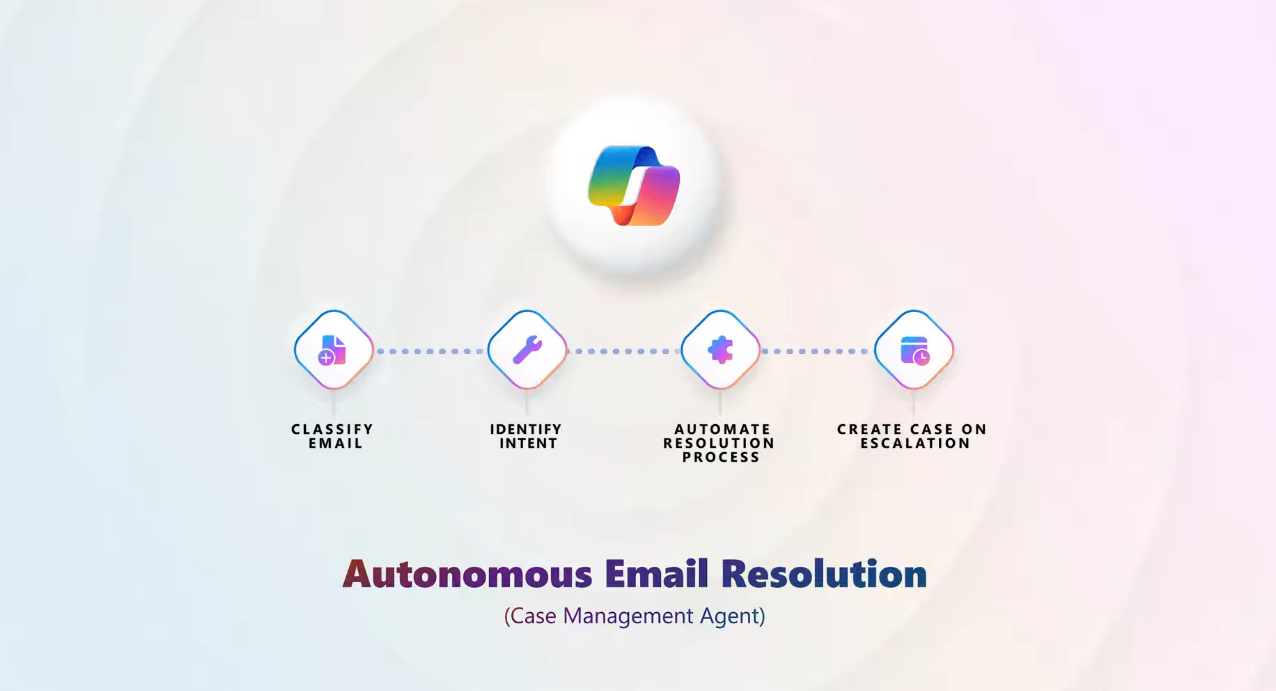
    Autonomous Email Resolution is a generative AI capability that resolves customer emails from start to finish using enterprise knowledge, configured instructions, connectors, and custom agents. It understands customer intent, generates accurate responses, and seamlessly escalates unresolved issues by creating a case with the complete conversation history.

  • How Does It Work?

    The system analyses every incoming email, identifies the customer's intent, and requests clarification when additional information is needed. Once enough context is available, it generates a response automatically and either resolves the issue or escalates it with the full conversation context for a service representative.

  • Why It Matters

    Autonomous Email Resolution helps organisations automate repetitive email requests, improve first-contact resolution, and reduce workloads across high-volume support queues. It also enables service representatives to focus on more complex cases while delivering consistent customer experiences and seamless escalations when required.

  • Getting Started

    Begin by identifying high-volume, repeatable email scenarios and configuring your knowledge sources, instructions, connectors, and custom agents. Use Simulation Mode to validate and refine your workflows before deploying Autonomous Email Resolution to your production environment.

Ready to do more with AI? Discover how Infinity AI Agent can enhance Dynamics 365 and Power Apps, and contact us today to get started.

Dynamics 365 Contact Center Introduces Conversation Orchestration

Microsoft has introduced Conversation Orchestration in Dynamics 365 Contact Center, expanding contact center capabilities beyond traditional call routing. The new feature enables organisations to dynamically manage customer conversations in real time, helping adapt interactions as conditions and customer needs change throughout the service journey.

Here's what you need to know:

  • What Is Conversation Orchestration?

    Conversation Orchestration extends traditional routing by enabling your contact center to respond dynamically as conversations evolve. Administrators can create business policies using natural language, allowing the system to react automatically to changing events, conditions, and customer needs.

  • Policies Written in Natural Language

    Building intelligent contact center experiences no longer requires complex configuration. Simply describe the outcome you want in natural language, and Conversation Orchestration translates that intent into automated business policies that run at scale.

  • Dynamic Prioritisation

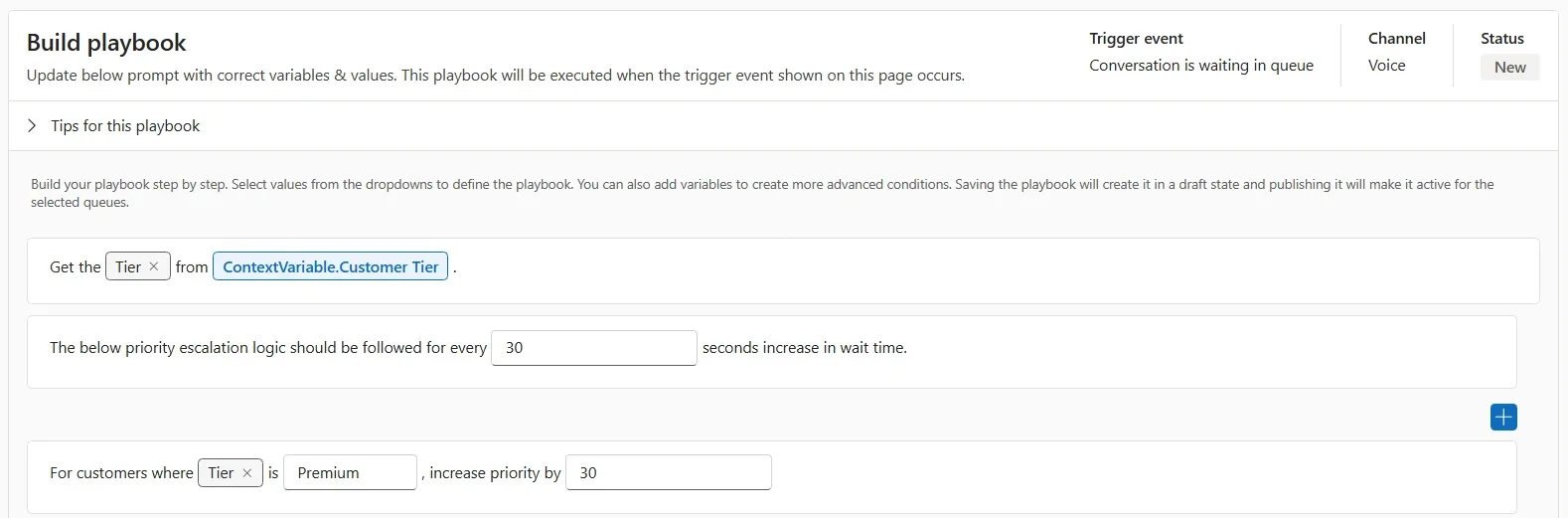
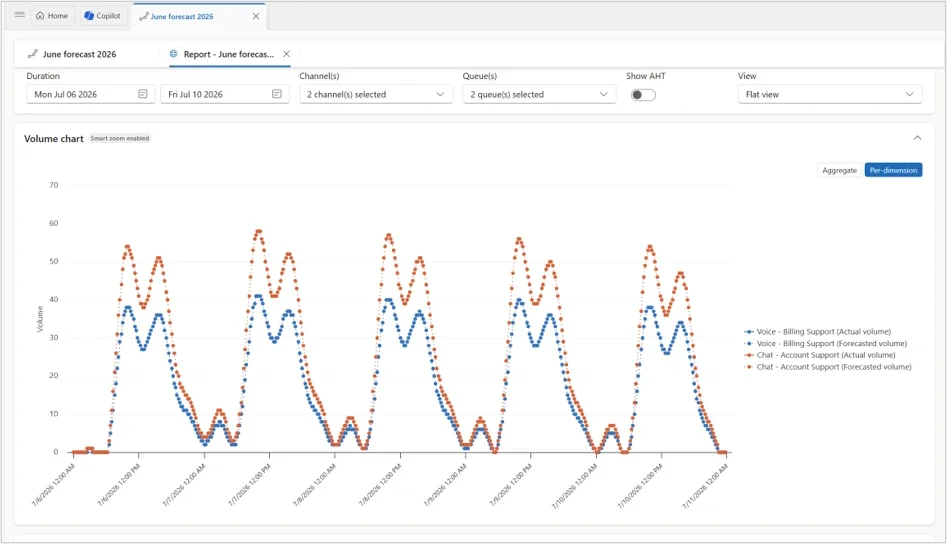
    Customer priority shouldn't be decided only once when they enter a queue. With Dynamic Prioritisation, priority is continuously re-evaluated based on factors such as wait time, customer value, transfers, and CRM data. High-value customers and customers waiting the longest automatically move up the queue, helping deliver fairer and more responsive service without manual intervention.

  • Overflow Based on Representative Availability

    When no suitable customer service representative is available, customers shouldn't be left waiting indefinitely. Conversation Orchestration can detect when a queue has no eligible representatives and immediately trigger the right response. Depending on the customer's context, the system can transfer them to another team, offer a callback, or provide a personalised message—ensuring every customer receives a timely response.

  • Try It Today

    Conversation Orchestration is now available in public preview for voice and live chat in Dynamics 365 Contact Center. Start building playbooks that help your contact center adapt to every conversation—not just route it.

Strengthen every customer relationship with the right CRM solution. Discover what you can achieve with Customer Relationship Management and contact us today to get started.

Microsoft Introduces Entra ID Single Sign-On for the Denodo Connector in Power BI

Microsoft has announced support for Microsoft Entra ID single sign-on (SSO) for the Denodo connector in Power BI, simplifying how users securely access Denodo data sources. The update allows report viewers to query data using their own identities, reducing the need for additional authentication configuration while strengthening security and governance.

Here's what you need to know:

  • What was the challenge before?

    Previously, Denodo SSO relied on Kerberos Constrained Delegation (KCD), which required a synchronised on-premises Active Directory environment. This added infrastructure complexity and made cloud-first deployments more difficult to manage.

  • How does Entra ID SSO work?

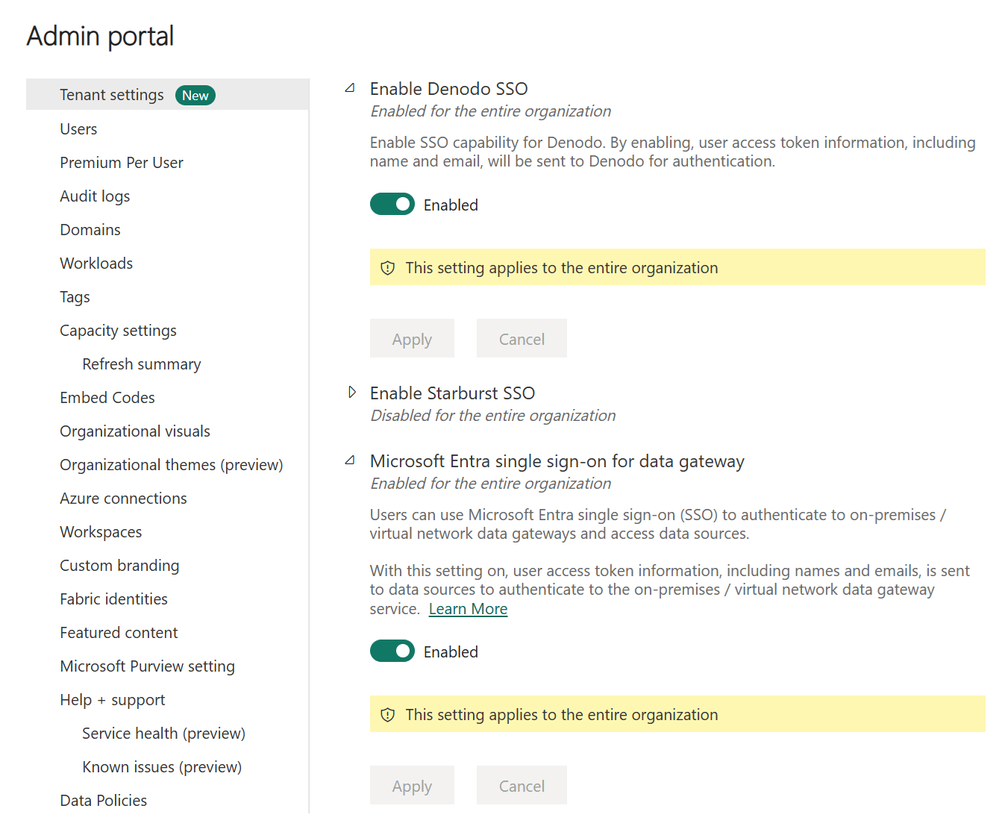
    Power BI can now pass a user's Entra ID identity through the gateway directly to Denodo when using DirectQuery. Denodo then validates the user and applies its own security policies, including row-level and column-level security.

  • When should you use it?

    Entra ID SSO is ideal when you want data access policies enforced against the actual report user rather than a shared account. It also helps meet audit and compliance requirements while reducing credential management overhead.

  • Getting started

    To use the feature, ensure your Denodo environment supports Entra ID token validation and that your data gateway is up to date. Then enable the required SSO settings in Power BI and bind your DirectQuery semantic model to the Denodo connection.

Want to learn what else you can do with Power BI? Explore Business Intelligence and get in touch with our team to discuss your requirements.

Customer Experience Leadership Enters a New AI Era with Dynamics 365

As customer service teams increasingly work alongside AI, Microsoft is expanding Dynamics 365 to support a new approach to customer experience leadership. The latest updates combine workforce engagement management, AI-driven coaching, and real-time performance visibility to help organizations optimize operations across people and AI agents.

Here's what you need to know:

  • Optimise Workforce with Workforce Engagement Management

    As AI becomes a bigger part of customer service operations, leaders need a unified way to manage both AI and human agents. Dynamics 365 provides a single system to plan, staff, monitor, and improve performance across your entire workforce.

  • A System That Works for You—and With You

    Dynamics 365 Contact Center continues to expand its AI capabilities by embedding coaching skills directly into existing workflows. Supervisors can access real-time guidance, analytics, and operational insights that help them effectively manage a blended workforce and scale operations with confidence.

  • Turn Data Into Actionable Decisions

    New real-time wallboards give supervisors instant visibility into operational performance. With up-to-date insights at their fingertips, teams can respond faster, maintain service levels, and reduce the need for manual monitoring and status checks.

Want to discover what more you can achieve with Dynamics 365? Explore Customer Relationship Management solutions and contact us today!

Microsoft Introduces Protection Policies for Power BI

Microsoft has introduced Protection Policies for Power BI, providing organizations with a more consistent way to safeguard sensitive data across reports and analytics workflows. The new capability aims to simplify governance by applying protection rules that travel with data wherever it is used in Power BI.

Here's what you need to know:

  • Why isn't traditional security always enough?

    Power BI already offers workspace roles, row-level security, and item permissions to control access. But what if you need protection based on how sensitive the data is, not just where it's stored?

  • What are Protection Policies?

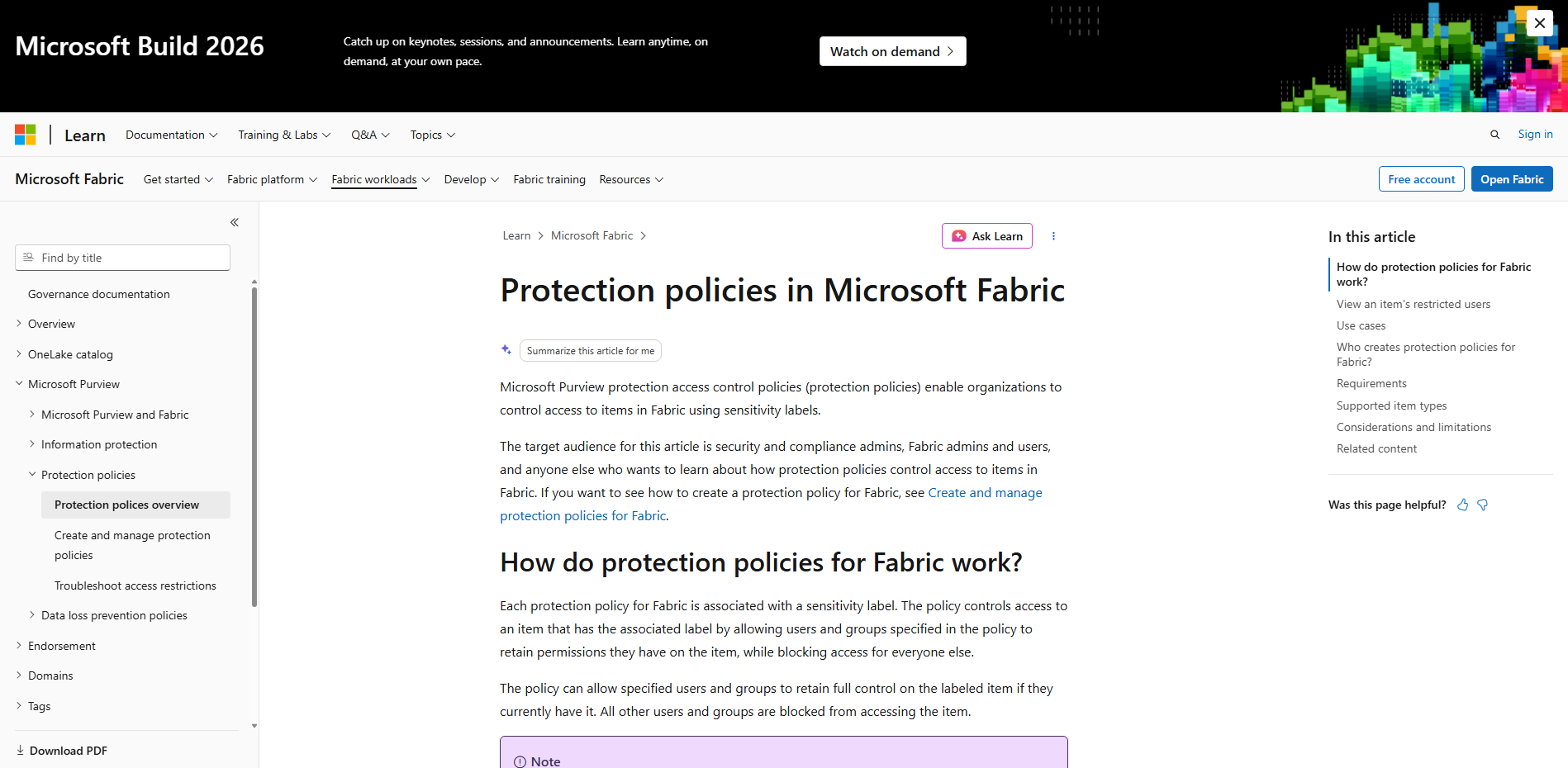
    Protection Policies, powered by Microsoft Purview Information Protection, let you control access based on sensitivity labels. For example, if a dataset is labeled "Highly Confidential," only the users and groups defined in the policy can access it. Everyone else is automatically blocked—even if they have access to the workspace. Think of it as: label it once, protect it everywhere.

  • Why do semantic models matter?

    Semantic models sit at the heart of Power BI's data layer, making them the perfect place to enforce protection. Since one semantic model can power multiple reports, applying a sensitivity label to the model (or upstream Fabric assets such as a Lakehouse or Warehouse) helps ensure protection follows the data wherever it's used.

  • How do you get started?

    Simply configure Protection Policies in Microsoft Purview, apply sensitivity labels to your semantic models, and let Power BI handle the enforcement automatically.

Explore what Power BI can do for your organisation. Discover Business Intelligence and contact us today.