Power BI Launches Fabric Data Days for Students and Professionals

Microsoft has launched Fabric Data Days — a 50-day learning initiative focused on advancing careers in Data and AI. Through live sessions, hands-on challenges, and certification opportunities, participants can gain real-world experience and connect with a global community of data professionals.

Here’s what you need to know:

  • What is Fabric Data Days?

    Microsoft Fabric Data Days is a 50-day global learning experience on Data & AI running from November 4 to December 31, 2025.

  • Live Learning Sessions

    Go beyond theory with real-world demos and deep dives into Power BI and Microsoft Fabric. Learn directly from Microsoft experts, MVPs, Certified Trainers, and global community leaders.

  • Contests & Hands-On Challenges

    Apply your learning through real-world challenges and competitions like the Student Dataviz Contest, Professional Dataviz Contest, Notebooks Contest, and weekly QuickViz Challenges. It’s a fun way to test your skills and showcase your creativity in data visualization.

  • Certifications & Exam Discounts

    Earn certifications that set you apart! Participants can get 100% discounts on exams DP-600 and DP-700, and 50% discounts on exams PL-300 and DP-900.

  • How to Join

    Register now and start your learning journey: https://aka.ms/fabricdatadays

Want to make smarter decisions with data? Discover the power of Business Intelligence and contact us today!
Custom Multisession Apps Now Available in Dynamics 365 Contact Center and Customer Service

Microsoft introduces custom multisession apps in Copilot Service Workspace for Dynamics 365 Contact Center and Customer Service. This new capability lets organisations design multiple tailored workspaces, each with its own sessions, productivity tools, and business logic—enhancing efficiency and flexibility across teams.

Here’s what you need to know:

  • Why it matters

    Previously, teams had to share one Customer Service workspace (CSw) app, resulting in complex sitemap configurations, overlapping views, and higher deployment risks. Now, each business unit can have a dedicated workspace, streamlining operations and reducing administrative overhead.

  • Where it shines

    This capability is especially valuable for banks, insurers, and government agencies, where departments require strict separation of data and UI components.

  • How it works

    Built on model-driven apps and enhanced through the Copilot Service admin center, admins can enable “Multisession with productivity tools” under Workspaces. This wraps the app in the familiar tabbed CSw interface, supporting session-based navigation, Copilot, and macros — just like the standard experience.

  • Real-world impact

    Global organizations are already adopting custom multisession apps to support hybrid personas and dual-licensed users across sales and service scenarios — enabling flexibility while consolidating functionality.

  • What’s next

    Custom multisession apps are now generally available, with Microsoft planning to expand support for more productivity tools, session templates, and cross-app navigation scenarios.

Want to strengthen customer relationships through exceptional service? Discover Customer Relationship Management and get in touch with us today!

Visual Studio’s AI Strategy Hits New Milestone: November Roadmap Revealed

Visual Studio is rolling out its November roadmap detailing how AI-powered agents will become more deeply integrated into the IDE, from new custom and test agents to enhanced chat and planning workflows. The update signals a push to make the IDE “smarter, faster and more intuitive”, including support for multiple simultaneous agents, advanced memory and tool-call features, and governance controls for bring-your-own models.

Here’s what’s in progress:

  • New Agents:

    Microsoft is refining how you find and switch between modes, ensuring both built-in and extension-provided agents can handle more complex workflows. New agents like custom user-created, test, and debugger agents are in the works.

  • Agent Mode & Chat:

    Expect major improvements, including Slash Commands for invoking prompts and managing chats, memory enhancements, tool call updates, and planning lead development.

  • Model Context Protocol (MCP):

    Integrate your entire development stack into Visual Studio with the same security and governance you trust. Microsoft is enhancing MCP UX, performance, and token optimization, alongside a unified experience for MCP servers.

  • Models:

    Developers will gain access to the latest AI models, including GPT-5 Codex in Chat. Work is underway to improve model UX, expand Auto Model in chat, and introduce custom system prompts per model.

Boost productivity and innovation in Dynamics 365 and Power Platform with the intelligence of Infinity AI Agents. Talk to us today to get started!

Microsoft Introduces “Power BI Controller” for Bulk Storytelling Operations

Microsoft today introduced the preview of Power BI Controller, a new add-in designed to streamline presentation workflows. The tool enables bulk operations on multiple embedded Power BI reports within PowerPoint, making it easier for storytellers to ensure consistency and accuracy across all visuals.

Here’s what you need to know:

  • Why use this feature?

    Say goodbye to manually updating every Power BI add-in in your weekly or monthly data-centric presentations. With Power BI Controller, you can refresh, lock, and distribute reports — all in one go.

  • Example Scenario

    Easily manage a monthly review presentation with multiple embedded Power BI reports by switching between live and image views in one action to ensure data is always current and secure.

  • How to use it

    Simply go to “Add-ins” in PowerPoint, search for “Microsoft Power BI Controller,” and add it to your ribbon to start performing bulk operations effortlessly.

Ready to take your data storytelling to the next level? Explore Business Intelligence and get in touch today!

Dynamics 365 Customer Service and Dynamics 365 Contact Center Introduces Quality Evaluation Agent

Quality Evaluation Agent (QEA), launched by Dynamics 365 Customer Service and Dynamics 365 Contact Center on October 24, delivers automated, data-driven evaluations of support interactions to help organisations scale quality assurance efforts. By replacing manual and inconsistent reviews with real-time, AI-powered scoring and coaching insights, QEA is designed to raise service standards, reduce bias, and improve coaching and compliance across customer service teams.

Here’s what you know:

  • What is Quality Evaluation Agent?

    QEA is an AI-powered tool that automatically evaluates support interactions — from cases to conversations — against your organization’s defined quality standards.

  • How does it work?

    QEA uses evaluation criteria to define what quality means for your organization and evaluation plans to determine how and when assessments are triggered — on-demand or event-based.

  • What to expect from evaluations:

    Get detailed performance summaries, scoring breakdowns, AI-generated coaching comments, supervisor review options, and full traceability for consistent, unbiased assessments.

  • Why it matters

    With QEA, you can shorten feedback cycles, improve coaching with actionable insights, enhance customer experiences, detect compliance risks early, identify coaching opportunities tied to sentiment, and uncover systemic issues across teams or products.

Want to see how AI can elevate your organisation’s performance? Discover Infinity AI Agents for Dynamics 365 and Power Platform, and get in touch with us today!

Microsoft launches Custom Agents for .NET — meet C# Expert and WinForms Expert

Copilot now supports purpose-built “custom agents” for the .NET ecosystem, with the debut of two specially trained offerings: C# Expert and WinForms Expert. These agents are designed to deeply accelerate developer workflows by analysing codebases, planning tasks and executing commands with domain-specific expertise.

Introducing two experimental agents for .NET developers:

  • C# Expert Agent

    Get best practices and guidance for C# development. This agent focuses on Core C# principles, code integrity, and testing standards—helping you write cleaner, more efficient code.

  • WinForms Expert Agent

    Perfect for developers working on Windows Forms applications, this agent specializes in UI design patterns, event-driven programming, and tool integrity—ensuring your app stays stable and designer-friendly.

  • How to get started

    Download CSharpExpert.agent.md and WinFormsExpert.agent.md from @github/awesome-copilot, and add them to your repo’s .github/agents folder.

  • Assign with ease

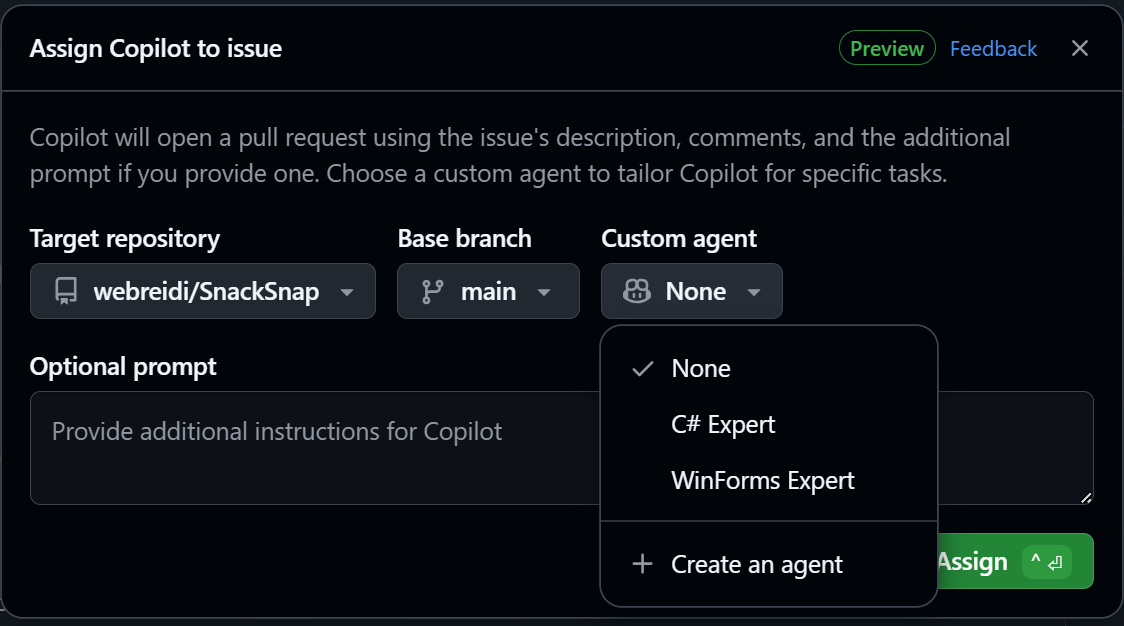
    When assigning an issue to Copilot, simply tag C# Expert or WinForms Expert for tailored support.

  • What’s improved

    Enjoy a smoother development experience with reduced unused code and built-in safeguards to protect your project files and maintain tool compatibility.

Want to unlock more potential in your Dynamics 365 and Power Platform with AI? Discover Infinity AI Agents and get in touch with us today!

Microsoft Power BI Readies Major Upgrade with New Card Visual for Reports

Microsoft has announced that its upcoming general-availability release of the new Card visual in Microsoft Power BI brings a complete rendering overhaul, dynamic layouts, image support and expanded styling controls for key-metric visuals. Users are advised to review their existing reports now—especially visuals with short heights—because the new default spacing and formatting may change appearances once the upgrade goes live.

Here’s what you need to know:

  • Rendering improvements

    The rendering engine has been completely re-engineered for responsive design. Now, when you resize the Card visual, the layout proportions stay consistent — and no more cut-off sections!

  • Impact on existing reports

    These updates may affect how your visuals appear, especially for cards with shorter heights. Once GA is released, default callout size and background formatting will automatically apply — regardless of whether a divider is used.

  • Preparing for GA

    Review your card visuals, adjust divider and background settings for alignment, and fine-tune callout sizes to match your design preferences.

  • What’s new in GA

    Enjoy enhanced image support, collage layout, expanded styling controls, and updated defaults (available as opt-in for existing reports).

See how Power BI can help you visualize data from every angle. Read our Independent Police Conduct Authority case study and contact us today.

Dynamics 365 Customer Service gets built-in session restore for agent continuity

Dynamics 365 Customer Service now includes a session-restore feature that saves open cases, tabs, and workspace states so agents can instantly pick up where they left off after a crash or browser closure. This enhancement helps improve productivity and ensures smoother customer interactions by minimizing downtime and lost progress.

Here’s what you need to know:

  • Reclaim lost time

    No need to reopen every case or rebuild your workspace. Session Restore automatically saves your open sessions, tabs, and navigation context — just log back in, and your environment is instantly restored.

  • Save your space

    Enabled by default, Session Restore captures your open sessions, tab states, navigation context, and productivity tools seamlessly.

  • Real-world impact

    Service reps can resume work instantly after breaks or system updates, supervisors see fewer escalations, and IT spends less time troubleshooting session issues — all adding up to smoother, more efficient operations.

Enhance your customer connections with the right solution. Explore Customer Relationship Management and get in touch with us today!

Microsoft Power BI Launches App-Scoped Copilot in Preview

Microsoft has introduced the new App-Scoped Copilot (Preview) within Microsoft Power BI apps, allowing users to chat with and query curated content confined to a specific app environment. Authored for app-authors, the feature also supports “verified answers” — human-approved responses tied to specific reports — helping ensure quality insights.

Here’s what you need to know:

  • How it works

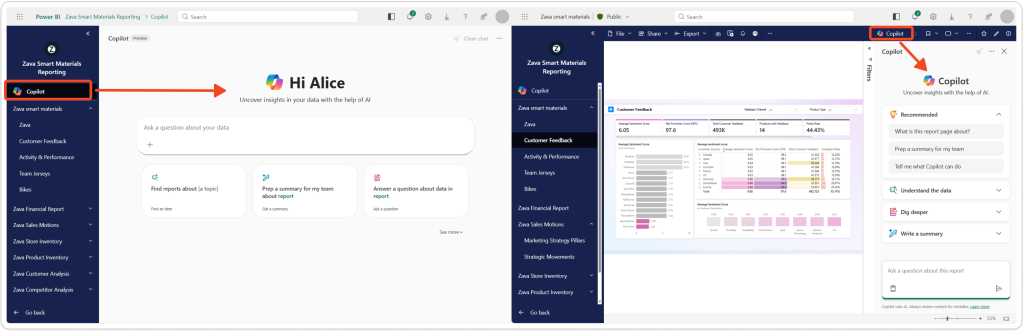
    App-scoped Copilot lets users search, ask questions, and get AI-generated insights from reports within the app. It complements the existing report-scoped Copilot, giving you answers based on all the reports included in your app.

  • Ask questions or get summaries

    Find the insights you need instantly. App Copilot identifies the most relevant reports, confirms your choice, and returns clear answers or summaries—all right inside your app navigation.

  • Helpful tip for app authors

    Keep your reports up to date! Once verified answers are created, update your app to push the latest report changes for your users.

  • Find reporting that matters to you

    Discover reports based on your interests and quickly drill down into insights. You can also switch to report-scoped Copilot within a report for deeper, context-specific analysis.

  • Control at your fingertips

    If Copilot is enabled in your tenant, App Copilot (Preview) is turned on by default for workspace apps. You can manage its visibility in Update app → Setup → Advanced Settings → Show Copilot in app navigation.

Discover how Power BI drives real results. Read our Ngāti Whātua Ōrākei Whai Maia case study and get in touch with us today!

Power Pages Gets a Security & Performance Boost with New Server Logic Feature

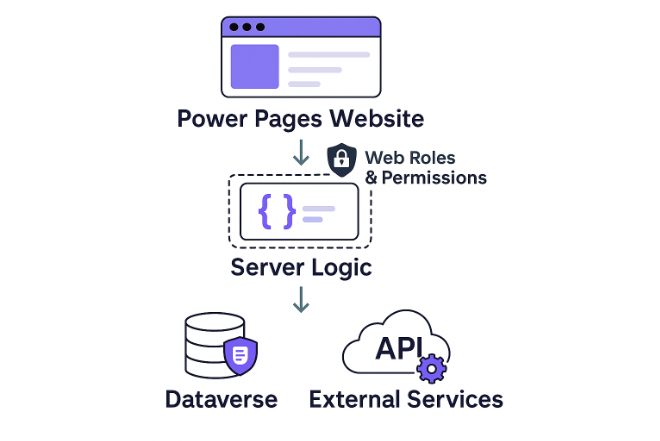
Microsoft is rolling out a preview of server-side logic for Power Pages that allows developers to run JavaScript securely on the server, helping keep business logic and API keys out of the browser. With this update, data operations move into the backend, offering tighter security, improved performance and better integration with the Microsoft Dataverse platform for full-lifecycle deployment.

Here’s what you need to know:

  • How it works

    Server logic executes on the server, keeping it hidden from browsers and protected by web roles and table permissions. You can author and validate code in Power Pages Studio and Visual Studio Code, with all logic stored in Dataverse for consistent lifecycle management and deployment.

  • What you can do

    Server logic lets you securely connect to external services and APIs, perform data operations or transformations, and return processed results to your Power Pages — all while simplifying authentication and boosting integration flexibility.

  • Why use Server Logic

    Gain enhanced security, integration flexibility, improved efficiency, and centralized maintenance — all while ensuring consistency across your Power Pages environment.

  • Language supported

    Write native JavaScript that complies with the ECMAScript 2023 standard.

  • Other information

    Server logic execution follows configured permissions — governed by web roles and table access. Authentication and authorization are managed automatically, so there’s no need for custom authentication code.

Keep your organisation’s information safe and secure with Secret Vault. Contact us today to learn more!