
Visual Studio 2026 makes switching branches, stashing changes, committing, and managing pull requests far more seamless — all inside the IDE, without dropping into external tools. Even complex workflows like juggling bug-fixes and code reviews are now more fluid, thanks to performance optimizations and integrated tooling for Git.
Here’s what’s new and how it helps you work smarter:
Create topic branches fast
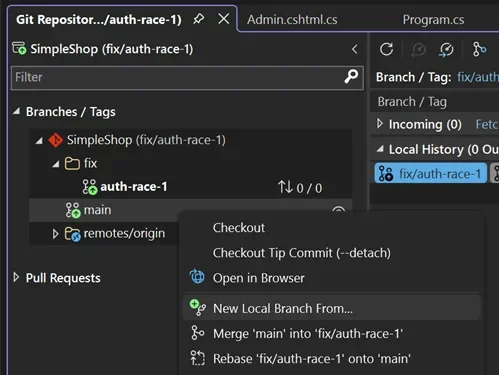
Right-click main in the Git Repository Window → New Local Branch From → name it fix/auth-race-1. You’re switched instantly, with the new 2026 Git status bar keeping you updated on branch and sync status at a glance.
Stash changes and stay flexible
Head to the Git Changes Window → select modified files → Stash All with a note like “WIP: Auth fix before demo.” Your working directory stays clean while you move between tasks.
Pop stashes and review effortlessly
Restore your work via the Stash tab → Pop Stash. Add a quick quality check by hitting the Copilot Code Review button to generate helpful inline comments.
Commit faster with AI-generated messages
Click Generate Commit Message in Git Changes. It auto-formats to your team’s standards and links to DevOps—saving you time and keeping history clean. One click to push and you’re good.
Create PRs and review inline
After pushing, follow the banner in Git Changes to create a pull request. Add reviewers from the dropdown, click Create, and your work is ready for feedback.
Automate your processes and boost efficiency. Discover custom business applications—reach out today!