
Power BI has released a new assessment tool designed to help organizations evaluate their Azure Data Factory pipelines before migrating to Fabric Data Factory. The tool identifies which pipelines are migration-ready, which require updates, and which features aren’t yet supported—enabling Power BI users to plan their transition with greater clarity and confidence.
Here’s what you need to know:
Why Perform a Migration Assessment?
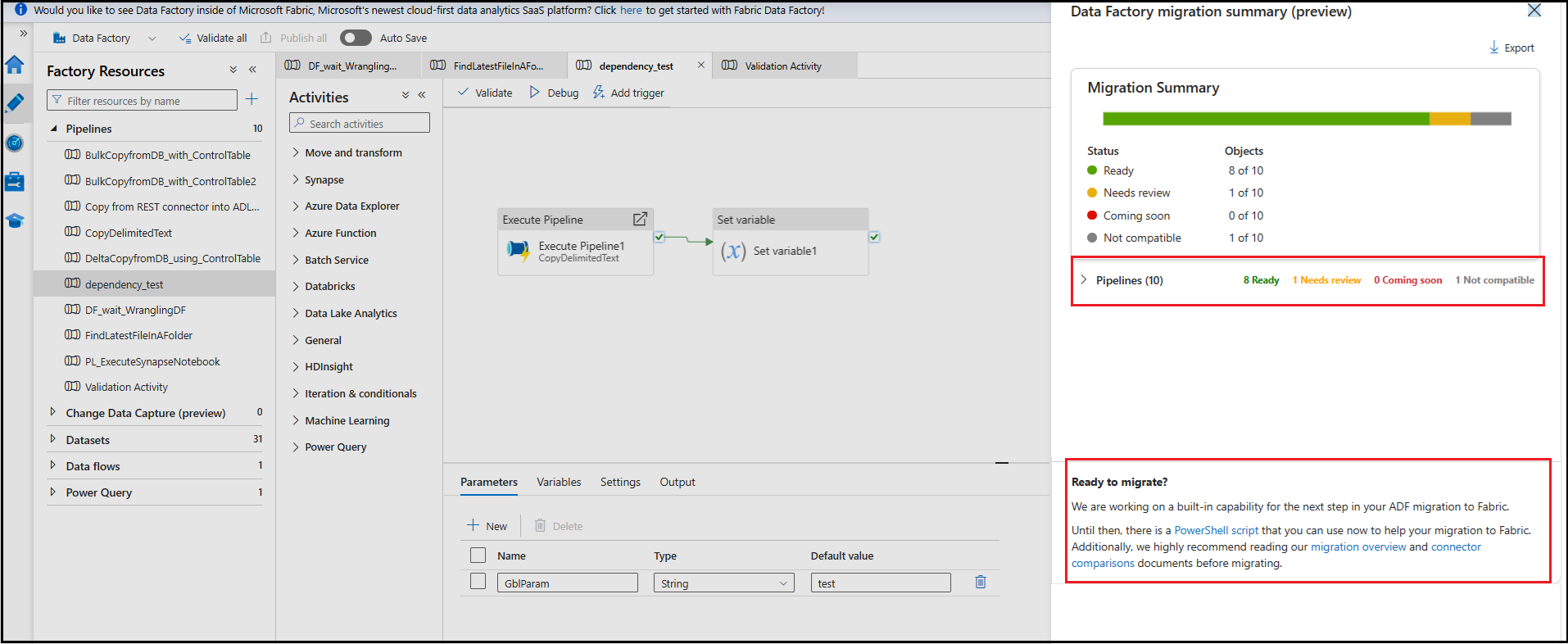
The assessment tool highlights pipelines and activities that are ready, need updates, or aren’t yet supported, helping you plan and track your migration with confidence.
How to Run the Assessment
Open your Azure Data Factory in the Azure Portal and select Run upgrade assessment (preview) from the authoring canvas toolbar to begin the evaluation.
Reviewing the Results
A side pane will display your pipelines and activities, allowing you to expand each item for status details and required remediation.
Exporting the Assessment Summary
Export the results as a CSV to view each pipeline’s migration status—Ready, Needs review, Coming soon, or Not compatible.
What’s Next?
Use the PowerShell upgrade tool for early migration, plan remediation for flagged items, and stay informed as Fabric Data Factory continues to expand feature support.
Take your analytics further with Power BI. Discover powerful BI capabilities and reach out to us to get started.