
Microsoft has announced the general availability of Process Maps in Power Apps, expanding how teams plan and design business solutions. The update allows makers and stakeholders to visually map workflows directly within Power Apps plans, helping align requirements earlier in the development process. This release reinforces Microsoft’s focus on improving clarity and collaboration before apps are built.
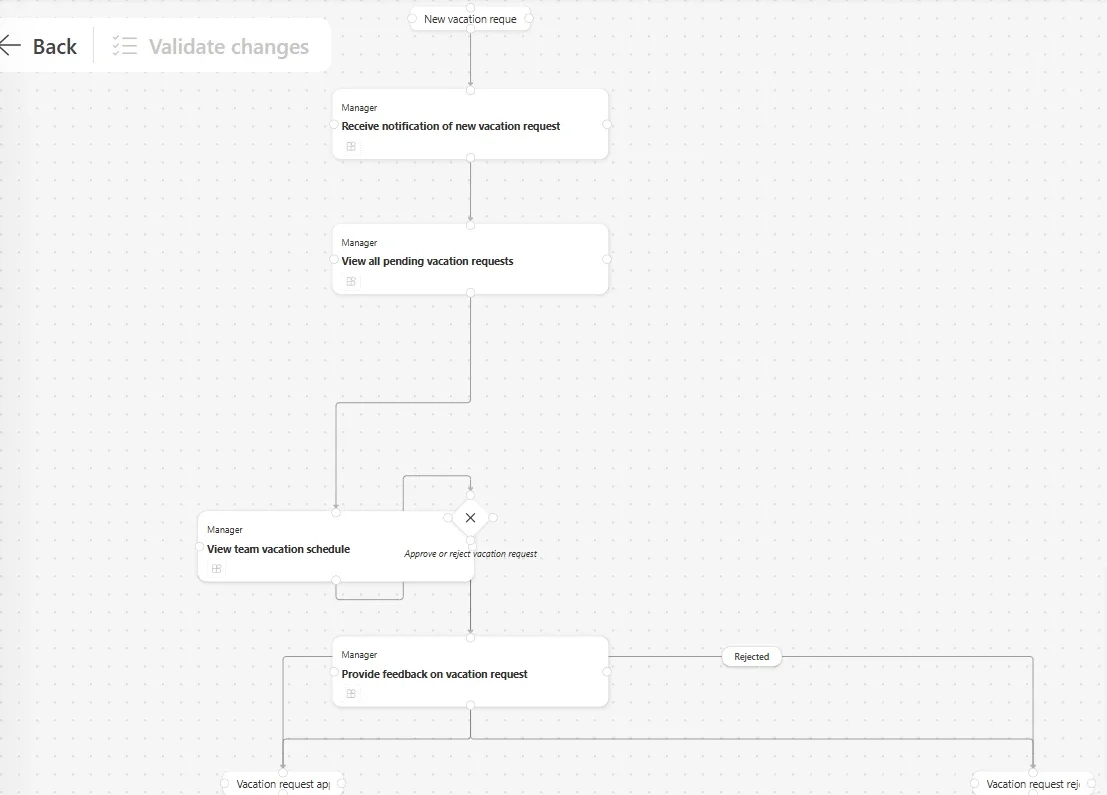
Here’s what you need to know:
Why use Process Maps?
Whether you’re building a new app or refining an existing one, process maps help teams align on steps, roles, and decision points early, reducing rework and misalignment.
What’s new?
Process Maps are now built into Plans, allowing you to visually design end-to-end workflows, collaborate with clearer user story mapping, and update processes using AI-assisted edits validated for consistency.
Why it matters for business solutions
Visualizing processes upfront helps teams identify bottlenecks, reduce miscommunication, and minimize delivery risks—leading to faster decisions, smoother implementations, and better outcomes.
Business impact
Organizations using process maps report faster project cycles, higher solution adoption, and stronger ROI.
How to get started
Open the Plan Designer in Power Apps, create or select a plan, navigate to Process Maps, and start visualizing your workflows.
Unlock greater productivity in Power Apps and Dynamics 365 with Infinity AI Agents. Talk to us today.