Microsoft has introduced a refreshed semantic model settings pane for Power BI, now available in preview. The redesigned experience aligns with the modern Microsoft Fabric interface and aims to make managing semantic models faster and more seamless by keeping users within their current workspace context. The update is part of Microsoft’s continued effort to improve usability and streamline modeling workflows across the Power BI ecosystem.
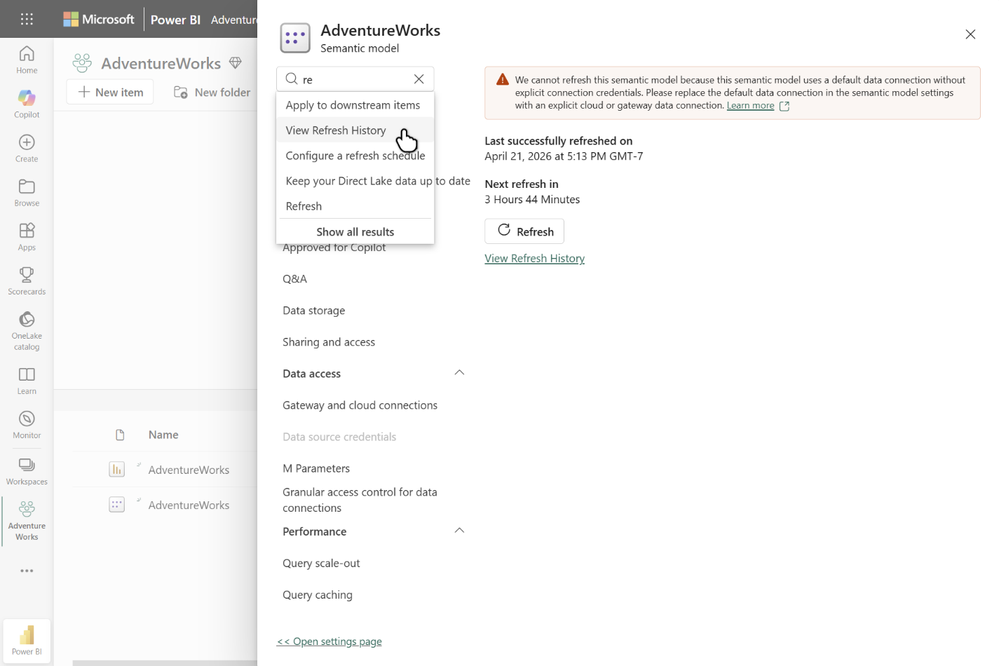
Here’s what you need to know:
Why it matters
The new settings pane keeps you in context, opening instantly without page reloads or navigating away from your semantic model. With collapsible sections, improved organization, and built-in search, it’s now faster and easier to find settings like refresh history, credentials, query caching, and sensitivity labels.
Incremental rollout
The settings pane is currently optional and can be opened from the existing settings page. In the coming months, it will become the default experience, while users will still have the option to switch back to the classic settings page during the transition period.
How to open the settings pane
Navigate to your semantic model’s settings page from the model context menu and select Open settings pane at the top of the page.
Unlock deeper insights and smarter decision-making with Power BI. Discover how Business Intelligence can transform your organisation and contact us today!