Dynamics 365 Enhances Contact Center Security for Sensitive Customer Interactions

Microsoft is rolling out enhanced security features in Dynamics 365 Contact Center to help organizations securely handle high-trust customer interactions, such as payments and identity verification, while protecting sensitive data. The update introduces capabilities like Secure Consult & Transfer, enabling agents to involve external secure endpoints without exposing confidential information. This marks a strategic step toward compliant, friction-free service workflows for industries with strict privacy requirements.
Here’s what you need to know:

  • What is Secure Consult & Transfer?

    Secure Consult & Transfer protects customer journeys by enabling agents to involve external secure endpoints in conversations — while maintaining strict privacy and compliance boundaries.

  • How the security works

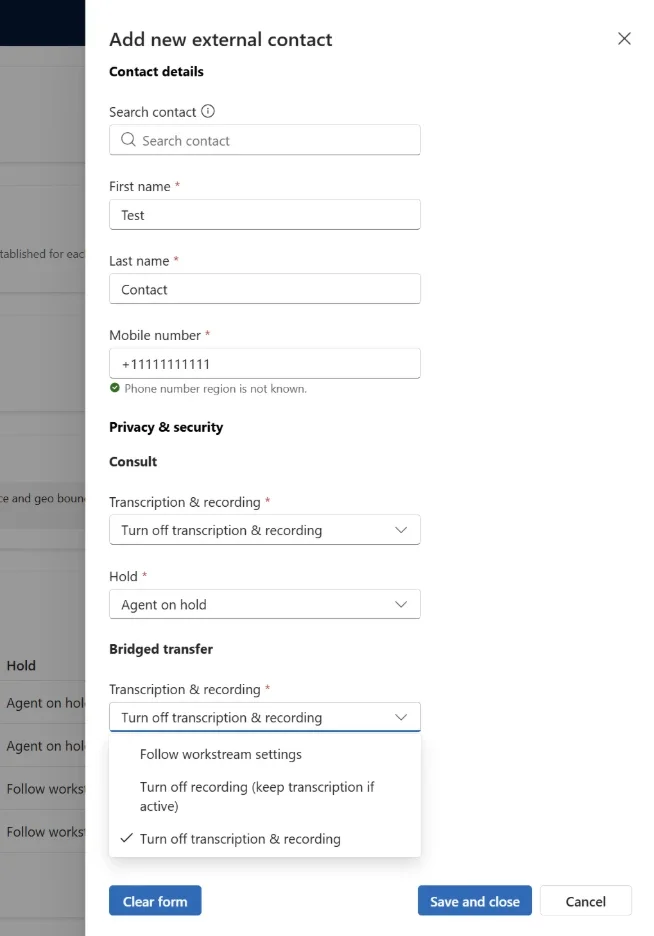
    Secure numbers are configured through specific contact settings. During runtime, the platform automatically enforces protections — no manual intervention required. These settings are flexible and can apply to consult, transfer, or both.

  • How consult and transfer works

    Administrators can control recording and transcription during consult and transfer — choosing to follow workstream settings, stop recording while continuing transcription, or stop both. They can also configure whether customers are placed on hold or managed according to workstream rules during consult.

  • Why use it?

    It protects sensitive customer data without disrupting workflows while enabling secure payment and identity verification scenarios with trusted endpoints. Compliance controls for recording and transcription are applied automatically and safely in real time.

Secure your transactions with your customers using a reliable CRM. Discover the power of customer relationship management and contact us today.
Power BI February 2026 Release Brings Smarter Copilot, New Reporting Tools

Power BI’s February 2026 update brings a wave of enhancements focused on usability, AI integration, and reporting performance. The latest release continues Microsoft’s push to make analytics more intuitive and impactful for businesses.

Here’s what you need to know:

  • Copilot & AI Just Got Smarter

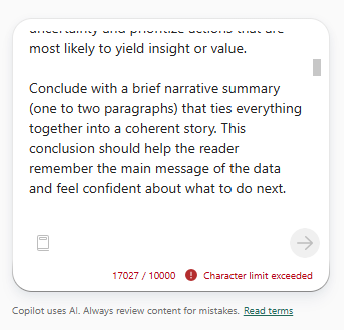
    The Copilot character limit has increased to 10,000 characters across all surfaces—Standalone, Report Pane, Apps, Mobile, and Embedded. This means you can now write longer, more detailed prompts to get richer, more precise AI-powered insights.

  • Reporting: Input Slicer Upgrade

    The Text Slicer is now officially renamed to Input Slicer—and it’s more powerful than ever. Users can filter reports using free-form text with flexible options like exact match, contains, or starts with—making data exploration faster and more intuitive.

  • Modeling: Safer, Smarter DAX

    A new DAX function, TABLEOF, joins NAMEOF as its companion. Together, they make your DAX formulas more resilient by referencing model objects that automatically adapt to renames—reducing fragile text-based logic and improving maintainability.

  • Visualisation: Pie PRO (Filter)

    Pie PRO (Filter) enhances pie and donut charts with advanced labeling and category-level reference markers.This gives users better performance context and the ability to interact directly with chart data.

  • Other Updates: Fabric Copilot Capacity

    Fabric Copilot capacity allows organizations to centralize Copilot usage across Power BI Desktop, Pro, and Premium per-user workspaces into one designated capacity. Starting February 8, 2026, the tenant setting for Fabric Copilot capacities will be enabled by default.

Check out the full list of Power BI’s February 2026 update.

Unleash the power of your data with Power BI. Discover Business Intelligence and contact us today!

Power BI Makes Input Slicer Generally Available to Simplify Free-Form Filtering

Microsoft has announced that the Input Slicer—formerly known as the text slicer—is now generally available in Power BI, giving users the ability to type or paste text directly into a visual to filter report data more flexibly. The new Input Slicer lets report consumers apply text-based filters with operators like contains or starts with, and can even collect free-form user input for scenarios such as comments or task flows.

Here’s what you need to know:

  • What can you do with the Input Slicer?

    Quickly narrow down reports by typing full or partial values — whether it’s an Order ID, Customer Name, or Product Code. Instead of selecting items one by one, simply type what you’re looking for and let Power BI do the filtering instantly.

  • How to get started

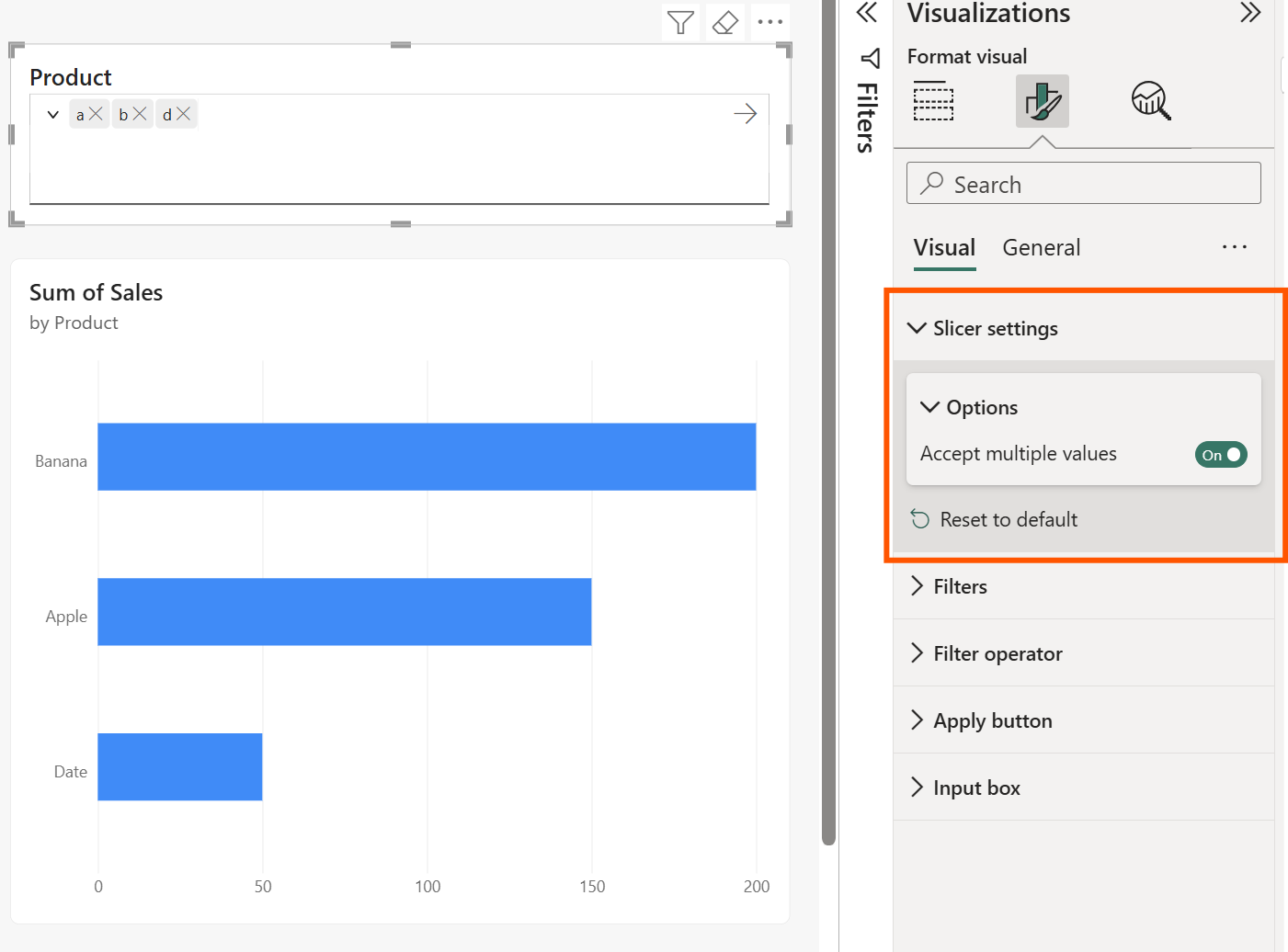
    Create sample data in a blank report. In Power BI Desktop, go to Modeling > New Table and enter your DAX expression. Then build a simple bar chart using Product and Sales so you can see the slicer in action.

  • How it works

    Add the Input Slicer from the Visualizations pane and drag your desired field (e.g., Product) into the Field well. Type a value like “a” and press Enter — matching results instantly appear (e.g., Apple, Banana, Date, Grape).

  • Advanced filtering options

    Choose how your input matches your data using operators like contains, starts with, or exact match. You can also switch between allowing multiple values or limiting the slicer to a single selection.

  • Where this shines

    Perfect for sales teams reviewing specific accounts, support teams searching for tickets, or any scenario that requires fast, precise filtering across large datasets.

Unlock the full potential of your data with Power BI. Discover how Business Intelligence can transform your organisation—contact us today.

Microsoft Rolls Out February Update for Visual Studio 2026

Microsoft has released its February 2026 update for Visual Studio, delivering a fresh set of improvements across AI assistance, diagnostics, and core developer workflows in the IDE. The latest Visual Studio update continues the platform’s evolution with smarter tools and performance refinements aimed at helping developers stay productive in real-world development scenarios.

Here’s a quick rundown of the newest features designed to make you faster, sharper, and more efficient as a developer:

  • Smarter Test Generation with GitHub Copilot

    Generate unit tests for your C# code faster using Copilot. Just type @test in Copilot Chat, describe what you want to validate, and it creates the test code for you — with support for xUnit, NUnit, and MSTest.

  • Slash Commands for Custom Prompts

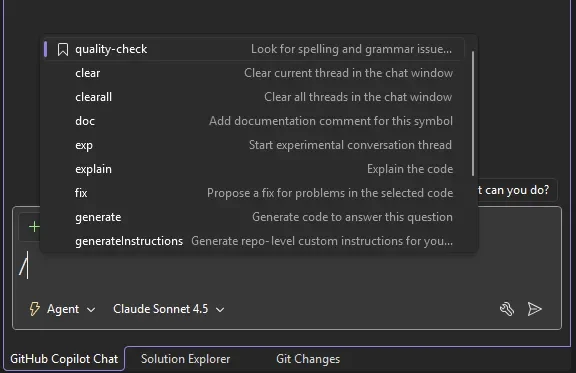
    Access your favorite custom prompts faster using slash commands in Copilot Chat. Type / and your saved prompts appear at the top of the list, marked with a bookmark icon for easy access.

  • C++ App Modernization (Public Preview)

    Copilot-powered modernization for C++ is now available in Public Preview. Upgrade your C++ projects to the latest MSVC versions and resolve upgrade-related issues with guided assistance from Copilot.

  • DataTips in IEnumerable Visualizer

    Debugging just got easier. You can now use DataTips inside the IEnumerable Visualizer. Hover over any value in the grid to see the full underlying object — the same DataTip experience you’re used to in the editor or Watch window.

  • Analyze Call Stack with Copilot

    When debugging pauses, select Analyze with Copilot in the Call Stack window. Copilot reviews the current stack and explains why execution stopped — whether your thread is waiting, looping, or blocked.

  • Profiler Agent with Unit Test Support

    The @profiler agent now works with unit tests. Use your existing tests to measure performance improvements and optimize code more effectively. It can automatically discover relevant unit tests or BenchmarkDotNet benchmarks that exercise performance-critical paths.

Boost your productivity further by partnering your Dynamics 365 and Power Platform with custom business applications. Contact us today!

Microsoft SQLCon Co-Located With FabCon: What You Need to Know

Microsoft is spotlighting key reasons data and analytics professionals won’t want to miss SQLCon, taking place in Atlanta this March. Co-located with the Microsoft Fabric Community Conference, the event aims to bring together the SQL community for learning, collaboration, and insights into the evolving data landscape.

Here’s what you need to know:

  • Event Details

    SQLCon will take place on March 16–20 in Atlanta. One registration gives you access to both conferences—no double sign-up needed—unlocking sessions across SQL, Fabric, and AI.

  • Who Should Attend?

    DBAs, developers, data engineers, architects, and leaders building data-driven teams. Connect with engineers, MVPs, and product teams through live conversations, Q&A sessions, and deep technical discussions.

  • Why Attend SQLCon?

    Explore 50+ deep-dive sessions covering SQL Server, Azure SQL, SQL database in Fabric, performance tuning, security, modernization, and AI-powered solutions—plus hands-on workshops where you’ll leave with practical scripts and patterns you can apply immediately.

  • What Makes It Even More Valuable?

    Get a front-row seat to where SQL is heading. Hear directly from engineering teams, catch first-look announcements, and see live demos across SQL tooling, drivers, SSMS/VS Code extensions, Copilot integrations, and Fabric SQL experiences.

Get your tickets now.

Unlock greater productivity by pairing your CRM with custom-built business applications designed around your processes. Let’s build smarter solutions together—contact us today.

Dynamics 365 Introduces Holistic AI Performance Measurement for Contact Centers

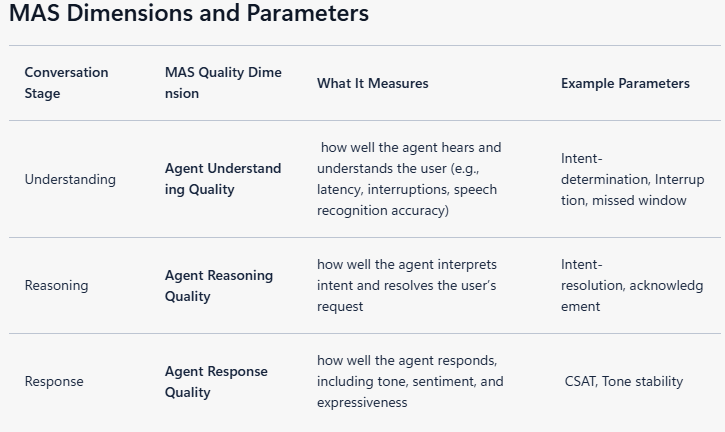
Microsoft is introducing a new performance measurement framework designed to give contact centers a holistic view of how their AI agents truly perform in real-world interactions, beyond traditional metrics like handle time or satisfaction scores. The updated approach focuses on understanding, reasoning, and response quality to help businesses benchmark and improve AI agent effectiveness across channels such as voice, text, and visual interactions.

Here’s what you need to know:

  • Rethinking What “Great” Support Really Means

    A 2017 study by Harvard Business Review found that customers don’t want to be pampered — they want fast, low-effort resolution. Two agent profiles stood out: empathizers and controllers — both effective in different contexts.

  • Smarter AI Through Real-Time Style Adjustment

    AI agents can learn from top-performing human agents and adapt their approach in real time based on conversation context — applying the right tone and control level when it matters most.

  • The Performance Benchmarks That Matter

    High-performing AI agents consistently hit 70–75% first-contact resolution, 78–90% customer satisfaction, sub-800ms response latency, and industry-aligned average handle times.

  • The Core Mechanics of Every Interaction

    Whether human or AI, every interaction follows three steps: understand the issue, reason through the solution, and deliver a clear, effective response.

  • Moving Toward a Unified Performance Score

    The future of AI agent evaluation lies in a composite score — one holistic measure that balances resolution, satisfaction, speed, and reasoning quality into a single view of performance.

Empower your team and deepen customer relationships with a powerful CRM solution. Contact us to get started.

Visual Studio Enhances Visual Studio with Built-In and Custom AI Agents

Visual Studio now includes a suite of built-in AI agents tailored to core developer tasks such as debugging, profiling, testing, and modernisation directly within the IDE. In addition, Microsoft is launching a preview framework that lets teams build their own custom agents — connected to internal knowledge sources — for workflow-specific automation and insights.

Here’s what you need to know:

  • Built-in agents

    Preset agents support debugging, profiling, testing, and modernisation—using your solution’s call stacks, diagnostics, and project context to deliver insights grounded in your actual codebase, not generic advice.

  • Bring your own: Custom agents (Preview)

    Custom agents let you build tailored experiences using the same powerful foundation—workspace awareness, deep code understanding, tool access, and your preferred model. You can also connect them to internal documentation, design systems, APIs, and databases so they go beyond what’s in your repo.

  • Get started

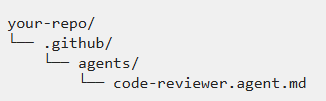
    Create a .agent.md file inside your repository’s /GitHub/agents/ folder to define a custom agent. This feature is in preview, and if no model is specified, the agent uses the one selected in the model picker.

Is your customer relationship management falling short in boosting productivity? Enhance it with custom business applicationscontact us today!

Dynamics 365’s Quality Evaluation Agent Now Supports Conversation Monitoring at GA

Microsoft has announced the general availability of the conversation capabilities in the Quality Evaluation Agent for Dynamics 365 Customer Service and Dynamics 365 Contact Center. The update expands AI-driven evaluation coverage across customer interactions, marking a significant milestone in automated quality oversight for support teams. The release signals Microsoft’s continued push toward scalable, AI-assisted service operations.

Here’s what’s new:

  • What is QEA?

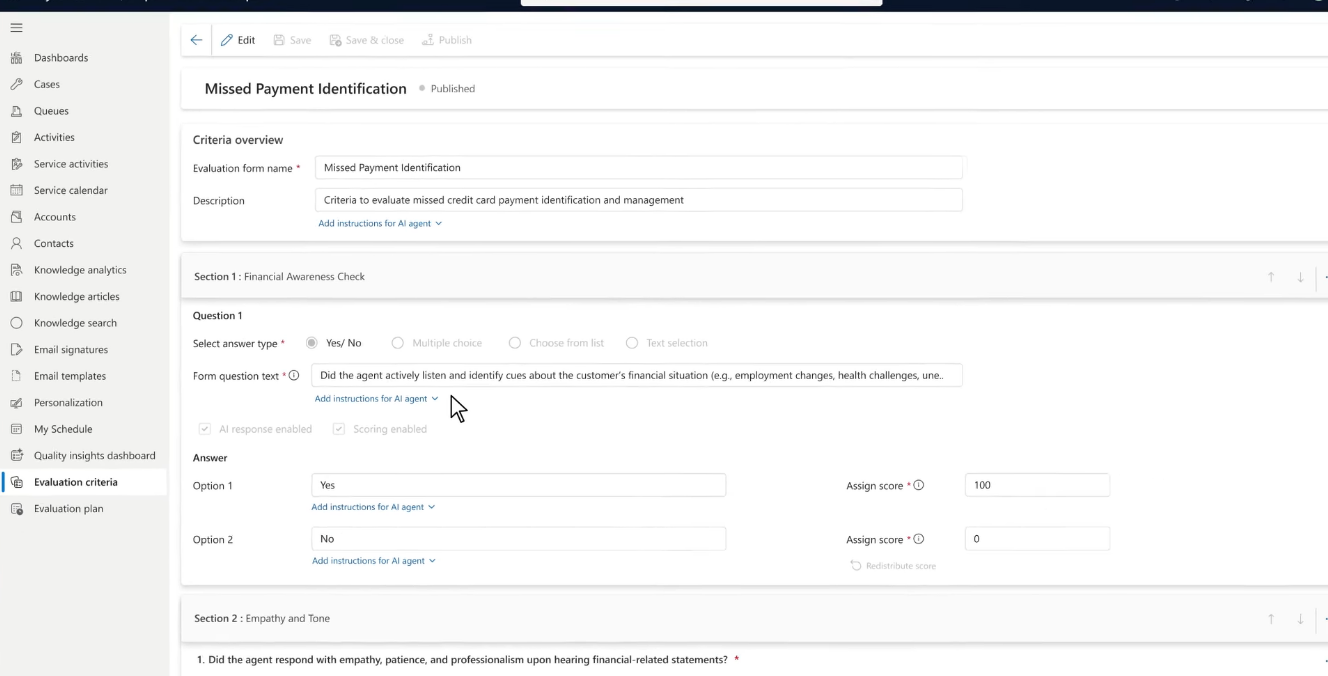
    The Quality Evaluation Agent (QEA) is an AI-powered tool that automatically reviews support cases and conversations against defined criteria to monitor performance and ensure service quality.

  • What’s new?

    Starting February 6, 2026, conversation evaluation is now generally available — joining case evaluation as a full GA capability.

  • What’s coming next?

    Upcoming enhancements include multilingual support, criteria versioning, critical question flagging, simulation capabilities, and improved knowledge-source adherence.

Discover how a modern Customer Relationship Management can support your business goals. Contact us to learn more.

GitHub Copilot Testing for .NET Now Generally Available in Visual Studio 2026

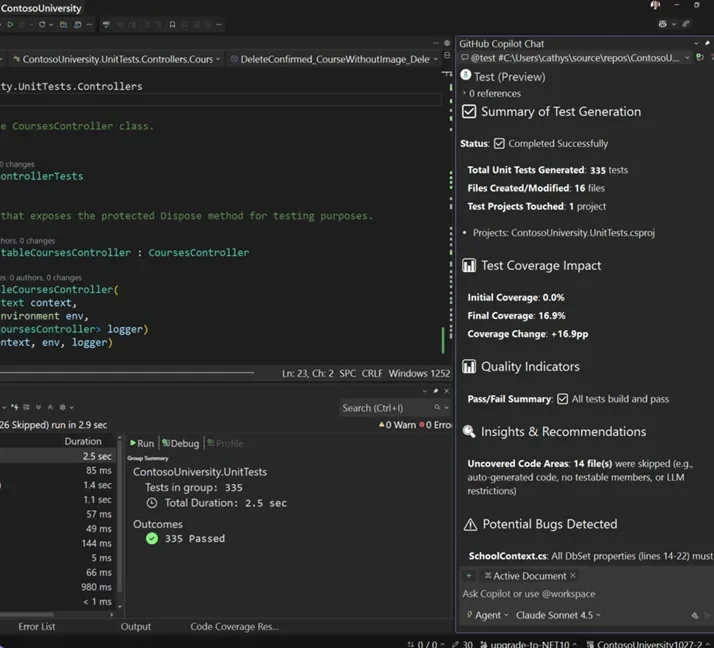
Microsoft has officially rolled out GitHub Copilot testing for .NET as part of Visual Studio 2026 v18.3, bringing AI-driven unit test generation directly into the IDE. The new capability helps developers automatically generate, build, and run high-quality tests for C# code, shortening the feedback loop between writing and validating code. Early users can now leverage richer IDE integration and more natural prompting for widespread test automation.

Here’s what you need to know:

  • Built for real testing workflows

    The testing agent understands your solution structure, frameworks, and build system — acting as an end-to-end workflow, not just a one-off prompt.

  • Natural, free-form prompting

    Simply start with @Test and describe what you want in plain language — no rigid commands required.

  • More control over test generation

    Generate or fix tests, target coverage goals, and apply your team’s testing conventions using simple prompts. You can reference specific code areas or even include current Git changes for more precise results.

  • Getting started

    Open your C# project or solution, start a new Copilot Chat thread, and begin your prompt with @Test, then select Send. Test Explorer shows the results as the tests are generated, and once complete, GitHub Copilot testing provides a summary in Copilot Chat.

Complement your Dynamics 365 CRM with custom business applications for maximum productivity. Contact us today.

Power Apps Introduces MCP and Enhanced Agent Feed in Public Preview

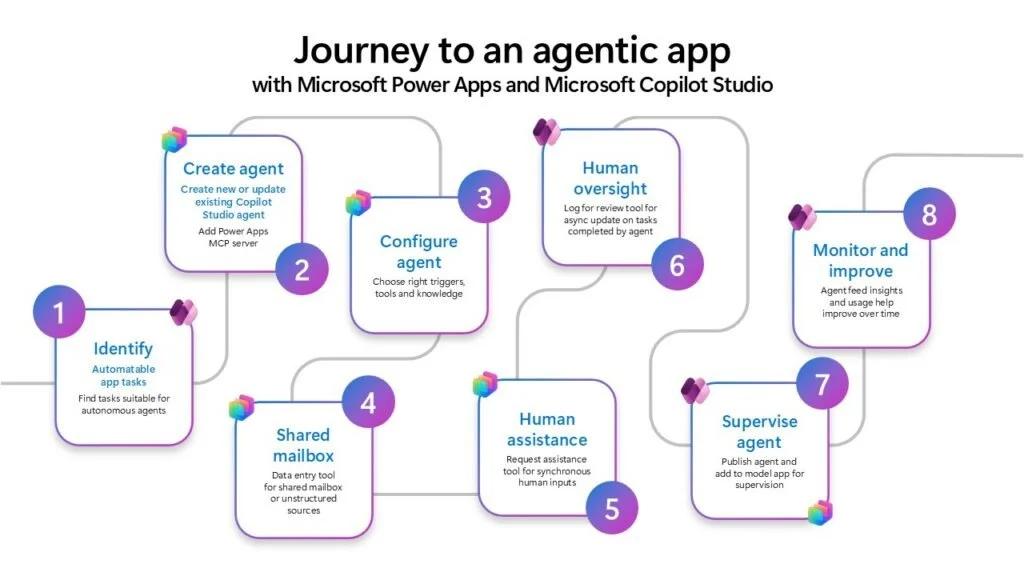
Microsoft has introduced a new public preview for Power Apps, highlighting its growing focus on AI-assisted business applications. The update brings MCP and an enhanced agent feed, pointing toward more interactive and intelligent user experiences. It represents another step in turning everyday apps into collaborative workspaces between people and AI.

Here’s what this means for organisations:

  • Automate repetitive app tasks

    AI agents can extract data from emails, files, or shared folders and create records automatically — with human approval before completion. Less manual entry, fewer errors, faster processing.

  • Human-in-the-loop supervision

    Users can review, guide, or take control of agent actions directly inside the app through built-in supervision tools. Keep governance and trust while benefiting from automation.

  • A redesigned collaborative agent feed

    A shared workspace where humans and AI work together — with side-by-side comparisons, task tracking, and performance insights. Clear visibility into what AI is doing and why.

  • Turn existing apps into agentic apps

    Embed agents into the apps employees already use daily — no rebuild required. Faster adoption and real productivity gains.

  • Scalable AI for real business processes

    From data entry to broader CRUD operations, the MCP framework enables enterprise-scale automation across workflows — assistance → autonomy → collaboration.

Want AI to help with your work in Dynamics 365 and Power Apps? Explore Infinity AI Agents and contact us today!