Power BI Adds Rich Interactivity to Images with New Visual Enhancements

Microsoft Power BI is rolling out a major update to its image visual, giving report creators more flexibility and interactivity. The new features include state-based formatting (hover, pressed, default), richer styling options, and enhanced image source control. With these improvements, images in reports can now be more dynamic, branded, and responsive.

Here’s what you need to know:

  • State-based customization

    Style your image visual across multiple interaction states — All, Default, Hover, and Pressed — to create richer, more responsive report experiences.

  • Rich styling controls

    Power BI now offers more precise control over backgrounds, borders, and shapes, making it easier to align the image visual with your report’s design.

  • Image sources and effects

    You can now pull images from URLs, data columns, or device uploads, and fine-tune them with improved fit options and effects like exposure, contrast, saturation, and blur.

  • How to get started

    Insert an Image Visual from the Insert tab or Visualizations pane, choose your style and state, and start customizing to bring your report visuals to life.

Discover more capabilities in Power BI. Explore Business Intelligence and contact us today!

Microsoft Unveils “New Power Apps” with AI-Agent Driven Development

Microsoft has launched a redesigned Power Apps experience, introducing a collaborative, AI-agent powered development environment at Microsoft Ignite 2025. The new platform enables makers to describe their app ideas in natural language, and a team of intelligent agents will automatically generate data models, user stories, and full-stack code. With tighter integration of Microsoft 365 Copilot, organizations can build, manage, and scale apps securely on the Power Platform.

Here’s what’s new:

  • Build apps without the hassle

    The new developer experience at vibe.powerapps.com empowers everyone — from business users to pro devs — to co-create with AI agents that help define requirements, generate data models, and now even code full-stack applications in minutes.

  • AI-powered creation

    Apps, agents, and Microsoft Copilot now work in sync, delivering a unified AI-assisted building experience across business and productivity apps.

  • Enhanced governance & security

    Premium Power Platform governance capabilities continue to grow. The Managed Platform now includes improved inventory and usage reporting, giving admins instant insights into apps, automations, and agents.

  • Build apps that understand the why

    Power Apps now features a reimagined agentic experience that goes beyond surface-level instructions. Simply describe what you need, and AI agents craft user stories, optimize data models, and generate full-stack code — all based on the intent behind your idea.

Want to pair your Dynamics 365 and Power Platform with applications that work for you? Discover our Custom Business Applications and contact us today.

New Card Visual Now Generally Available in Power BI Reports

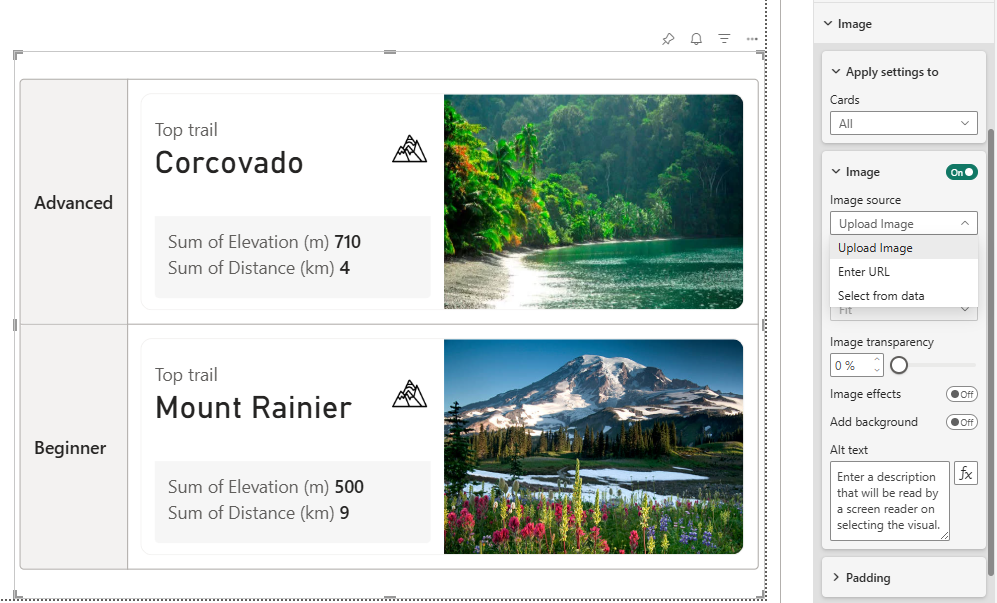
Microsoft Power BI has officially released the revamped Card visual in general availability, giving report creators a more modern, visually compelling way to surface key metrics. The update brings major design upgrades: it supports hero images, offers new default styling, and introduces a flexible collage layout for better visual storytelling.

Here’s what’s new:

  • Uploading hero images

    You can now add hero images in three ways: upload directly from your device, paste an image URL, or use an image sourced from a data column.

  • Modernized default styling (opt-in for existing reports)

    The updated design introduces improved spacing, cleaner typography, and a refreshed layout—helping your reports look more professional right out of the box.

  • More layout and ordering options

    Leverage the new dynamic collage layout to emphasize key sections while maintaining balance across the visual. You can also control the order of the Callout area, Reference label, and hero image.

  • UI and experience enhancements

    Expect smoother alignment, more consistent spacing, and overall layout improvements—covering callout image alignment, background image behavior, reference label padding, and autogrid enhancements.

See the impact of smarter data visualization with Power BI. Explore our Independent Police Conduct Authority case study and contact us to get started!

Power BI Mobile Gets a Standalone Chat Copilot to Access Data Anywhere

Microsoft is rolling out a preview of standalone Copilot in its Power BI mobile apps, enabling users to “chat with your data” directly from their phone or tablet. This full-screen AI interface brings the same conversational experience found in Power BI Service to mobile, allowing you to ask questions, get summaries, and access insights without opening individual reports.

Here’s what you need to know:

  • How to Get Started

    To use Standalone Copilot, your activity must be linked to a capacity—either Fabric Copilot capacity or a workspace with Fabric capacity. Once enabled, you’ll see a new Copilot button on your mobile home screen, ready for instant insights.

  • What You Can Do With It

    Go beyond basic Q&A with interactive visualizations, citations in summaries, and dictation support on iPhone and iPad.

  • Share Insights Effortlessly

    Share insights easily using the share button from the visual pane or copy responses directly from the chat for quick collaboration.

  • Get Your Data AI-Ready

    Structured, clear data helps Copilot deliver stronger insights. Semantic model authors can use built-in tools to get their data AI-ready

Discover the benefits Power BI can bring to your organization. Explore Business Intelligence and contact us today!
Microsoft Simplifies Upgrading with Visual Studio 2026

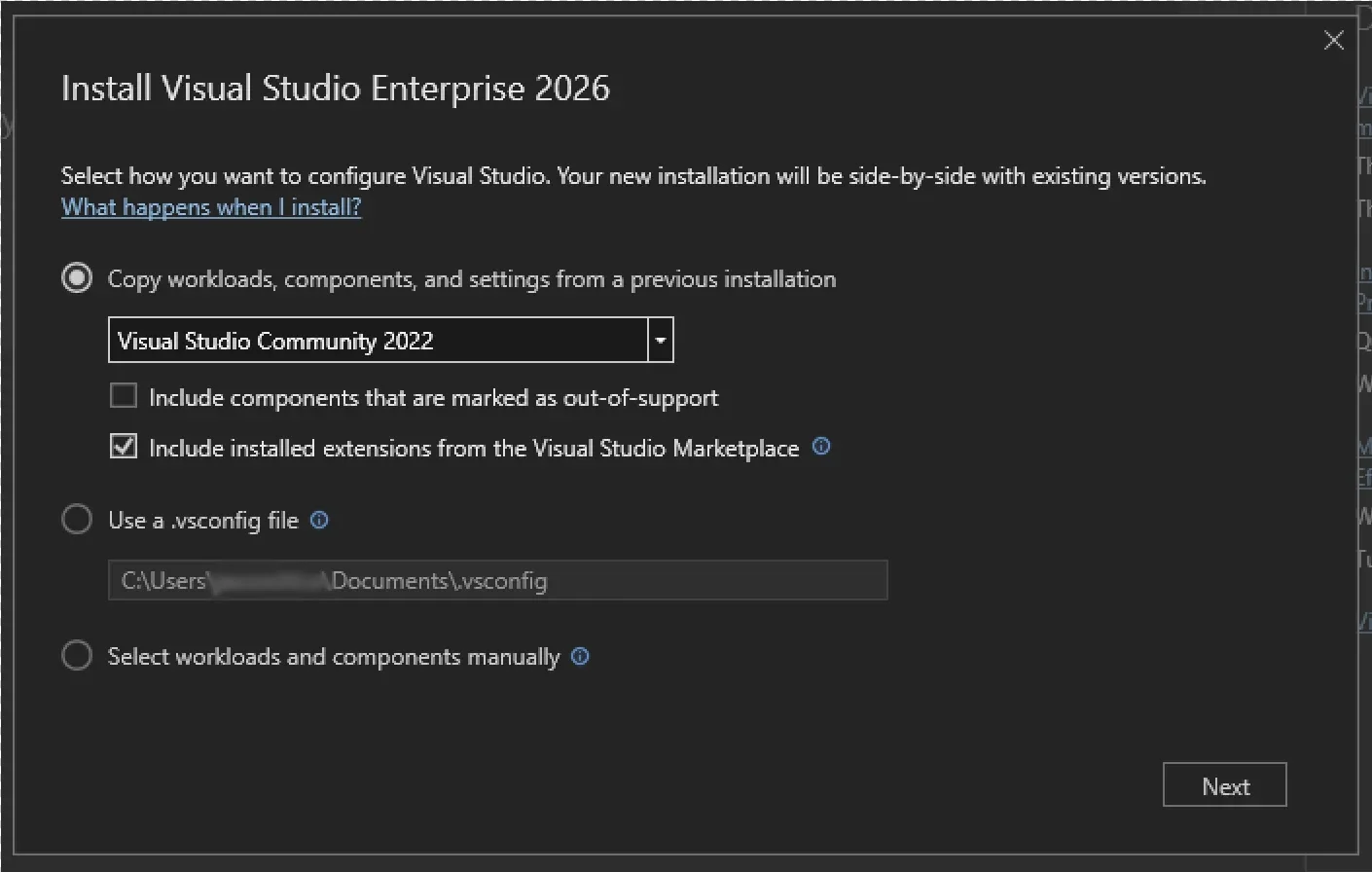
Microsoft is rolling out a smoother migration path for developers moving from Visual Studio 2022 to Visual Studio 2026. The new installer copies over workloads, settings, extensions, and SDKs automatically — letting you spend minimal time on setup and jump straight back into coding.

Here’s what’s new and better:

  • A Smarter Install Experience

    The new Visual Studio Installer makes upgrading seamless. It detects your existing Visual Studio 2022 setup and can rebuild it in Visual Studio 2026—including workloads, toolsets, SDKs, extensions, and settings.

  • Easy Setup on a New Machine

    Setting up somewhere new? Just import your .vsconfig and pair it with your .vssettings file to recreate your exact environment—fast.

  • Setup Assistant (In-IDE Acquisition)

    When you open a project, the Setup Assistant automatically detects your project’s required dependencies. With support for multiple toolsets and SDKs, you can easily retarget to the latest version or install missing dependencies on the spot.

  • GitHub Copilot App Modernization – Now Built In

    Copilot’s app modernization agent helps you upgrade projects, migrate them to Azure, detect outdated dependencies, recommend improvements, and apply code changes in real time—keeping your workflow smooth and uninterrupted.

  • Automatic Updates on Close

    Updating is now effortless with Update on Close. When you’re done coding, Visual Studio downloads and installs updates after you close the IDE, so your next session always starts with the latest improvements.

Enhance your Dynamics 365 and Power Platform with custom-built business applications. Contact us today!

Power BI to Default to PBIR Format Starting January 2026

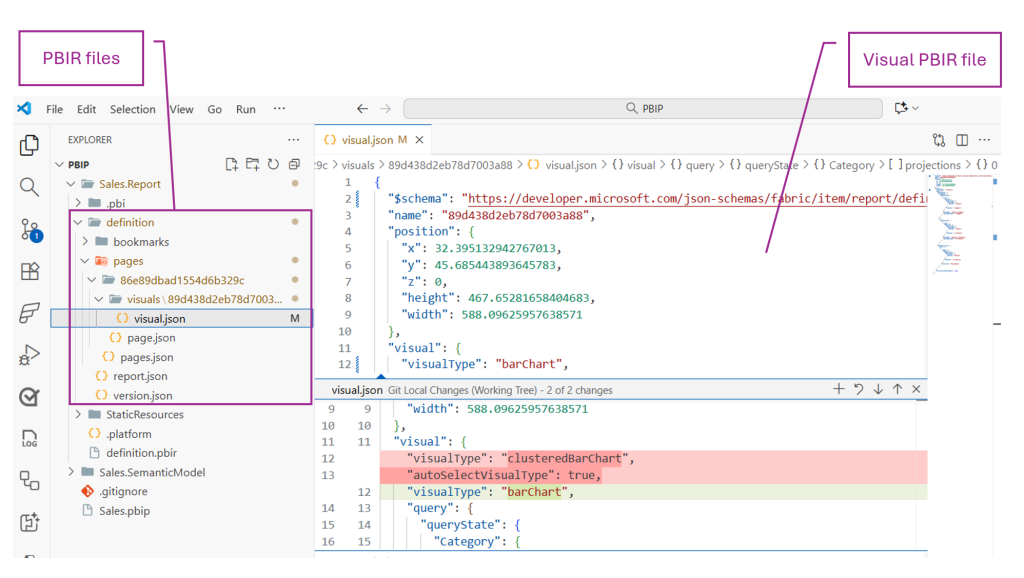
Microsoft is shifting the default Power BI report format to PBIR — the enhanced, code-friendly format — starting January 2026. Existing reports will be automatically converted when edited and saved, marking a major milestone ahead of full general availability.

Here’s what you need to know:

  • Why PBIR?

    PBIR unlocks modern development practices with full support for source control, CI/CD, collaborative development, and AI-powered automation. Developers can now programmatically create, edit, and manage reports like never before.

  • When Is It Becoming Default?

    Starting January 2026, all new reports built in Power BI Service or Power BI Desktop will use PBIR by default. Editing and saving existing reports will automatically convert them to PBIR.

  • How to Opt Out During The Preview

    Simply turn off the PBIR metadata options in Power BI Desktop or disable the tenant setting in Power BI Service—though these won’t be enforced until January 2026.

  • General Availability

    Once PBIR reaches GA, it becomes the only supported report format. All reports will convert automatically, and PBIR-Legacy will be deprecated.

Ready to make smarter, data-driven decisions? Explore Business Intelligence and contact us today!

Visual Studio 2026 Brings Agentic Cloud Automation with Built-In Azure MCP Server

Microsoft has integrated Azure MCP Server directly into Visual Studio 2026, enabling developers to manage cloud resources through natural language rather than switching between tools. The built-in support promises to streamline workflows, improve security, and boost productivity by reducing manual context-switching.

Here’s what you need to know:

  • What Is Azure MCP Server?

    Azure MCP Server is a standards-based Model Context Protocol server that enables AI agents to securely access and manage Azure resources using natural language. It helps streamline cloud operations, reduce manual effort, and increase developer productivity—without needing custom integrations.

  • Why It Matters

    With MCP tools built in, you can generate Azure-related code, manage resources, and apply best practices using natural language. This helps simplify cloud operations and makes troubleshooting faster and more efficient.

  • Additional Azure Development Tools

    You also get enhancements like automated CI/CD setup, effortless publishing, and Azure CLI command generation—making the end-to-end development experience smoother.

  • How To Get Started

    Download Visual Studio 2026, enable Azure and AI Development, and turn on GitHub Copilot in the Visual Studio Installer. Launch Visual Studio, open GitHub Copilot Chat, and enable all Azure tools including Azure MCP Server from the Tools menu.

Ready to boost productivity with AI in Dynamics 365 and Power Platform? Discover Infinity AI Agents and get in touch with us today.

Developer-Centric Makeover Arrives in Visual Studio 2026: Cleaner UI, Smarter Tools

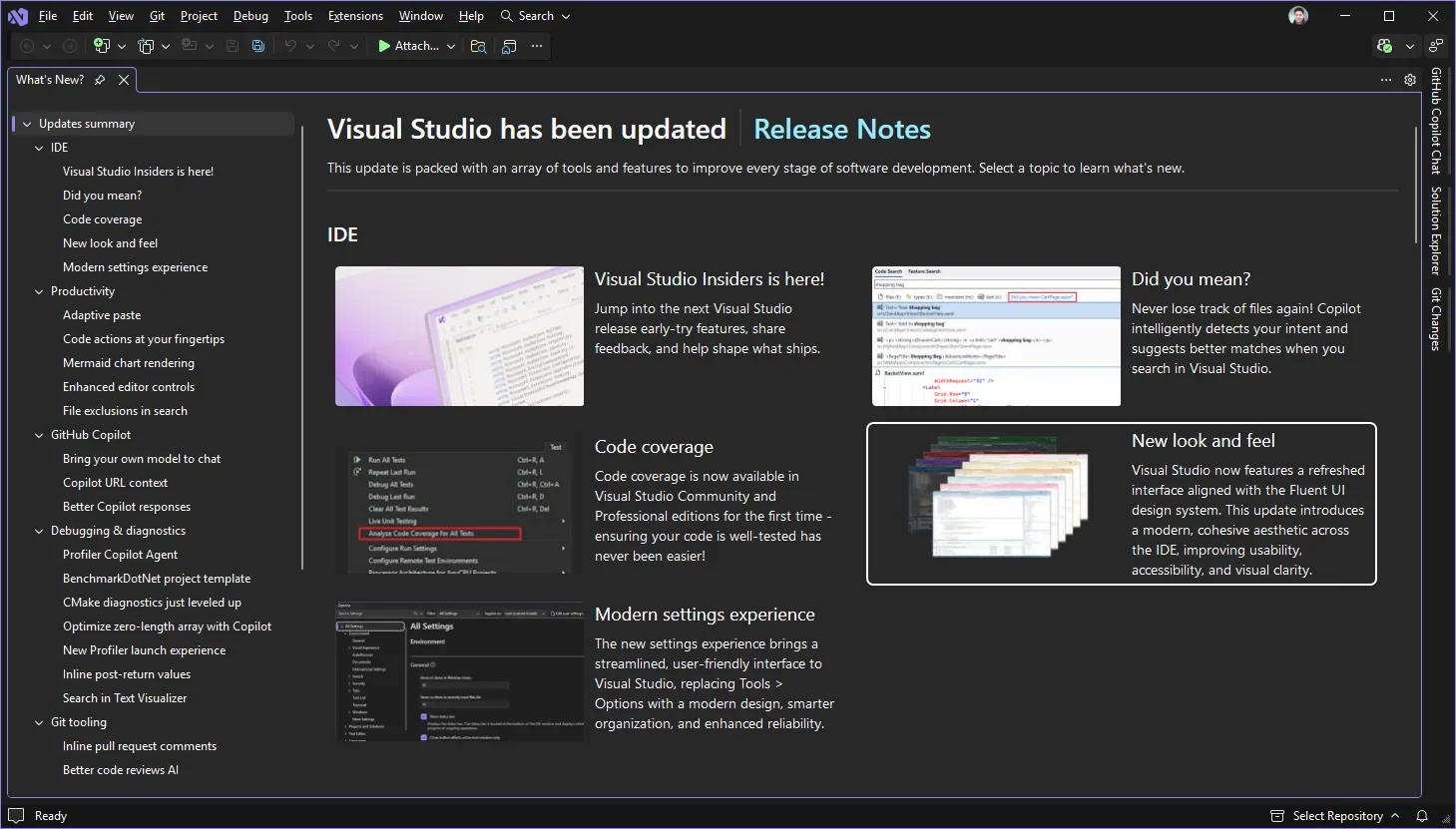
Microsoft has revealed the redesigned user experience of Visual Studio 2026, featuring a cleaner, distraction-free interface built around developers’ workflows. With new typography, iconography, settings overhaul and AI-powered enhancements, it aims to make the IDE more intuitive, accessible and performance-ready at enterprise scale.

Here’s what you need to know:

  • Code-First Design

    Small inconsistencies and visual clutter have been addressed through refined UI details, improved spacing, and clearer navigation. You’ll also notice refreshed Get Started and What’s New experiences for a smoother, more developer-friendly workflow.

  • Modern, Consistent, and Transparent Settings

    The settings experience has been modernised to make configuration easier than ever. Enjoy a more streamlined UI, smarter search results, and a new underlying JSON file that makes every change trackable in real time.

  • Customisable Themes

    Visual Studio 2026 introduces 11 new tinted themes with subtle color accents on Light or Dark backgrounds. Enhanced contrast and improved text legibility support both personalization and accessibility—while reducing eye strain.

  • New Editor Appearance Options

    A new editor appearance setting lets you choose whether your editor matches the IDE theme or stands apart. Your font family, size, and style persist across themes.

Enhance the potential of your Dynamics 365 and Power Platform with customised applications. Explore Custom Business Applications and contact us today!

GitHub Copilot Launches Copilot Auto Model Selection in Visual Studio in Preview Mode

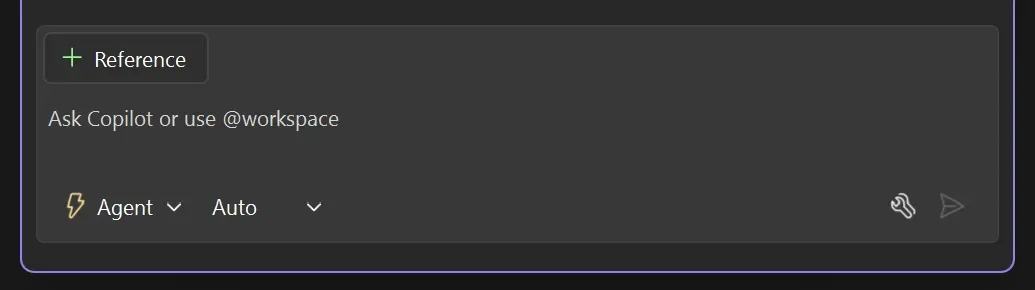
Microsoft has introduced a preview of “Auto Model Selection” for GitHub Copilot that automatically chooses the optimal AI model for each task — removing the need for manual model selection. The feature promises faster responses, fewer rate-limit issues and even a 10 % discount on premium requests for paid users.

Here’s what you need to know:

  • Why Use Auto Model Selection

    Skip the guesswork — Copilot automatically chooses the best AI model for your task, helping you focus on building instead of configuring.

  • How It Works

    Copilot intelligently picks the optimal model to deliver top performance and reduce rate limits. It can switch between GPT-5, GPT-5 Mini, GPT-4.1, Claude Sonnet 4.5, Claude Haiku 4.5, and others — unless your organization enforces a single model. Currently, paid users benefit from the Claude Sonnet 4.5 model by default.

  • What’s Next

    GitHub plans to expand Auto Model Selection with dynamic switching between models, broader language model support, and improved transparency for users.

Save time and boost productivity with Dynamics 365 and Power Platform. Discover Infinity AI Agents and contact us today!

Visual Studio 2026 Goes Live with Major AI and Performance Boost

Microsoft has officially released Visual Studio 2026, delivering faster performance, a redesigned interface, and advanced AI capabilities to enhance the developer experience. Early feedback highlights smoother workflows and improved productivity. Discover the key updates and new features that make this release stand out below.

Here’s what’s new:

  • Faster Performance

    No more lag disrupting your flow! Solution load times are now over 50% faster, making the IDE feel lightweight and effortless — even on large projects.

  • More Responsive UI

    Enjoy a smoother experience as UI freezes have been cut by more than half. Stay productive while Visual Studio keeps up with you.

  • AI-Native IDE

    Meet the world’s first Intelligent Developer Environment (IDE) — AI is built right in to reduce friction, surface insights, and help you code smarter, not harder.

  • New AI Agents for C# and C++

    Tailored for professional developers who value precision and speed. These new agents keep you in control while boosting productivity.

  • Seamless Compatibility

    Already using Visual Studio 2022? Great news — 2026 is fully compatible with your existing projects and extensions. No migration hassles, no surprises — just open, code, and go.

Take your solution further with apps built for your business. Discover Custom Business Applications and contact us today!