
Microsoft has announced that Translytical Task Flows in Power BI are now generally available, marking a major step in transforming reports into action-driven experiences. The feature enables users to update data, trigger workflows, and interact with external systems directly within reports. This shift brings Power BI closer to a unified analytics and operations platform, reducing the gap between insight and execution.
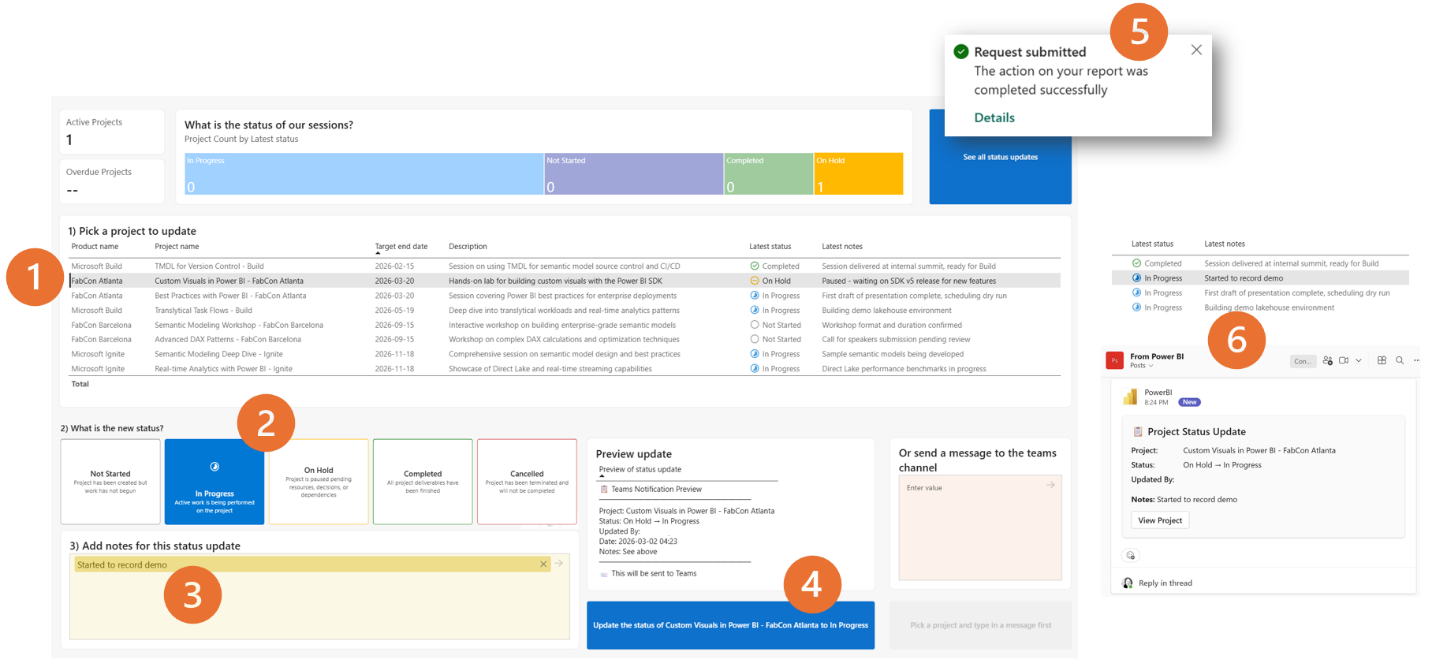
Here’s what you can do:
Add data
Create new records straight from your report. For example, a customer service rep can add a new customer while reviewing accounts—and see it reflected instantly.
Update data
Modify existing records in real time. A logistics coordinator can update order statuses or add shipment notes while working through their queue.
Delete data
Clean up outdated or unnecessary records. Inventory managers can remove discontinued products while monitoring stock levels.
Call external APIs
Trigger actions in other systems via API requests. For instance, a sales rep can submit a discount request that posts directly to Microsoft Teams for manager approval.
More capabilities
Go beyond basic data edits with annotations, data quality management, workflow automation, and even AI-assisted decision-making.
See how the Independent Police Conduct Authority gains better oversight of complaints data with Power BI. Explore the case study and get in touch with us today to transform your own data into actionable insights.