
Microsoft has announced that Azure MCP tools are now natively integrated into Visual Studio 2022, removing the need for separate extensions and streamlining the developer experience. The update embeds these tools directly within the Azure development workload, enabling seamless access through GitHub Copilot Chat. This shift aims to reduce setup friction while giving developers easier access to over 230 tools across multiple Azure services.
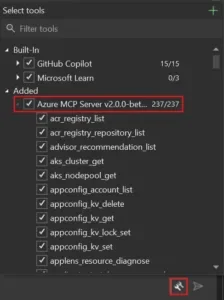
Here’s what changed and why it matters:
Built-in by default
Azure MCP tools now ship with the Azure development workload. Once enabled in GitHub Copilot Chat, they stay active across sessions—no repeated setup.
230+ tools at your fingertips
Access over 230 tools across 45 Azure services directly within GitHub Copilot Chat, supporting your entire development lifecycle.
From learning to production
Ask questions about Azure services, get architecture recommendations, configure apps, deploy resources, and troubleshoot issues—all without leaving Visual Studio.
Quick setup
Update Visual Studio 2022, ensure the Azure development workload is installed, sign in, and enable the Azure MCP Server in Copilot Chat.
A few things to note
Azure MCP tools are off by default and must be enabled manually. Availability depends on your Azure permissions and requires an active GitHub Copilot subscription.
Your CRM can only take you so far—unlock its full potential with custom business applications built around your operations. Get in touch with us today and start transforming the way your organization works.