
Power BI is making report design faster with a preview of modern visual defaults and improved theme customisation. The latest update helps authors apply consistent formatting across reports while reducing the time spent styling individual visuals.
Here's what you need to know:
Modern Visual Defaults
Start with professionally styled visuals automatically on a new report page. Whether you're working with a local semantic model or a live connection, Power BI provides polished defaults so you can focus on your data rather than formatting.
Customise Your Entire Report Theme
The new Customise Theme pane lets you update report-wide formatting from one place. Instantly preview changes to colours, fonts, visual properties, pages and filters without editing visuals individually.
Manage Themes with Ease
Create, import, export or edit custom themes using JSON files and tools such as VS Code with Copilot. You can also switch base themes or preserve your preferred base theme when sharing reports.
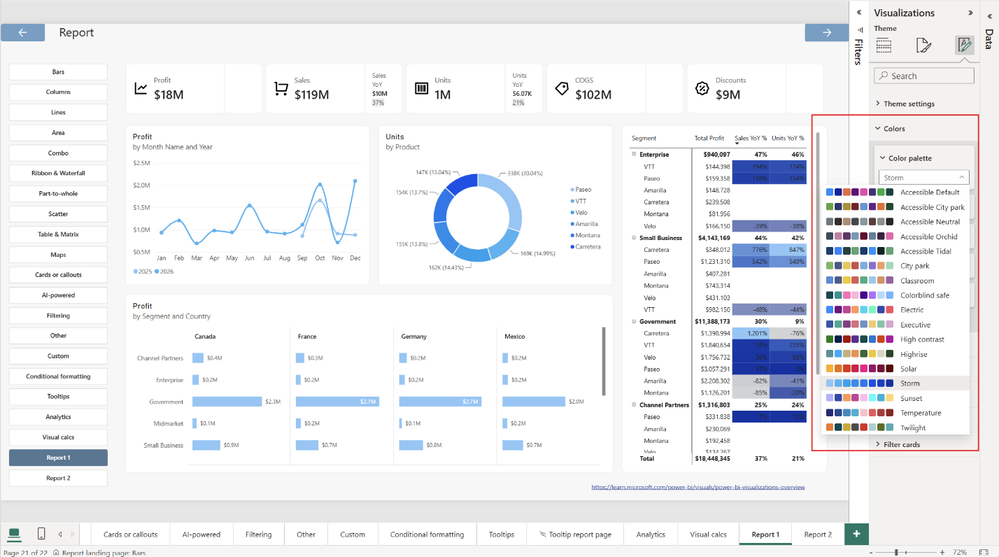
Apply Colour Palettes Instantly
Mix and match built-in colour palettes with your existing themes or custom formatting. Adjust a colour once and every visual in your report updates automatically.
Standardise Text Formatting
Set fonts, sizes and title styles across your entire report in just a few clicks. New visuals automatically inherit these settings, helping maintain a consistent and professional appearance.
Create Consistent Visuals
Configure common visual properties such as backgrounds, borders, tooltips, shadows, headers and spacing from one central location. Achieve a clean, professional report design without repetitive formatting.
Set Default Page Formatting
Define default page size, backgrounds, wallpaper and transparency for every report page. Existing pages can also be reset to adopt your new standard layout.
Format the Filter Pane Across Your Report
Apply consistent styling to filter panes and filter cards across every page. This creates a more polished and consistent reporting experience.
Simplified Theme Selection
The redesigned Themes menu makes it easier to distinguish complete report themes from simple colour palettes. You can confidently experiment with built-in undo support or quickly return to the default visual style.
See how the Independent Police Conduct Authority transformed complaint management with Power BI. Read the case study and contact us to discover how we can help your organisation turn data into actionable insights.