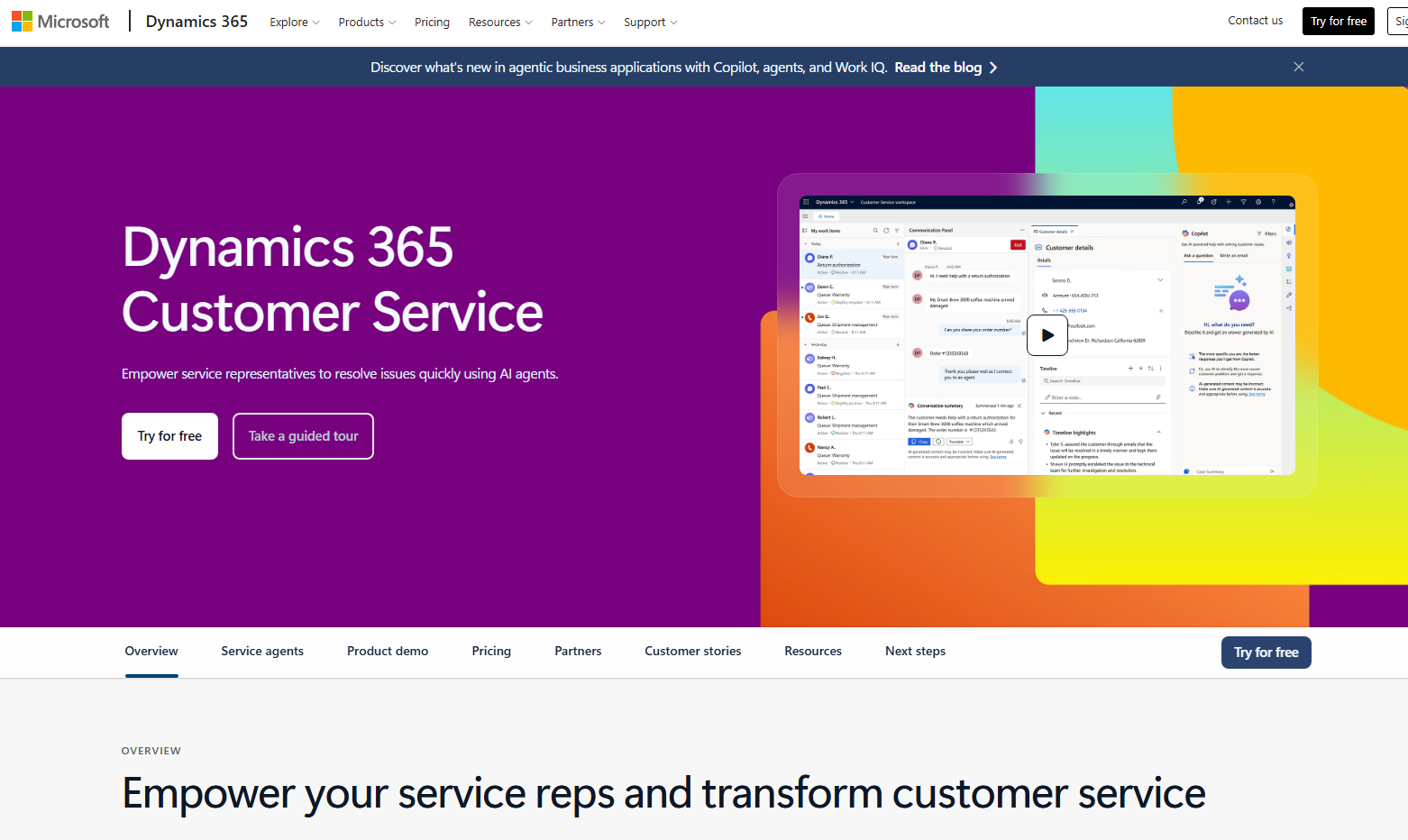
Dynamics 365 Customer Service Brings Emotional Intelligence to Customer Emails

Microsoft is introducing Email Sentiment in Dynamics 365 Customer Service, an AI-powered capability that helps service teams recognize emotional tone directly within customer emails. By surfacing sentiment insights early, organizations can respond with greater empathy, prioritize higher-risk conversations, and improve customer experiences at scale.
Here’s what you need to know:

  • What is Email Sentiment?

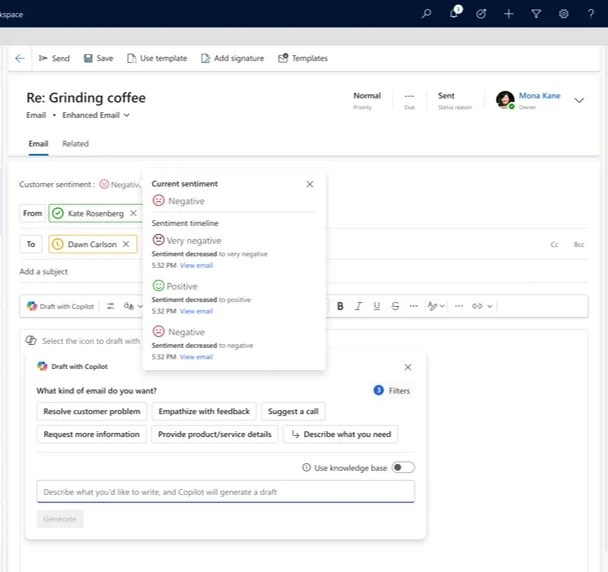
    Email Sentiment automatically analyses incoming customer emails and classifies their tone as Positive, Neutral, or Negative. These insights appear directly within the email and case workspace before a response is drafted, helping service representatives understand not only what customers are saying, but how they feel.

  • Why sentiment awareness matters

    Customers communicate differently across cultures, languages, and experiences, making emotional cues easy to miss in high-volume support environments. Email Sentiment helps organizations identify frustrated customers earlier, respond more empathetically, and reduce escalations through better-informed communication.

  • How it works

    Imagine a customer reaching out after repeated service disruptions. Email Sentiment flags the message as Negative before the representative replies, allowing them to acknowledge frustration upfront, respond with empathy, and focus immediately on resolution.

  • Key capabilities

    Email Sentiment includes automatic sentiment detection, in-context emotional insights, language-aware AI, and actionable emotional signals directly within the workflow. It also supports sentiment timelines and case sentiment tracking to help teams better understand customer interactions over time.

  • Designed for customer-focused organisations

    Email Sentiment in Dynamics 365 Customer Service complements Email Assist and case management by bringing emotional intelligence directly into everyday support interactions — helping empathy become part of the workflow, not just an individual skill.

Want deeper insight into how your customers feel across Dynamics 365 and Power Apps? Discover how Infinity AI Agents can help you understand customer sentiment, improve engagement, and deliver more personalised experiences. Contact us today to learn more!
Microsoft Introduces Copilot Cowork for Action-Driven AI Workflows

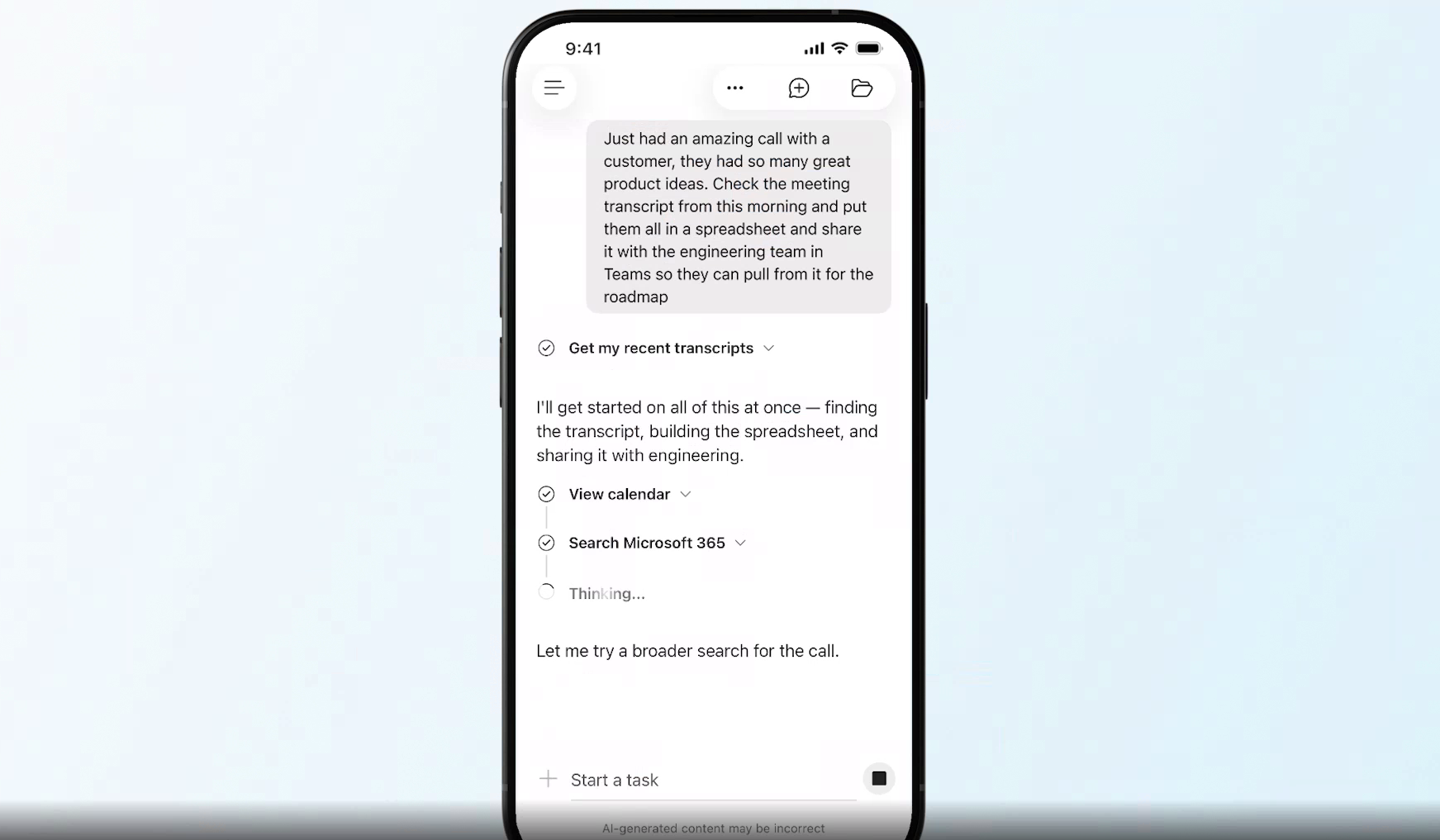
Microsoft is taking AI beyond conversations with the introduction of Copilot Cowork, a new Microsoft 365 experience designed to turn prompts into real actions across apps, workflows, and devices. The latest update brings built-in skills, integrations, and custom automation capabilities that help users coordinate work, create content, and manage tasks more efficiently. With support across desktop and mobile, Microsoft is positioning Copilot as a more capable digital coworker for everyday business operations.

Here’s what you need to know:

  • What is Copilot Cowork?

    Copilot Cowork is built on Work IQ, Microsoft’s intelligence layer that understands your data, tools, and organisation. This allows Cowork to plan, act, and deliver outcomes based on how your business actually operates — not just information from the public internet.

  • Assign tasks on the go

    Cowork is available on iOS and Android, making it easy to delegate work anytime, anywhere. While you focus on higher-value priorities, Cowork can handle tasks in the background for you.

  • Use it with Cowork Skills

    Many business processes follow repeatable patterns — and that’s where Skills come in. Skills are reusable instruction sets that guide Cowork on how to complete tasks consistently using your preferred structure, tone, and workflow.

  • Connect work with Cowork Plugins

    Copilot Cowork integrates with Microsoft tools like Power BI, Dynamics 365, and ERP systems so it can work across your organisation’s existing platforms. It also supports third-party connectors and custom plugins, helping businesses automate workflows and extend AI capabilities into their unique systems.

Empower your teams with AI that can assist, automate, and accelerate work in Dynamics 365 and Power Apps. Discover Infinity AI Agents and contact us today to transform the way you work.

Power Fx User Defined Types Are Now Generally Available in Power Apps

Microsoft has announced the general availability of User Defined Types (UDTs) in Power Fx for Power Apps, bringing makers more flexibility when building scalable and maintainable applications. The update enables developers to structure records and tables more effectively, helping simplify complex formulas and improve app readability. With UDTs now production-ready, Power Fx continues evolving into a more powerful low-code programming language for enterprise app development.

Here’s what you need to know:

  • Records and Tables as Parameters and Return Values

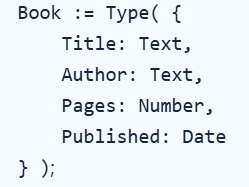
    User Defined Types help make formulas easier to read, write, and maintain by grouping related information into structured data types. This also reduces errors through strong typing, especially when working with JSON data. For example, details like a book title, author, page count, and publication year can all be grouped into a single typed structure using the Type function in the App object’s Formulas property.

  • UDTs and JSON

    Working with JSON becomes more reliable with UDTs by validating and converting untyped text into typed Power Fx objects. Since JSON doesn’t support native date/time types and often stores them as ISO 8601 strings, UDTs help ensure values are correctly interpreted and handled correctly.

  • IsType and AsType

    Need more control when converting values? IsType and AsType let you safely check and convert Dynamic values into strongly typed objects while helping avoid runtime errors.

  • RecordOf

    RecordOf makes it easier to define functions that work with individual records from a table structure, helping you build cleaner, reusable, and scalable formulas.

Empower your teams to work smarter anytime, anywhere with custom business applications built for your organisation’s needs. Discover what’s possible and let’s talk today!

Visual Studio Introduces Agent Skills for Smarter AI Workflows

Microsoft is continuing to evolve AI-assisted development with the introduction of Agent Skills in Visual Studio. The new capability allows developers to create reusable instruction sets that help GitHub Copilot agents handle specific development tasks more consistently and efficiently. With Agent Skills, teams can customize how AI supports their workflows, from automation to code generation and project-specific processes.

Here’s what you need to know:

  • What are Agent Skills?

    Agent Skills are reusable instruction sets that teach Copilot agents how to handle specific tasks, such as running build pipelines, generating boilerplate code, or following your team’s coding standards. Once defined, the agent can automatically apply the right skill whenever it’s relevant.

  • Creating a Skill

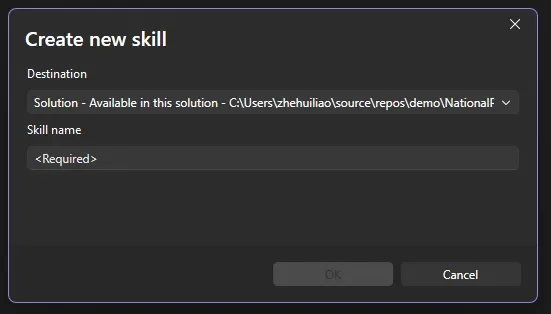
    You can create a skill directly inside Visual Studio. Open the skills panel by clicking the tools icon in the bottom-right corner of Copilot Chat, then select the + button to start the guided setup. Choose whether the skill will be global or solution-level, give it a name, and Visual Studio will generate a SKILL.md template for you to complete. Copilot Agent mode can even help you fill out the template. This experience is currently available in the Insiders channel and is coming to Release soon.

  • Managing Skills

    The skills panel makes it easy to manage your skills in one place, including editing SKILL.md files, searching by keyword, opening skill folders, and viewing diagnostics to quickly identify configuration issues.

  • Skills vs. Custom Instructions

    Custom instructions are best for broad, always-on guidance like coding preferences or formatting rules. Agent Skills, on the other hand, are task-specific and dynamically loaded only when relevant, helping Copilot respond more intelligently based on the situation.

Want AI agents that can support your team’s work in Dynamics 365 and Power Apps? Discover Infinity AI Agents and contact us today!

Microsoft Unveils Latest Power BI Innovations for May 2026

Microsoft has released the May 2026 Feature Summary for Microsoft Power BI, introducing a new wave of updates across Copilot, reporting, modeling, and data connectivity experiences. The latest release focuses on helping users explore data more efficiently, generate insights faster, and create more polished reports. Several enhancements also continue Microsoft’s push toward AI-assisted analytics and streamlined business intelligence workflows.

Here are some of the standout updates:

  • Copilot and AI: Set Perspectives for Explore

    Make large data models easier to navigate by setting an Exploration perspective for reports. This gives report consumers a more focused list of tables and fields when using Explore, improving usability and reducing complexity.

  • Reporting: Visual Calculations and Custom Totals (Generally Available)

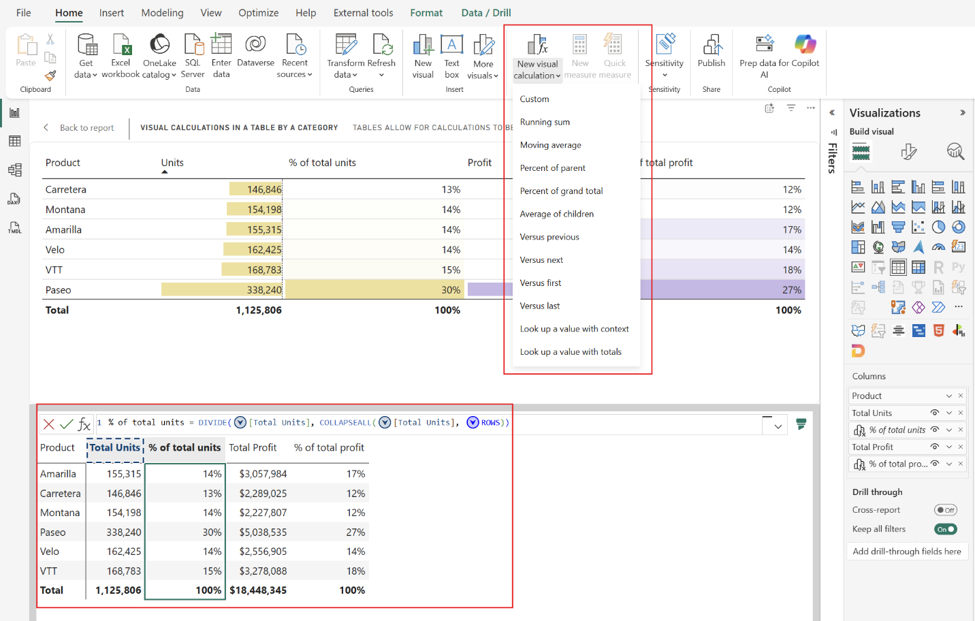
    Create running sums, moving averages, percent of parent, and more directly inside visuals — without adding DAX measures to your semantic model. Visual calculations now provide greater flexibility and faster insights right where you need them.

  • Modeling: Faster Access to Web Modeling for Semantic Model Authors

    Power BI is streamlining the semantic model authoring experience by taking users with edit permissions directly into web modeling instead of the model details page, helping reduce extra navigation and speed up iteration.

  • Data Connectivity: New Get Data Experience in Power BI Desktop (Preview)

    The redesigned Power Query Get Data experience introduces a more unified and accessible way to discover and connect to data sources across Microsoft Fabric, Power BI Desktop, and Excel.

  • Visualizations: Card with States

    The popular Card with States visual by OKVIZ is back with a fully modernized experience, updated for the latest Power BI APIs and ready for the future of KPI storytelling.

See the full list of Power BI’s May 2026 updates!

Turn your data into actionable insights that drive smarter business decisions. Discover the power of Business Intelligence and contact us today!

Microsoft Introduces Consent-Based Recording in Dynamics 365 Contact Center

Microsoft is introducing Consent-Based Recording for voice interactions in Dynamics 365 Contact Center with Microsoft Copilot Studio, helping organisations better manage compliance and customer trust during AI-powered conversations. The new capability captures and maintains caller consent across both voice agents and live service representatives, ensuring recording preferences are consistently respected throughout the interaction. The update is part of Microsoft’s broader push to deliver more secure, transparent, and compliant customer engagement experiences.

Here’s what you need to know:

  • Why it matters

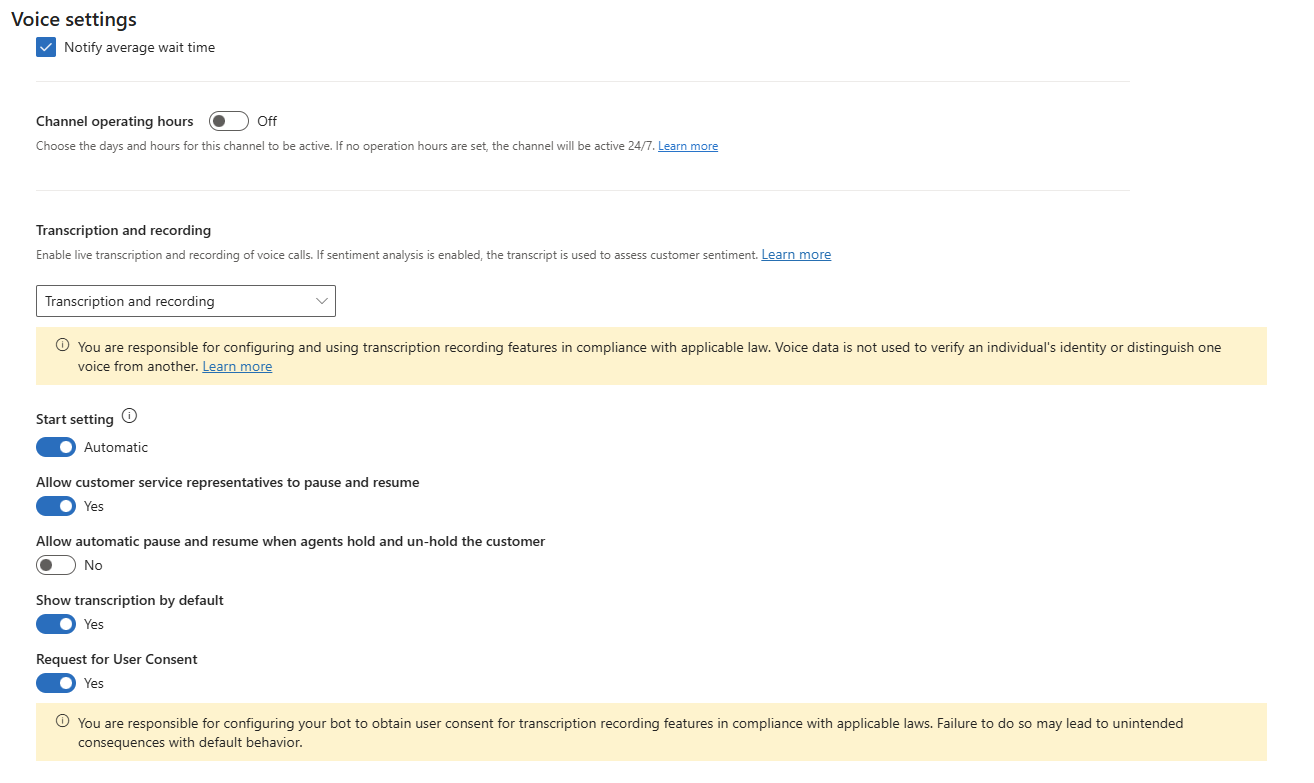
    Many regions now require explicit customer consent before calls can be recorded or transcribed. Consent-Based Recording makes consent a system-enforced signal, ensuring recording and transcription always align with the caller’s choice.

  • How it works

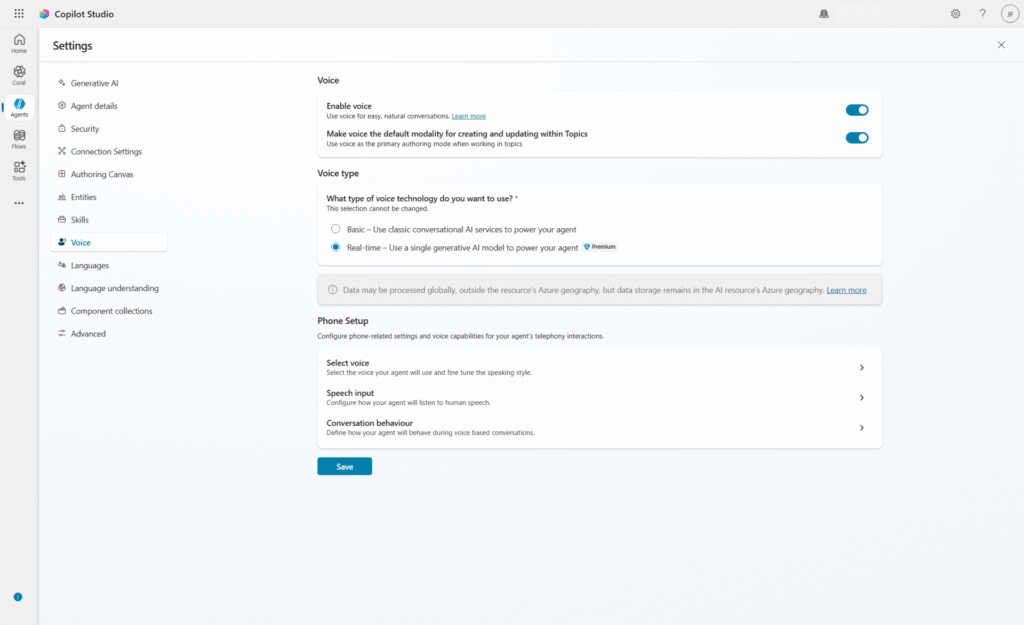
    A Voice Agent requests consent early in the conversation. If consent is granted, recording and transcription are enabled with pause and resume controls available to CSRs; if denied, the interaction continues without recording or transcription.

  • Key benefits

    Consent-Based Recording helps organisations support compliance, reduce operational risk, and create more transparent customer experiences. It also enables smoother AI Agent-to-CSR transitions in the contact center.

Strengthen customer trust with a reliable system that securely manages and records customer interactions. Discover how customer relationship management solutions can help your organisation deliver better experiences—contact us today!

Power BI Introduces New Semantic Model Settings Pane in Preview

Microsoft has introduced a refreshed semantic model settings pane for Power BI, now available in preview. The redesigned experience aligns with the modern Microsoft Fabric interface and aims to make managing semantic models faster and more seamless by keeping users within their current workspace context. The update is part of Microsoft’s continued effort to improve usability and streamline modeling workflows across the Power BI ecosystem.

Here’s what you need to know:

  • Why it matters

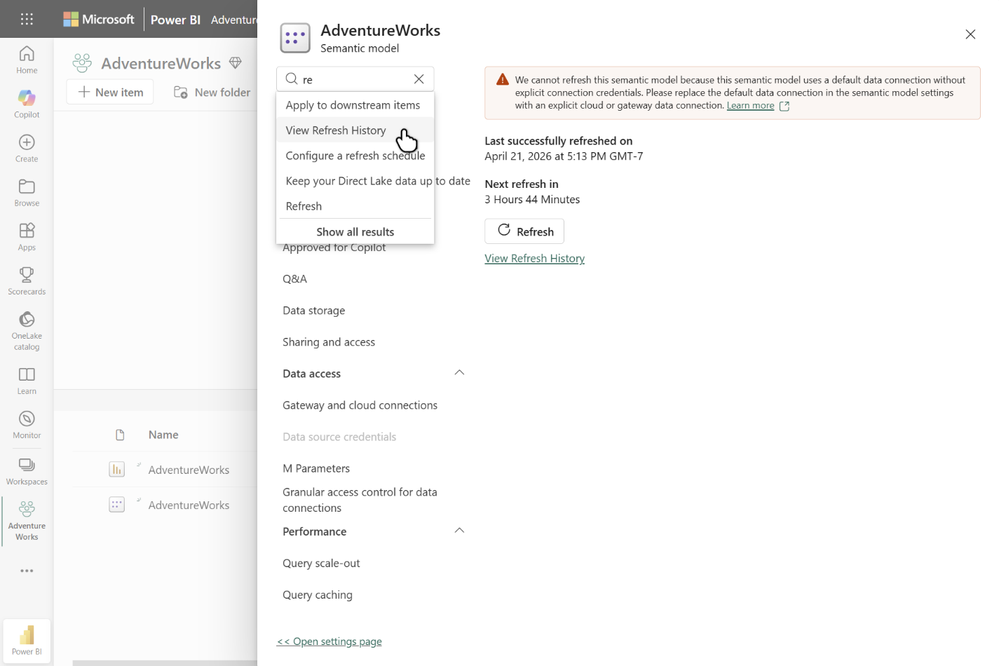
    The new settings pane keeps you in context, opening instantly without page reloads or navigating away from your semantic model. With collapsible sections, improved organization, and built-in search, it’s now faster and easier to find settings like refresh history, credentials, query caching, and sensitivity labels.

  • Incremental rollout

    The settings pane is currently optional and can be opened from the existing settings page. In the coming months, it will become the default experience, while users will still have the option to switch back to the classic settings page during the transition period.

  • How to open the settings pane

    Navigate to your semantic model’s settings page from the model context menu and select Open settings pane at the top of the page.

Unlock deeper insights and smarter decision-making with Power BI. Discover how Business Intelligence can transform your organisation and contact us today!

Microsoft Launches Case Enrichment Simulation in Dynamics 365 Customer Service

As AI continues to play a bigger role in customer service operations, organisations are looking for better ways to validate automation before rolling it out at scale. Microsoft is addressing that challenge with the introduction of case enrichment simulation in Dynamics 365 Customer Service. The new capability helps teams evaluate AI-powered field prediction accuracy using historical case data before enabling the feature in live environments.

Here’s what you need to know:

  • What It Does

    Admins can test AI-powered field predictions against real historical case data before rolling out case enrichment. This allows teams to evaluate results, refine field descriptions, and confidently enable the feature once accuracy meets business expectations.

  • Key Capabilities

    Case Management Agent simulations provide flexible testing with detailed field-level and case-level comparisons, exportable Excel reports, re-run capabilities, and shadow runs to help teams continuously validate and refine AI prediction accuracy.

  • Getting Started

    Open the Copilot Service admin center and navigate to: Case Settings → Case Management Agent → Case Creation and Update → Simulation. From there, you can run tests against historical cases and quickly identify where field descriptions may need tuning before enabling case enrichment.

Want to unlock more from your data in Dynamics 365 and Power Apps? From AI-powered sentiment analysis to automated phone number formatting, Infinity AI Agent helps streamline and enhance your business processes. Discover Infinity AI Agent and contact us today!

Microsoft Unveils Agentic CX Capabilities in Dynamics 365

Microsoft has announced new “agentic” customer experience capabilities in Microsoft Dynamics 365, positioning CX as a key driver of business growth. These innovations leverage AI to automate routine interactions across the customer journey while enabling more personalized and efficient engagement. The update also introduces real-time voice agents and AI-powered tools designed to unify and optimize the entire customer lifecycle.

Here’s what you need to know:

  • From IVR to real conversations

    With real-time voice agents in Microsoft Copilot Studio, customers can speak naturally—no more rigid menus. AI understands intent in real time and carries context across self-service and human support, creating a seamless experience from start to finish.

  • One connected contact center experience

    Dynamics 365 Contact Center unifies every interaction into a single journey. AI agents like Customer Assist, Quality Assurance, and Service Operations work together to automate, optimize, and elevate service across the entire lifecycle.

  • Smarter selling that keeps deals moving

    With Dynamics 365 Sales, signals turn into action automatically. AI-powered agents provide real-time insights, recommend next steps, and keep CRM data up to date—helping sellers move faster with confidence and less manual effort.

  • Conversations that drive real outcomes

    Dynamics 365 Customer Insights brings campaigns to life through two-way, AI-powered interactions. From voice to SMS, businesses can engage customers in real time, complete actions within conversations, and only involve humans when it truly matters.

Looking to boost productivity across Dynamics 365 and Power Apps with AI that actually works for you? Discover Infinity AI Agents—built to automate, optimize, and elevate your workflows. Get in touch today to see it in action.

Microsoft Introduces Governance Preview in Dynamics 365 Customer Service

Microsoft has introduced a preview of Governance in Dynamics 365 Customer Service, expanding its customer service platform with new policy-driven controls for communication oversight. The update is designed to help organizations enforce compliance, brand safety, and regulatory standards across customer interactions, including AI-generated content. It reflects Microsoft’s continued push toward more controlled, AI-assisted service operations in enterprise environments.

Here’s why this matters:

  • AI-ready compliance

    Ensure both human and AI-generated responses align with your organization’s policies before they ever reach the customer.

  • Policy-driven oversight

    Administrators can define rules that help enforce brand, legal, and communication standards at scale.

  • Visibility and control

    Track how policies are applied, what gets flagged, and how issues are resolved—bringing transparency to every interaction.

  • Safe testing with simulation

    Test governance policies before full enforcement to reduce risk and fine-tune controls.

Build stronger customer relationships with a trusted CRM system. Explore our customer relationship management solutions and contact us today.