
Microsoft is continuing to evolve AI-assisted development with the introduction of Agent Skills in Visual Studio. The new capability allows developers to create reusable instruction sets that help GitHub Copilot agents handle specific development tasks more consistently and efficiently. With Agent Skills, teams can customize how AI supports their workflows, from automation to code generation and project-specific processes.
Here’s what you need to know:
What are Agent Skills?
Agent Skills are reusable instruction sets that teach Copilot agents how to handle specific tasks, such as running build pipelines, generating boilerplate code, or following your team’s coding standards. Once defined, the agent can automatically apply the right skill whenever it’s relevant.
Creating a Skill
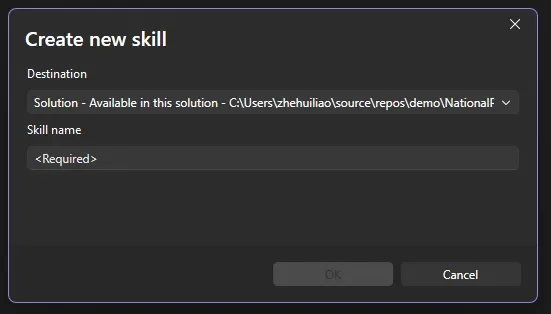
You can create a skill directly inside Visual Studio. Open the skills panel by clicking the tools icon in the bottom-right corner of Copilot Chat, then select the + button to start the guided setup. Choose whether the skill will be global or solution-level, give it a name, and Visual Studio will generate a SKILL.md template for you to complete. Copilot Agent mode can even help you fill out the template. This experience is currently available in the Insiders channel and is coming to Release soon.
Managing Skills
The skills panel makes it easy to manage your skills in one place, including editing SKILL.md files, searching by keyword, opening skill folders, and viewing diagnostics to quickly identify configuration issues.
Skills vs. Custom Instructions
Custom instructions are best for broad, always-on guidance like coding preferences or formatting rules. Agent Skills, on the other hand, are task-specific and dynamically loaded only when relevant, helping Copilot respond more intelligently based on the situation.
Want AI agents that can support your team’s work in Dynamics 365 and Power Apps? Discover Infinity AI Agents and contact us today!