Microsoft is expanding security controls in Power BI with the preview release of Outbound Access Protection (OAP) for semantic models. The update gives organizations more control over outbound connections by allowing only trusted destinations for workspace traffic. This marks another step toward stronger governance and protection for sensitive data environments in Microsoft Fabric.
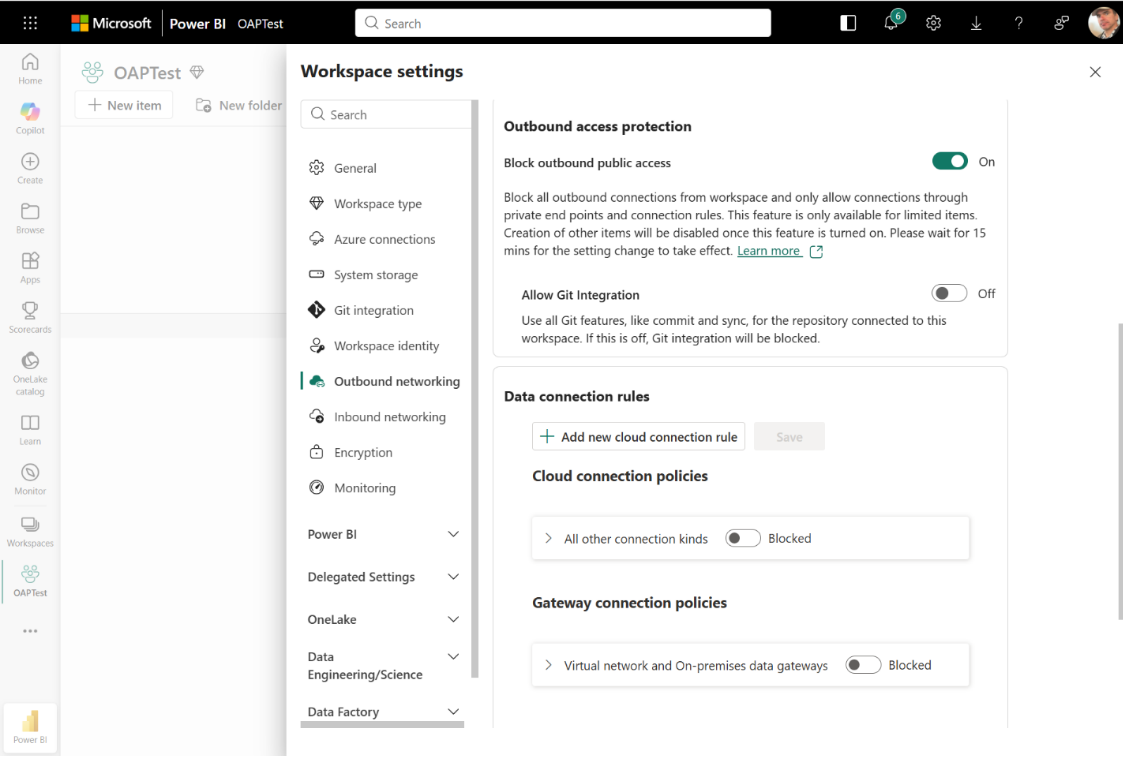
Here’s what you need to know:
What is OAP?Outbound Access Protection (OAP) is a workspace-level network security feature that blocks outbound traffic by default and only allows connections to trusted destinations you explicitly approve.
How does outbound data move from semantic models?
Semantic models can connect across workspaces and access cloud or on-premises data sources, including destinations outside your organisation’s data boundary. Composite models can also transfer data between sources when using DirectQuery mode.
How does OAP work?
OAP is managed through a single workspace setting. By enabling “Block outbound public access” under Network security, all outbound connections are denied unless an exception is configured.
Getting started with OAP:
Confirm your workspace is using an F SKU, enable the required tenant setting, and ensure the workspace only contains OAP-supported items before turning on “Block outbound public access” under Network security. After adding exceptions for approved destinations, allow time for the policy to propagate and validate connections to confirm everything is working correctly.
See how Power BI helped the Independent Police Conduct Authority unify their data and streamline investigations with greater efficiency and visibility. Read our case study and contact us today to discover how data-driven insights can support your organisation.