Microsoft Expands Copilot Studio With New Ways to Build Apps, Agents, and Workflows

Microsoft has introduced new capabilities in Copilot Studio that bring apps, workflows, and agents together in one platform. The September 2026 updates are designed to help organisations build more complete business solutions while giving makers greater control over agent behaviour, enterprise knowledge, evaluation, and production readiness.
Here’s what you need to know:

  • Turn Ideas Into Interactive Business Apps

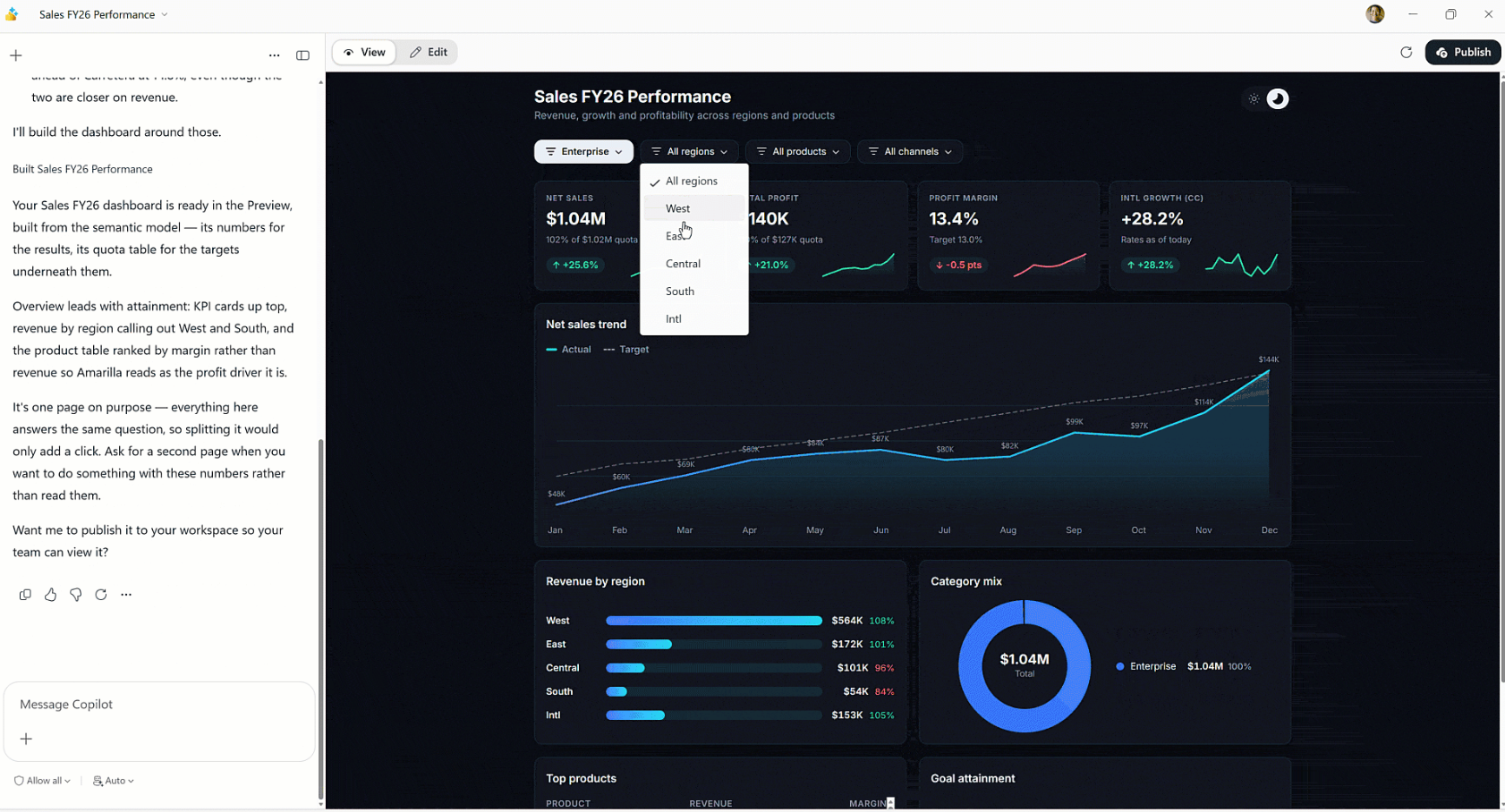
    Apps are now available in public preview in Copilot Studio, giving makers a new way to create interactive business experiences alongside agents and workflows. You can describe what you want to build in natural language, preview the generated app, refine it conversationally, and access the underlying code for deeper customisation.

  • Keep Agents Flexible, With Control Where It Matters

    Hooks are now in preview for agents powered by the GitHub Copilot harness, giving makers more control over what happens at specific points in an agent’s lifecycle. They can help consistently load context, inspect or block tool calls, transform results, handle errors, and capture logging and telemetry.

  • Give Agents The Knowledge They Need

    The Foundry IQ integration with Copilot Studio is now generally available, allowing organisations to connect agents to reusable enterprise knowledge. Agents can retrieve information from shared knowledge bases, provide citations with their responses, and connect through private networking for more secure access.

  • Measure What Your Agents Can Really Do

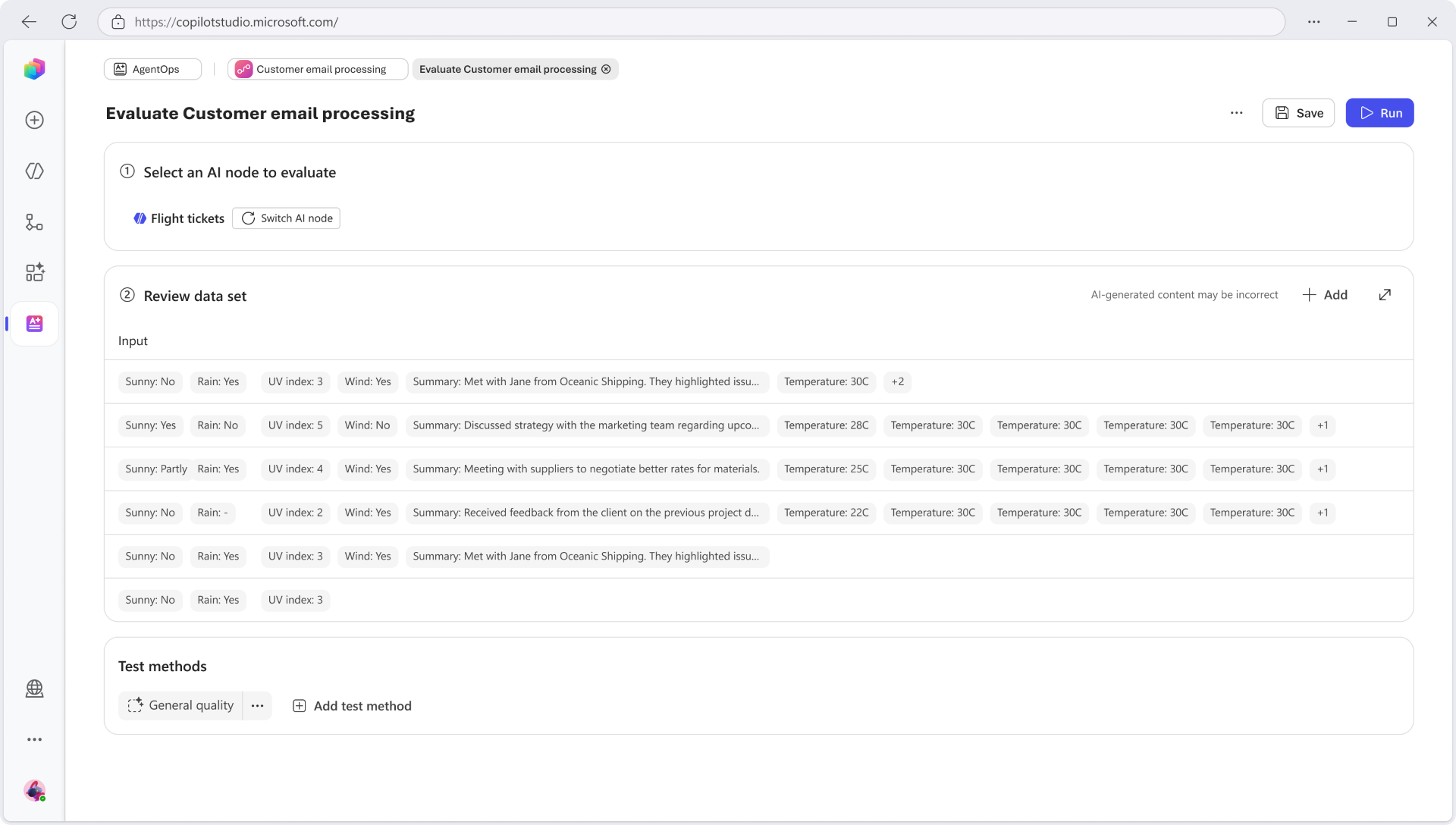
    Copilot Studio evaluations are expanding to cover automation, individual AI nodes, and broader agent performance. New evaluation dimensions such as Task Completion, Tool Accuracy, Safety, and Latency can help teams measure whether agents are delivering the intended outcomes.

  • Make Sure Your Agent Is Ready To Go

    The Review panel is now generally available, helping makers identify blockers, warnings, and potential issues before publishing an agent. It can also highlight outdated evaluation results and organisational policy restrictions, making it easier to address issues before an agent goes live.

  • Find And Reuse Capabilities Across Copilot

    Microsoft’s centralised plugin registry brings skills, connectors, and agents into a shared catalogue for discovery and governance. With more than 100 plugins already available, the registry is designed to make reusable capabilities easier to find and manage across Microsoft Copilot experiences.

  • Take Your Copilot Studio Skills Further

    With Copilot Studio expanding into a unified environment for apps, workflows, and agents, there are more ways to learn and experiment. Microsoft is offering demos, guided learning, Agent Academy projects, official curriculum and credentials, and AI Skills Navigator to help makers build their skills.

Work smarter in Dynamics 365 and Power Apps with AI agents designed to support your team and improve productivity. Explore Infinity AI Agents and contact us today to get started.
Build, Test, and Experiment in Azure With Visual Studio

Microsoft is highlighting an often-overlooked benefit of eligible Visual Studio Subscriptions: monthly Azure credits that developers can use to build, test, and experiment in the cloud. The benefit provides developers with a personal Azure sandbox, making it easier to explore new services, prototype ideas, and build practical cloud skills without needing a separate Azure budget.

Here’s what you need to know:

  • Build and Learn in Your Own Azure Environment

    There’s no substitute for hands-on experience, and your Azure credit gives you room to move from “How does this work?” to “Let me try it.” Configure services, deploy code, troubleshoot issues, and understand how different Azure components work together.

  • Explore New Ideas With Azure Credits

    New cloud services, architectures, development tools, and AI capabilities are emerging constantly. Your individual Azure credit gives you a space to explore new technologies, test ideas, and build skills at your own pace.

  • Experiment With Greater Peace of Mind

    You don’t need to provide a payment method to activate your individual Azure credit. If you use your full monthly credit without adding a payment method, Azure usage stops until your credit resets rather than automatically charging you for additional usage.

  • Know How to Make the Most of Your Credits

    The individual Azure credit is intended for personal development and testing rather than production workloads. Your credit renews monthly while you remain eligible, unused credit doesn’t accumulate, and some services, quotas, and geographic restrictions may apply.

  • Turn Your Azure Credits Into Hands-On Experience

    Your Visual Studio Subscription includes more than the IDE, and Azure credits are an easy-to-overlook benefit for learning and experimentation. Try a service you’ve been curious about, build a proof of concept, test an architecture, or simply explore what Azure can do.

Need a secure way to protect sensitive information while experimenting? Explore Secret Vault and contact us today to learn more!

Debug Production Crashes with Visual Studio and GitHub Copilot

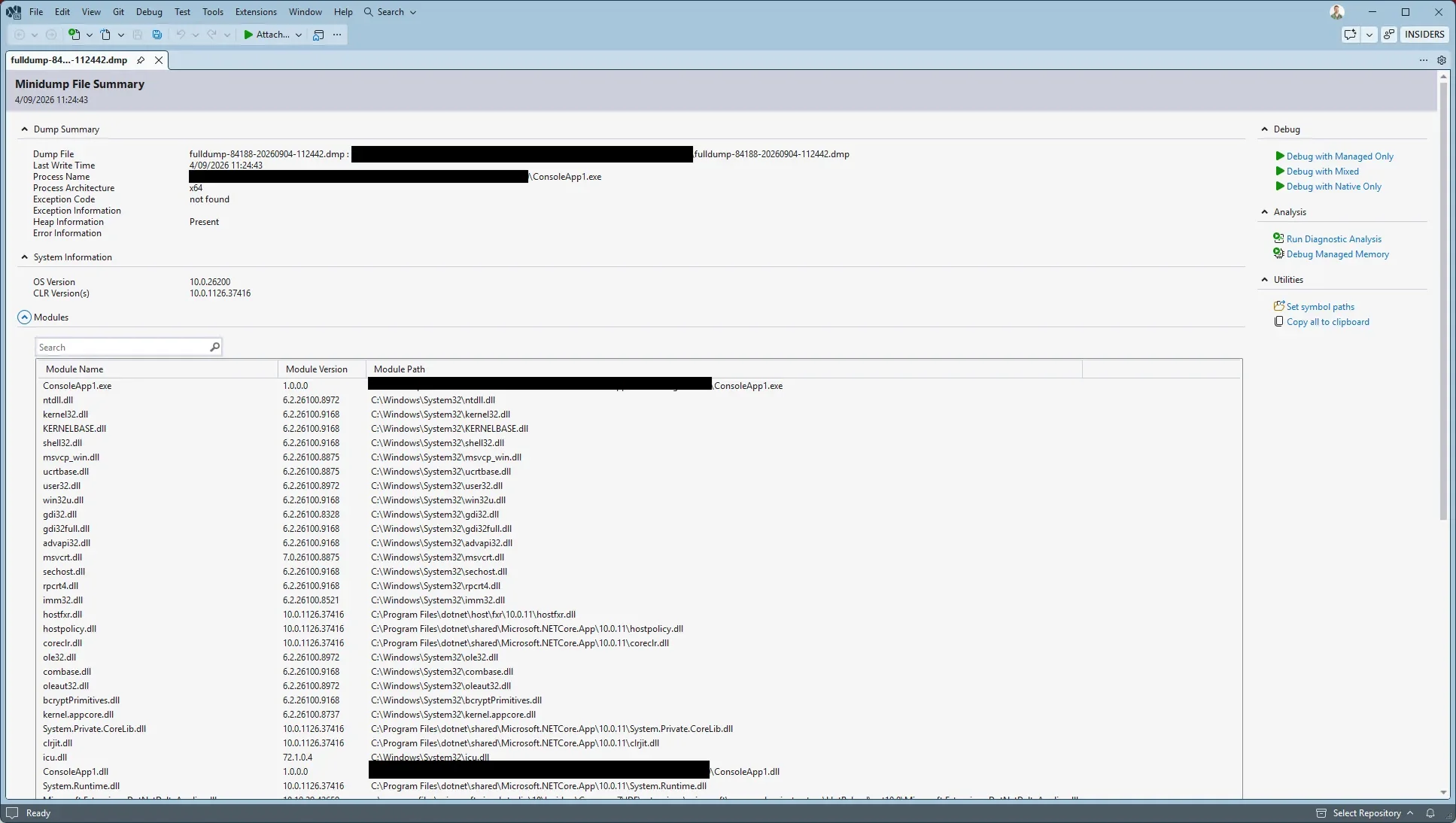
Production crashes can be difficult to diagnose when developers don’t have access to the application’s state at the time of failure. Microsoft has shared a practical walkthrough showing how Visual Studio can use memory dumps, Parallel Stacks, and GitHub Copilot to investigate application issues and identify potential thread saturation.

Here's how:

  • Capture a Memory Dump

    Start by capturing a memory dump from the production application when an issue occurs. The dump preserves the application's state so it can be opened and investigated in Visual Studio.

  • Monitor the ThreadPool

    Monitor how long tasks take to complete in the ThreadPool. If they exceed a defined threshold, the application can capture a memory dump for further diagnostics.

  • Reproduce the Problem

    Try to intentionally overload the ThreadPool with long-running asynchronous tasks. As more tasks are added, the application becomes unresponsive, allowing the memory dump to capture the issue.

  • Open and Debug the Memory Dump

    Open the .dmp file in Visual Studio and use Debug with Mixed to investigate both managed C# and native code. You can inspect the Call Stack, local variables, and other debugging information to understand what was happening when the application became unresponsive.

  • Analyse Parallel Stacks

    The Parallel Stacks window provides a visual overview of the application's threads. By examining the threads and where they are blocked, developers can identify issues such as ThreadPool saturation and pinpoint where the application is getting stuck.

  • Analyse With GitHub Copilot

    GitHub Copilot can work alongside the Parallel Stacks window to analyse thread states, stacks, and memory dump information. It can help identify potential root causes and suggest a path towards resolving the issue.

  • From Production Issue to Root Cause

    Debugging production problems can be challenging when the application's state is difficult to reproduce. With Visual Studio, memory dumps, Parallel Stacks, and GitHub Copilot, developers can investigate what happened and gain deeper insight into issues affecting their applications.

Make your business systems work smarter with custom applications designed around your team’s needs. Explore our custom business applications and contact us today to get started.
Power Apps Puts Existing Solutions at the Centre of AI Transformation

Microsoft is highlighting how organisations can begin their AI transformation by building on the applications, data, automations, and processes they already rely on. With Power Apps, Power Platform, and Copilot Studio, teams can bring AI into existing solutions while creating new ways to solve business challenges and improve how work gets done.

Here's what you need to know:

  • Build Business Solutions Faster with AI

    Power Apps hybrid authoring lets users collaborate with AI agents and choose the development approach that best suits their skills. This helps teams accelerate solution development while maintaining IT governance and control.

  • Integrate AI into Everyday Workflows

    Microsoft Copilot enables users to interact with business data, uncover insights, and take action directly within their applications. By integrating AI into existing workflows, organisations can improve productivity and simplify processes.

  • Discover What's Next for Power Platform at PPCC 2026

    Discover how AI, intelligent apps, agents, and automation are shaping the future of business at PPCC 2026. Check the latest innovations in Power Platform and Microsoft Copilot Studio on October 27 - 29, 2026, in Las Vegas.

Let AI handle routine tasks and streamline your workflows in Dynamics 365 and Power Apps. Explore Infinity AI Agents and contact us today to get started!

What's Next for Power BI? Exploring the Future of Business Intelligence

Microsoft is outlining the next chapter of Power BI as it evolves beyond traditional business intelligence into a more connected, AI-powered platform. The latest announcements introduce new capabilities in AI-assisted app development, semantic modelling, and Microsoft 365 Copilot integration, bringing data insights closer to business workflows.

Here's what you need to know:

  • AI-Powered App Development in Power BI

    Power BI is introducing a new app-building experience that lets users create data applications using natural language. Built on trusted semantic models, these apps support data writeback and operational workflows to help turn insights into action.

  • Building a More Connected Semantic Layer

    Power BI is expanding its semantic layer to provide trusted business context for AI agents, applications, and Copilot. New semantic views and industry collaboration aim to make business metrics more reusable and interoperable across platforms.

  • Bringing Power BI Insights to Microsoft 365 Copilot

    Microsoft 365 Copilot Chat and Copilot Cowork can now use governed Power BI reports and semantic models to answer business questions. These capabilities are also expanding to Copilot in Power BI and external MCP clients, bringing conversational analytics to more users.

  • Shaping the Future of Business Intelligence

    Power BI continues to evolve through feedback and ideas from its global community of creators, analysts, and developers. Microsoft is encouraging users to contribute to its roadmap and connect at upcoming events, including FabCon and Microsoft Ignite.

Discover how Power BI helped the Independent Police Conduct Authority streamline investigations and case management. Read the case study and contact us to learn more.

Explore the Latest Updates in Power BI's September 2026 Release

Microsoft has released its Power BI September 2026 Feature Summary, introducing new updates across Copilot and AI, reporting, data modelling, data connectivity, and more. The latest enhancements aim to improve how users create reports, analyse data, and work with AI-powered experiences in Power BI.

Here’s what you need to know:

  • Copilot and AI: Power BI Agentic Experiences (Generally Available)

    AI agents can help BI developers build and refine semantic models and reports, accelerating development workflows. With access to business context, development tools, and team-specific practices, agents can generate, edit, and validate solutions for developers to review.

  • Reporting: New Report Ribbon on the Web (Preview)

    Power BI introduces a new web-based Report ribbon that brings the browser experience closer to Power BI Desktop. With organised tabs, a new Design ribbon, and features such as Format Painter, users can discover tools and complete more report-authoring tasks directly in the browser.

  • Modelling: Create and Edit DirectQuery Semantic Models in the Power BI Service

    Users can now create and edit DirectQuery semantic models directly in the Power BI service without downloading Power BI Desktop. This enables browser-based modelling across different operating systems, real-time collaboration, and faster updates without the usual download-and-republish process.

  • Data Connectivity: Microsoft Outlook Mail Connector (Preview)

    The new Microsoft Outlook Mail connector for Power BI Desktop lets users access mailbox data, including folders, messages, and attachments, through their organisational accounts. Built on Microsoft Graph API, it introduces a modern alternative to the Exchange Online connector, with additional connectivity options planned for the future.

  • Mobile: Mobile Page Indicator (Generally Available)

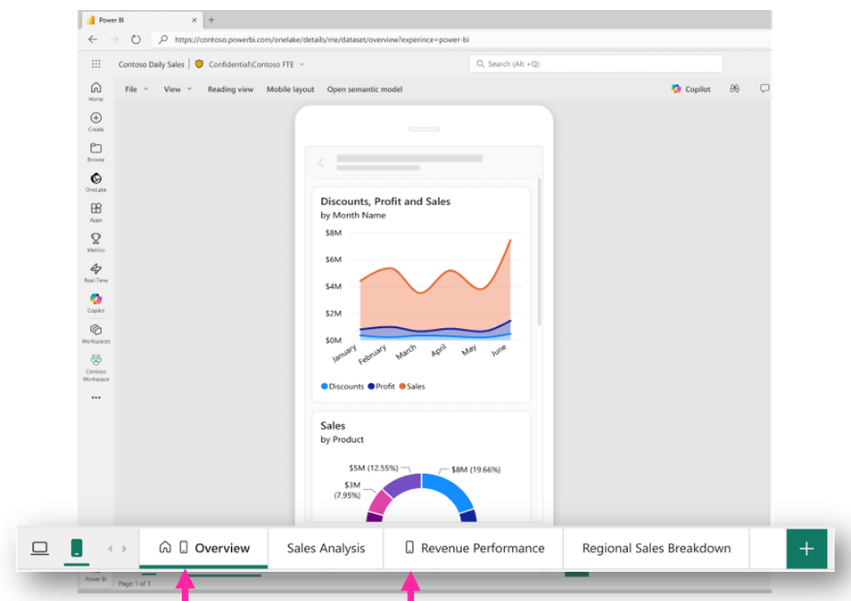
    Power BI now makes it easier to identify which report pages have mobile layouts through a dedicated icon on their page tabs. This gives report creators a clearer view of mobile-ready content and helps them identify pages that still need mobile optimisation.

See the full list of Power BI’s September 2026 update.

Want to explore what Power BI can do for your business? Discover our Business Intelligence solutions and contact us today to learn more!

Visual Studio September Update Brings More AI Flexibility and Smarter Debugging

Microsoft has released its September 2026 Visual Studio update, introducing new AI-powered capabilities and debugging enhancements to help developers streamline their workflows. The update focuses on giving developers more flexibility in choosing AI models while improving code security, pull request reviews, and debugging experiences.

Here's what you need to know:

  • Bring Your Own AI Model

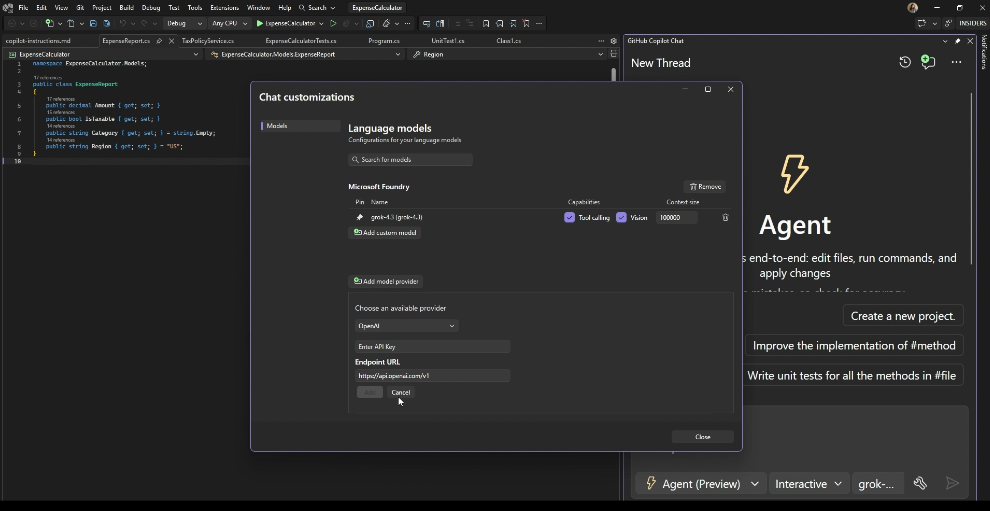
    Visual Studio's updated Bring Your Own Model (BYOM) lets developers connect to their preferred AI providers, including Microsoft Foundry, OpenAI, Anthropic, and Ollama. With support for the new Agent (Preview), developers can tailor AI-assisted workflows to their needs.

  • Fix NuGet Vulnerabilities with GitHub Copilot

    Developers can now use GitHub Copilot to address vulnerable NuGet packages directly from the Visual Studio Error List. This makes it easier to identify security issues, review suggested fixes, and apply changes.

  • Explore Pull Requests with the Git Agent

    The Git agent helps developers explore pull requests by summarising relevant discussions, comments, and file changes. With navigable links and follow-up questions, developers can investigate changes directly within Visual Studio.

  • Simplify Debugging with Branch Highlighting

    Visual Studio now highlights the expressions that determine the outcome of C# if statements using && or ||. This helps developers understand conditional logic more easily while debugging.

  • Debug Podman Containers

    Visual Studio now supports attaching to Podman containers alongside Docker. Developers can discover and debug .NET and C++ containers directly from the IDE.

Choose how AI works for your business with Dynamics 365 and Power Apps. Explore Infinity AI Agents and contact us to learn more.

Visual Studio Live! Explores the Future of Developer Learning

As AI continues to change how developers write code, troubleshoot issues, and learn new technologies, the way they build their skills is evolving too. In a recent Visual Studio blog, Microsoft highlights the importance of hands-on learning, knowledge sharing, and connecting with fellow developers through events like Visual Studio Live! (VSLive!).

Here's what you need to know:

  • Gain Insights From Industry Experts

    VSLive! focuses on practical developer education, helping developers, software architects, and engineers keep up with the evolving Microsoft development landscape. With more than three decades of experience, the event brings together industry experts who share not only how technologies work but also the lessons, decisions, and real-world experiences behind them.

  • Turn New Knowledge Into Practical Skills

    Go beyond theory by exploring technologies, working through challenges, and gaining practical insights you can apply to your projects. Learning alongside experts and fellow developers also gives you the opportunity to ask questions, explore different approaches, and build confidence in your skills.

  • Learn Through Collaboration and Connection

    Some of the most valuable learning experiences happen outside the conference room. Whether you're asking a speaker a follow-up question, exchanging ideas over lunch, or discussing how another team solved a similar challenge, VSLive! creates opportunities to build meaningful professional connections and learn from different perspectives.

  • Stay Ahead of Emerging Development Trends

    Stepping away from your everyday workload gives you time to explore emerging technologies and think about your next steps as a developer. From AI-powered development and .NET to Azure, GitHub Copilot, and modern application architecture, VSLive! helps you discover new ideas and approaches to bring back to your team.

  • Take Advantage of Your Subscriber Benefits

    If you have a Visual Studio Subscription, you may be eligible for exclusive pricing and significant discounts on VSLive! events. Check your benefits at my.visualstudio.com and take advantage of subscriber discounts.

  • Take Your Learning to VSLive! Orlando

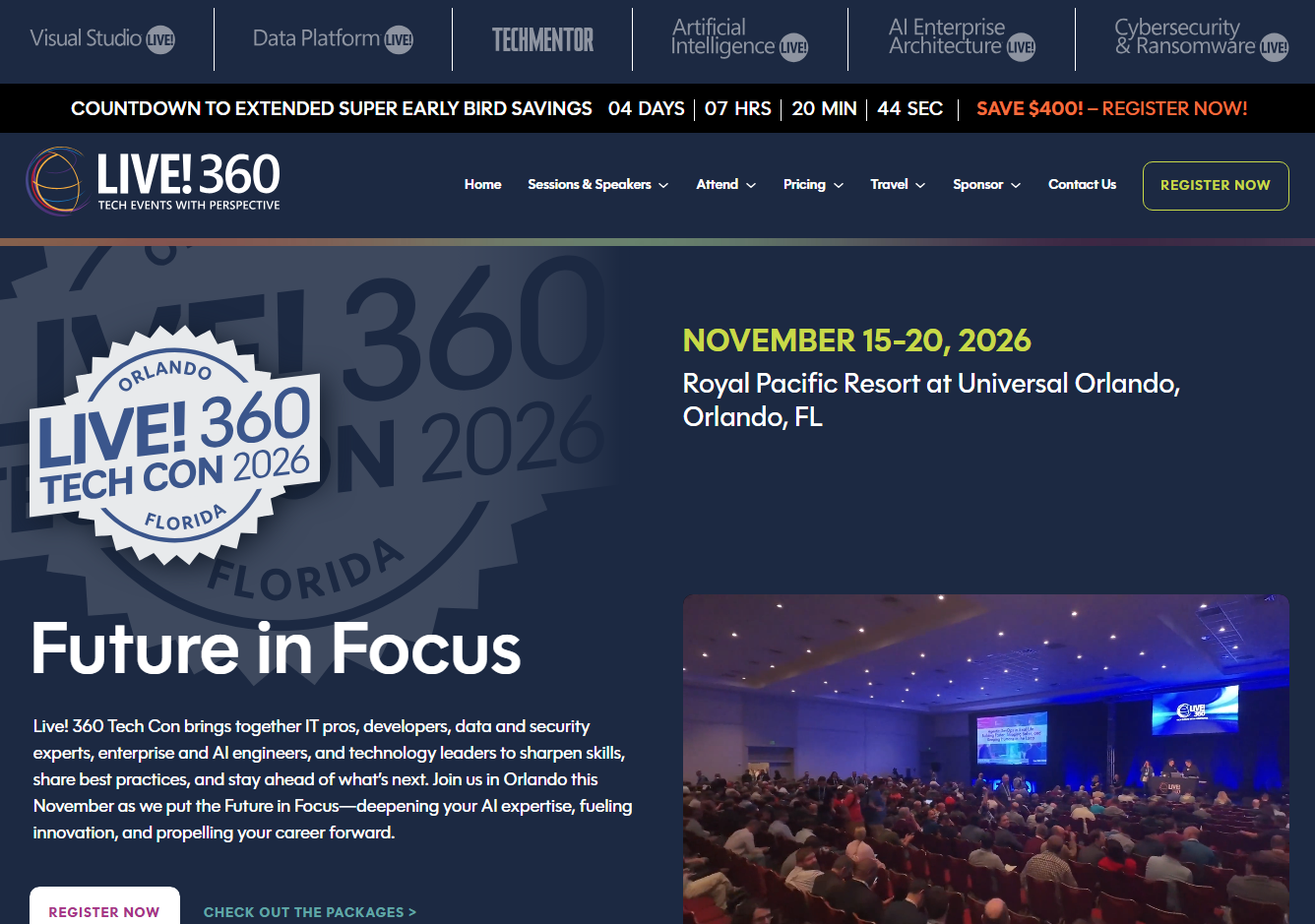
    VSLive! Orlando is part of Live! 360 Tech Con, taking place at Universal Orlando from November 15–20, 2026. Explore a range of topics, including modern software engineering, cutting-edge AI, the core of .NET, full-stack web development, database development, developing new experiences, and human factors in engineering.

Want to see how custom business applications can help your organisation work smarter and achieve more? Contact us to learn how we can build a solution tailored to your business needs.

Power Pages Adds Self-Service Ownership Transfer for Easier Site Governance

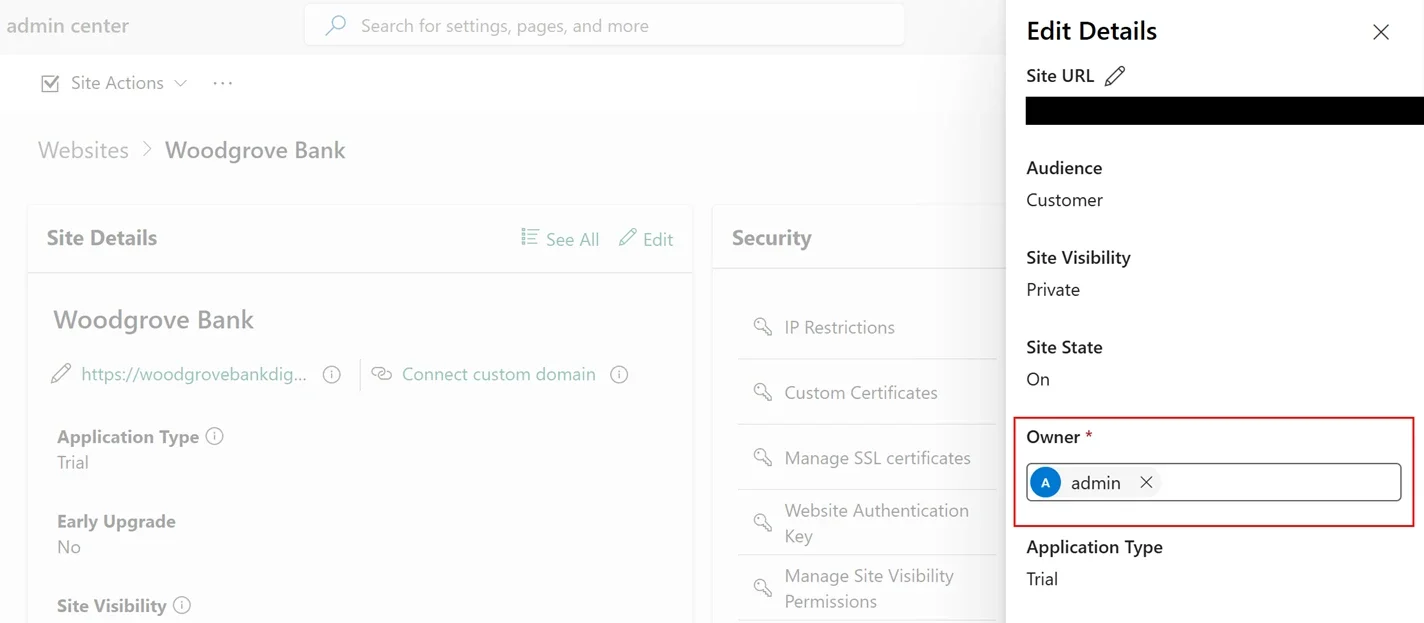
Microsoft has introduced self-service site ownership transfer in Power Pages, making it easier for organisations to keep site ownership aligned as teams, roles, and responsibilities change. The new capability helps simplify ownership handovers while supporting ongoing site governance and accountability.

Here's what you need to know

  • Keeping Ownership Aligned With Your Organisation

    Ownership changes are a natural part of an organisation’s lifecycle, whether an employee changes roles, a project moves from implementation to operations, or another team takes over an existing site. Self-service ownership transfer makes it easier to keep Power Pages sites assigned to the people responsible for managing them.

  • Maintaining Visibility Across Ownership Changes

    Ownership transfers record key details, including the previous owner, new owner, person who initiated the transfer, and when the change occurred. Email notifications also keep relevant stakeholders informed, helping organisations maintain visibility and accountability.

  • Making Ongoing Site Management Easier

    Power Pages sites can become long-term business assets that need to adapt as teams and responsibilities evolve. Self-service ownership transfer helps reduce administrative overhead while keeping ownership records current and sites manageable.

See how Power Pages helps Human Resources New Zealand enhance their membership management. Read our case study to learn more, and contact us for more details.

Microsoft Brings Modern List to General Availability in Power Pages

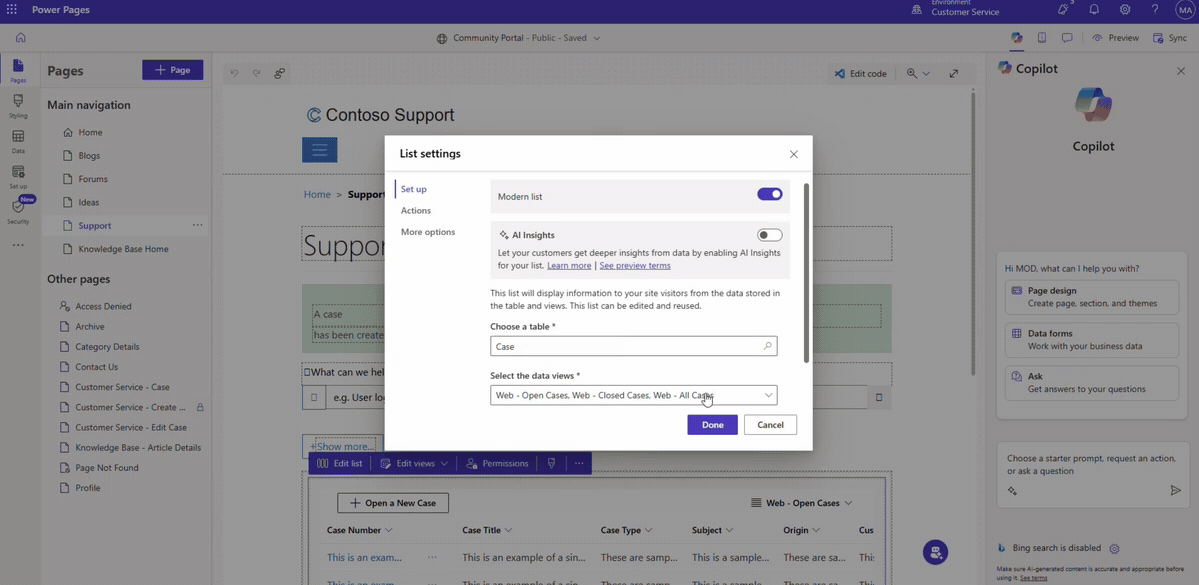
Microsoft has announced the general availability of Modern List in Power Pages, bringing a refreshed way to present Dataverse data with a more modern and customisable experience. The update also introduces greater flexibility for developers through custom JavaScript support via the Power Pages Client API.

  • What’s New with Modern List?

    Modern List provides a refreshed way to showcase Dataverse data with a range of built-in capabilities. Makers can take advantage of infinite scrolling, inline filtering, shimmer loading, low-code customisation, and custom JavaScript support.

  • A More Flexible Default Experience

    With general availability, Modern List is now the default list experience for newly created Power Pages sites. Existing classic lists remain unchanged, giving organisations the flexibility to transition at their own pace.

  • Extend Lists with Custom JavaScript

    When built-in configuration isn't enough, developers can use the Power Pages Client API to add more advanced behaviours without replacing the Modern List with a separate data grid. This makes it possible to customise how data is displayed while retaining existing Dataverse views, actions, filtering, and security configurations.

  • What Can the Client API Do?

    Developers can use the Client API to access and customise Modern List data, respond to user interactions, and style rows, columns, headers, and tooltips. For example, customer service portals can highlight high-priority requests or apply status-based styling while keeping existing list configurations intact.

Want to see what Power Pages can do for membership management? Explore how Human Resources New Zealand uses Power Pages to deliver a more streamlined member experience, and contact us to learn more.