Microsoft Enhances .NET Testing Workflows with Azure DevOps Integration

Microsoft has announced full Azure DevOps support for its modern .NET testing solution, Microsoft.Testing.Platform, marking a major step toward smoother CI/CD testing workflows. The update introduces intelligent handling of test retries and better pipeline integration, aiming to improve reliability and clarity in automated test results.
Here’s what you need to know:

  • What’s New in Azure DevOps?

    Azure DevOps now provides first-class support for Microsoft.Testing.Platform, allowing you to run tests with the familiar DotNetCoreCLI task and handle retries intelligently.

  • What is Microsoft.Testing.Platform?

    Microsoft.Testing.Platform is a modern, lightweight alternative to VSTest, built for flexibility and performance.

  • Running Tests in Azure DevOps

    Run tests using the recommended DotNetCoreCLI task or execute dotnet test directly when custom scripting is needed.

  • Understanding Retry Outcomes

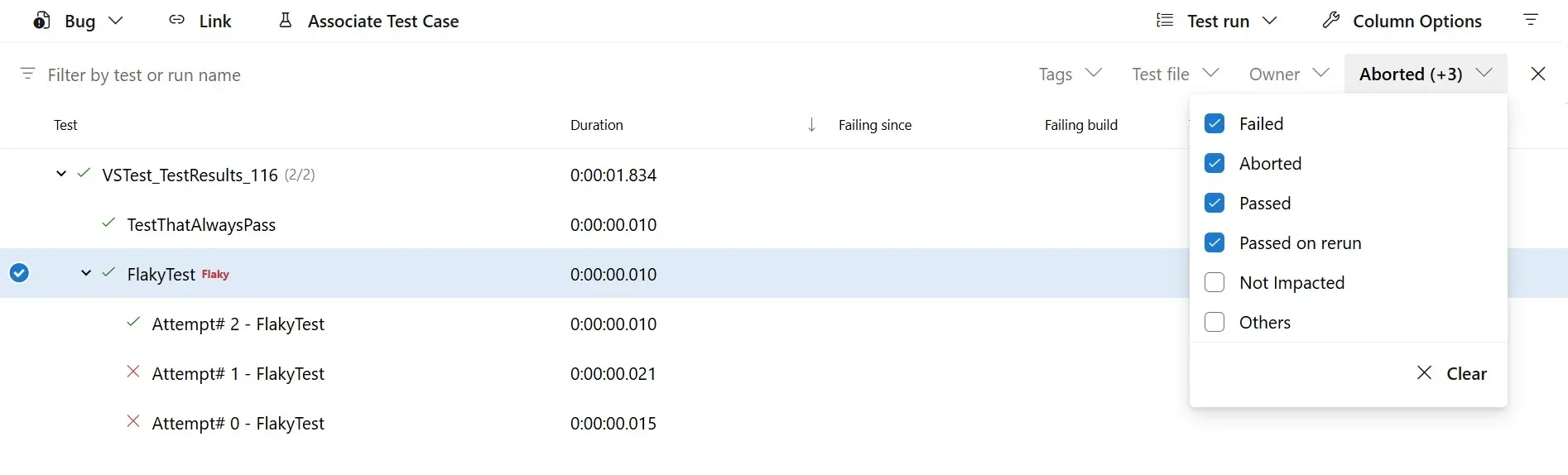
    Retry results clearly show whether tests pass on the first run, pass after a retry, or fail after all retry attempts.

  • Get Started Today

    Upgrade to .NET SDK 10, add the Retry extension, enable AllowPTRToDetectTestRunRetryFiles, and run tests with the --retry-failed-tests flag.

Curious how the right apps can enhance your Dynamics 365 and Power Platform? Explore custom business applications and connect with us.
Dataverse Search Gets Smarter with Agentic AI at the Core

Microsoft is introducing a major upgrade to Dataverse Search by embedding agentic AI to deliver more intuitive, context-aware responses across Dynamics 365 and Power Apps. The new approach transforms traditional keyword lookups into dynamic, conversational interactions with business data, marking a significant step toward more intelligent enterprise workflows.

Here’s what makes it powerful:

  • From queries to real conversations

    Ask questions in natural language and get real-time, actionable insights—no need to understand tables or schemas. You can refine and build on questions as the conversation evolves.

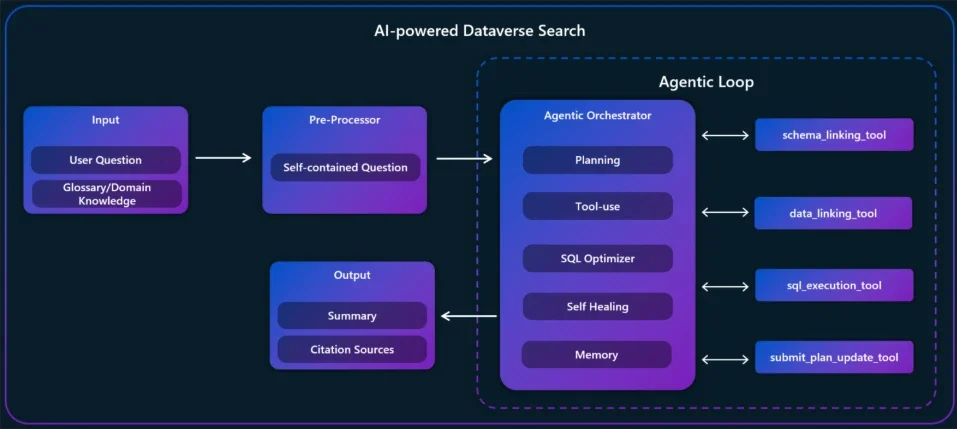
  • Agentic architecture

    This isn’t simple text-to-SQL. Each question is treated as a goal. The orchestrator reasons through it using a dynamic loop: plan → execute → refine, delivering smarter, more contextual results.

  • Real-world example

    A coffee equipment seller identifies at-risk opportunities, then asks for the positive response rate for Coffee Grinder 02. The system delivers precise answers, including calculated metrics, to support faster decisions.

  • Glossaries & enriched schema

    Makers can fine-tune how the Q&A agent understands data. Teach it your company’s terminology, acronyms, and add richer descriptions to tables and columns—so answers align with how your business actually talks.

Turn your data into action with AI-powered Agent Actions. Analyze, recommend, and update records automatically with Infinity AI Agentscontact us to get started.

The Most-Watched .NET Videos and Live Streams That Defined 2025

2025 was a standout year for .NET video content, with the community tuning in to thousands of hours of learning, announcements, and live discussions. From must-watch beginner content to deep technical sessions and major event live streams, the year delivered some clear favorites. Microsoft has rounded up the top .NET videos and live streams that captured developers’ attention throughout 2025.

Here are the highlights:

  • “Start Here” videos

    Evergreen intros continued to dominate—covering C#, .NET, .NET MAUI, and ASP.NET Core—helping new developers get up to speed fast.

  • New videos released in 2025

    Conference content stood out, especially from .NET Conf, with popular sessions on .NET 10, Visual Studio 2026, clean architecture with ASP.NET Core 10, and more.

  • Series highlights

    Developers followed along with preview and release waves through dedicated .NET 10 series, Aspire-focused Aspire Fridays with community guests, and deep-dive content for those wanting advanced technical insights.

  • Top live streams

    Highly watched live sessions featured .NET conferences, .NET 10 discussions, modernization topics, and Model Context Protocol (MCP). Over 30 episodes of On .NET Live brought together product experts and community voices.

  • Community-focused content

    .NET Community Standups continued to offer behind-the-scenes updates, open discussions, and a direct line to the teams building the platform..

Enhance your Dynamics 365 with custom business applications designed to boost your productivity. Get in touch with us today.

Power BI’s Biggest Visualization Competition Is Back

Microsoft’s flagship data visualization competition, the Power BI DataViz World Champs, is officially back for another year, inviting analytics professionals and enthusiasts worldwide to push their creative and storytelling skills with fresh challenges. The global contest will span multiple rounds of curated datasets and culminate in a live finale at FabCon 2026, spotlighting top visual talent from the Power BI community.

Here’s what you need to know:

  • Contest Structure
    The competition runs across three rounds, each featuring a fresh challenge and curated dataset. Entries are evaluated through judges’ scoring and community fan voting, with one Wildcard finalist selected by the judges—leading to a live finale at FabCon 2026 on March 16.

  • Three Rounds – Key Dates
    Round 1 runs from January 12–19, followed by Round 2 on January 19–26, and the Final Round from January 26 – February 2.

  • Finalist Selection – Key Dates
    Community voting takes place from January 19 – February 14, with finalists announced weekly on January 26, February 2, February 9, and February 16, and the Wildcard revealed on February 16.

Discover how Power BI can turn your data into actionable insights. Explore Business Intelligence and contact us today.

Microsoft .NET Team Reflects on a Landmark Year of Developer Innovation

2025 proved to be a milestone year for the .NET community, marked by a surge in high-impact blog content spanning major platform releases, tooling updates, and ecosystem insights. The official recap highlights the most-read posts that shaped developer conversations across performance, AI, productivity and community engagement.

Here’s a quick recap:

  • .NET 10

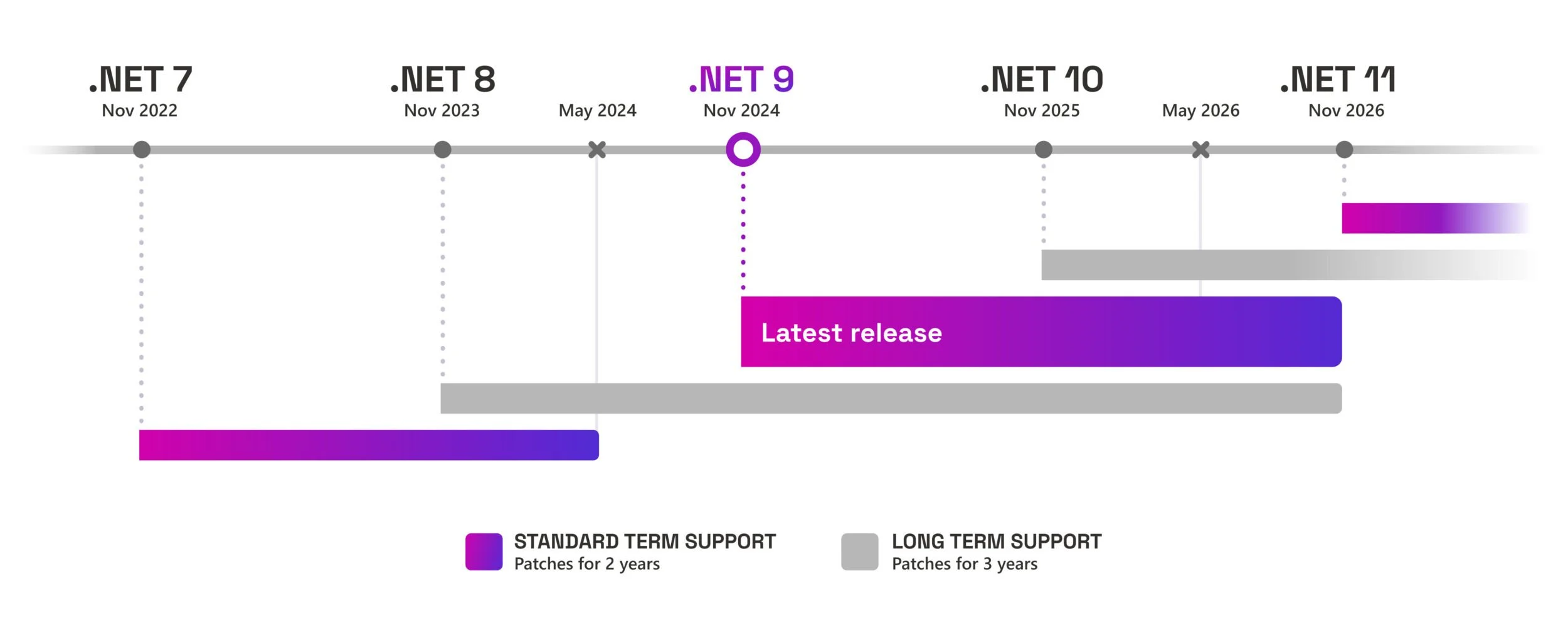
    The headline release of the year. As the latest LTS version, .NET 10 delivered improvements across the runtime, SDK, libraries, languages, workloads, and tooling.

  • AI

    AI became part of everyday .NET development—from Copilot experiences to agents and tool integration patterns. Highlights included simpler AI agents for developers, building Model Context Protocol servers in C#, and the preview of new .NET AI templates.

  • Productivity

    Many posts focused on shortening feedback loops, whether through smarter Copilot workflows or faster “try this now” experiences—helping developers choose the right copilot approach, from Ask mode to Agent mode.

  • Announcements

    Some of the most impactful updates focused less on new features and more on how .NET is released, supported, and kept secure across the ecosystem.

  • Tooling

    Tooling also leveled up with support for SLNX, a simpler solution file format in the .NET CLI, and dotnet run app.cs, making it easier than ever to get started with C# and .NET 10.

Unlock more value from Dynamics 365 and the Power Platform with custom business applications designed for your workflows. Contact us to get started.

.NET Blog Explores Generative AI Foundations for .NET and C# Developers

Microsoft has published a new .NET Blog post introducing key generative AI and large language model concepts for C# developers as part of its 2026 .NET ecosystem guidance. The article offers a concise refresher on what AI and generative AI are, and how these technologies can be leveraged to create intelligent, responsive applications in .NET.

Here’s what you need to know:

  • What is Generative AI?

    Generative AI refers to systems that can create text, images, audio, code, and more. These systems are powered by Large Language Models (LLMs) trained on billions of tokens to generate intelligent, contextual outputs.

  • Tokens and parameters

    Models don’t read text directly—they break it into tokens such as words, fragments, or characters. Parameters are the trained weights that influence a model’s reasoning depth, knowledge, and nuance.

  • Prompts, instructions, and tools

    Prompts are what users send to the model, while system instructions act as a hidden blueprint guiding its behavior. Tools (or functions) allow the model to access real-world data and services like APIs, databases, or business systems.

  • Model Context Protocol (MCP) and agents

    MCP provides standards that let models understand which tools are available and how to use them. Agents combine a model, tools, and context into a specialized, goal-driven AI solution.

  • Model management in the .NET ecosystem

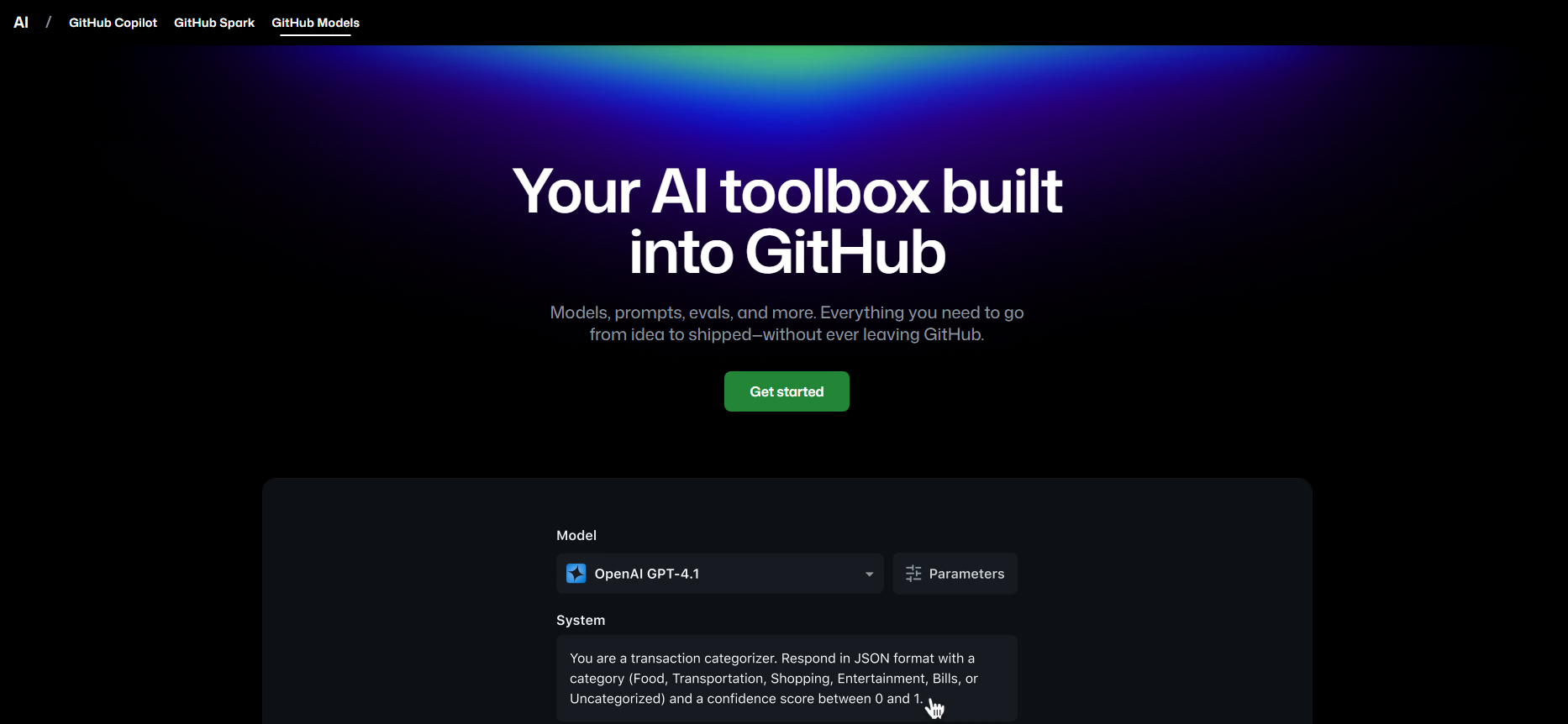
    The .NET ecosystem enables secure, trusted, and cost-effective AI using platforms like GitHub Models, Microsoft Foundry, Foundry Local, and Ollama. These tools help developers choose, host, and run models for both enterprise and local workloads.

Unlock AI that adapts to your business in Dynamics 365 and Power Platform. Explore Infinity AI Agents and get in touch today!

Visual Studio Live! 2026 Promises Hands-On, Deep Technical Training for Modern Devs

At the start of 2026, Microsoft is doubling down on experiential developer education with the launch of VS Live!, a series of immersive events that go beyond standard conference talks. Promising practical, scenario-based learning and direct expert engagements, the initiative aims to equip developers with skills for the evolving Visual Studio and modern development tooling.

Here’s what you need to know:

  • Must-watch VS Live playlists

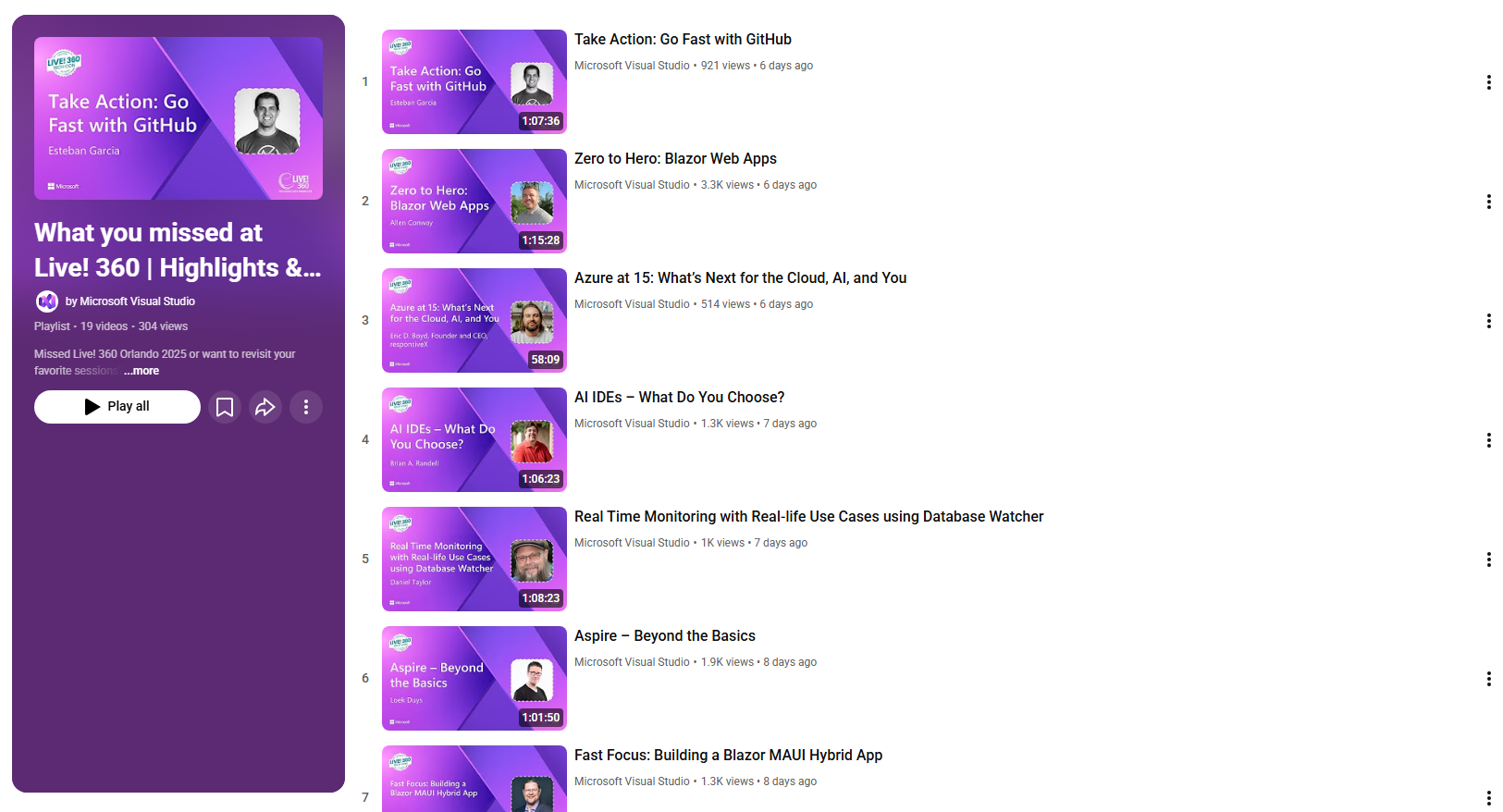
    Over the holidays, the Visual Studio team curated 19 standout VS Live sessions, covering everything from Visual Studio 2026 and C# Source Generators to next-level debugging with GitHub Copilot and advanced .NET techniques.

  • What makes VS Live different

    VS Live is built for hands-on learning. You code as you learn, solve real-world problems, and engage directly with experts shaping Visual Studio, .NET, and Azure.

  • Choose your immersion in 2026

    Join one of two immersive VS Live events this year: Las Vegas from March 16–20, 2026, or VS Live at Microsoft HQ from July 27–31, 2026.

  • Why join VS Live

    Get access to registration discounts (subscriber or not) and connect with the people behind Visual Studio, .NET, Azure, and GitHub Copilot—along with a global developer community.

Discover how custom business applications can improve process compliance, reduce manual data entry, and deliver information exactly where it’s needed. Contact us today.

Beat Procrastination and Start Building with Copilot in Visual Studio

Got projects you’ve been putting off for months—or even years? A new post from the Visual Studio team explores how AI-powered tools like Copilot can help developers break through procrastination and get back into building mode. Now’s the perfect time to get moving—with Copilot in Visual Studio by your side.

Here are three smart ways to jump-start your next project:

  • Build a static website—fast

    Turn documents (like books or guides) into websites. Export your .docx to .txt, open an empty folder in Visual Studio, prompt Copilot with your desired layout and style, and watch it generate a site in seconds.

  • Extend a TOON language service

    Use Copilot to make your TOON language service fault-tolerant, improve parsing, and auto-generate unit tests based on specifications. Just click the Cloud Agent, describe your goal, and let Visual Studio plan the rest.

  • Create custom color themes

    Provide screenshots and ask Copilot to extract color tokens for the shell, environment, and syntax highlighting—then map them directly to the VS XML theme file.

Extend Dynamics 365 with custom apps that streamline processes, reduce data entry, and surface the right data at the right time. Discover custom business applicationscontact us today.

Power BI Expands Excel Drillthrough Support to Direct Lake and DirectQuery Models

Microsoft has removed the long-standing limitation that prevented Excel users from drilling into underlying data when connected to Direct Lake and DirectQuery Power BI semantic models. With the update, Excel’s Show Details feature now works consistently across Import, Direct Lake, and DirectQuery connections, enabling deeper data inspection directly from PivotTables without switching modes.

Here’s what’s new:

  • What’s new

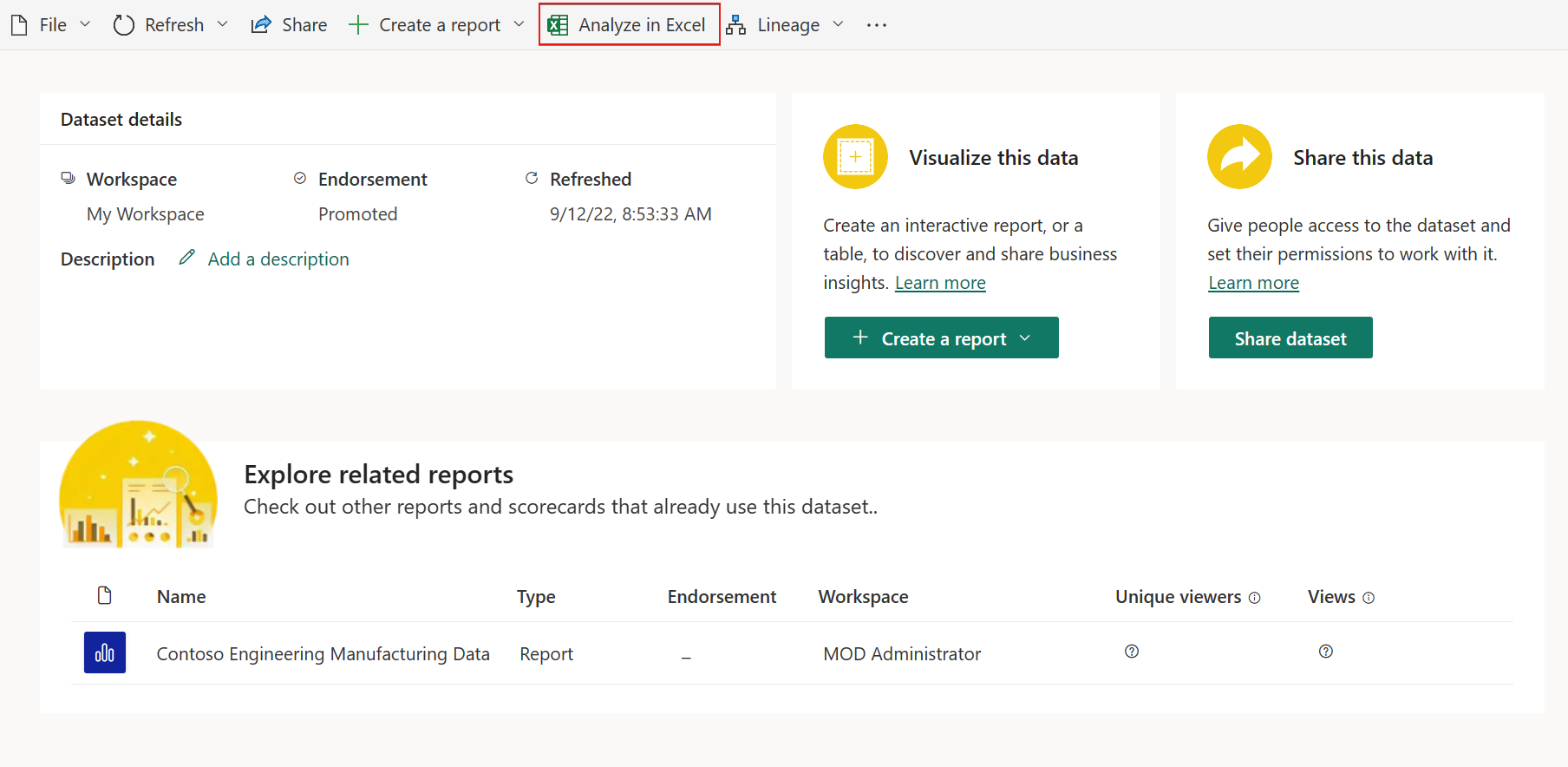
    Power BI now enables drillthrough for Direct Lake and DirectQuery models, allowing you to double-click a PivotTable cell and view the underlying detail rows—even when connected live. No need to switch to Import mode for deeper analysis in Excel.

  • How it works

    Connect to your semantic model as usual using Analyze in Excel. Make sure you’re using explicit measures or fields that support detail rows, then double-click a leaf-level PivotTable cell to explore the data.

  • Performance considerations

    Drillthrough performance depends on the source system and query complexity—especially for DirectQuery models connected to external data sources.

See how the Independent Police Conduct Authority used Power BI to turn data into insights. Explore the case study and talk to us today.

Visual Studio 2026 Introduces AI-Driven Debugging Tools with Copilot Assistance

Visual Studio 2026 is bringing Copilot deeper into its debugging experience, with AI-driven exception analysis, smarter breakpoint handling, and inline insights that help developers understand code behavior in real time. These enhancements are designed to accelerate troubleshooting and reduce repetitive tasks during development.

Here’s what’s new:

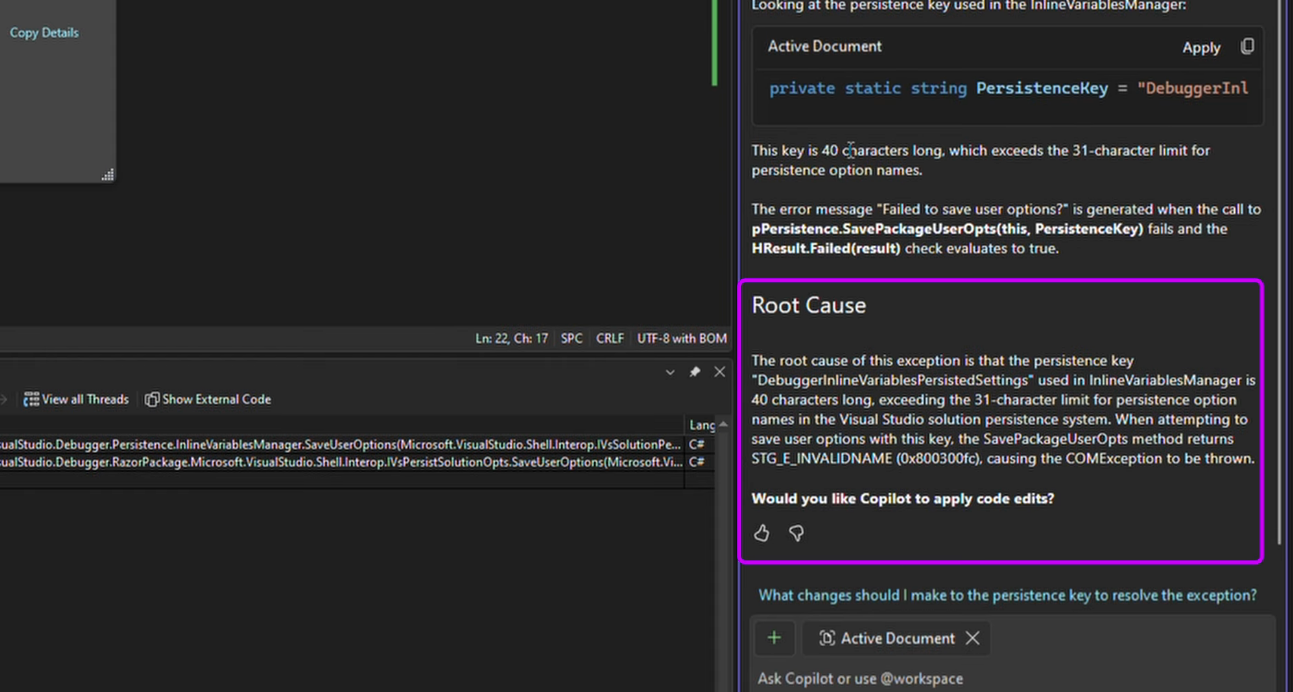
  • Exception Assistance

    Visual Studio analyzes your entire repository—not just the file you’re in. It reviews past bugs, pull requests, and previous fixes to detect similar issues, highlight affected code paths, and pinpoint where unexpected values may have been introduced.

  • Inline in Editor

    No more hunting for errors one by one. Debugging insights appear directly in the editor, clearly showing which part failed and how it impacted the final result.

  • Debug with Copilot

    When a test fails, the Debugger Agent reviews the test, its code, and recent changes. It proposes a fix, runs the test, refines the solution, and delivers a clear summary of what changed—and why.

Enhance Dynamics 365 and Power Platform with custom applications designed around your needs. Talk to us about custom business apps today.