
Microsoft has unveiled its November 2026 Power BI Feature Summary, introducing new capabilities designed to improve how users build, customise, manage, and share data experiences across Power BI and Microsoft Fabric. This month's updates bring enhancements to Copilot integration, reporting and visualisation, organisational apps, data connectivity, and semantic model deployment. Explore what's new and see how these improvements can help make your business intelligence workflows more efficient and interactive.
Here's what you need to know:
General: Power BI Desktop for Apps (Preview)
Building interactive applications from your data is becoming easier. Power BI Desktop for Apps combines your semantic model with AI-assisted app authoring, allowing you to describe the experience you want, build and refine it with an integrated agent, and customise its appearance through the Design pane.
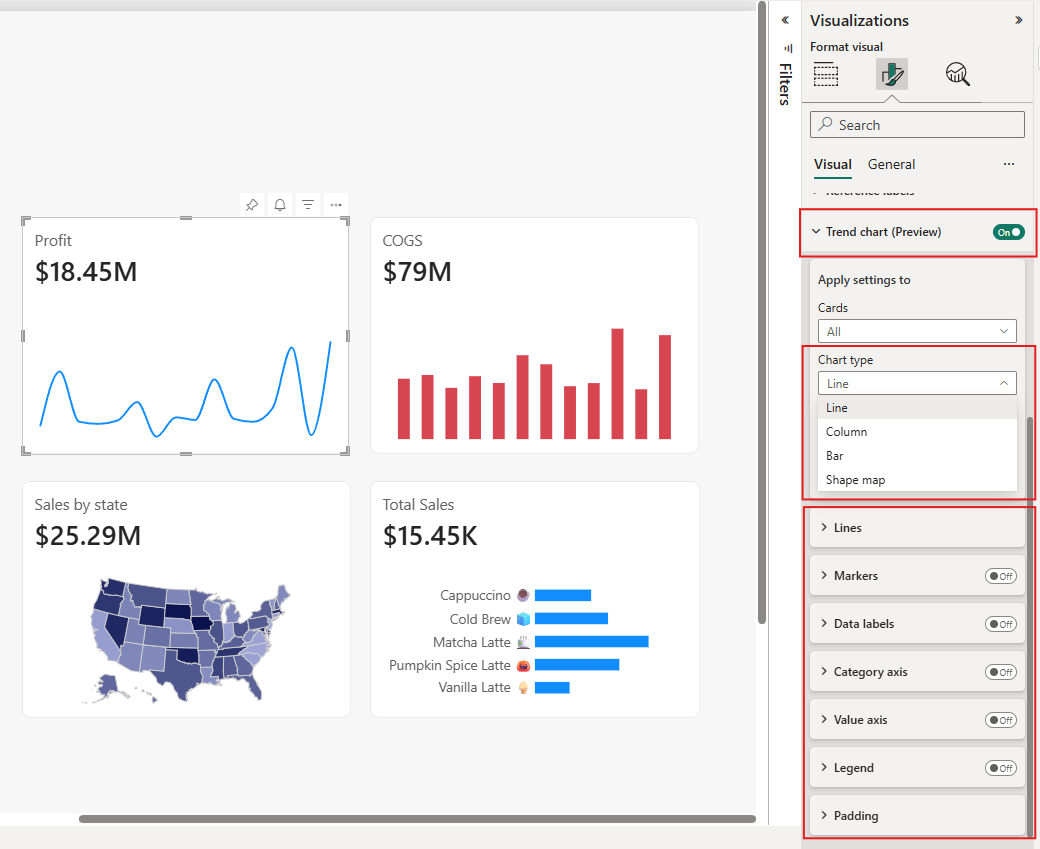
Reporting: Card Visual Trend Charts
Give your key metrics more context by displaying trends and regional patterns directly in the Card visual. Add line, bar, or column charts to track changes over time, or use shape maps to highlight geographical insights, with additional formatting options for a more informative presentation.
Modeling: Semantic Views (Preview)
Define business metrics once and reuse them across teams, Power BI reports, and Fabric data agents. Semantic views allow organisations to maintain consistent definitions alongside their data in OneLake, making it easier to share business context across different analytics and AI experiences.
Data Connectivity: Switch Power Query Experiences from Get Data (Preview)
Switch between the new and legacy Power Query experiences directly from the Get Data dropdown in Power BI Desktop. There's no need to navigate through Settings or restart Desktop, making it easier to try the updated experience when connecting to your next data source.
Power BI Mobile: Open Fabric Apps Directly in Power BI Mobile (Coming Soon)
Access purpose-built Fabric apps directly from the Power BI Mobile app. Users can discover and open apps, explore insights, share content, and use familiar mobile features without leaving their Power BI experience.
Embedded Analytics: Embed Workspace Apps in SharePoint Online (Coming Soon)
Bring complete Power BI workspace apps into your SharePoint Online pages and sites. Instead of embedding individual reports or visuals, you can now provide readers with the full app experience, including its navigation, sections, and content.
See the full list of Power BI November 2026 updates!
See how Sport Wellington uses Power BI to gain greater visibility into participants’ progress and make more informed, data-driven decisions. Read our case study to learn more, and contact us to discuss how we can support your organisation’s business intelligence needs.