
Microsoft has introduced Workspace Outbound Access Protection (OAP) for Power BI reports, expanding workspace-level security controls in Microsoft Fabric. The feature helps organizations manage how report data can connect to external resources, supporting stronger governance and reducing the risk of unintended data exposure.
Here's what you need to know:
What is OAP?
Workspace Outbound Access Protection (OAP) is a workspace-level control in Microosft Fabric that allows administrators to restrict outbound data access helping enforce stricter data boundaries.
Why does it matter?
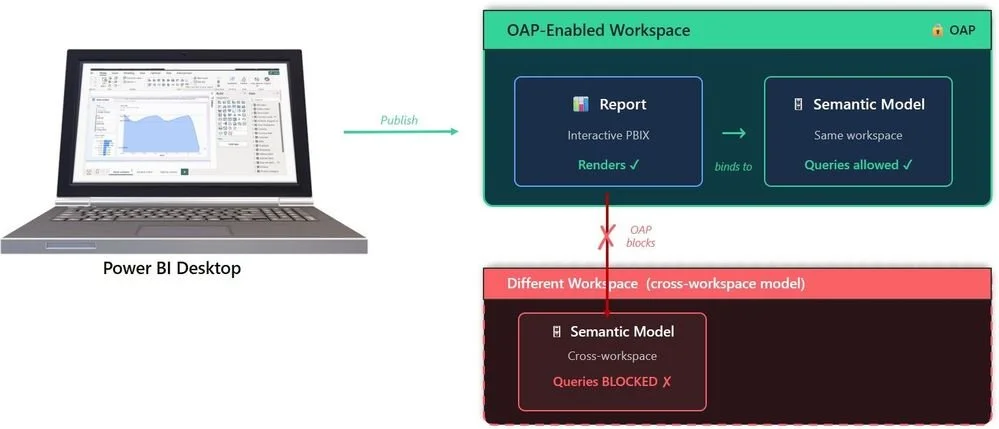
Power BI reports are tied directly to semantic models, and those models can reside in different workspaces. This can create unintended data flows across workspace boundaries. OAP closes that gap by ensuring reports in protected workspaces can only access semantic models within the same workspace.
How does it work?
OAP enforces a simple rule: reports in a protected workspace can only connect to semantic models within the same workspace, preventing cross-workspace bindings. Semantic models continue to enforce OAP policies for their underlying data sources, extending protection across the data ecosystem.
Publishing and authoring
Publishing reports to an OAP-enabled workspace works as normal, provided the report connects to a semantic model in the same workspace. Reports that reference models in another workspace can be published but won't be able to render data.
Getting started
Assign the workspace to a Fabric Capacity (F SKU), enable workspace-level outbound network rules, and turn on OAP for the workspace. Then configure semantic model connection rules and ensure reports and semantic models are located within the same workspace.
Discover how Power BI helps the Independent Police Conduct Authority manage thousands of cases efficiently. Read our case study and contact us to learn how Power BI can transform your data management processes.