
Microsoft has introduced an improvement to Power BI that gives organisations greater flexibility when working with semantic models across different workspaces. With support for OAP (Outbound Access Protection) exception policies, Power BI reports can now connect to semantic models in separate workspaces while maintaining controlled data access and security.
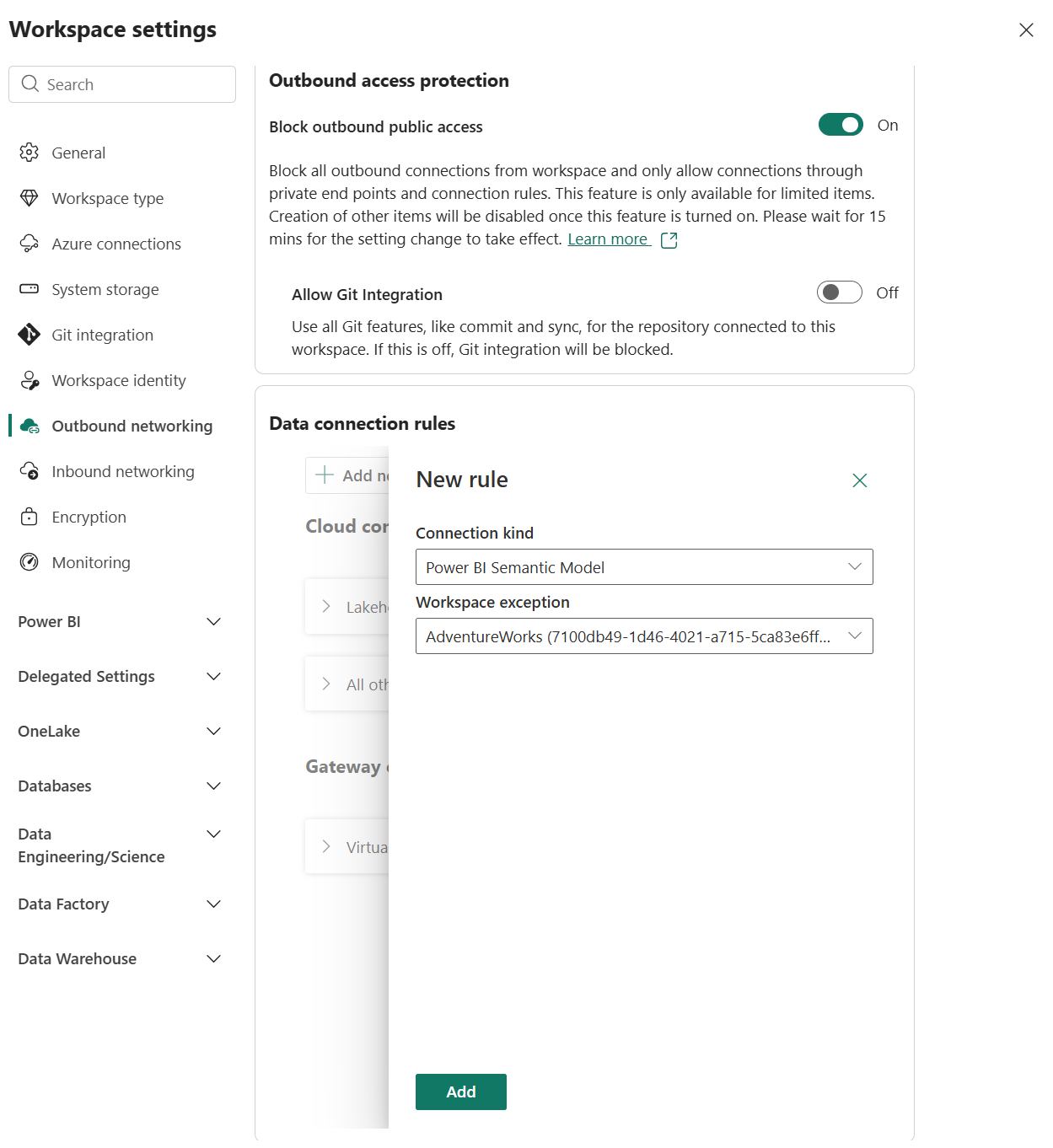
Here's what you need to know:
What Is Workspace Outbound Access Protection (OAP)?
Workspace Outbound Access Protection (OAP) helps organisations control where data from a Microsoft Fabric workspace can flow. Previously, reports in OAP-protected workspaces could only query semantic models within the same workspace, but this update introduces approved cross-workspace connections through administrator-defined exception policies.
Allow Cross-Workspace Connections Through Exception Policies
OAP blocks outbound report-to-model connections by default, but workspace administrators can now create exception policies to allow reports to connect to approved semantic models in other workspaces. This allows organisations to centralise shared semantic models while giving business teams the flexibility to manage reports in separate workspaces.
See the Improvement in Action
Without an applicable exception policy, Power BI blocks reports from connecting to semantic models in other OAP-protected workspaces. Once an administrator creates an exception policy for the destination workspace, the same report can load successfully and display its visuals.
How to Configure an Exception Policy
Workspace administrators can configure an exception policy through the workspace settings under Outbound networking by adding a new cloud connection rule. Select Power BI Semantic Model as the Connection Kind, specify the approved destination workspace, then save the data connection rules.
Getting Started
Work with your workspace administrator to confirm that OAP is enabled and that your report workspace meets the necessary prerequisites. Create an exception policy for every approved semantic model destination, keeping in mind that policy changes may take approximately 15 minutes to propagate.
Want to make better, data-driven decisions for your organisation? Explore our Business Intelligence solutions and contact us today to find out how we can help!