
Microsoft has announced the general availability of Workspace Outbound Access Protection (OAP) for Power BI semantic models and interactive reports in Microsoft Fabric. This update gives workspace administrators greater control over outbound connections, helping organisations restrict access to approved data sources and reduce potential data security risks.
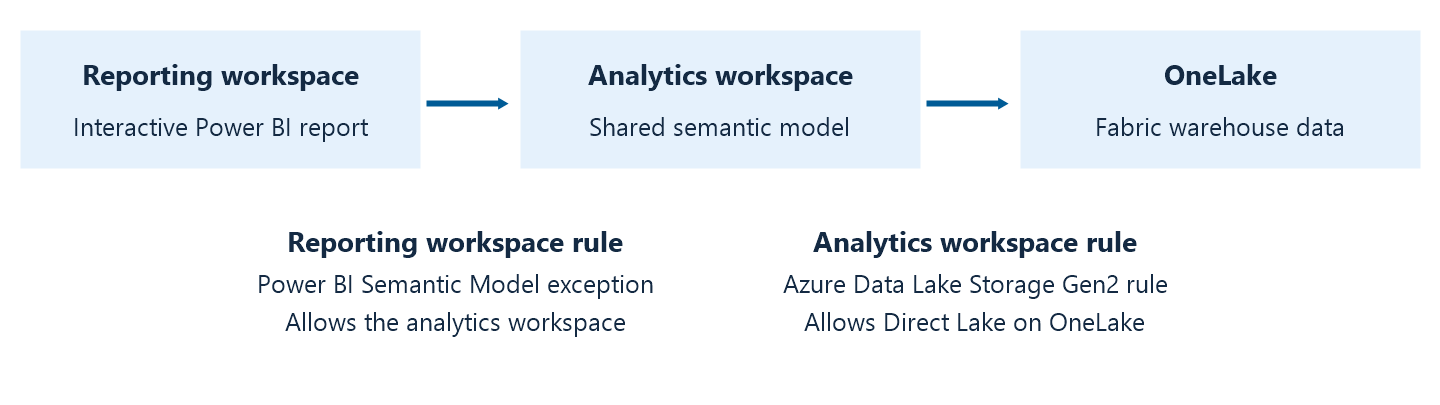
Here's what you need to know:
Control Which Connections Are Allowed
Workspace outbound protection (OAP) allows workspace administrators to control which data sources semantic models can access and which semantic models in other workspaces interactive reports can query. These restrictions help prevent unintended outbound connections and reduce potential data exfiltration risks.
Define Access Based on Workspace Roles
Semantic model creators select their data sources, while report authors choose the semantic models their reports use. Workspace administrators then determine which outbound connections are permitted, allowing organisations to establish governance rules that suit their security requirements.
Understand Which Workspace Controls Each Connection
Each workspace enforces its own OAP policy, with report workspaces controlling connections to semantic models and model workspaces governing access to underlying data sources. Approving one connection does not automatically approve the other, so administrators must configure the required exceptions separately.
Consider Special Connection Scenarios
Some connections may require additional OAP exceptions, even when the destination is within the same Fabric workspace, as SQL and ADLS Gen2 connections are treated as external. OAP also does not govern browser-based requests from interactive report features such as ImageURL and custom visuals, which require separate network security controls.
See How Cross-Workspace Governance Works
When interactive reports use a shared semantic model in another workspace, both workspaces must approve their respective connections independently. This ensures that reports can access approved semantic models while those models remain restricted to authorised data sources.
Plan and Test Your OAP Rollout
Before enabling OAP in production, coordinate with report owners, semantic model owners, and workspace administrators to identify required connections and configure the appropriate exceptions. Test reports and semantic models separately to verify that approved connections work and unauthorised destinations remain blocked.
Want to make better business decisions with the right insights? Discover how our Business Intelligence solutions can help your organisation make sense of its data, identify opportunities, and achieve better outcomes. Get in touch with our team to learn more!