
Microsoft is expanding AI capabilities in Power Pages with the introduction of the Security Agent (Preview). The new assistant is designed to help makers identify security risks, configure protections, and streamline security management directly within Power Pages Design Studio.
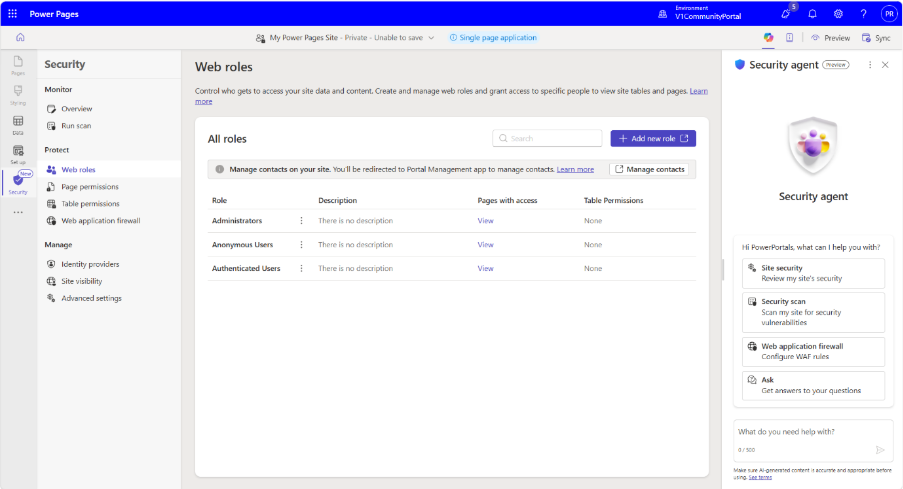
Here's what you need to know:
Get AI-powered security guidance
The Security Agent understands your site's current security configuration and provides recommendations tailored to your environment. It explains potential issues and can help apply approved configuration changes through a simple conversation.
Assess your site's security
Ask the agent to review your site's security posture, and it will analyse authentication, authorisation, vulnerability scans and configuration settings. It also identifies risks such as excessive permissions, anonymous data exposure and missing security protections.
Manage access with confidence
Create and update table permissions, web roles and page permissions using natural language. The agent recommends least-privilege access and validates your configuration before helping apply changes.
Simplify authentication setup
Configure providers including Microsoft Entra ID, Entra External ID, Azure AD B2C, OpenID Connect and SAML 2.0 with AI assistance. The agent can also troubleshoot sign-in issues and recommend configuration updates.
Strengthen your site's protection
Review and configure Content Security Policy (CSP), HTTP security headers, CORS, cookie settings and other application-level security features. The agent helps ensure your site is aligned with security best practices.
Start using Security Agent
Open your site in Power Pages Design Studio, navigate to the Security workspace and launch the Security Agent. Start with a prompt such as "Review my site's security" to receive personalised recommendations.
Discover how we transformed Human Resources New Zealand (HRNZ)'s membership management with Power Pages. Get in touch today to see how we can do the same for your organisation.